Solitaire - Classic Card Games
Card4.9 out of 5
For Android & iOS · Bluetile


 Analysis by Gamesive
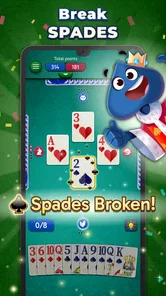
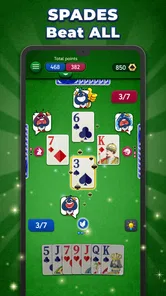
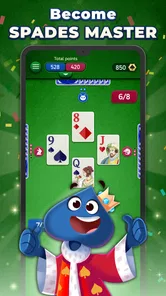
I like card games that let me settle into a familiar routine without needing a long tutorial, and Spades is a natural fit: the rules are recognizable, but each hand still asks me to think. Spades Stars is a free card game from Bluetile that is presented as a way to play Spades offline. That makes it appealing for a quiet break or a stretch without a reliable connection. My main question is not whether the game is approachable in principle, but how well that simplicity works for people playing in different settings and at different comfort levels.
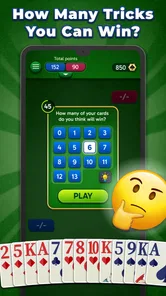
Spades has a helpful advantage for new players: its central idea is easy to explain. Players bid on how many tricks they expect to take, then try to meet that commitment as the cards are played. If you already know the game, you can focus on decisions rather than learning a new set of rules. If you are rusty, the familiar structure makes it easier to pick things up through play.
The app’s short name, Spades Stars, keeps the focus where I want it: on the card game rather than a complicated collection of unrelated activities. I would still recommend taking a moment to get comfortable with the game’s screens before settling into a longer session. In a trick-taking game, it matters whether I can quickly check my hand, the current trick, and the score. Any extra pause to work out what I am looking at can interrupt the reasoning that makes Spades enjoyable.
A useful habit is to treat the opening hand as a warm-up. Before making a bid, take stock of high cards, likely control of spades, and whether your hand looks dependable or awkward. That is good Spades practice generally, but it is especially useful when returning to the game after a break: it slows the decision just enough to make the bidding logic clearer. I would not assume that a familiar title means every player will instantly understand every prompt or control, so a new player may benefit from playing at an unhurried pace at first.
The game has a 4.8 average from around 170,000 ratings, and it has passed one million installs. Those figures suggest a well-established audience, though they cannot tell me whether a particular screen will be comfortable for someone with low vision or whether a particular match will suit a beginner. I use popularity as reassurance that the game has found its audience, not as a substitute for judging its fit for myself.
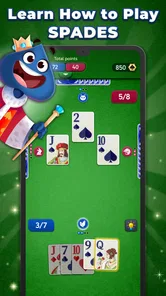
Card games put a lot of information in a small space. I need to distinguish suits and ranks quickly, remember what has already been played, and keep the score in mind. That makes readability more than a cosmetic detail. A layout that is clear on one device or in one posture may feel cramped when I am holding a phone one-handed, playing outdoors, or sitting farther from the screen.
For a more comfortable session, I would play somewhere with steady light and hold the device at a distance that makes the cards easy to scan. If the screen feels crowded, turning down distractions around me can help more than trying to rush through a hand. These are modest adjustments, but they matter in Spades because a missed rank can change whether I should take a trick or let my partner handle it.
I also find it useful to pause before each play and identify the lead suit, the cards already on the table, and whether spades have become relevant to the trick. This simple three-part check reduces avoidable mistakes, especially for players who are still learning how to count cards. It is a practical workaround rather than a special app feature: the game’s basic format rewards a deliberate glance, and a deliberate glance can make the experience less stressful.
Navigation matters for a different reason. A player should be able to return to the match without losing track of what is happening, and the route from opening the game to playing should feel manageable. I would pay attention to whether the interface makes the next action obvious instead of assuming that speed is the same as clarity. Spades is not improved by tapping quickly; it is improved by choosing a bid and a card with enough context to understand the consequences.
Motor comfort can shape whether a card game feels relaxing. Repeated small taps, awkward reach across a screen, or pressure to act quickly can be tiring for some players. I would use a grip that keeps the important parts of the table within comfortable reach and avoid trying to play while walking or juggling other tasks. A game that is easy to pick up can still demand steady attention once a hand is underway.
Sensory needs vary, too. Some people prefer a quiet, visually simple experience; others are not bothered by extra animation or sound. I would check the game’s available settings and try a short session before assuming it can be tailored to a particular sensory preference. I cannot responsibly promise specific controls for sound, animation, contrast, or text size without seeing them, so anyone who depends on one of those options should verify it on their own device before committing to a long session.
One practical way to reduce pressure is to separate learning the rules from trying to play well. On an early hand, focus on following suit and noticing which cards win tricks rather than trying to make perfect bids. Once that feels familiar, pay closer attention to how a conservative bid affects the rest of the hand. This staged approach makes the game easier to learn without pretending that every decision is obvious from the start.
Spades is also a social game by nature, but the store summary emphasizes offline play with friends. That makes the game a plausible choice for a shared break when a group wants a familiar card game and does not want to depend on an internet connection. I would confirm how the intended offline session is started before planning around it, then agree on the rules with the group if people use different house conventions. A small rules disagreement can derail a friendly game faster than a difficult hand.
Offline play is useful in ordinary situations, not just during travel. I can imagine opening the game while waiting for an appointment, taking a break where reception is unreliable, or sitting with a friend who wants to play cards without setting up a full table. It is a good match for short, self-contained moments when I want something more thoughtful than a reflex game but less involved than a lengthy strategy session.
For that kind of use, I would start a hand only when I have enough time to finish it without feeling rushed. Spades depends on the sequence of tricks and the result of the bid; stopping midway can make a quick break less satisfying. If I have only a minute or two, another casual game with shorter rounds may be a better choice. If I have a little breathing room, the familiar card format gives me a reason to stay engaged without needing a constant connection.
Compared with a physical deck, a digital game removes the need to shuffle, deal, and keep track of the score by hand. That convenience is valuable when I am alone or when a group does not have cards nearby. A real deck remains better for players who want face-to-face conversation, tactile cards, or complete control over house rules. Compared with other digital card games, Spades Stars is most compelling for someone who specifically wants Spades rather than a broad collection of solitaire modes or a different trick-taking game.
There is a trade-off in that focus. A player who wants varied game modes, a deep customization suite, or a highly social online community should compare alternatives before choosing this one. The appeal here is the straightforward card-game premise and offline use, not a promise of every possible way to play cards. For me, that is a strength when I know what I want, and a limitation when I am looking for variety.
The game is free to download, but it includes in-app purchases priced from $0.99 to $99.99 per item. I would treat optional purchases as something to review carefully rather than assuming they are needed to enjoy a basic hand. If I am setting up the game for a child or someone who may tap purchase prompts impulsively, I would check the device’s purchase controls first. The content rating is Everyone, which makes the intended audience broad, but that does not remove the value of supervising spending on a shared device.
Its current version is 2.7.3, and the minimum operating system requirement is Android 7.0. The game was released on January 23, 2024. Those details are useful when deciding whether an older device can run it, but I would still check compatibility in the relevant app store because device support depends on more than the operating system version alone.
For someone who is new to Spades, the most important question is whether the game makes the rules and current situation understandable enough to learn by doing. For an experienced player, the question is whether the pace and presentation make it pleasant to play repeatedly. I would try a brief session with those questions in mind. Notice whether the cards are easy to distinguish, whether you can follow the trick without strain, and whether the game gives you time to think. That short test tells you more about personal fit than a rating can.
Spades Stars is worth considering if you want a familiar, focused card game that can be played offline and you enjoy the bidding and trick-taking decisions that define Spades. Bluetile’s game has drawn a large audience, and the Everyone age rating and free entry make it approachable to a wide range of players. I especially like the idea of using it as a low-preparation option for a relaxed break or a casual game with a friend.
I would be more cautious if you need specific accessibility adjustments, dislike making decisions on a compact screen, or want a game that explains every nuance of Spades as you go. The practical advice is simple: test the card readability and controls in a short session, check the purchase settings if someone else will use the device, and choose a quiet moment to learn the rhythm of bidding and play. For players who value a straightforward offline Spades game, that focused experience is the reason to try it; for players who need extensive customization or more variety, another card app may be a better fit.
Spades Stars - Card Game is a digital take on the classic trick-taking card game, where players compete to win tricks by predicting how many they can take. It is designed for people who enjoy strategy, bidding, and playing cards on a phone or tablet. Rules and available modes can vary by version, so check the in-game instructions before starting if you are new to Spades.
The game may offer ways to play against other players, friends, or computer-controlled opponents, depending on the current version and its available modes. Look through the lobby and multiplayer menus to see which options are offered, and whether a mode requires an internet connection or an account. If you plan to play with friends, confirm that the game supports inviting or joining them before downloading.
Some features in card games like this may work offline, while online matches, leaderboards, events, or social features generally require a connection. The exact offline availability can depend on the version and device, so it is worth checking the app listing and trying the game’s modes after installation. Keep in mind that connection quality can affect online play and may be needed to save or synchronize progress.
Check the Google Play or App Store listing for the current price and details, since availability and monetization can change by region or update. A free download does not necessarily mean every feature is free: the game may include advertisements, optional in-app purchases, or other paid items. Review the store’s purchase information and your device’s settings, particularly if children may use the device.
Before installing, make sure your device meets the app store’s listed operating-system requirements and has enough free storage. Review the current listing for supported devices, permissions, privacy information, and any notes about online features or purchases. Spades rules and scoring can differ between variations, so check the in-game tutorial or rules page; this helps you understand bidding and avoid surprises during your first match.
On Android, Spades Stars - Card Game asks for these permissions.
4.8 out of 5
170,262 reviews
Card · Bluetile

Card4.3 out of 5

Card4.7 out of 5

Card4.2 out of 5

Card4.6 out of 5

Card4.7 out of 5

Card4.6 out of 5
Word4.8 out of 5

Board4.7 out of 5

Board4.8 out of 5
Board4.8 out of 5
Card4.9 out of 5

Card4.5 out of 5
Card4.8 out of 5

Card4.8 out of 5

Card4.5 out of 5
Card4.7 out of 5
Card3.9 out of 5

Card4.7 out of 5

Card4.5 out of 5
Card4.6 out of 5
Card4.5 out of 5

Card4.8 out of 5



Gamesive reviews games on its own and is not paid by developers for scores. We do not host game files: the download buttons open the official Google Play and App Store pages. Names, icons and screenshots belong to their owners.