Solitaire - Classic Card Games
Card4.9 out of 5
For Android · Big Cake Apps

 Analysis by Gamesive
I like solitaire best when it is easy to pick up, clear enough to play without fuss, and comfortable to leave after a few hands. Classic Solitaire is a free card game from Big Cake Apps built around that familiar, quiet pastime. Its appeal is not a promise of novelty; it is the chance to settle into a recognizable puzzle whenever a short break opens up. Whether that makes it worth installing depends on what you want from a card game: a dependable solo diversion, or something with more variety and depth.
The game is free to download, so you can try its central solitaire experience without paying upfront. It also offers in-app purchases priced from $0.99 to $9.99 per item. I’d treat those as optional spending rather than part of the entry cost: the confirmed price range does not, by itself, tell you which extras are included or whether you would find them worthwhile. If you prefer to keep mobile games free, you can make that your spending boundary before you start.
That distinction matters because solitaire is a category with plenty of alternatives. Many people already have access to a basic version through another app or device. Here, the useful question is less “Is this the cheapest way to play cards?” and more “Do I enjoy this particular version enough to keep it?” Since the initial download costs nothing, trying a few sessions is a low-commitment way to answer that for yourself.
The game is rated for Everyone, which makes its basic presentation suitable for a broad audience. It has a 4.7 average from around 49,000 ratings, alongside roughly 5,900 written reviews. Those figures suggest a well-liked title among its players, though they cannot tell you whether its style will suit your own habits. I would use them as a reason to consider it, not as a substitute for checking how it feels in your hands.
Classic Solitaire’s value is in having a small, self-contained activity ready when you want one. A hand asks you to look at the cards available, consider which move opens the most useful options, and adjust when the layout does not cooperate. That modest decision-making is enough to make a few minutes feel more engaging than idle scrolling, without requiring you to learn a complicated ruleset first.
It also suits moments when you cannot give a game your full attention. I can imagine opening it while waiting for an appointment, sitting through a short commute as a passenger, or taking a break between chores. The practical advantage of solitaire in those situations is that the goal is clear and each move is easy to assess. If you are interrupted, you can simply stop thinking about the cards and return when you have time.
A useful way to get more out of a familiar solitaire game is to avoid moving cards just because a move is available. Before shifting a card from a column, check whether doing so reveals a hidden card or blocks a useful sequence. That little pause makes the game feel more like a puzzle and less like tapping through every obvious option. It also helps explain why a simple card layout can stay satisfying over repeated short sessions.
Another practical habit is to decide what you want from a session before you start. If you only have a minute, play casually and accept that you may not finish. If you want a more thoughtful round, take time to compare moves that expose new cards with moves that merely tidy the layout. This is not a special feature; it is a way to use the game’s familiar structure deliberately rather than expecting it to provide a new kind of challenge every time.
Compared with a generic solitaire app that offers a larger collection of card games, this title is most compelling for someone who wants a straightforward, recognizable card pastime. A broader collection can be the better choice if you regularly switch between different rules or want one download to cover several moods. By contrast, a dedicated classic game can feel easier to return to when your preference is already settled: deal a hand, think through the layout, and play.
It is also different from competitive card games. There is no reason to choose it if your main motivation is to test your skill against other people, chat during play, or follow a shared match. Its appeal is solitary and low-pressure. That makes it a sensible fit for a quiet pause, but less suitable when social interaction or changing objectives are what keep you interested.
Against a physical deck, a phone game is more convenient when you are away from a table and do not want to set up cards. The trade-off is that a screen-based version can feel less tactile, and the physical routine of shuffling and arranging cards is part of the pleasure for some players. If that hands-on ritual is what you value most, a digital adaptation may never be a complete replacement.
The main limitation is also the game’s defining choice: it sticks to classic solitaire rather than promising a broader card-game experience. Familiarity can be comforting, but it can also become repetitive if you want fresh rules, a campaign, or a reason to master a new system. I would not install this expecting a deep collection or a story-driven game; the better expectation is a simple card diversion you can revisit when the mood strikes.
There is a second tradeoff in the purchase model. The game is free to start, while optional items cost between $0.99 and $9.99 each. That gives you a way to try the core activity before deciding whether to spend, but it also means you should not assume every convenience or extra is included in the free experience. I would first play without buying anything, then consider a purchase only if a clearly useful item is presented and you know you want it.
For anyone trying to limit incidental spending, it is worth being intentional about in-app purchases. A simple approach is to decide in advance that the game is a free pastime unless a particular item genuinely improves how you play. That keeps the value calculation grounded: the basic entry price is zero, while the value of any paid item depends on what it offers and how much you personally use it.
I would recommend giving it a try if you already enjoy solitaire and want a free way to play on a phone. It is also a reasonable pick for someone who prefers familiar rules over tutorials and complex systems, or who wants a low-pressure activity that can fit into brief gaps in the day. The game has passed 10 million installs, but popularity should not be confused with a guarantee that its restrained format is right for everyone.
It may be a poor match if you need a game to keep surprising you over long sessions. Players who crave multiplayer competition, several distinct card modes, or a strong sense of progression may be happier with a different card app. Likewise, if you dislike looking at a screen for leisure or prefer the feel of physical cards, the convenience of a mobile version may not outweigh what you miss.
On compatibility, the listed minimum operating system is version 7.0, and the current version is 2.14.104. Those details are useful when checking whether an older device can run it, but they do not change the basic decision: this is a classic card game, not a showcase for demanding hardware or elaborate systems. The release date is June 3, 2020, so it is an established title rather than a brand-new experiment.
For me, the strongest reason to choose Classic Solitaire is the straightforward value of a free, familiar game that is easy to try. I would download it if I wanted a quick solo card puzzle and was happy to keep optional purchases optional. Its broad Everyone rating and simple premise also make it easy to recommend as a casual choice for people who already know they like solitaire.
I would skip it in favor of a more varied card collection if I expected one app to supply many different games, or choose a competitive title if I wanted opponents and social play. The free starting point makes experimentation sensible, but it does not make every paid item automatically good value. My practical recommendation is to play a handful of sessions before spending and see whether the familiar rhythm keeps drawing you back.
In short, this is a solid option for the specific job of playing classic solitaire on a mobile device. Its value comes from convenience and an accessible free entry point, not from breadth or reinvention. If that modest promise matches what you want, it is worth trying; if you are looking for a more varied or social card experience, another game will likely serve you better.
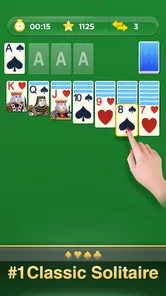
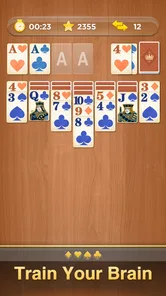
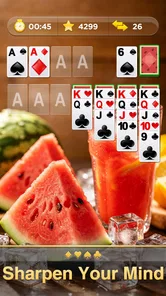
Classic Solitaire is a single-player card game, usually based on Klondike, in which you arrange cards into four suit-specific foundations from Ace through King. On the tableau, you build descending sequences while alternating red and black cards, and draw from a stock pile when you need more options. Rules and draw settings can vary between versions, so check the app’s instructions before starting.
Many apps named Classic Solitaire are free to download and let you play without paying, but the exact terms depend on the publisher and version. Free editions may include advertisements, optional purchases, or paid features such as ad removal, extra themes, or hints. Review the store listing and in-app purchase details before installing, and check whether an internet connection is needed for ads or other features.
Basic Solitaire gameplay is often available offline, making it suitable for playing during travel or when a connection is unavailable. However, features such as advertisements, online leaderboards, cloud backups, daily challenges, or syncing progress may require internet access. Offline support can differ between apps with the same name, so confirm the specific listing and test the game before relying on it without a connection.
Depending on the version, Classic Solitaire may include one-card or three-card draws, timed and untimed games, daily challenges, scoring options, and different card or table designs. These choices affect how challenging a round feels and whether the game emphasizes speed or relaxed play. Feature availability is not identical across publishers, so look at the app description and settings to confirm which modes are included.
Solitaire’s card-based rules are generally straightforward, but suitability also depends on the particular app’s advertisements, purchases, and privacy practices. Before downloading, check its age rating, requested permissions, data-safety information, and whether children can access external links or make purchases. If the game includes ads or optional payments, consider using device-level parental controls and reviewing those settings with younger players.
On Android, Classic Solitaire asks for these permissions.
4.7 out of 5
48,955 reviews
Card · Big Cake Apps

Card4.3 out of 5

Card4.7 out of 5

Card4.2 out of 5

Card4.6 out of 5

Card4.7 out of 5

Card4.6 out of 5

Trivia4.8 out of 5
Card4.9 out of 5

Card4.5 out of 5
Card4.8 out of 5

Card4.8 out of 5

Card4.5 out of 5
Card3.9 out of 5
Card4.7 out of 5

Card4.5 out of 5

Card4.6 out of 5
Card4.5 out of 5

Card4.8 out of 5
Card4.9 out of 5



Gamesive reviews games on its own and is not paid by developers for scores. We do not host game files: the download buttons open the official Google Play and App Store pages. Names, icons and screenshots belong to their owners.