
Disney Solitaire
For Android & iOS · SuperPlay.
- 4.8 out of 5Rating
- 882.75KReviews
- 10.00M+Downloads
- CardGenre
Game details
- Version
- 1.26.3
- Updated
- Requires
- 7.1
- Price
- Free
- Age rating
- Everyone
- In-app purchases
- $0.99 - $149.99 per item
Screenshots
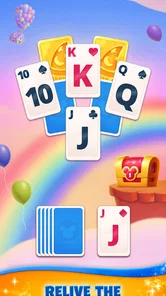






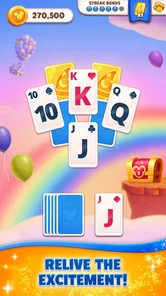
Disney Solitaire review
 Analysis by Gamesive
I can imagine Disney Solitaire fitting neatly into a household’s quiet moments: one person has a few minutes before dinner, someone else wants a low-pressure card game, and the phone is available to share. Its Disney theme gives familiar characters and settings a role in the experience, while the core appeal remains solitaire-style card challenges. I find that combination more inviting than a plain deck of cards, though it won’t suit everyone: players who want deep strategy, a traditional interface, or a game everyone can use on one shared profile may prefer something else.
Playing in the small gaps of a shared day
As a card game from SuperPlay, Disney Solitaire is easiest to approach as a short-session pastime rather than a long, focused gaming commitment. I’d reach for it while waiting for a ride, winding down on the sofa, or taking a brief break between chores. The familiar solitaire format means the basic idea is easy to understand, and the Disney presentation gives the experience a warmer, more character-led identity than a standard card app.
That makes it a plausible fit for a household where people have different levels of gaming experience. A regular card-game player can settle into the puzzle, while someone who mainly likes Disney can be drawn in by the theme. But shared interest does not automatically mean shared progress: it’s safest to think of the game as something people take turns enjoying on a device, not as a jointly managed family game with coordinated profiles.
In a realistic everyday scenario, I’d let one person play a challenge during a short break, then hand the phone to another person later rather than trying to make every session a group activity. That avoids turning a casual game into a negotiation over whose turn it is to make a move. It also suits the stop-and-start rhythm of solitaire, where a player can focus on the current puzzle without needing a full group to be present.
Compared with a typical solitaire app, the distinctive draw here is the Disney framing. A plain solitaire game may be the better choice if you only want cards and minimal decoration. This one makes more sense when the characters and atmosphere are part of the reason you’d open it. In my view, that’s a meaningful difference for casual players, but not a substitute for richer strategic mechanics if that is what you’re seeking.
Keep the device handoff simple
On a shared phone or tablet, I’d establish a basic household rule before anyone starts: use the game as a personal turn-taking activity, and don’t assume another person’s progress or spending choices are yours to manage. That advice is not about a special family feature; it’s a practical boundary for any game used by several people on one device. If keeping individual play histories separate matters, a personal device is the cleaner arrangement.
It is also worth agreeing who can make purchases before handing over a device. The game is free to download, but it offers in-app purchases priced from $0.99 to $149.99 per item. That range makes a quick check of the device’s purchase settings sensible, especially when children can access it. I would not treat “free” as meaning that every optional part of the experience is free, and I’d make the household expectation clear rather than relying on a child to guess which prompts involve spending.
For adults sharing a device, the same boundary helps prevent accidental confusion. A person who picks up the phone to play may encounter choices or progress associated with whoever last used the game. Before making a purchase or changing anything, I’d pause and confirm that the action belongs to the current player. This is a small habit, but it is more useful than assuming a shared device automatically keeps everyone’s decisions separate.
Taking turns without mixing expectations
Solitaire can be a good fit for casual turn-taking because each person can approach a card challenge at their own pace. Still, I wouldn’t make the game a household competition unless everyone genuinely enjoys that. One person may care about finishing challenges, while another simply wants a relaxing few minutes. Agreeing that each player can enjoy the game in their own way prevents the theme and shared device from creating pressure to keep up.
For a parent or caregiver, an uncomplicated routine can help: decide when the device is available, agree that the player hands it back when their time is up, and keep purchase decisions with an adult. Those are household choices, not controls I’m attributing to the game. They’re particularly useful when a game is appealing enough that a child may want to continue beyond the time originally agreed.
If several people are interested, I’d also avoid using one person’s progress as a measure of who is “better.” A card puzzle can reward patience and attention, but a shared-device arrangement can make individual goals hard to distinguish. Taking turns for enjoyment, rather than treating every session as a contest, is a more comfortable way to keep the game in the family rotation.
Age suitability and practical trust
The content rating is Everyone, which makes the game broadly suitable from a content standpoint. That rating is useful context, but it does not answer every household question. Age suitability also depends on whether a child understands in-app purchases, how long they are allowed to play, and whether the device itself is appropriate for them to use. I’d make those decisions separately instead of treating the rating as a complete family-use policy.
The game has an average rating of 4.8 from around 883,000 ratings, and it has been installed over 10 million times. Those figures suggest that it has reached a large audience and is well liked overall, but popularity is not a promise that every player will enjoy it. A child who loves Disney may be more interested than a player who finds themed visuals distracting; an adult who wants pure card efficiency may prefer a simpler alternative.
It is also sensible to distinguish trust in the game’s content from trust in a shared device. If a family member is allowed to play, I’d still keep payment permissions and personal account decisions with the account holder. The game’s Everyone rating doesn’t mean that every device setting is automatically suitable for every age, so the household’s own rules remain important.
What the game is—and is not—best at
The strongest reason to choose this game is the blend of a familiar card pastime with Disney-themed presentation. It offers a more personable alternative to stripped-back solitaire, while remaining easier to dip into than a complex card strategy game. For a player who likes both casual puzzles and Disney, that pairing can make an ordinary wait or quiet break feel less repetitive.
The trade-off is that themed presentation may be the main point of difference for some players. If you want a no-frills deck, a different solitaire app may be less distracting. If you want a card game built around long-term tactical depth or direct group play, a more specialized option would likely serve you better. I’d choose this one for approachable solo card challenges with a recognizable theme, not because it replaces every kind of card game.
There is also a practical cost consideration. Although the game itself is free, optional purchases span from $0.99 to $149.99 per item. I would set expectations before a child plays and avoid treating an in-game purchase as a necessary part of a casual session. For an adult, the useful question is simply whether the free experience is enjoyable on its own and whether any optional spending feels worthwhile to them.
A sensible household verdict
Released on April 16, 2025, and currently at version 1.26.3, the game supports devices running Android 7.1 or later. Its combination of accessible solitaire play and Disney flavor makes it a reasonable pick for someone who wants a light card game to open in spare moments. I’d be comfortable recommending it to a household that enjoys the theme and can agree on simple device and spending boundaries.
I would hesitate to recommend it as a shared family hub or as a game designed around coordinated household progress. The better approach is to treat it as a casual title that different people may take turns playing, with account and purchase decisions kept clear. That distinction helps answer the practical question of whether it works on a shared device: it can, if the household is comfortable with informal turn-taking, but a personal device is preferable when separate play matters.
Overall, I think Disney Solitaire is most appealing to casual players who want familiar card challenges wrapped in a Disney setting. Its free entry point lowers the barrier to trying it, while the optional purchase range calls for sensible boundaries. If you value a themed, approachable way to fill short breaks, it is worth considering; if you want unadorned solitaire, stronger separation between household players, or a more demanding strategy game, I’d look elsewhere.
What we like
- Disney characters give familiar solitaire games extra charm.
- Simple controls make rounds easy to learn.
- Short games suit quick play sessions.
- Themed card designs add variety to the table.
- Progression gives players goals beyond each round.
What could be better
- Some levels can feel difficult without power-ups.
- Energy limits may interrupt longer play sessions.
- Optional purchases can speed up progression.
- Frequent rewards may clutter the experience.
- New content can require an internet connection.
Frequently Asked Questions
What is Disney Solitaire?
Disney Solitaire is a mobile puzzle game that combines familiar solitaire-style card play with Disney characters and settings. You arrange cards according to the rules of each level, clear the board, and progress through themed stages. The exact characters, events, and features can vary with updates, so check the current store listing for the latest content and compatibility details.
How do you play Disney Solitaire?
The game uses card-matching and sequencing mechanics inspired by solitaire. In a typical level, you choose playable cards to build a sequence and uncover cards beneath them, aiming to clear the layout while managing the cards available to you. Levels may add objectives or obstacles, and special items can help when a move is difficult. Tutorials and on-screen prompts explain the rules as you progress.
Is Disney Solitaire free to download, and does it include in-app purchases?
Disney Solitaire is generally offered as a free-to-download mobile game, but availability and pricing can differ by country and platform. Free play may include limits such as lives, boosters, or waiting periods, while optional in-app purchases can provide extra resources or other advantages. Review the Apple App Store or Google Play listing, and check purchase settings, before downloading or spending money.
Can I play Disney Solitaire offline?
Some basic gameplay may be available without a continuous internet connection, but online access can be needed for features such as events, progress synchronization, advertisements, or purchases. Offline behavior may also change after an update or depend on how the game manages your account. If you expect to play while traveling, test the game beforehand and avoid assuming that every feature will work without a connection.
Is Disney Solitaire suitable for children, and what should parents know?
The card puzzles and Disney themes may appeal to a broad audience, but parents should review the game’s current age rating and content details in their device’s app store. Also check whether it offers in-app purchases, advertisements, or social and online features, since these can affect a child’s experience. Device-level parental controls and purchase authentication can help prevent unintended spending.
Permissions
On Android, Disney Solitaire asks for these permissions.
- Wi-Fi connection information
- view Wi-Fi connections
- Other
- view network connections, full network access, control vibration, prevent device from sleeping
Languages
Disney Solitaire is also available in 1 other languages on our site.
EspañolDisney Solitaire
User reviews
4.8 out of 5
882,748 reviews
- 85%
- 11%
- 2%
- 1%
- 2%
Download Disney Solitaire
Card · SuperPlay. · Free
Games like Disney Solitaire
View all: Games like Disney Solitaire
Pokémon TCG Pocket - Card Game
Card4.6 out of 5
Solitaire - Classic Card Games
Card4.9 out of 5
Solitaire
Card4.5 out of 5

Spades - Classic Cards
Card4.8 out of 5
About this listing
- Game
- Disney Solitaire
- Developer
- SuperPlay.
- Package
- com.superplaystudios.disneysolitairedreams
- Version reviewed
- 1.26.3
Gamesive reviews games on its own and is not paid by developers for scores. We do not host game files: the download buttons open the official Google Play and App Store pages. Names, icons and screenshots belong to their owners.