Solitaire - Classic Card Games
Card4.9 out of 5
For Android & iOS · Zynga





 Analysis by Gamesive
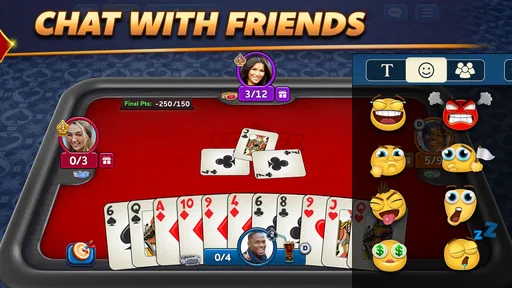
I find Spades Plus easiest to judge by asking a practical question: can I follow a hand comfortably when I have only a few minutes and my attention is split? This is a digital take on the familiar trick-taking card game, made by Zynga, and its appeal depends less on spectacle than on how well the cards, choices, and pace work for the person playing. The game is free to download, though optional in-app purchases range from about fifty cents to just under two hundred and twenty dollars per item, so I would treat spending as a choice rather than part of the basic appeal.
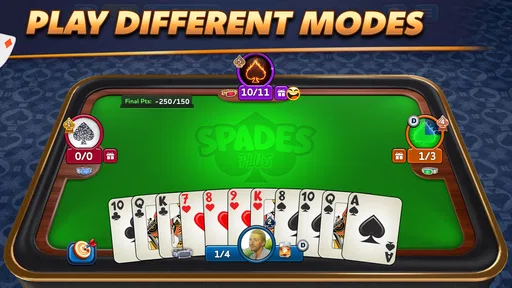
Spades is a game where the important information is concentrated in the cards and the changing state of a trick. That makes legibility and uncluttered navigation more than cosmetic concerns: if I have to work to identify a card or find the next action, it becomes harder to think about what opponents may hold. Clear access to the hand and the current play matters as much as the rules themselves, especially for newcomers who are still learning when to conserve a high card or take a trick.
The game is listed in the card category, but that label understates the mental work involved. A turn asks me to connect what has already been played with the cards I still hold, while keeping track of the round’s objective. I would recommend learning the basic rhythm in a relaxed setting before trying to play quickly or while distracted. Familiarity reduces the effort of scanning each move, leaving more attention for decisions instead of interface hunting.
One useful habit is to pause briefly before committing a card and check two things: what suit is being played, and what the move could mean for the rest of the hand. This is especially helpful when several cards look similar at a glance or when I am returning after a break. It is a simple workflow rather than a special feature, but it makes the game easier to follow and can prevent hurried plays that I regret a moment later.
For players who already know Spades, the digital format offers a convenient alternative to arranging a physical game. For someone learning, the screen can make the sequence of play easier to observe than a crowded table, but it does not remove the need to understand the game’s decisions. I would not assume that a card app automatically teaches strategy; a beginner will get more from taking time to understand why a play worked than from tapping through hands as quickly as possible.
Card games are often less physically demanding than action games because a turn usually involves choosing from a hand rather than making continuous, precise movements. That can make this kind of play appealing to someone who wants a calmer pace. Still, a small screen can turn a straightforward selection into a frustrating one if a player has difficulty with fine touch control, hand steadiness, or distinguishing adjacent cards. I would play at a comfortable screen size and avoid rushing selections when accuracy matters.
Motor comfort also depends on context. Playing with one hand while walking, carrying something, or riding in a moving vehicle is a poor fit: the same tap that feels easy at a desk may be awkward when the phone is unstable. I prefer to sit down, hold the device securely, and give myself a moment to inspect the hand. This is not a special requirement of Spades so much as a practical way to reduce accidental input in any card game on a touchscreen.
Sensory needs deserve the same consideration. Card play invites sustained visual attention, and the contrast between suits and card values is central to making a good decision. If a player has low vision or finds dense screens tiring, the experience may demand more effort than a physical deck with large, high-contrast cards. I would check the display in the actual lighting where I plan to play rather than assuming it will be comfortable in every setting. Glare, dimness, and a cramped view can all make it harder to read a hand.
Sound is not essential to understanding the core activity of a trick-taking game, so I would not choose a noisy environment as a reason to avoid it. Conversely, if someone relies on audio cues, I would not count on sound alone to communicate important card information. The safest approach is to make decisions from what is visible on screen and use the game only where visual attention is comfortable. That distinction matters for players who need a sensory experience that does not depend heavily on one channel.
A realistic use case is a quiet break at home: I can open a hand, focus on the cards, and stop when I need to return to another task. It is less suitable for a short queue if I know I may be interrupted at any moment. Spades asks me to remember the state of play, and an interruption can make the next decision feel less satisfying even if the game itself is easy to start. I would choose a settled break over a setting where I am expected to answer someone or move around continuously.
The game’s Teen age rating is worth noting for households choosing games for younger players. The central activity is card strategy, but parents may also want to consider the social environment of online play and the possibility of optional spending. I would discuss purchases with a young player before handing over a device, particularly because the listed in-app items extend from low-cost options to much more expensive ones. The free entry point does not mean every purchase is necessary, and I would set clear expectations before play.
Spades Plus has been available since July 24, 2014, and its current version is 7.5.0. It is built for devices running version 7.1 or later of its supported operating system. Those details make it a long-running option rather than a newly introduced card experiment, but a current version number alone does not tell me how it will feel on every device. Before settling in for regular sessions, I would make sure the game runs comfortably on the phone or tablet I actually use.
The game has a 4.8 average from around 423,000 ratings, with roughly 107,000 reviews, and more than 10 million installs. Those figures suggest that it has found a substantial audience, but popularity cannot answer the personal question of whether the interface suits a particular player. I would use the numbers as context, not as a substitute for checking how easily I can read the cards, maintain focus, and enjoy the pace.
Compared with a physical deck, a digital Spades game removes the need to find three other people, shuffle, deal, and keep a table clear. That convenience is its strongest everyday advantage. A tabletop game, however, gives players more control over card size, lighting, seating, and the pace of conversation. It can also be easier to adapt for someone who needs oversized cards or a particular arrangement. If those adjustments are important, a physical game may be the more comfortable choice.
Compared with simpler digital card games, Spades asks for more memory and judgment. It is not the best pick when I want something that needs almost no concentration or can be played while listening closely to a conversation. Someone who prefers solitary, low-pressure play may also want a different card experience if the social and competitive side of this one does not appeal. The trade-off is that Spades rewards attention: following the pattern of a hand gives each decision more meaning than a purely luck-led game.
The NFL content available for a limited time gives the game a seasonal theme, but I would not let that determine whether it is a good fit. The lasting question is whether I enjoy the underlying card play. A themed period can add interest for a fan, yet the core appeal remains the challenge of managing a hand and reading how a round is unfolding. I would approach the theme as an extra, not as a reason to spend or a promise that the game will suit every football supporter.
The biggest barrier is the attention the game expects. A player who struggles to distinguish card details, gets tired from sustained screen use, or cannot comfortably make touch selections may find that a calm card game is still demanding. I would not describe it as universally accessible simply because it avoids fast action. Its slower style helps in some situations, but the card-focused display and need to track play remain central to the experience.
There is also a difference between being able to open a game and being comfortable enough to return regularly. A person may manage a short session but find longer play visually tiring or mentally draining. I would keep sessions brief at first and notice whether I am still enjoying the decisions or merely pushing through them. If I regularly lose track after interruptions, want a more adjustable physical setup, or need play that does not depend on close visual attention, another format is likely a better choice.
Spending is another point where a little restraint improves the experience. Since the game is free and offers optional purchases, I would decide in advance whether I want to spend anything at all. The high end of the listed purchase range is substantial, so I would not tap through purchase prompts casually or treat paid items as necessary to learn the game. Players who prefer a completely purchase-free environment should be cautious and involve a parent or account holder where appropriate.
I would recommend Spades Plus to people who already enjoy trick-taking cards, want a portable way to play, and can give a hand their attention. Zynga has built a card game with a large established audience, and the free download makes it easy to try without paying up front. For someone who likes weighing a card choice rather than reflexes, it can be a satisfying way to spend a quiet break.
I would be more hesitant to recommend it to someone who needs large, highly adaptable physical cards, finds screen reading tiring, or wants a game that can be played with only half an eye on the phone. A person who is new to Spades should also be prepared to learn the strategic rhythm rather than expect every hand to explain itself. My most useful advice is to try it in a calm setting, check that the cards are comfortable to read, and decide whether the pace suits you before making purchases or building it into a routine.
My overall view is positive but specific: Spades Plus works best when its card-focused demands match the player’s eyes, hands, and attention span. It is a practical digital choice for familiar players and curious beginners who want a thoughtful card game on a phone, not a universal substitute for every kind of card night. If you can comfortably follow a hand and enjoy considering each move, it is worth trying; if those conditions are not right, a physical deck or a simpler, less visually demanding game may serve you better.
Spades Plus is a mobile version of the classic trick-taking card game Spades. Players compete in teams or individually, depending on the selected mode, and try to predict how many tricks they will win. The app offers online matches, tournaments, and other game options, making it suitable for both casual play and more competitive sessions.
Yes. Spades Plus includes options for playing with friends, such as joining or creating tables and inviting other players, though the exact options may depend on the current app version and account features. You can also match with people online. Before starting a private game, check the table settings so everyone understands the rules, scoring, and any optional features in use.
Spades Plus is primarily designed for online multiplayer, so an internet connection is generally needed to access its main modes, join tables, and play against other people. Availability of any solo or practice options can vary by version and feature. If you expect to play while offline, check the app listing and in-game menus first, as connectivity requirements may change.
The app is generally available to download for free, but it may include advertisements, optional in-app purchases, or virtual currency and other paid features. You can usually enjoy matches without buying extras, although some events or cosmetic and convenience options may involve spending. Review the store listing and your device’s purchase settings, especially if children use the device.
Spades has familiar core rules, but scoring, bidding, team formats, and optional rules can differ between tables or game modes. Review the rules shown for a match before you join, particularly if you are new to the game. Online play also involves other players, so use available reporting or blocking tools if needed and avoid sharing personal information in chats.
On Android, Spades Plus - Card Game asks for these permissions.
4.8 out of 5
422,742 reviews
Card · Zynga

Card4.3 out of 5

Card4.7 out of 5

Card4.2 out of 5

Card4.6 out of 5

Card4.7 out of 5

Card4.6 out of 5

Racing4.6 out of 5

Word4.1 out of 5

Sports4.4 out of 5
Card4.9 out of 5

Card4.5 out of 5
Card4.8 out of 5

Card4.5 out of 5
Card4.7 out of 5
Card3.9 out of 5
Card4.7 out of 5

Card4.5 out of 5
Card4.6 out of 5
Card4.5 out of 5

Card4.8 out of 5
Card4.9 out of 5



Gamesive reviews games on its own and is not paid by developers for scores. We do not host game files: the download buttons open the official Google Play and App Store pages. Names, icons and screenshots belong to their owners.