
Heads Up!
Word4.5 out of 5
For Android & iOS · Bluetile
 Analysis by Gamesive
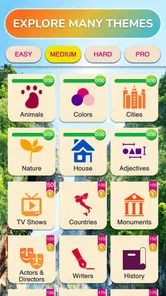
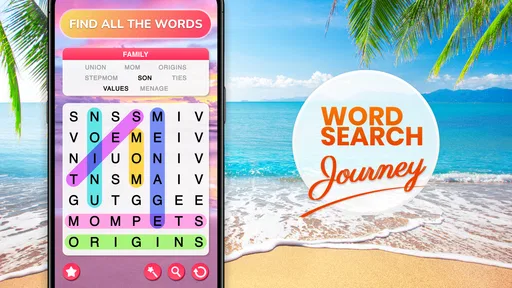
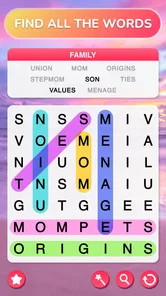
I can see Word Search Journey working well in a home where people share a tablet or simply pass a phone around between errands. It is a word puzzle game, so the basic appeal is easy to understand: look through a grid, find the listed words, and enjoy a quiet stretch of concentration. I like that it asks for attention without demanding a long session or a complicated explanation. For a household, that makes it approachable—but it also means everyone should treat a shared device as shared space, rather than assuming the game separates each person’s activity.
Word Search Journey is free to download, with optional in-app purchases priced from $0.99 to $19.99 per item. It is made by Bluetile, has an average rating of 4.8 from around 792,000 ratings, and has passed 100 million installs. Those figures suggest it has reached a large audience, but popularity alone does not tell me whether it suits a particular family. The more useful question is whether a straightforward word hunt fits the way your household likes to relax.
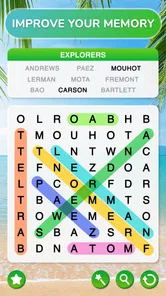
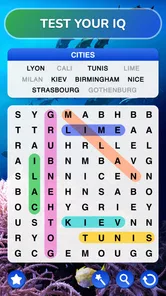
The game’s central activity is a familiar one: scan a letter grid and locate words. That simplicity is a practical advantage when the phone is being handed from one person to another. Nobody needs to learn a complicated control scheme before taking a turn, and a younger player can understand the task while an adult can still use it as a brief mental break. In my view, it is better suited to casual passing around than to a game that depends on a long, uninterrupted session.
A realistic use might be a quiet wait at a clinic, a pause before dinner, or a few minutes on the sofa while someone else chooses what to watch. One person can search for a word, then hand the device over without needing to explain a story or remember a sequence of actions. That kind of low-pressure turn-taking is a genuine strength for a household, especially when its members have different gaming habits.
There is a trade-off, though. A word-search puzzle is still a solo puzzle at heart. Sharing the screen does not automatically turn it into a collaborative or competitive family activity. You can point out a tricky word or let someone else take over, but I would not choose it expecting built-in team play or a structured group challenge. If the goal is conversation and coordinated play, a dedicated party or board-game-style app is likely a better fit.
The other advantage of the format is that it can fill a short gap without requiring sound or a lot of visual spectacle. That makes it less disruptive in a waiting room or in a shared living space than an action game with constant effects. It does require the player to focus on the grid, however, so it is not ideal when someone needs to watch a child, follow a conversation, or remain alert to what is happening around them.
Because this is a free game with paid items available, I would make the purchase boundary clear before giving a child access to a shared device. The listed range runs from $0.99 to $19.99 per item, so the sensible household habit is to check the device’s purchase settings and make sure the person playing knows not to confirm an unfamiliar transaction. That is ordinary shared-device housekeeping, not a special feature of the game.
I would also avoid assuming that each household member has a separate profile or private progress. If several people use one installation, it is safest to treat what appears in the game as belonging to the device’s current setup unless you have confirmed otherwise on your own device. This matters if one person prefers to keep a particular puzzle state untouched, or if another wants to explore freely. Agreeing on a simple rule—finish the current puzzle before handing the phone over, for example—can prevent minor disagreements.
That small bit of coordination is more useful than trying to turn the game into a family account system. One player can announce which words remain, then let the next person search. If the group wants to preserve a puzzle for someone else, they can simply leave it alone and choose a different activity on the device. I would not rely on a casual word game to manage household boundaries; clear expectations between users are the better tool.
Another practical point is that a word-search grid rewards careful scanning. When a device is passed around mid-puzzle, the next player may not know where the previous person already looked. A quick verbal handoff—“I found two, and I’m checking the lower half”—makes a shared turn feel more cooperative and avoids repeating the same search. It is a small workflow, but it turns an otherwise solitary activity into a more satisfying shared moment without pretending the game itself provides a team mode.
The game has an Everyone content rating, and its word-puzzle premise is naturally accessible to a broad age range. I would still make the first handoff an adult-led one for younger children, especially on a device that can make purchases. The age label is a useful starting point, not a replacement for supervising how a child uses the whole phone or tablet.
For adults and older children, the appeal is less about learning new rules and more about having a contained task. Searching for words can encourage attention to spelling and visual patterns, though I would describe that as a pleasant mental exercise rather than promise a measurable improvement in vocabulary. If a child is using the game to practise spelling, an adult can make the session more purposeful by asking them to read a found word aloud or explain how they spotted it.
On the other hand, this is not the right choice for someone who wants a guided language lesson, definitions, pronunciation practice, or a structured curriculum. A word grid asks players to recognize letter sequences; it does not replace a dictionary or a dedicated learning tool. I would also skip it for a child who becomes frustrated by visual scanning or who is looking for a fast-moving game with frequent changes in activity.
My trust judgment is therefore simple: the content itself sounds suitable for general audiences, but the purchase options deserve the same attention as they would in any free-to-start game. A parent can let a child enjoy the puzzle while keeping control of device-level spending settings. On a shared family tablet, that is a more reliable approach than assuming the game will enforce household rules for you.
Compared with crossword puzzles, this style of play puts less weight on clues, general knowledge, and writing answers into crossing spaces. That makes it easier to pick up when a player wants a quick visual task rather than a longer reasoning session. Compared with word-building games, it is also less about composing words from a rack of letters and more about spotting complete words already arranged in a grid.
That distinction helps clarify who will enjoy it. If you like scanning, pattern recognition, and the small satisfaction of finding a hidden sequence, this is a natural fit. If you prefer to solve clues, compete over vocabulary choices, or create words strategically, another word-game format may keep you engaged longer. I would treat Word Search Journey as a calm option in a collection, not as a substitute for every kind of word puzzle.
Its broad audience is reflected in the scale of its reception, but a large player base does not remove the basic limitation of the genre: repeated searches can feel similar if you are craving variety in the way a puzzle challenges you. The best use is to pick it up when you specifically want a straightforward word hunt, rather than expecting it to deliver a changing set of mechanics. That expectation makes the experience more satisfying and helps explain why it can be useful for brief breaks.
For households that already enjoy word puzzles, it can sit alongside crosswords, spelling games, and paper puzzle books without replacing them. A paper puzzle may be preferable when you want no screen at all, while a clue-based app suits players who want more verbal reasoning. This game’s advantage is convenience: the grid is on the device already, so there is no need to find a book or prepare a group activity before taking a short turn.
I would recommend it to someone who wants a familiar, low-pressure word game for spare moments, or to a household that wants an easy activity to pass around without teaching elaborate rules. It can also suit a player who wants a quiet alternative to action games and enjoys visually searching for words. The game is free to install, while optional purchases mean families should decide in advance how they want to handle spending.
I would pass if you need a genuinely multiplayer experience, separate household profiles, or a structured way to track each person’s progress. I would also choose a different app if your main goal is vocabulary instruction or if you want puzzles built around clues and deeper deduction. Those are not criticisms of a simple word hunt; they are boundaries that help match the app to the right player.
The game is listed as version 4.9.0 and requires Android 7.0 or later. For a household deciding whether an older Android device can run it, that minimum operating-system requirement is the most useful compatibility check to make before installing. Its release date was November 14, 2020, so it has been available long enough to establish a substantial audience, while the current version number identifies the edition to look for in the app store.
My overall view is positive, with modest expectations. Word Search Journey is strongest when someone wants a clear, quiet puzzle that can be picked up for a few minutes, and its familiar format makes it easy to share a device informally. It is not a family-management tool, a language course, or a built-in group game, so I would not ask it to solve those needs.
For a household, I would install it if the aim is to have an accessible word-search option ready for pauses in the day. I would set purchase expectations first, avoid assuming that different players have separate spaces, and use a quick verbal handoff when sharing a puzzle. With those boundaries in place, the game offers an uncomplicated way to spend a quiet moment together—or alone—without making a small break feel like a major commitment.
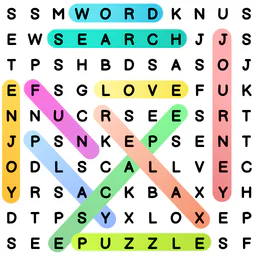
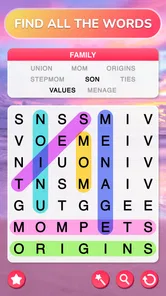
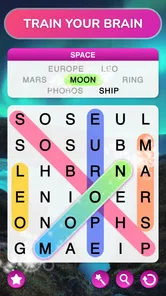
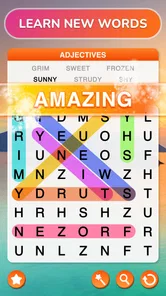
Word Search - Word Puzzle Game is a puzzle app built around finding a list of hidden words in a grid of letters. You typically swipe across adjacent letters to select a word, which may run horizontally, vertically, or diagonally, depending on the game’s rules. It suits quick play sessions and can offer a relaxing way to practise vocabulary and pattern recognition. Exact modes and features can vary by version.
The game may be available to download at no upfront cost, but that does not necessarily mean every feature is free. Some versions include advertising, optional in-app purchases, or paid options to remove ads or unlock extra content. Check the current Google Play or App Store listing for the price, purchase details, and any regional differences before downloading, since store terms and the app’s monetization can change.
Basic word-search puzzles may work without an internet connection, making the game convenient for travel or short breaks away from Wi-Fi. However, features such as advertisements, optional purchases, leaderboards, cloud saves, or daily challenges may need internet access or may not be available offline. Availability depends on the specific version, so it is sensible to open the game once while connected and check which modes remain playable without a connection.
Word-search puzzles are generally easy to understand and can be suitable for a wide range of ages, but the experience depends on the app’s content and settings. Before handing it to a child, review the store’s age rating and check for advertising, in-app purchases, external links, and any privacy disclosures. Difficulty, vocabulary, and available themes may also affect whether the game is a good fit for a particular child.
Confirm that you are selecting the intended app, then review its supported Android or iOS version, storage requirements, recent update history, and user feedback. Also check the permissions requested, privacy information, advertising and purchase disclosures, and whether the features you want require an account or internet access. These details can differ between releases and devices, so rely on the current official store listing rather than assuming every version offers the same experience.
On Android, Word Search - Word Puzzle Game asks for these permissions.
4.8 out of 5
792,071 reviews
Word · Bluetile

Word4.7 out of 5

Word4.9 out of 5

Word4.9 out of 5

Word4.8 out of 5

Word4.8 out of 5
Word4.7 out of 5

Board4.7 out of 5

Board4.8 out of 5

Board4.8 out of 5
Card4.8 out of 5
Word4.5 out of 5

Word4.9 out of 5
Word4.7 out of 5
Word4.8 out of 5

Word4.7 out of 5

Word4.9 out of 5
Word4.9 out of 5

Word4.9 out of 5

Word4.5 out of 5

Word4.1 out of 5

Word4.6 out of 5
Word4.9 out of 5



Gamesive reviews games on its own and is not paid by developers for scores. We do not host game files: the download buttons open the official Google Play and App Store pages. Names, icons and screenshots belong to their owners.