
Toca Boca World
Educational4.4 out of 5
For Android & iOS · RV AppStudios
 Analysis by Gamesive
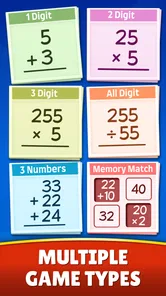
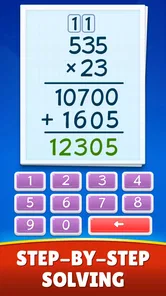
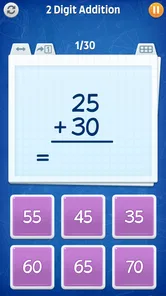
I see Math Games: Math for Kids as a handy practice companion, not a replacement for a teacher, workbook, or patient explanation at the kitchen table. Its appeal is straightforward: it turns arithmetic practice into a game, giving children a more inviting way to work on addition, subtraction, multiplication, and division. In my view, that makes it most useful for short, repeatable sessions when a child needs to build familiarity rather than learn an entirely new mathematical idea.
It is a free educational game from RV AppStudios, rated for Everyone. Its broad audience is reflected in its reach: it has over 50 million installs and an average rating of 4.5 from around 73,000 ratings. Those figures suggest that many families find a use for it, but they don’t tell me whether its style will suit a particular child. The real question is whether game-based repetition makes arithmetic feel easier to approach for yours.
My recommended starting point is to treat the game as a small part of a learning routine. Pick one operation the child is currently studying, play for a brief stretch, then ask them to explain one answer aloud or solve a similar problem on paper. That final step matters: selecting an answer in a game can build speed, but explaining the reasoning helps show whether the child understands what the numbers mean.
The game covers four core operations, so it can fit different stages of elementary arithmetic practice. A child who is comfortable adding but still hesitates over subtraction can focus attention there instead of turning every session into a broad review. For multiplication and division, I would use it after the child has met the underlying ideas in class, rather than expecting a game alone to explain grouping, equal sharing, or why an answer is correct.
A realistic use case is a few minutes after homework, when a child is tired of worksheets but still has enough energy for a low-pressure practice round. I’d make the goal modest: revisit one skill, stop while the child is still willing, and return to it another day. Short sessions are easier to keep consistent, and consistency is usually more useful for basic arithmetic than one long burst followed by a week away.
There is also a useful way to notice where support is needed. If a child repeatedly pauses on a particular operation, that hesitation can guide the next conversation or paper exercise. I wouldn’t treat a game result as a formal assessment, though. A child may be distracted, rushing, or unfamiliar with the format; what matters is whether the same difficulty appears when you ask them to work through a similar problem away from the screen.
For a younger learner, I’d begin with the operation they already recognize and use the game to make repetition less dull. For a child who knows the basic facts but answers slowly, recurring play can provide another chance to retrieve them. If the child is making conceptual mistakes—such as confusing subtraction with addition—pause the game and use objects, drawings, or a spoken example to explain the idea before returning to practice.
That distinction is important. A game can make drilling more appealing, but it is not automatically the best way to teach every part of mathematics. Children who need to see a worked example, manipulate counters, or talk through a strategy may learn more from a parent, tutor, classroom activity, or paper-based exercise first. I’d use this app to reinforce that teaching, not ask it to carry the whole lesson.
Before handing over a device, I’d look at how the child responds to the presentation and pace. Do they enjoy answering, or do they become focused only on getting through the game? Are they willing to explain an answer afterward? Those observations are more useful than assuming that enthusiasm on screen means the skill is secure. If the child is getting frustrated, switch to an easier explanation or take a break rather than turning practice into a test.
The app is free, which makes it easy to try as a supplement without committing to a purchase. I would still keep ordinary device boundaries in place: decide when the game is appropriate, stay nearby if the child is very young, and make sure play doesn’t replace sleep, movement, reading, or other learning. Its Everyone age rating offers a broad content signal, but a parent’s judgment about a particular child and device remains more practical than any label.
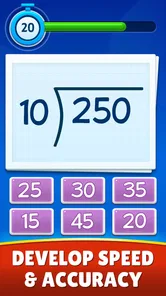
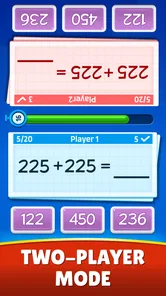
One useful habit is to pair a game session with a small, repeatable target: practice one operation, then say aloud how one answer was found. This keeps the activity from becoming aimless tapping and gives a parent a quick sense of whether the child is relying on understanding or guessing. I would avoid setting a race against the clock or another child unless the learner genuinely enjoys that pressure; speed can motivate some children, while others start making careless errors or feel embarrassed.
Another practical approach is to alternate the screen with a real-world example. After addition practice, ask the child to combine two small groups of objects. After division, share a set of snacks or toys equally and talk about what happens if they don’t divide evenly. These examples do not need to be elaborate. They help connect the abstract answer to a situation the child can picture, which is a limitation of any screen-based arithmetic exercise.
When a child is preparing for a school quiz, the game can be a warm-up rather than the entire study plan. I’d use it to refresh familiar facts, then switch to a few written problems that resemble the work they need to do in class. That change of format is a good check against a common trap: a child may become comfortable with one game’s way of presenting questions without being equally ready to solve them on paper.
Compared with a workbook, a math game may feel less like another assignment and can make repeated practice easier to start. A workbook, however, is often better when the goal is to show written working, revisit a specific method, or let an adult see exactly how a child reached an answer. Compared with a full teaching app or a one-to-one lesson, this game is a narrower tool: it is centered on arithmetic practice, not a substitute for a structured explanation of every topic a child will encounter at school.
I’d choose it for a child who enjoys interactive practice and needs another way to revisit the four basic operations. I’d lean toward a teacher-led explanation or a more visual, hands-on resource if the child does not yet understand what the operations represent. And if screen time is already a source of conflict, a paper game or physical counters may be the better choice even if the child would technically enjoy this app.
Repetition is valuable, but it has diminishing returns if a child keeps answering without thinking. If a session turns into guessing, stop and ask the learner to describe a strategy: counting on, making a group, recalling a known fact, or checking an answer another way. The point isn’t to demand a formal explanation every time; it’s to keep practice connected to reasoning so that speed doesn’t become the only measure of progress.
There is a similar limit when children are at very different levels. One child may need basic addition, while another is ready to strengthen multiplication facts. The app’s range of operations gives families a place to direct practice, but I’d still tailor the session to each child rather than making siblings share a single target. A parent can keep the routine fair by giving each learner a short turn with a skill that makes sense for them.
It is also worth remembering that arithmetic confidence doesn’t always transfer instantly from a game to schoolwork. A child may need time to apply a familiar fact in a word problem or a different layout. If that happens, it doesn’t mean the practice was wasted; it means the next step should involve varied examples and a chance to explain the connection, rather than simply repeating the same kind of play.
Math Games: Math for Kids is most convincing as an easy-to-reach arithmetic practice tool: use it for a short session, focus on a current skill, and follow up with a question or real-world example. It is a sensible option for families who want a free, game-shaped alternative to another page of drills, and its educational focus makes it appropriate to consider for children who are learning basic operations.
I would not choose it as the sole resource for a child who needs careful teaching, written problem-solving, or hands-on support. Its best role is narrower and more practical: help make regular practice feel less like a chore, then let conversation, schoolwork, and everyday examples deepen the understanding. If your child responds well to that rhythm, it can earn a useful place in the after-school routine; if the game creates pressure or distracts from the meaning of the math, a calmer offline method is a better fit.
RV AppStudios released the game on August 25, 2020, and it has accumulated around 1,000 written reviews alongside its broader rating history. I’d take its popularity as a reason it may be worth trying, not as a guarantee that every child will learn best this way. My advice is to start small, observe whether the child is thinking as well as playing, and keep the app in its proper role: a convenient practice aid, not the whole math lesson.
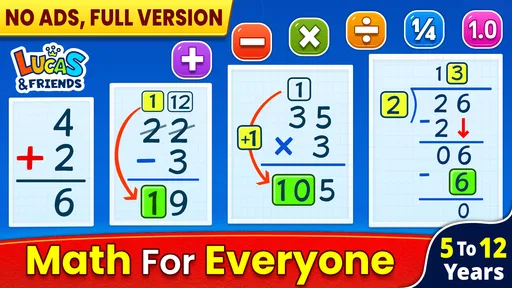
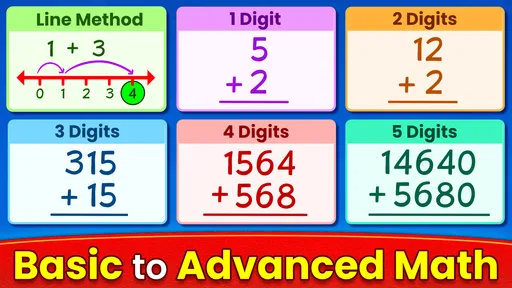
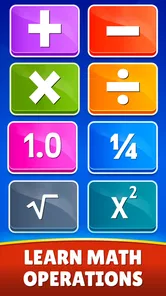
Math Games: Math for Kids is an educational app designed to help children practise foundational maths through interactive activities. Depending on the version, its exercises may cover skills such as counting, addition, subtraction, multiplication, division, and number recognition. It is intended to make practice feel more engaging than worksheets, but the exact topics, age range, and difficulty levels can vary by app version, so check the store listing before downloading.
The app is aimed at children who are learning or reviewing basic maths, but the best fit depends on the child’s current skills and the activities included in the version available to you. Younger learners may benefit from simple number and counting exercises, while older children may want more challenging arithmetic. Review the age guidance and sample screenshots in the Google Play or Apple App Store listing to decide whether its content matches your child’s needs.
Pricing and monetisation can differ between the Android and iOS versions and may change over time. The app may be free to download while offering advertising, optional purchases, or paid features; these details should be confirmed on the relevant store page before installation. If a child will use the device, check purchase and advertising settings, and consider enabling parental controls to reduce the chance of accidental purchases or exposure to unsuitable promotions.
Offline access depends on the app version and on whether its activities or content have already been downloaded. Some basic exercises may be available without a connection, while ads, updates, additional content, or other features may require internet access. If offline use is important for travel or limited connectivity, check the developer’s description and test the app in airplane mode before relying on it. Also review its permissions and privacy information.
The app’s suitability depends on its content, data practices, advertising, and the child’s age, so parents should review the current store listing and privacy policy rather than assume every version is identical. Check whether it contains ads, links to external websites, social features, or in-app purchases, and supervise a child’s first use. Store age ratings and parental controls can help, but they do not replace checking the app’s actual features.
On Android, Math Games: Math for Kids asks for these permissions.
Math Games: Math for Kids is also available in 2 other languages on our site.
4.5 out of 5
72,546 reviews
Educational · RV AppStudios

Educational4.4 out of 5

Educational4.3 out of 5

Educational4.5 out of 5

Educational4.1 out of 5

Educational3.3 out of 5

Educational4.4 out of 5
Educational4.4 out of 5
Educational4.5 out of 5

Educational4.6 out of 5
Educational4.5 out of 5
Educational4.4 out of 5

Educational3.3 out of 5

Educational4.6 out of 5
Educational4.5 out of 5

Educational4.5 out of 5
Educational4.6 out of 5
Educational4.5 out of 5

Educational3.8 out of 5

Educational4.4 out of 5

Educational4.6 out of 5

Educational4.5 out of 5

Educational4.4 out of 5



Gamesive reviews games on its own and is not paid by developers for scores. We do not host game files: the download buttons open the official Google Play and App Store pages. Names, icons and screenshots belong to their owners.