
Toca Boca World
Educational4.4 out of 5
For Android & iOS · RV AppStudios
 Analysis by Gamesive
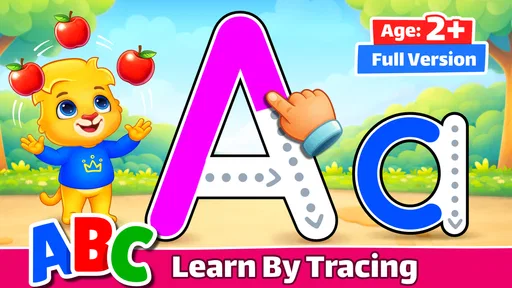
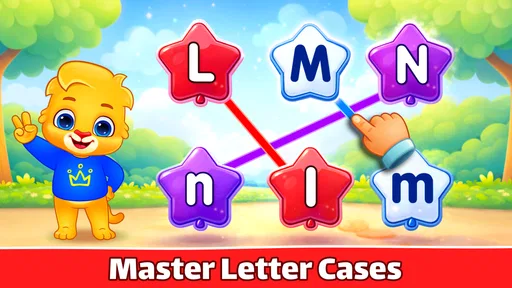
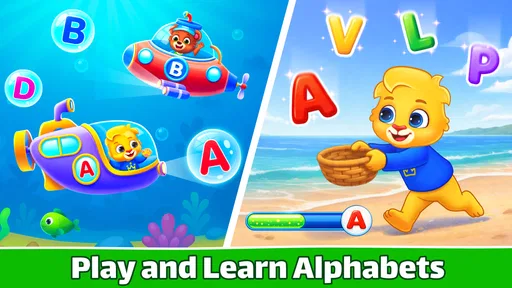
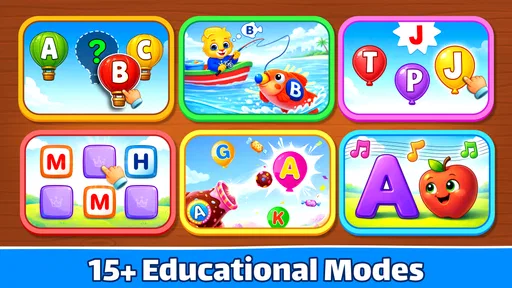
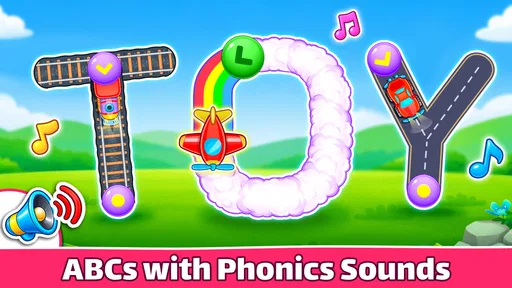
I like early-learning games best when they give a child something clear to do without turning a short practice session into a test. ABC Kids - Tracing & Phonics is built around that kind of focused activity: young learners can practise letter shapes and connect letters with sounds. It is an educational game from RV AppStudios, intended for toddlers through kindergarten-age children. My overall impression is that it works best as a simple, supervised starting point for alphabet practice—not as a complete reading course or a replacement for an adult reading with a child.
The appeal is easy to understand. Letters can feel abstract to a preschooler, while tracing gives a child a physical action to associate with each shape. Phonics adds another useful link: a letter is not only something to recognize or draw, but also a prompt to notice a sound. That combination makes this a more purposeful choice than a game that rewards tapping without connecting the activity to early literacy.
The game has been available since March 3, 2016, and its audience is listed as Everyone. It is free to download, which makes it a low-commitment option for a family that wants to try digital letter practice before investing in a paid learning product. Its broad age range is also a reminder that children develop at different speeds: a toddler may simply enjoy exploring, while a child approaching school may be ready to focus more deliberately on letter forms and sounds.
Its reception suggests that many families have found a reason to keep it in their rotation: it has a 4.6 average from around 97,000 ratings, with over 50 million installs. I treat those figures as useful context, not proof that every child will enjoy it or that it will suit every learning style. For an individual family, the more important question is whether the child can engage with the tracing and sound activities without becoming frustrated or distracted.
I would use this as a short companion to ordinary activities, rather than as the whole lesson. After a child traces a letter, an adult can point out the same shape on a cereal box, in a picture book, or on a handwritten note. That small bridge from screen to everyday life helps prevent letter practice from feeling like an isolated game task. It also gives the adult a chance to hear what the child thinks the letter says, instead of assuming that a completed screen activity means the sound has been learned.
For a realistic routine, imagine a child waiting while dinner is being prepared. A brief turn with one or two letters could occupy that pause, followed by a quick invitation to find one of those letters on a package at the table. The app can provide a prompt; the conversation supplies context. I would keep sessions short and stop if the child starts pressing through without looking. At this age, a calm finish is more useful than stretching practice until it becomes a chore.
Tracing is particularly helpful when a child is curious about writing but not ready to manage a pencil confidently. A screen can make repeated attempts feel less intimidating than a worksheet full of marks. Still, tracing on glass is not the same as controlling a pencil on paper. I would not take a child’s success with an on-screen path as evidence that handwriting is mastered; the motions and feedback are different, and real pencil practice remains important.
One practical tip is to treat the game as a place to notice rather than to score. Ask the child to name or point to a familiar letter, then let them try the activity. If they need help, model the movement slowly instead of taking over the device. This keeps the adult involved without turning every mistake into correction. It also helps reveal whether the child recognizes the letter independently or is mainly following the visual prompt.
Another useful approach is to follow the child’s attention rather than insisting on a fixed sequence. If a particular letter connects to their name or a favorite object, that can be a natural starting point for discussion. I would then return to less familiar letters when the child is ready. This is not a special progression system I can promise the game provides; it is a way to make whatever letter practice is available more meaningful at home.
The main friction is that a child may enjoy tapping and tracing without retaining the sound or shape. That is a common limitation of digital practice, not a reason to dismiss the app. The adult can check understanding with a simple follow-up: ask the child to find the same letter somewhere else, or to say its sound again later. If the answer is uncertain, that is useful information—not a failure. Repeating a smaller amount with patience is often better than pushing ahead for the sake of apparent progress.
Since the game is free, families can try it without paying an upfront price. That is the clearest verified point about spending, and it makes the initial decision straightforward: download it if the device and child are a good fit, then judge the experience firsthand. I would not infer from the free price alone that every part of the experience is free of purchase prompts or that there are no other commercial elements. Those details are not established here, so a parent who cares about spending should review the app’s current store information and check the device’s purchase controls before handing it to a child.
Fairness in a learning game is less about winning against another player and more about whether the child is being asked to do something age-appropriate without pressure. This is not a competitive game in the usual sense of racing other players or comparing scores. I would frame it as practice, not a contest: there is no need to reward speed or to compare one child’s progress with a sibling’s. That matters especially when one child is just beginning to recognize letters and another already enjoys writing them.
In the wider educational category, the usual alternatives include alphabet videos, printed tracing sheets, letter puzzles, and broader early-reading apps. Videos are easy to watch but may leave a child passive; worksheets build pencil control but can feel demanding before a child is ready; physical puzzles invite hands-on exploration but do not necessarily connect a letter to its sound. This game’s particular value is the pairing of tracing and phonics in one screen-based activity. If a child learns best by moving objects, talking, or drawing freely, a physical alternative may be the better first choice.
I would skip this as a primary tool for a child who needs a structured, teacher-led reading plan, detailed progress reporting, or individualized instruction. A compact alphabet game can introduce and reinforce concepts, but it cannot watch a child’s pencil grip, ask why a sound is confusing, or adapt a lesson through conversation. Families looking for those things should put adult guidance, classroom support, or a more comprehensive learning resource first.
I would also be cautious about relying on it for a child who becomes distressed when a tracing attempt does not go as expected. In that situation, tracing on paper together—or simply naming letters in books and signs—may feel more relaxed. The right alternative depends on the child: some want the clear boundaries of a screen activity, while others do better when there is no visible task to complete. I would let the child’s response guide that choice rather than assuming a digital format is automatically more engaging.
Another limitation is that screen practice can quietly become the default because it is convenient. I would avoid using the game as a substitute for conversation, shared reading, or chances to make marks with crayons and pencils. A useful balance is to let the app spark a letter-focused moment, then close it and carry the idea into something tangible. That keeps its role modest and makes it easier to tell whether the child is learning beyond the device.
Because this is aimed at very young children, I would explore the app myself before making it part of an unsupervised routine. Check how the child moves between activities, whether any on-screen prompts are easy to understand, and whether the experience stays focused on learning. Also look at the current app-store details and device settings for information about purchases and access controls. Those are sensible checks for any children’s app, and they avoid assumptions based solely on a free download.
It is worth deciding in advance what a successful session looks like. For one child, it may be calmly attempting a letter; for another, it may be saying a sound and then spotting the letter in a book. I would avoid measuring success by how long the child stays on the screen. A short, attentive turn followed by a real-world connection is a better sign that the app is serving a purpose.
The game has a 4.6 average from around 97,000 ratings, and its roughly 3,900 written reviews give families another place to look for current impressions. I would still read recent comments with care, since children’s devices, habits, and expectations differ. A high average can help a parent decide whether an app is worth a trial, but watching a child use it is the only reliable way to know whether its particular approach clicks.
I would recommend ABC Kids - Tracing & Phonics to a parent or caregiver who wants an accessible way to introduce letter tracing and sounds, especially when a child enjoys learning through short, guided screen activities. It is best treated as one small part of a wider routine: use it to prompt practice, then reinforce the same letters through books, conversation, and drawing. That balance is the difference between a handy learning aid and an attempt to outsource early literacy to a device.
My verdict is positive, with clear limits. The free price makes trying it easy, and the combination of letter movement and phonics gives it a more focused purpose than simple alphabet entertainment. But it is not a full curriculum, pencil practice, or a substitute for an attentive adult. If your child responds well to tracing and sound-based activities, it is a sensible option to test. If they need hands-on play, personalized teaching, or a less screen-centered approach, choose those supports first and let this game remain optional.
ABC Kids - Tracing & Phonics is an early-learning app designed to help young children explore letters, letter sounds, and basic writing skills. Activities typically combine tracing practice with visual and audio prompts, so children can follow a letter’s shape and hear how it is pronounced. It is intended as a playful introduction to the alphabet, not a replacement for broader reading instruction or guidance from an adult.
The app is aimed at young learners who are beginning to recognize letters or practise early handwriting, making it a potential fit for toddlers and preschoolers with adult support. A child’s readiness will vary: some may enjoy tapping through activities, while others may need help following the tracing paths or understanding the instructions. Parents should check the age guidance on the app listing and supervise use, especially for very young children.
Core learning activities may be available offline after the app has been installed, but this can depend on the version, device, and any content that needs to be downloaded separately. An internet connection may still be needed for installation, updates, or store-related features. Before relying on the app during travel or away from Wi-Fi, open it on the child’s device while connected and confirm that the activities you plan to use are accessible offline.
The app’s price, advertising, and in-app purchase arrangements can vary by platform, region, and release version. Check the current Google Play or Apple App Store listing before downloading, and review the purchase and privacy information rather than assuming every feature is free. If a child will use the device independently, consider enabling parental controls and requiring approval for purchases so that accidental taps do not lead to unwanted charges.
Before installing ABC Kids - Tracing & Phonics, review the privacy details and permissions shown on the relevant app-store listing, since data practices can change between versions. Avoid entering personal information unless it is genuinely necessary, and use the device’s parental controls to manage access. Short, supervised sessions can make the activities easier to discuss and balance with offline play, conversation, drawing, and other hands-on learning.
On Android, ABC Kids - Tracing & Phonics asks for these permissions.
4.6 out of 5
97,247 reviews
Educational · RV AppStudios

Educational4.4 out of 5

Educational4.3 out of 5

Educational4.5 out of 5

Educational4.1 out of 5
Educational3.3 out of 5

Educational4.4 out of 5
Educational4.4 out of 5
Educational4.5 out of 5
Educational4.5 out of 5
Educational4.5 out of 5
Educational4.4 out of 5

Educational3.3 out of 5
Educational4.5 out of 5

Educational4.6 out of 5
Educational4.5 out of 5

Educational4.5 out of 5
Educational4.5 out of 5
Educational3.8 out of 5
Educational4.4 out of 5

Educational4.6 out of 5

Educational4.5 out of 5

Educational4.4 out of 5



Gamesive reviews games on its own and is not paid by developers for scores. We do not host game files: the download buttons open the official Google Play and App Store pages. Names, icons and screenshots belong to their owners.