Toca Boca World
Educational4.4 out of 5
For Android & iOS · TutoTOONS
 Analysis by Gamesive
When I want a relaxed game that gives a child room to invent rather than chase a score, Dopples World is the kind of title I’d consider. It is an educational game from TutoTOONS built around creating an avatar and making up stories in a playful world. That focus makes it a different proposition from a quiz app or a game with tightly defined levels: the appeal is in deciding who to be and what happens next.
The game is free to download, with in-app purchases listed from $0.49 to $39.99 per item. That distinction matters: trying it does not require an upfront purchase, but some optional items can cost substantially more than others. I would let a child explore the free experience first, then review any purchase decision together rather than treating the listed price range as a single expected cost.
Free access makes Dopples World easy to sample, especially if you are looking for a low-pressure activity to try at home. Its Everyone content rating also gives families a straightforward starting point when deciding whether the game is suitable for a child, though a rating is not a substitute for an adult checking how a particular child responds to the experience.
The purchase range is broad, so I would not assume every player needs to spend money or that every paid item offers equal value. A sensible approach is to begin without buying anything and see whether the child returns to the game for its creative play. If the fun depends on purchases for your household, that changes the value calculation; if the free access is enough, the initial cost remains easy to manage.
For context, the game has a 4.7 average from around 60,000 ratings and more than 10 million installs. Those figures suggest that many people have tried it, but they cannot tell you whether its style suits your child. I’d use them as background, not as a promise that every family will find the same value.
The educational angle here is best understood as imaginative play, not as a structured course. Making an avatar and inventing stories can give children a simple prompt for choosing characters, setting a scene, and deciding what happens. That can be a useful change of pace from games where progress means completing a fixed sequence of challenges.
In practical terms, I’d use it as a short creative break: a child can pick an avatar, come up with a situation, and then tell a parent or sibling the story behind it. Asking “What is your character trying to do?” or “What happens after that?” can turn screen time into a conversation instead of leaving the device to hold all the attention. The game supplies a starting point; the child supplies the narrative.
One useful way to make open-ended play feel less aimless is to set a small story challenge before handing over the device. For example, ask the child to invent a character who has to solve a minor everyday problem, then invite them to explain the choices they made. This gives the session a beginning and an ending without imposing a score or demanding a long play period.
That same freedom is also a limitation. If a child wants clear instructions, defined educational goals, or a sense of achievement tied to correct answers, a focused learning game may be a better fit. Dopples World’s premise points toward self-directed storytelling; parents should not expect it to replace a reading, maths, or language-learning resource.
Compared with a quiz-based educational game, this one appears better suited to children who enjoy pretending and making choices than to those who want immediate right-or-wrong feedback. Compared with a conventional level-based game, its draw is less about mastering a challenge and more about making a character and shaping a little personal scenario. That difference is worth considering before installing it: a child who asks “What do I do next?” may prefer a more guided alternative.
It can also complement, rather than compete with, offline play. A child might use the avatar as a starting point for a drawing or a spoken story after putting the device down. That is a practical way to extend the creative idea beyond the screen, especially for a child who enjoys explaining their characters. I would not count on the game alone to create that habit; an adult’s follow-up question often makes the difference.
Because the central promise is avatar creation and storytelling, I’d encourage children to make a specific choice before they begin: who their character is, what the character wants, or what kind of story they plan to tell. This is a simple way to give an open-ended game direction without claiming there is a hidden mode or a particular feature beyond its stated creative focus.
Another helpful routine is to ask for a recap at the end of a session. “Tell me the story from the start” gives a child a reason to organise events and put them into words. If they prefer to play quietly, that is fine too; the point is to make the game’s imaginative premise useful for the child in front of you, not to turn every session into a lesson.
For shared play, taking turns proposing what happens next can keep one person from making every decision. This works especially well when a younger child is playing with an older sibling or an adult: one person can suggest a story problem, while the other explains how their character responds. It is a low-effort way to make the game social without assuming that it includes a particular multiplayer system.
The biggest tradeoff is that a broad creative idea can feel less compelling to children who need frequent direction. Some players thrive on inventing their own aims; others would rather be shown a task and rewarded for finishing it. If your child tends to lose interest when a game does not spell out the next step, I’d try a short session before making it part of a regular routine.
Purchases deserve a little attention too. The listed range runs from $0.49 to $39.99 per item, so the presence of low-cost items should not make the upper end easy to overlook. I’d discuss the household rule in advance—whether purchases are off the table, need permission, or can be considered after trying the free version. That avoids making an in-game choice under pressure.
Version 23.0.65 is the current version, and the minimum operating system is Android 7.0. Those details are useful when checking a device before installing, particularly if it is an older family phone or tablet. I’d confirm compatibility in the relevant app store rather than assuming that a device used for other games will necessarily run this one.
I’d recommend giving it a try if your child enjoys inventing characters, telling stories, or turning a simple prompt into an imaginary situation. It may also suit a parent looking for a free-to-start game that can be used in short, informal sessions rather than as a formal teaching tool. TutoTOONS has placed it in the educational space, but the most convincing value for me is the opportunity for child-led creative play.
I’d steer toward a more structured alternative if your main goal is practising a specific school skill, following a curriculum, or getting clear evidence of progress. I’d also hesitate if the child is most engaged by fast goals and constant rewards. The game’s central idea is strongest when the player is happy to decide what a story should be, rather than waiting for the game to define every objective.
It is suitable for an adult to consider for children, with an Everyone rating, but I’d still make the first session a shared one. That lets you see whether the child understands the open-ended premise and whether the purchase options need a conversation. It also gives you a chance to notice whether they enjoy creating stories or would rather move on to a more guided game.
Released on February 11, 2025, Dopples World has reached more than 10 million installs and has around 1,100 written reviews alongside its ratings. I take that as evidence of a sizeable audience, not as a substitute for judging the game against your child’s tastes and your family’s spending rules.
Dopples World is worth trying when imaginative play is the point. Free access lowers the barrier to a first look, and avatar-led storytelling gives children a different kind of activity from quizzes or tightly directed level games. The paid-item range means I would keep purchases in view, but I would not assume spending is required just to decide whether the game suits your household.
My recommendation is to install it as a trial, sit nearby for the first session, and ask the child to tell you what their character is doing. If that sparks ideas and they return to the story on their own, the game may offer good value for your family. If they need explicit lessons, constant goals, or measurable progress, I’d skip it in favour of a more structured educational game. Its strongest case is not that it teaches everything; it is that it gives a child room to make something up.
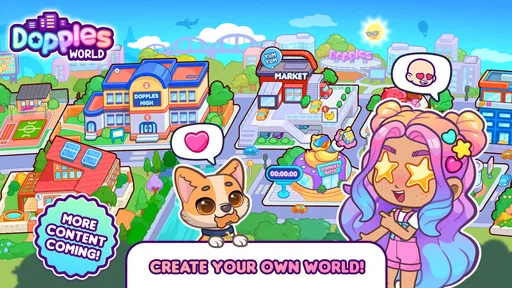
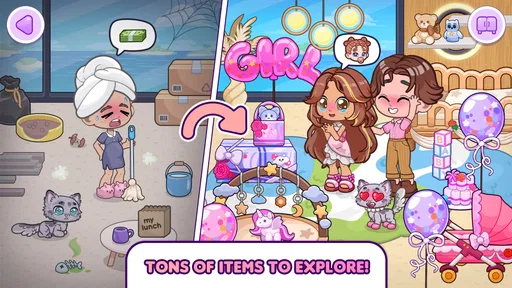
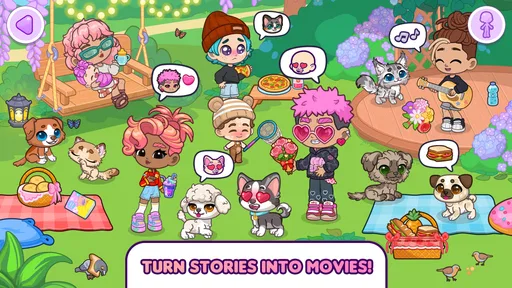
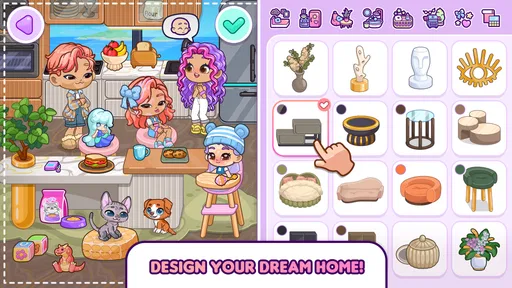
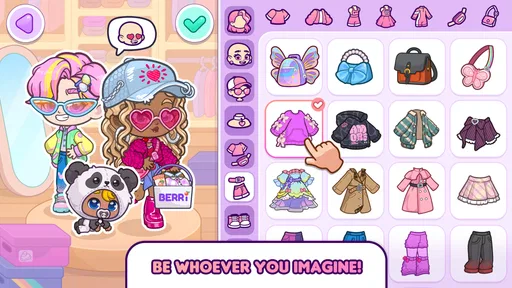
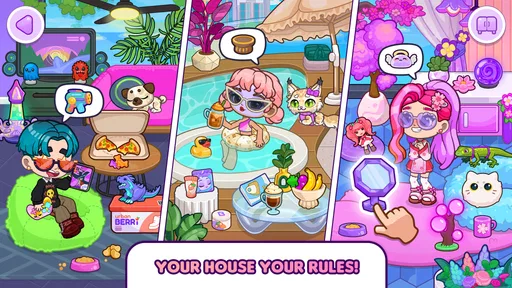
Dopples World is a casual avatar and social simulation game where you can create a character, personalize their appearance, and explore a colorful virtual world. Depending on the available activities, you can interact with locations, objects, and other characters while inventing your own stories. It is aimed at players who enjoy creative, open-ended play more than a game built around a fixed campaign or competitive challenges.
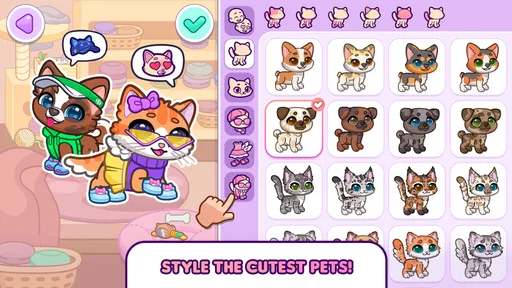
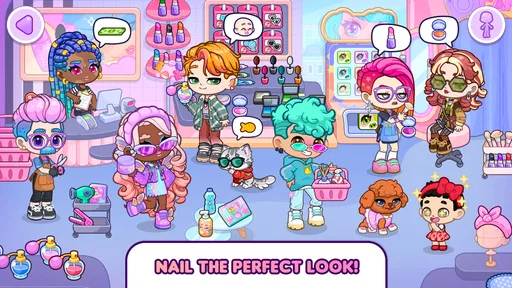
Character creation is a central part of Dopples World. You can typically choose from available appearance options and outfits to give your avatar a style that feels personal, then adjust it as you continue playing. The exact choices may vary by version, and some items or features may be unlocked through play or offered as in-app purchases. Check the current store listing for details about what is included.
Dopples World may be available as a free download, but the price, optional purchases, and included features can differ between platforms and versions. Free-to-play games may offer paid items, cosmetic content, or other extras, so review the in-app purchase information before downloading, especially if a child will be using the device. Availability and pricing can also vary by country and may change over time.
The game’s creative avatar and virtual-world format may appeal to younger players, but parents should review its age rating, privacy information, and any communication or social features before allowing play. Use device-level parental controls to manage purchases and screen time, and supervise play if the game permits interaction with other people. Features and safety options can change with updates, so check the current app-store description.
Offline access and device compatibility depend on the current version of Dopples World and the platform you use. Some parts of a virtual-world game may require an internet connection for loading content, updates, or online interactions, while other activities might be available without one. Before installing, check the Android or iOS store listing for supported operating-system versions, required storage, and connection requirements for your specific device.
On Android, Dopples World asks for these permissions.
Dopples World is also available in 2 other languages on our site.
4.7 out of 5
60,414 reviews
Educational · TutoTOONS

Educational4.4 out of 5
Educational4.3 out of 5
Educational4.5 out of 5
Educational4.1 out of 5
Educational3.3 out of 5
Educational4.4 out of 5
Educational4.1 out of 5
Educational4.1 out of 5
Educational4.4 out of 5

Educational3.3 out of 5
Educational4.5 out of 5

Educational4.6 out of 5
Educational4.5 out of 5
Educational4.5 out of 5

Educational4.6 out of 5
Educational4.5 out of 5
Educational3.8 out of 5
Educational4.4 out of 5

Educational4.6 out of 5

Educational4.5 out of 5



Gamesive reviews games on its own and is not paid by developers for scores. We do not host game files: the download buttons open the official Google Play and App Store pages. Names, icons and screenshots belong to their owners.