Word Collect - Word Games Fun
Word4.7 out of 5
For Android & iOS · Gimica GmbH

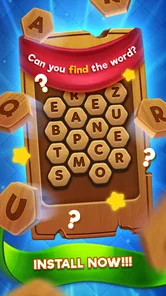
 Analysis by Gamesive
I judge a word game not only by whether its puzzles are enjoyable, but by how easy it is to settle into them when I’m tired, distracted, or playing in an awkward moment. Word Seeker is a straightforward word-finding game from Gimica GmbH: its central appeal is the pleasure of spotting words, rather than learning a complicated set of rules. That makes it approachable in principle, though a simple premise does not automatically make a game comfortable for every player or every situation.
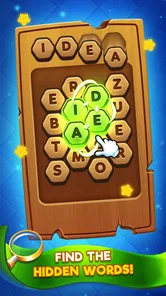
The game’s short description calls it “Word Seeker,” and the basic idea is immediately legible: look for hidden words. I appreciate that kind of directness when I want a quick mental task instead of a long tutorial or a story I need to follow. As a word game, it is best suited to people who enjoy scanning letters and testing possible words, whether as a small break or a familiar pastime.
Readability matters especially in a search game because the letters themselves are the task. If I have to work hard to understand where to look, the puzzle becomes less satisfying. A useful way to approach each board is to scan in passes rather than darting around randomly: check the obvious horizontal runs first, then look vertically and diagonally if the puzzle allows those directions. This is a general solving method, not a claim about a special tool in the game, and it can make visual search feel more deliberate.
I would also treat the game as a better fit for focused, short sessions than for multitasking. Word finding asks the eyes to compare neighboring letters and the mind to hold possible words in memory. Pausing for a moment between scans can help prevent the familiar mistake of repeatedly checking the same area. If you tend to lose your place easily, a slow sweep across the board is more useful than trying to spot everything at once.
Compared with a crossword, Word Seeker’s appeal is less about recalling definitions or filling intersecting answers and more about visual recognition. Compared with a fast word puzzle that rewards rapid input, its premise is naturally suited to taking a little time over a grid. That distinction is helpful when choosing what to play: people who enjoy letter patterns may find it inviting, while anyone looking for deep clues, narrative, or a broad mix of puzzle types may prefer another word game.
The game is listed as free, with optional in-app purchases priced from $0.99 to $4.49 per item. I’d start without spending and see whether the basic word-search experience suits your habits before considering any purchase. Those optional items can matter to someone who prefers a completely uninterrupted or tightly controlled experience, so it is sensible to check the purchase prompts and settings before handing a device to a child.
Word Seeker is rated Everyone, which makes its general content appropriate for a broad audience. That label is useful, but it does not answer every practical question a family might have: a child’s comfort with screen time, attention needs, or accidental purchases still deserves adult judgment. For a shared device, I’d make sure the child knows how to return to the puzzle and what to do if a purchase screen appears.
Word searching is primarily a visual activity, so the main comfort question is whether the player can comfortably distinguish and track the letters on their device. I would not assume that a simple game is automatically accessible to someone with low vision, color-vision differences, or reading difficulties. Before committing to a long session, try a short one and see whether the text remains easy to follow at the device’s usual brightness and viewing distance.
For players with limited dexterity or hand fatigue, the practical issue is not just tapping accurately; it is how much repeated interaction the game asks of them. If selecting a word requires a gesture that feels uncomfortable, that friction can outweigh the pleasure of solving. I would test the interaction gently rather than pushing through discomfort. Someone who needs highly configurable controls should compare this with a word game that clearly offers those options.
Sensory context can change the experience too. A bright screen may be unpleasant in a dark room, while glare can make letters harder to separate outdoors. I find it more sensible to adjust the device environment first—move away from reflections, reduce distractions, and take breaks—than to assume the puzzle will be equally comfortable everywhere. These are practical habits, not built-in accessibility features.
One non-obvious strategy is to use a “candidate word” approach: when a likely word comes to mind, trace its letters mentally before tapping, then move on if the sequence does not fit. This reduces unnecessary back-and-forth and is particularly useful for players who find rapid visual scanning tiring. Another is to play when you can give the board a few uninterrupted minutes; even a short interruption can make it harder to remember which regions you have already checked.
I can see Word Seeker working well during a quiet wait—sitting in a waiting room, taking a brief break between chores, or unwinding before bed—provided the screen is comfortable and the player has enough attention to scan letters. It is not my first choice for a crowded commute if I need to watch my surroundings, nor for a moment when I can only glance at the phone every few seconds. A word puzzle may be low-pressure, but it still asks for visual concentration.
It can also suit a family member who likes word games but does not want to learn a complex interface. For two people sharing a device, taking turns to search the same puzzle can make the activity conversational: one person can suggest a possible word while the other checks the letters. That is a way to enjoy the format together, rather than a special multiplayer feature I’m claiming the game provides.
For language learners, finding familiar words can be a pleasant bit of practice, but I would not treat this alone as a structured vocabulary course. Recognition is different from learning definitions, pronunciation, or usage. Likewise, people who want a daily challenge with a strong competitive layer may be happier with a game built around timed rounds, leaderboards, or varied puzzle mechanics.
The Android listing shows over a million installs and an average rating of 4.4 from around 28,000 ratings, with about 2,300 written reviews. Those figures suggest that many players have tried it, but they cannot tell you whether its visual presentation or interaction style will suit your needs. The useful test is personal: try a puzzle and notice whether you can read the board comfortably and enjoy the pace.
The biggest trade-off is the narrowness that makes the game easy to understand. If you love word searches, a clear focus is a strength; if you expect a changing mix of crossword clues, anagrams, and word definitions, the central format may feel repetitive. I would not choose it as an all-purpose brain-training app, because the premise is specifically about finding hidden words.
There is also a difference between “easy to start” and “easy for everyone to use.” A player may understand the objective immediately and still struggle with small-looking letters, visual crowding, or repeated tapping. Since those needs vary from person to person and device to device, I recommend testing the game in the conditions where you actually plan to play. If you need text enlargement, screen-reader support, adjustable contrast, or alternative input, confirm that the experience meets those needs before relying on it; I would not infer such options from the game’s simple concept.
Word Seeker is currently version 1.11.0 and requires Android 7.0 or later. That makes it worth checking the operating-system requirement before downloading on an older device. The game is free to install, but the presence of in-app purchases means “free” should not be read as a promise that every optional item is included at no cost.
Gimica GmbH released the game on December 24, 2021. I mention its age only as context for someone comparing it with newer word games; the more important question is whether the current experience feels comfortable and engaging on your device. A long-standing, familiar format can be appealing, but it does not remove the need to check how the actual screen and controls work for you.
I’d suggest Word Seeker to someone who enjoys scanning letter grids, wants a simple word-focused activity, and is comfortable playing primarily through visual attention. It is a reasonable pick for casual breaks and for people who prefer a clear objective over a puzzle that asks them to interpret clues. Its free entry point also makes it easy to try before deciding whether it deserves a regular place on your phone.
I would steer away from it if you need extensive accessibility controls and cannot confirm that the game supports them, if tapping or sustained visual scanning is uncomfortable, or if you want a wide variety of word-game formats. In those cases, a crossword app with adjustable text, a game with alternative input, or a more varied puzzle collection may be a better match. The right alternative depends on the barrier you are trying to avoid, not simply on which game has the most features.
My overall impression is that Word Seeker benefits from a plain, recognizable idea: find words in a letter puzzle and enjoy the small satisfaction of spotting them. That clarity can lower the learning burden, but it does not settle questions of readability, motor comfort, or sensory fit. I’d approach it as a focused word-search game, try a short session in realistic conditions, and keep the optional purchases in mind when sharing a device.
For a player who can comfortably read and interact with the board, it looks like a straightforward way to spend a few quiet minutes. For someone who needs specific accessibility settings, I would make verification part of the decision rather than assume the game will adapt. That is the fairest recommendation: give it a try if its focused format matches your needs, and choose a more configurable or varied option if the screen, controls, or repetition get in your way.
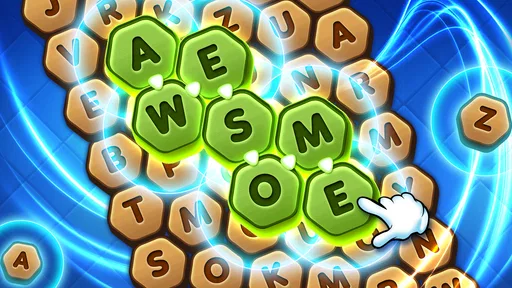
Word Seeker is a word puzzle game built around finding words from a set of letters. You typically swipe or connect letters to form words and fill spaces in a puzzle, with new challenges introducing different letter combinations and layouts. The exact modes and rules can vary by version, so check the store listing for the edition you plan to download. It is a straightforward option for players who enjoy vocabulary challenges and short puzzle sessions.
Word Seeker may be free to install, but the price, advertising, and purchase options depend on the particular app listing and platform. Some versions of word games show ads, offer optional hints, or sell ways to remove ads or unlock content. Before downloading, review the store page for pricing and in-app purchase disclosures, and check whether purchases can be restricted through your device settings if children may use the game.
Offline availability depends on the specific Word Seeker version. Core word puzzles may work without an internet connection in some editions, while features such as advertisements, daily challenges, cloud saves, leaderboards, or updates may require connectivity. If you need a game for travel or areas with unreliable service, install it and test a puzzle with Wi-Fi and mobile data turned off. The app’s store description may also state whether an internet connection is required.
Word Seeker’s letter-based puzzles can offer a casual way to practise spelling and recognise vocabulary, which may appeal to both younger players and people learning a language. Its suitability depends on the selected version, including its difficulty, advertising, and any social or purchase features. Check the age rating and privacy information on the app store, and supervise younger players where appropriate. A puzzle game can support practice, but it is not a substitute for structured language instruction.
Several apps may use the name Word Seeker, so confirm that the developer, screenshots, description, and supported platform match the version you want. Check the app’s recent reviews, update history, device requirements, age rating, privacy disclosures, and whether it contains ads or in-app purchases. Also make sure you have enough storage and are downloading from the official Google Play Store or Apple App Store rather than an unfamiliar third-party source.
On Android, Word Seeker asks for these permissions.
4.4 out of 5
27,543 reviews
Word · Gimica GmbH
Word4.8 out of 5

Word4.7 out of 5

Word4.9 out of 5

Word4.9 out of 5
Word4.8 out of 5

Word4.8 out of 5

Casual4.5 out of 5
Card4.6 out of 5

Casual4.5 out of 5

Word4.5 out of 5
Word4.7 out of 5

Word4.5 out of 5

Word4.9 out of 5
Word4.7 out of 5
Word4.8 out of 5
Word4.7 out of 5
Word4.9 out of 5
Word4.9 out of 5
Word4.9 out of 5

Word4.5 out of 5

Word4.1 out of 5

Word4.6 out of 5



Gamesive reviews games on its own and is not paid by developers for scores. We do not host game files: the download buttons open the official Google Play and App Store pages. Names, icons and screenshots belong to their owners.