
Word Search Explorer
For Android & iOS · PlaySimple Games
- 4.9 out of 5Rating
- 1.27MReviews
- 100.00M+Downloads
- WordGenre
Game details
- Version
- 1.290.0
- Updated
- Requires
- 8.0
- Price
- Free
- Age rating
- Everyone
- In-app purchases
- $0.99 - $49.99 per item
Screenshots
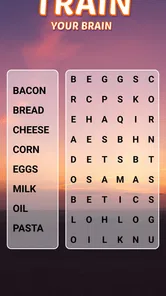
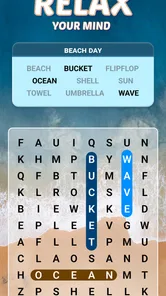
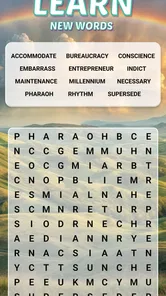
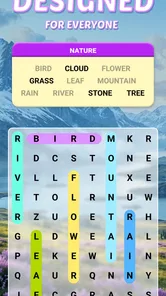
Word Search Explorer review
 Analysis by Gamesive
I like word-search games best when I can settle into a puzzle without feeling rushed or having to learn a complicated system. Word Search Explorer suits that kind of casual session: it is a free word game from PlaySimple Games, built around finding words in letter grids. Its visual approach is intended to be comfortable for older players, but the straightforward format can appeal to anyone who wants a quiet mental break. My overall impression is positive, with one important caveat: a free download is not the same as a promise that every part of the experience will remain free.
A relaxed take on the familiar word search
Word Search Explorer takes a well-known puzzle idea and makes it the center of the experience rather than one activity among many. You scan a grid, look for the words you are meant to find, and work through the puzzle at your own pace. That familiarity is useful: there is little to explain before you can begin, so it is easy to pick up during a short break or hand to someone who does not play many mobile games.
The visual design is part of the pitch. The game is specifically presented as a word search made with seniors in mind, which makes readability and approachable presentation especially relevant. That does not mean it is only for older adults. I can see it working just as well for a commuter, a casual puzzle fan, or someone who wants an activity that asks for attention without demanding quick reactions.
It is listed as a word game and carries an Everyone age rating. The game was released on November 19, 2021, and the current version is 1.290.0, with Android 8.0 as the minimum operating system. It has a 4.9 average from around 1.3 million ratings, alongside roughly 23,000 written reviews and over 100 million installs. Those figures suggest broad reach, though popularity alone cannot tell you whether the presentation will suit your eyesight, preferences, or tolerance for in-app spending.
How it fits into an ordinary day
A realistic use is a few minutes after lunch, while waiting for an appointment, or during a quiet evening when a fast-paced game would feel like too much. Word searches invite a different rhythm from action or timed puzzle games: you can concentrate on the letters, pause to rethink a section, and resume when convenient. I would also consider it for a family member who enjoys printed word searches but wants a version on a phone or tablet. The key question in that case is whether the screen and letter size feel comfortable on their particular device.
One practical tip is to treat the first session as a comfort check rather than a test of skill. Hold the device at the distance the player would normally use, check whether the grid is easy to scan, and notice whether tracing or selecting words feels natural. A game intended to be visually approachable still has to work for an individual’s eyesight and hand control. If a person struggles to distinguish the letters or interact precisely, a large-print book or a tablet with a larger display may be a better choice.
Progress without turning every session into a race
The appeal of a word-search format is that progress comes from careful looking, not from mastering a long list of controls. That can make the game a comfortable option for players who dislike reflex challenges or complicated strategy. It also gives a small, useful mental routine: scan in one direction, check likely letter patterns, then shift your attention to a different part of the grid instead of repeatedly staring at the same cluster.
There is a trade-off, though. If you want a puzzle that keeps changing its underlying rules, a conventional word search may feel repetitive. Familiarity makes it accessible, but it can also limit the sense of novelty for players who have already spent a lot of time with paper puzzles or other digital searches. I would choose it for a calm, recognisable activity, not for elaborate mechanics or a demanding competitive challenge.
For a less frustrating session, I recommend searching for distinctive letter combinations rather than trying to read every row from left to right. When a word is hard to spot, look for its less common letters first and scan around them. This is a general solving approach rather than a special in-game feature, but it suits the grid-based task and helps keep the activity deliberate instead of turning into random tapping. If the game’s own presentation or interaction does not make that process comfortable, there is no reason to force it; a paper puzzle offers the same basic search with different physical controls.
Free to install, with a real spending consideration
The game is free to download, but it includes optional in-app purchases priced from $0.99 to $49.99 per item. That range is worth noticing before installing, especially if a child will use the device or if you prefer games with no purchase prompts. The existence of purchases does not establish that spending is necessary to enjoy the core word-search activity, so I would not assume either that payment is required or that every extra is easy to ignore.
My practical advice is to check the purchase controls on the device before sharing the game with someone who might tap through prompts unintentionally. This is particularly sensible for a parent setting up a phone for a child or a relative who is unfamiliar with app-store purchases. The game’s Everyone rating describes its content suitability; it does not, by itself, answer whether the purchase setup fits your household’s expectations.
On fairness, I can make only a narrow judgement from the confirmed purchase facts: the game is free to install and offers paid items. Those facts do not establish how purchases affect progress, whether any particular item changes puzzle difficulty, or how the game treats players who spend nothing. I would avoid calling it pay-to-win or claiming that purchases are purely cosmetic without knowing those details. If spending fairness is decisive for you, use the game cautiously until you have seen how its purchase options appear in practice.
Where it sits beside paper puzzles and other apps
Compared with a printed word-search book, a phone game is easier to carry and can be more convenient when you have a spare moment, while paper gives you a larger physical page and avoids in-app purchases entirely. Someone who values a quiet, screen-free habit may prefer print. Someone who wants a puzzle ready on a device may find the app more practical, provided the display is comfortable and purchase prompts are not a concern.
Compared with other mobile word games, this one is best understood as a focused search activity rather than a broad collection of word challenges. If you want to build words from a rack of letters, solve clues, or compete through a more involved system, a crossword, an anagram game, or another word-puzzle format may fit better. If you simply enjoy spotting words in a grid, the familiar structure is a strength rather than a shortcoming.
That distinction also helps set expectations for long-term use. A single, recognisable puzzle style is easy to return to, but players who need frequent changes in pace may want to alternate it with a different kind of game. I would not download it expecting a substitute for every word-game preference. I would download it because I specifically want word searches in a mobile format.
Who I would recommend it to
I would recommend Word Search Explorer to people who already enjoy word searches, want an uncomplicated way to pass a few quiet minutes, or are looking for a phone-based puzzle that does not revolve around fast reactions. It is also worth considering for older players who prefer a game designed with visual approachability in mind, while still checking the actual screen on the device they plan to use.
I would steer away from it if you find letter grids monotonous, want a deep campaign or demanding competition, or do not want a free-to-install game with paid items. It may also be the wrong choice for someone who has difficulty reading a phone screen even when a game aims for a comfortable presentation. In those cases, a large-format paper puzzle, a tablet, or a different word-game style could be a better match.
My trust verdict
Word Search Explorer earns a recommendation as a straightforward word-search game, not as a guaranteed purchase-free or endlessly varied puzzle experience. PlaySimple Games has made a familiar activity easy to approach, and the game’s large audience and strong average rating offer useful context, though neither replaces checking whether you personally enjoy its look and feel.
I would try it if a calm letter hunt sounds appealing, then decide based on the first few sessions whether the grid is comfortable and the purchase options fit your boundaries. The sensible expectation is simple: a free word game with optional paid items, a senior-focused visual intention, and a classic puzzle format. If that is what you want, it is a reasonable choice; if you need certainty about purchase effects or prefer a wider mix of mechanics, compare alternatives before settling in.
What we like
- A large word library keeps puzzles varied.
- Adjustable difficulty suits both beginners and experienced players.
- Offline play makes it convenient during travel.
- Hints help when a puzzle becomes difficult.
- Simple controls make searching words easy.
What could be better
- Ads may interrupt the puzzle experience.
- Some advanced levels can feel repetitive.
- Hints may be limited without in-app purchases.
- Small letters can be hard to read on compact screens.
- Progress may not sync across devices.
Frequently Asked Questions
What is Word Search Explorer?
Word Search Explorer is a word puzzle game built around finding hidden words in a grid of letters. Each level gives you a group of words to locate, typically by tracing through neighboring letters in a straight line. It is designed for quick play sessions as well as longer puzzle runs, and its simple rules make it approachable for beginners while later challenges can require more careful scanning.
How do you play Word Search Explorer?
Choose a puzzle and look for the listed words among the letters on screen. When you spot one, drag your finger across its letters to select it; words may run in different directions, depending on the puzzle’s rules. Found words are marked off the list, and completing the set lets you move on. If you get stuck, check whether the game offers hints or other assistance.
Is Word Search Explorer free to download and play?
Availability, pricing, and in-app purchases can vary by platform, region, and the current version, so check the Google Play or Apple App Store listing before downloading. A game may be free to install while offering optional purchases, advertisements, or paid features. Review the store page and purchase settings if you want to understand any potential costs before playing.
Can I play Word Search Explorer offline?
Offline access depends on the version and on which features you want to use. Word puzzles already downloaded to your device may be playable without an internet connection, but advertisements, optional purchases, cloud saving, or online events can require connectivity. Check the app’s store description and test a puzzle in airplane mode if offline play is important to you.
Is Word Search Explorer suitable for children, and what should I check before downloading?
Word Search Explorer’s basic activity—finding words in a letter grid—is generally easy to understand and can be enjoyed by a wide range of ages. However, suitability depends on the specific app listing, including its age rating, advertisements, in-app purchases, and privacy disclosures. Parents should review those details, along with any permissions requested, before installing it on a child’s device.
Permissions
On Android, Word Search Explorer asks for these permissions.
- Photos/Media/Files
- read the contents of your USB storage
- Storage
- read the contents of your USB storage
- Wi-Fi connection information
- view Wi-Fi connections
- Other
- view network connections, full network access, run at startup, prevent device from sleeping, set an alarm, Google Play license check, read Google service configuration
Languages
Word Search Explorer is also available in 2 other languages on our site.
User reviews
4.9 out of 5
1,273,359 reviews
- 95%
- 3%
- 1%
- 0%
- 1%
Download Word Search Explorer
Word · PlaySimple Games · Free
Games like Word Search Explorer
View all: Games like Word Search Explorer
Wordscapes Search: Word Games
Word4.7 out of 5
Crossword Go!
Word4.9 out of 5

Word Connect Association
Word4.8 out of 5
More from PlaySimple Games
View all: More from PlaySimple GamesCrossword Go!
Word4.9 out of 5
Word Connect Association
Word4.8 out of 5
About this listing
- Game
- Word Search Explorer
- Developer
- PlaySimple Games
- Package
- in.playsimple.wordsearch
- Version reviewed
- 1.290.0
Gamesive reviews games on its own and is not paid by developers for scores. We do not host game files: the download buttons open the official Google Play and App Store pages. Names, icons and screenshots belong to their owners.