
Heads Up!
Word4.5 out of 5

For Android & iOS · Fugo Games
 Analysis by Gamesive
I can see Words of Wonders: Crossword working well as a shared-device game: one person can pick it up for a quick puzzle, then pass the phone or tablet to someone else without needing a long session or complicated setup. Its familiar letter-connecting format makes it easy to understand, while the crossword-style boards give each turn a clear stopping point. I like that combination for a household, where people may have different levels of patience and word-game experience.
That shared use does come with a practical caveat: a device is not the same thing as a shared account or a coordinated family game. I would treat each session as a small solo challenge rather than expect the game to manage turns, profiles, or household progress for you. If everyone is happy to play independently and hand over the device when they are done, it fits naturally into everyday downtime.
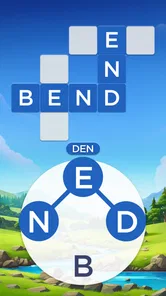
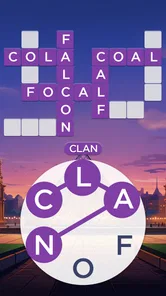
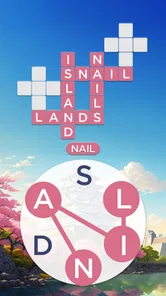
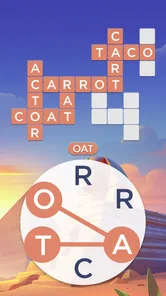
The basic task is to connect letters into words that fill spaces on a crossword board. That gives the game more structure than a free-form word search: you are not just making any word you can spot, but working toward a board with specific gaps. The travel-and-landmark theme supplies a light sense of progression, though the word-solving remains the main attraction.
In my experience, that board structure makes it easy to play in short bursts. Someone waiting for dinner, taking a break between chores, or winding down before bed can solve a few clues and stop at a natural point. On a shared tablet, the next person can begin a fresh puzzle session when the device is free. It is less suited to a group trying to solve one board together in real time, since the core activity is individual letter reasoning rather than conversation or team play.
A useful household habit is to agree on whether people are taking turns on one person’s progress or simply using the same device at different times. Those are different expectations. If players care about keeping their own history or continuing exactly where they left off, they should check how the game behaves on the device before treating it as a communal save. I would not assume that passing the phone also passes a cleanly separated personal profile.
The game can suit a mix of word skills because a board offers more than one way to approach it. A confident solver may scan for longer words first, using those answers to make the remaining letter combinations easier to inspect. A newer player can begin with short, obvious words and use the crossing spaces to narrow down what belongs elsewhere. This is a more helpful approach than repeatedly trying random combinations.
One small but useful tactic is to pause when a word does not fit rather than keep reshuffling the same letters mentally. Look at the empty spaces and the letters already implied by crossing answers; the board itself can point toward the missing word. I also find it sensible to leave an awkward gap for a moment and solve another part of the puzzle. A new crossing letter may make the earlier answer feel obvious, without needing to spend help resources immediately.
That makes the game a decent fit for a quiet shared space, but not necessarily for a noisy family gathering. People can watch and offer suggestions, yet one person’s hint can take away another person’s satisfaction in finding the answer. If you want everyone involved, agree that spectators should wait to be asked before calling out a word.
For households that share a device, the simplest coordination is often a verbal one: say when you are done, and avoid opening a puzzle while someone else is midway through a session. This sounds obvious, but it prevents the common problem of one person assuming a game is available while another expects to resume it. If the device is used by children as well as adults, a household routine can also make it clear who is allowed to make purchases or change settings.
I would be cautious about using a single shared game session as a family scorekeeping system. A crossword game is naturally satisfying as a personal challenge, and a device handoff does not automatically create a fair comparison between players with different vocabularies or puzzle experience. If you want a contest, keep it informal: take turns on comparable puzzles and focus on the fun of solving rather than treating one shared progress trail as a reliable record of each person’s skill.
For a parent or caregiver, it is worth reviewing the game’s store and device settings before letting a child use a shared phone unattended. That is a sensible general boundary for any free game with purchases available, especially when the same device may be used for other accounts or services. I would not rely on the game itself to provide household-level purchase rules or separate child and adult spaces.
The game is rated Everyone, so its age context is broad and approachable for general audiences. That does not mean every child will enjoy the vocabulary challenge equally, or that an adult should skip the usual checks on a shared device. Younger players may need help with unfamiliar words, while older word-game fans may prefer to solve independently. The best fit depends more on reading comfort and interest in puzzles than on the rating alone.
It is free to install, which makes trying it low-commitment, but optional in-app purchases range from $0.99 to $99.99 per item. That wide range is a reason to keep purchase approval clear in a household, rather than assume that “free” means there can never be a charge. I recommend checking the device’s purchase controls and making sure children know to ask before buying anything. This is especially important when several people use the same app-store account or payment setup.
From a trust perspective, I would describe it as a light word game rather than an educational program. Solving boards can encourage attention to spelling and word patterns, but I would not treat that as a substitute for a lesson or assume that every answer will match a child’s everyday vocabulary. If the goal is structured learning, a dedicated language or spelling app is a better choice; if the goal is casual puzzle time, this format is more relaxed.
Compared with a classic word search, this game asks for more active construction: you connect letters and fit answers into a crossword layout instead of simply scanning a grid for a visible word. Compared with a crossword built around written clues, it places greater emphasis on the available letters and intersecting spaces. That middle ground is its strongest design choice. It gives players a clear puzzle without requiring them to know a particular trivia topic before they start.
The trade-off is that players who love rich clues, vocabulary definitions, or a competitive head-to-head format may find the loop too restrained. It is also not the best pick if someone wants an open-ended word game with no board completion pressure. I would choose a traditional crossword for clue variety, a word-search game for relaxed scanning, or a multiplayer word game when conversation and competition matter more than solo solving.
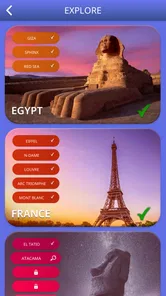
For this particular style, the landmark theme adds atmosphere, but I would not choose it primarily as a travel guide. The appeal is the steady sequence of letter puzzles, with the world-tour framing giving the boards a broader setting. If a player is mainly looking for detailed information about destinations, a travel app or book will serve that interest better.
I would recommend Words of Wonders: Crossword to people who enjoy spotting words, filling a tidy board, and making progress in brief sessions. It can be a pleasant shared-device option when household members take turns informally, and the straightforward format makes it easy to explain without a lengthy tutorial. Fugo Games developed it, and its reach is substantial: it has over 100 million installs, with a 4.9 average rating from around 6.6 million ratings. Those figures suggest broad appeal, though they do not guarantee that its pace or puzzle style will suit every player.
I would steer away from it if you want a strongly social game, a detailed clue-based crossword, or a learning tool with an explicit teaching structure. I would also hesitate if your household expects separate profiles and carefully coordinated individual progress on one device; check the app’s behavior before building that routine around it. The current version is 5.10.6 and requires Android 8.0 or later, useful details to check when an older shared device is involved. It was released on April 10, 2018, and remains a free game with optional purchases.
My household verdict is positive, with realistic expectations. This is a convenient solo word puzzle that can be passed around, not a family-management tool or a team game. Its best shared use is simple: one person solves during a spare moment, stops at a natural break, and lets the next person take a turn without expecting the app to organize everyone’s play.
Before installing it on a family device, I would check compatibility, agree on purchase boundaries, and decide whether people are sharing one progress trail or merely sharing the hardware. Once those expectations are clear, the crossword format offers an easy way to fill a short quiet moment. If your household wants a polished, low-pressure word challenge, I think it is worth trying; if you need robust account separation, guided learning, or lively group competition, another kind of game will be a better match.
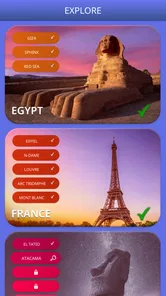
Words of Wonders: Crossword is a word puzzle game that combines crossword-style boards with letter-linking challenges. Each level gives you a set of letters, and you connect them to form words that fit into the grid. The puzzles are grouped into themed stages inspired by landmarks and places around the world, so the game pairs vocabulary practice with a light travel theme.
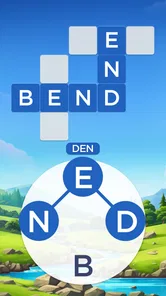
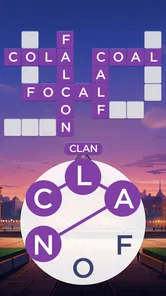
At the start of a puzzle, you see a wheel of letters and an empty crossword grid. Swipe across letters to build words, then release to submit each one. Correct words fill spaces on the board, while additional valid words may earn bonus rewards. If you get stuck, hints can reveal letters or help with the puzzle, though how many hints you have may depend on your progress and available in-game resources.
Many of the core crossword puzzles can generally be played without a constant internet connection, which makes the game convenient for travel or short breaks. However, online access may be needed for features such as advertisements, rewards, events, updates, or syncing progress, depending on the version and device. Check the app’s current store listing and test your connection settings if offline play is important to you.
Words of Wonders: Crossword is commonly offered as a free download, and you can progress through puzzles without paying for every level. The experience may include advertisements and optional in-app purchases, such as items that help you solve challenging boards. Availability, pricing, and purchase options can differ by platform or region, so review the Google Play or App Store listing before downloading, especially if you manage purchases for a child.
The game’s word-finding format can encourage spelling, vocabulary recall, and pattern recognition, making it approachable for many players who enjoy language puzzles. Difficulty increases as you progress, and unfamiliar words may require a dictionary or hints. It is not a structured language course, and advertising or optional purchases may be present, so parents should review the current age guidance, privacy details, and purchase settings before letting a child play.
On Android, Words of Wonders: Crossword asks for these permissions.
Words of Wonders: Crossword is also available in 2 other languages on our site.
4.9 out of 5
6,557,659 reviews
Word · Fugo Games
Word4.8 out of 5
Word4.7 out of 5

Word4.9 out of 5
Word4.8 out of 5
Word4.8 out of 5
Word4.7 out of 5

Word4.9 out of 5

Word4.9 out of 5

Word4.8 out of 5
Word4.5 out of 5
Word4.9 out of 5
Word4.7 out of 5
Word4.8 out of 5
Word4.7 out of 5
Word4.9 out of 5
Word4.9 out of 5

Word4.9 out of 5
Word4.5 out of 5

Word4.1 out of 5

Word4.6 out of 5
Word4.9 out of 5



Gamesive reviews games on its own and is not paid by developers for scores. We do not host game files: the download buttons open the official Google Play and App Store pages. Names, icons and screenshots belong to their owners.