
Heads Up!
Word4.5 out of 5

For Android & iOS · Oakever Games




 Analysis by Gamesive
I like word games best when they give me a clear little challenge without demanding a long session, and Zen Word is built around that kind of play. It is a word puzzle game from Oakever Games, with a calm presentation that makes it easy to pick up for a few minutes. The appeal is straightforward: look for words, make progress at your own pace, and use a brief break to focus your attention. That simplicity can suit a wide range of players, though it does not automatically make the game comfortable for every person or every situation.
The first thing I appreciate is that the central task is easy to understand. You are not being asked to learn a complicated strategy before you can begin; the focus stays on noticing words and solving the puzzle in front of you. That keeps the mental effort on vocabulary and pattern recognition rather than on figuring out a maze of menus. For someone who enjoys word games but prefers a direct start, that is a meaningful strength.
The game’s identity also sets an expectation: this is intended as a relaxed word puzzle, not a fast-action contest. I find that framing useful for players who want to concentrate without feeling pushed into racing an opponent. The title and presentation invite a calmer mood, although the experience still depends on whether the puzzle’s text and on-screen controls are comfortable for you to use.
It has a strong following: the average rating is 4.8 from around 833,000 ratings, and it has passed 50 million installs. Those figures suggest that the basic word-search appeal works for many people, but they cannot tell you whether the layout suits your eyesight, reading preferences, or device. I would treat them as a sign of broad interest, not as a promise that every player will find it accessible.
One practical way to assess the reading experience is to try a short session when you are not tired. Notice whether you can distinguish the letters at your usual screen distance and whether scanning the puzzle feels comfortable rather than effortful. If you need to enlarge text across apps or rely on a particular display setting, check whether the game remains legible with your normal setup instead of assuming its word-focused format will be enough.
For a useful first-session routine, I would solve a few puzzles and pay attention to the points where you hesitate. Is it difficult to find the next word, to understand what the game expects, or to operate the controls accurately? Those are different kinds of friction. Identifying which one affects you helps you decide whether the game is a good fit, rather than judging it only by whether you enjoy word puzzles in general.
Compared with a traditional crossword, Zen Word puts more emphasis on spotting possible words than on working through written clues. That makes it a reasonable choice when you want language-based thinking but do not want to commit to solving a themed grid. Compared with a competitive word game, its relaxed framing is better suited to a solo pause than to a social match. If you specifically want clue-solving depth, a crossword may offer more; if you want live competition, another format may be a better match.
The difference matters for people with different reading strengths. A player who enjoys scanning letter patterns may find the task inviting, while someone who relies on explicit clues to guide their thinking may prefer a crossword or a word game with more contextual hints. Neither preference is a weakness. It is simply worth choosing the kind of language puzzle that gives you useful structure rather than asking you to push through a format that feels opaque.
Word puzzles can appear physically simple because they do not require complex movement, but touch accuracy still matters. If you have limited dexterity, hand tremors, or discomfort from repeated tapping, even a calm game can become tiring when you need to make precise selections. I would test the controls with a small number of puzzles and notice whether accidental touches or repeated corrections interrupt the flow. A game’s gentle pace does not remove the physical work of interacting with a touchscreen.
There is also a difference between cognitive calm and sensory calm. A word puzzle may feel less hectic than an action game, but the screen can still hold your attention for longer than intended, and its visual presentation may not suit everyone. If bright screens or close visual focus cause discomfort, keep the session short and use the device’s own comfort settings if those are already part of your routine. I would not assume that a “zen” theme means the game has specific sensory accommodations.
For players who are sensitive to sound, the safest approach is to check the game’s audio behavior during an initial session and adjust the device as needed. I cannot promise a particular audio control or setting, so I would not make sound a reason to install it without trying it first. The same goes for haptics or other feedback: players who need a completely quiet or low-stimulation experience should verify how the game behaves on their own device before settling into a longer session.
A useful trade-off is that solo word play can be easier to pause than a timed match. If you are interrupted, you are not letting down a teammate or trying to keep pace with another player. That makes it more practical for people who need to stop frequently. Still, frequent interruptions can make it harder to hold a word pattern in mind, so I would choose a quieter moment for puzzles that require sustained concentration.
I can see using it during a short break between tasks, while waiting for an appointment, or during a quiet stretch at home. In those situations, a puzzle gives the mind something specific to do without requiring a full setup or a conversation with other players. For someone who wants to practice noticing letter combinations, a brief session can feel more engaging than passively scrolling. I would keep it as an optional mental break, not treat it as a substitute for a structured learning plan or a clinical cognitive exercise.
There are contexts where I would skip it. If you are walking, crossing a street, driving, or responsible for monitoring something that needs your attention, a screen-based puzzle is the wrong choice. It asks you to look closely and think about the letters, even if the pace is unhurried. On public transport, it may work when you have a stable seat and can focus, but it is less comfortable if the movement makes reading difficult or if you need to stay alert to frequent changes around you.
For a person who wants an accessible shared activity, this is also not automatically a group game just because more than one person can look at a screen. A useful low-pressure approach is to take turns suggesting possible words, but that is a way to share the puzzle rather than a built-in social feature. If you need spoken prompts, large-print materials, or a format designed for collaborative play, a paper activity or another game that explicitly supports those needs may be more dependable.
The main limitation is that word puzzles rely on visual reading and precise interaction. Players with low vision, dyslexia, language-processing differences, or motor impairments may have a very different experience depending on the screen, their device settings, and their individual needs. I would not assume that the game offers a particular font, screen-reader support, color adjustment, or alternative input method. If any of those are essential, confirm that the game works with your setup before spending time or money on it.
Another possible barrier is vocabulary. A puzzle can be relaxing when the words feel familiar, but frustrating when you are unsure what counts as an answer or when your preferred language is not the one you want to play in. The game’s basic word-focused design is best for people who enjoy searching and experimenting with language. It is less suitable if you want a narrative to carry you through, explicit lessons, or a clue for every answer.
There is a financial consideration too. The game is free to download, but it includes optional in-app purchases ranging from $0.39 to $99.99 per item. That is a wide span, so I would check any purchase prompt carefully and use device-level purchase controls if you share a phone or want to avoid accidental spending. Free access makes it easy to try, but it does not mean every part of the experience is necessarily free of purchase offers.
Zen Word is rated for Everyone, which makes its intended audience broad, but an age rating is not an accessibility guarantee. Parents or caregivers should still consider whether the screen time and purchase prompts suit the person using the device. Likewise, people who are sensitive to persistent app engagement may prefer to set a time limit before opening it, rather than relying on a relaxed theme to keep a session brief.
The game is free, and its current version is 2.50.0, with Android support beginning at version 8.0. It was released on March 31, 2023. Those details are useful if you are checking compatibility or deciding whether it is a current option for your device, but the most important practical test is still whether you can comfortably read and interact with its puzzles.
I would suggest Zen Word to someone who likes word searches, wants a solo puzzle with a calm feel, and is happy to explore answers through letter patterns rather than solve clue-heavy crosswords. It can also suit players who prefer short, self-directed sessions and do not want the pressure of a head-to-head match. Oakever Games has reached a large audience with this approach, and the 17,000 reviews alongside its high average rating show that many players have taken time to share their views, though popularity should not replace a personal accessibility check.
I would point a different player elsewhere if they need reliable screen-reader navigation, highly adjustable text, a no-touch control scheme, or a strictly competitive challenge. A crossword is likely a better choice for someone who wants definitions and context; a multiplayer word game is better for someone who wants an opponent; and a paper puzzle may be easier for a person who finds phone screens tiring. The best alternative depends on what makes word play enjoyable and manageable for you.
My overall view is that Zen Word is most convincing as a simple, low-pressure way to spend a few focused minutes. Its accessible concept is a real plus, but the actual comfort of play depends on reading, touch, sound, and the situation around you. I would give it a brief trial with your usual device settings, check how the purchase prompts fit your preferences, and stop if the screen or controls feel like work. If the letters are comfortable to read and the search itself is satisfying, it is an easy game to keep nearby for a quiet break; if those basics are difficult, a different word format will serve you better.
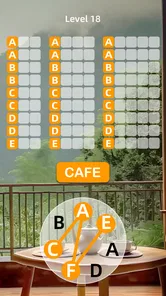
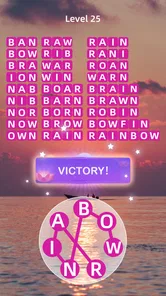
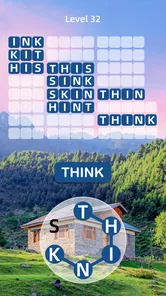
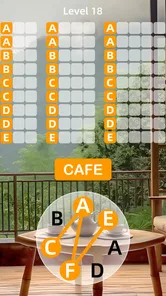
Zen Word® is a word puzzle game that asks you to find words by connecting or selecting letters, depending on the puzzle format. Its calm presentation and steady progression make it suitable for players who want a more relaxing alternative to fast-paced games. Puzzles can also offer a light vocabulary challenge, though the exact features and available levels may change with app updates.
The game is generally offered as a free download, but free access does not necessarily mean every feature is available without limits. It may include advertisements, optional in-app purchases, or paid options intended to support continued play or provide hints. Check the current Google Play or App Store listing for pricing, purchase details, and any subscription terms before downloading, as these can vary by region and change over time.
Some word puzzles may be playable without an internet connection, which can make the game convenient while traveling or when connectivity is limited. However, features such as advertisements, account services, rewards, updates, or other online content may require internet access. Offline availability can also depend on whether the relevant content has already loaded, so it is best to test this before relying on the game during a trip.
The game’s word-focused puzzles are generally approachable for a broad audience, but difficulty and vocabulary may vary, and younger players might need help with unfamiliar words. Before installing it for a child, review the current age rating and privacy information on the relevant app store. Also consider that advertisements or in-app purchases may be present, and use device-level purchase controls where appropriate.
Check that your phone meets the current operating-system requirements and has enough storage, then review the app’s latest store listing for permissions, privacy disclosures, advertisements, and in-app purchases. Ratings and reviews can help you assess recent performance, but experiences may differ across devices and updates. Download from Google Play or the Apple App Store rather than an unofficial source to reduce the risk of installing an altered app.
On Android, Zen Word® - Relax Puzzle Game asks for these permissions.
Zen Word® - Relax Puzzle Game is also available in 2 other languages on our site.
4.8 out of 5
832,782 reviews
Word · Oakever Games
Word4.8 out of 5

Word4.7 out of 5

Word4.9 out of 5

Word4.9 out of 5
Word4.8 out of 5
Word4.7 out of 5
Puzzle4.9 out of 5

Puzzle4.9 out of 5
Puzzle4.7 out of 5
Word4.5 out of 5

Word4.9 out of 5
Word4.7 out of 5
Word4.8 out of 5
Word4.7 out of 5
Word4.9 out of 5
Word4.9 out of 5
Word4.9 out of 5
Word4.5 out of 5

Word4.1 out of 5

Word4.6 out of 5
Word4.9 out of 5



Gamesive reviews games on its own and is not paid by developers for scores. We do not host game files: the download buttons open the official Google Play and App Store pages. Names, icons and screenshots belong to their owners.