
Heads Up!
Word4.5 out of 5
For Android & iOS · ZenLife Games Ltd

 Analysis by Gamesive
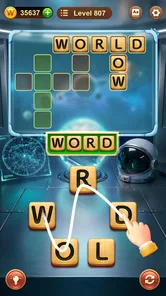
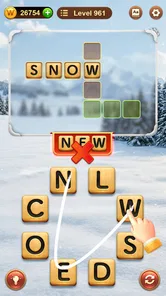
I find Word Connect easiest to enjoy when I treat it as a quiet word puzzle rather than a test of speed. You look for words by connecting letters, so the appeal is immediate: notice a pattern, try a word, and see whether it fits. That simple loop makes it approachable for a short break, though it also means the game depends heavily on whether its presentation and input feel comfortable to you.
As a word game from ZenLife Games Ltd, it has reached a broad audience: it has over 50 million installs, a 4.8 average from around 1.3 million ratings, and about 160,000 written reviews. Those figures suggest lasting appeal, but they do not tell you whether the game will suit your eyesight, dexterity, language skills, or tolerance for repetition. My view is that it works best for people who enjoy unhurried letter puzzles and are happy to make their own adjustments to the play setting.
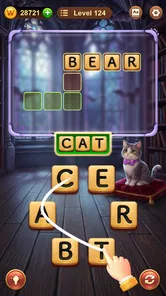
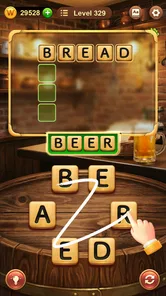
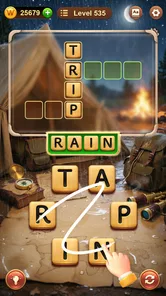
The central task is visually direct: focus on the available letters, form a word, and check whether it belongs in the puzzle. There is little conceptual overhead before you can start playing. That matters if you want a game you can pick up without first learning a large set of rules, and it also gives new players a clear place to direct their attention.
Still, a simple word puzzle can be demanding in a different way. You need to distinguish the letters, keep track of possible combinations, and compare your guesses with the words the puzzle accepts. If letter shapes are hard for you to read on your device, or if you find it tiring to shift attention between the letters and the puzzle’s progress, the basic design may feel less effortless than its rules suggest.
I recommend trying a few rounds in the conditions where you expect to play most often. Check whether you can read the letters comfortably at your usual screen distance and whether the interface remains clear after several puzzles. If you find yourself leaning in or losing your place, increasing your device’s text or display settings may help where those adjustments affect the game. It is better to discover that early than to assume a familiar word format will automatically be easy on the eyes.
Navigation is also worth judging by how much attention it takes away from solving. Word Connect’s appeal comes from returning to the letter puzzle quickly, not from exploring elaborate systems. If you prefer games with a map, a story, or a clearly staged campaign, this stripped-back focus may feel thin. If you want a small puzzle you can reopen and understand at a glance, that same simplicity is a strength.
The most useful habit I’ve found is to avoid treating every possible letter arrangement as an urgent guess. Scan for familiar beginnings and endings, then test a likely word rather than repeatedly dragging through combinations without a plan. This turns the puzzle into a small exercise in pattern recognition and reduces the feeling of random trial and error.
When I get stuck, I pause and look at the letters as a group instead of staring at one blank space. A short reset can help me notice a common word I had overlooked. This is a practical advantage for players who prefer thinking time, but it can be a disadvantage for anyone expecting the game to provide a rich explanation of vocabulary or teach language rules. The main satisfaction is finding an answer, not receiving a lesson about why a word works.
Because the core activity involves connecting letters on a screen, hand control matters. Players who can make short, deliberate touch gestures are likely to find the interaction natural. If your hands shake, your movements are limited, or repeated swipes become uncomfortable, the same action may take more effort. I would test the input gently rather than assuming that a word game is automatically low-effort just because it is not a fast action game.
A useful approach is to play in brief sessions and notice whether the repeated gesture stays comfortable. You can also try a steadier grip or rest the device on a surface, if that suits your setup. These are ordinary ways to reduce strain, not special features of the game. If the interaction itself is the barrier, changing how you hold the phone may not be enough, and a word game built around a different input method could be a better fit.
The pace is one of the game’s most welcoming qualities. I can stop to consider a word instead of needing quick reactions, which makes it easier to play when I’m tired or have only a little attention to spare. That does not make every puzzle equally accessible: visual searching and repeated touch still take focus. For someone who wants a game that can be played entirely without looking at the screen, this is not the right choice.
Sensory comfort can vary from person to person. Some players will enjoy the repeated, focused task; others may find the visual repetition dull or tiring. I would avoid long sessions if the board starts to blur into a pattern or if tapping and dragging becomes irritating. The game is better suited to a few deliberate puzzles than to forcing yourself through a marathon simply because the next answer feels close.
Word Connect fits naturally into a waiting room, a quiet commute, or a few minutes between chores because each puzzle gives you a clear activity without demanding a long narrative commitment. A realistic routine is to open it while waiting for an appointment, solve a handful of words, then put the phone away when your name is called. The task is easy to resume mentally because the basic goal remains the same from puzzle to puzzle.
It can also work as a low-key option around other people: you can focus on a word without needing sound or a conversation to understand the game. But I would not choose it for a situation where looking down at a screen is unsafe or impractical, such as walking through a busy area. Nor is it a substitute for a social word game if what you want is discussion, turn-taking, or shared competition. Its appeal is individual concentration.
For language learners, the puzzle may provide a gentle nudge to notice familiar letter patterns, but I would not rely on it as a structured vocabulary course. The game is designed around finding words, not explaining definitions or tailoring practice to a learner’s level. If your goal is systematic study, a dedicated language-learning tool will be more useful; if you simply want an occasional word challenge, this can be a pleasant companion.
The biggest limitation is that a straightforward format can become repetitive. The central pleasure is repeatedly spotting words in a set of letters, so players who need changing mechanics, a strong story, or deeper strategic decisions may lose interest. Compared with crossword games, it asks less of you in terms of clues and general knowledge; compared with word searches, it asks you to create combinations rather than locate words already laid out. That makes it a distinct, compact alternative, but not a replacement for every kind of word puzzle.
Another trade-off is that the game’s accessibility depends partly on your device and personal comfort. A player who benefits from larger text, stronger contrast, reduced motion, or alternative controls should check what their own device can change and then see whether those adjustments help here. I would not assume that every setting will affect the game in a useful way. If you still struggle to read or select letters after making reasonable adjustments, another title with more suitable presentation or input options is the kinder choice.
It is free to download, with in-app purchases ranging from $0.99 to $99.99 per item. That range is worth keeping in mind if you prefer games with no optional spending at all. I would decide in advance whether you are comfortable with in-app purchases and use the controls available through your app store or device if you want to prevent accidental spending. The game’s basic appeal is the word puzzle itself, so spending should never be treated as necessary to enjoy the core idea.
Word Connect is rated Everyone, which makes it broadly suitable in content terms, but an age label does not guarantee that the interface will suit every player or that every child will enjoy the same level of repetition. If you are choosing it for someone else, let them try a few puzzles and see whether the letters, gestures, and pace feel comfortable. That quick test is more useful than assuming all ages have the same needs.
The game is free and was released on June 5, 2017. Its current version is 9.1110.527, and it requires Android 8.0 or later. If you are deciding whether to install it, check that your device meets the operating-system requirement first. Those details matter most when you are using an older phone; they do not change the more important question of whether the puzzle’s visual and touch-based format works for you.
I’d recommend Word Connect to someone who likes word puzzles but wants less structure than a crossword and less pressure than a timed challenge. It suits casual players who enjoy spotting familiar words, people who want a small activity during quiet downtime, and anyone who appreciates being able to pause and think. Its 50-million-plus installs show how widely it has been picked up, but popularity should be only a starting point when choosing a game for your own routine.
I’d suggest skipping it if you need spoken or nonvisual play, find repeated touch gestures difficult, or want a game that actively teaches vocabulary with explanations. I would also point a player who quickly tires of repeating one central mechanic toward a more varied puzzle collection. That is not a fault so much as a clear boundary: Word Connect knows what kind of word challenge it offers and stays close to it.
Overall, I find it a satisfying, uncomplicated choice when I want to focus on letters for a few minutes without committing to a longer game. Its strongest quality is how quickly the puzzle makes sense; its main weakness is that the same simplicity can become monotonous, while the visual and touch demands may exclude players who need different ways to interact. Try a short session on your own device before settling into it, especially if comfort, legibility, or hand movement affects how you play. If the letters feel clear and the gestures feel easy, it can be a friendly everyday word game; if not, a crossword, word search, or vocabulary app with a better-matched format will serve you better.
Word Connect is a word puzzle game where you form words from a small set of letters, usually by swiping across them. The words you find fill spaces in a crossword-style grid, and some levels include extra bonus words for additional rewards. It is designed for quick sessions as well as longer play, with puzzles that generally become more challenging as you progress.
Word Connect is generally available as a free-to-download game, and its core puzzles can be played without paying. Depending on the version and platform, it may include advertisements, optional in-app purchases, or both. Purchases may offer hints, remove ads, or provide other game resources. Check the store listing for your device for current pricing and purchase details before installing.
Many Word Connect puzzles can be played offline after the game has been installed, which makes it convenient for travel or places with limited connectivity. However, features such as advertisements, cloud saving, rewards, or certain events may require an internet connection and can vary by version. If offline access matters to you, try opening a puzzle with your device disconnected and check whether your progress is being saved.
Yes, Word Connect typically provides hints to help when you cannot find a word, though the exact options depend on the version. A hint may reveal a letter or help complete a space in the puzzle, and using one may consume coins or another in-game resource. You can often earn resources through play, but some versions also offer optional purchases. Consider saving hints for tougher levels.
Word Connect is a vocabulary and spelling puzzle, so it can be suitable for children who enjoy word games, but difficulty and age suitability depend on the child. The game may include ads, in-app purchases, or links to external content, depending on the edition. Parents should review the app-store age rating and privacy information, and consider using device settings to manage purchases and screen time.
On Android, Word Connect asks for these permissions.
4.8 out of 5
1,271,808 reviews
Word · ZenLife Games Ltd
Word4.8 out of 5
Word4.7 out of 5

Word4.9 out of 5

Word4.9 out of 5
Word4.8 out of 5
Word4.7 out of 5
Word4.5 out of 5

Word4.9 out of 5
Word4.7 out of 5
Word4.8 out of 5
Word4.7 out of 5
Word4.9 out of 5
Word4.9 out of 5
Word4.9 out of 5
Word4.5 out of 5

Word4.1 out of 5

Word4.6 out of 5
Word4.9 out of 5



Gamesive reviews games on its own and is not paid by developers for scores. We do not host game files: the download buttons open the official Google Play and App Store pages. Names, icons and screenshots belong to their owners.