Word Collect - Word Games Fun
Word4.7 out of 5
For Android & iOS · Words Mobile
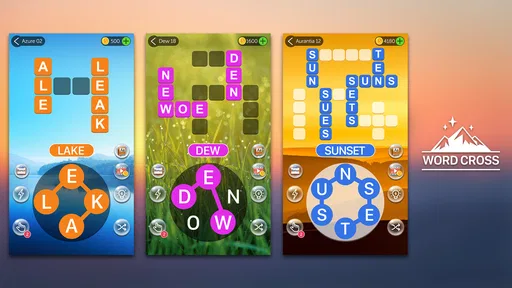
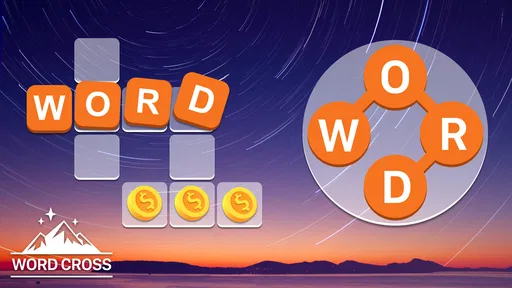
 Analysis by Gamesive
I’d pick Crossword Quest when I want a word puzzle that feels approachable at first glance but still asks me to think carefully about spelling and letter patterns. It is a free word game from Words Mobile, built around crossword-style puzzles rather than trivia or fast reactions. That makes it easy to fit into a quiet break, though its appeal depends on enjoying the process of testing possible words—not just filling time without much concentration.
The familiar crossword format is part of the attraction: I look at the letters available and work out how they could form the words the puzzle needs. The challenge is less about knowing a specialist subject and more about noticing combinations I might overlook. A short word can be particularly easy to miss when I am fixated on a longer one, so I get better results by scanning the letter set again before repeating the same guesses.
When progress stalls, I find it useful to change the order of my thinking. Instead of trying to solve the whole board at once, I look for the most obvious word, then use the remaining letters as a fresh starting point. I also try rearranging the letters mentally rather than assuming the first arrangement I notice is the intended one. These are small habits, but they make a word puzzle feel more like a reasoning exercise and less like random tapping.
That approach suits Crossword Quest particularly well if you enjoy casual vocabulary challenges but do not want to depend on obscure facts. It can also be a pleasant way to practise noticing spelling patterns. I would not treat it as a formal language-learning tool, though: solving a puzzle can sharpen attention to words, but that is different from a structured course in grammar or vocabulary.
A realistic use is a few puzzles during a commute break or while waiting for an appointment. I can pick it up, focus on one word problem, and stop when I need to move on. If I am tired, however, the same puzzle can feel more stubborn than relaxing. When letters refuse to click, I would rather pause and return with fresh eyes than keep tapping at guesses until the activity stops being enjoyable.
A useful routine is to separate what I know from what I am only assuming. I first identify a word that seems clearly supported by the available letters, then check whether that choice helps reveal another plausible arrangement. If a candidate word would leave an awkward combination behind, I reconsider it rather than treating the first answer as certain. This kind of self-check is more effective than cycling through guesses without a plan.
It also helps to take a brief reset when a board starts to look like a jumble. Looking away for a moment can make a familiar letter sequence stand out when I return. That is not a hidden game feature; it is simply a better way to use attention. For players who like working through a puzzle at their own pace, the method keeps the challenge satisfying without requiring outside word lists.
If the game does not behave as expected, I start with ordinary checks rather than assuming the puzzle itself is broken. I make sure the device has a stable connection if the issue appears to involve an online function, close and reopen the game, and check that the installed version is current. Crossword Quest is listed for Android devices running version 6.0 or later, so an older operating system may be a compatibility issue worth checking before spending time troubleshooting elsewhere.
I also distinguish a difficult answer from a technical problem. If the game is responsive and accepts input, but I cannot see a word, I treat that as a solving challenge first. If taps do not register or the app stops responding, I try closing and reopening it before moving on to more disruptive steps. I would avoid deleting the app as an early fix unless I knew my progress was safe; losing a puzzle state can be more frustrating than a temporary pause.
The game is free to download, with optional in-app purchases listed from $0.99 to $49.99 per item. I would check the purchase confirmation carefully if I am playing on a shared device, especially if a child may use it. Its Everyone age rating makes the content broadly suitable, but that does not mean every purchase decision should be left unattended.
When I have to leave in the middle of a puzzle, I try to make a mental note of the letters or words that were giving me trouble. That gives me a useful restart point if I return later, without pretending that every interruption can be recovered automatically. If a session disappears after an app restart, I would first reopen the game and see what remains before trying resets or reinstalling. Safe troubleshooting means changing one thing at a time and avoiding steps that might remove local progress.
For a smoother routine, I play when I can give the board a little attention instead of opening it while juggling several tasks. Word puzzles invite small moments of concentration; constant interruptions make it harder to notice a useful pattern. I also avoid turning every uncertain answer into a purchase decision. If I am stuck, taking a break or approaching the letters differently is often a better first move than spending money just to force progress.
There is a practical difference between a puzzle that is hard and a puzzle that is not responding. In the first case, I change my solving strategy. In the second, I check that the app is responsive, restart it if needed, and make sure the device software is compatible. Keeping those problems separate saves time and prevents unnecessary troubleshooting.
Not every frustrating session points to a flaw in Crossword Quest. A small screen, interrupted attention, or a device that is struggling with other open apps can make tapping and reading less comfortable. I would close apps I do not need and make sure the screen is easy to read before deciding the game is at fault. If the device itself is unresponsive across several apps, the issue may be broader than this one puzzle game.
Likewise, this is not my first choice when I want a crossword built around clues, themes, or broad general knowledge. Crossword Quest is better suited to working with letters and finding words from a set of possibilities. A conventional clue-based crossword is the better fit if I enjoy interpreting definitions and filling a grid from written prompts. A fast word-search game may suit someone who wants less deliberation; this one is more rewarding when I am willing to pause and reason.
It is also worth being realistic about the limits of a casual puzzle. If my goal is a deep, social competition or a guided lesson plan, I would look for a product designed around those needs. Crossword Quest’s strength is a more direct, individual word-solving session. That focus keeps the experience easy to understand, but it may feel repetitive to players who need frequent changes in format or a strong social layer to stay interested.
Compared with clue-led crosswords, this game puts more emphasis on rearranging letters than interpreting a question. Compared with word searches, it asks me to generate answers rather than simply spot a word already placed in a grid. That middle ground is its most useful distinction: I get a clear word challenge without needing to know a subject area or scan a crowded board for hidden text.
The trade-off is that players who prefer a larger puzzle narrative or richer clue variety may find the format narrow. I see that as a matter of taste rather than a defect. If I want a quick vocabulary-oriented challenge with a low barrier to entry, the format works. If I want layered clues, a collaborative match, or a lesson that explains why a word is correct, I would choose a different kind of word app.
Words Mobile has a well-established audience for this release: the game has a 4.7 average from around 147,000 ratings and has passed 10 million installs. Those figures suggest that the straightforward word-puzzle approach has broad appeal, but they do not tell me whether its particular rhythm will suit an individual player. I would judge it by whether I enjoy solving from letters, not by popularity alone.
I would recommend Crossword Quest to someone who likes word games, wants a simple activity for short breaks, and enjoys finding a solution through letter combinations. It is especially suitable for players who prefer a calm solo challenge over timers, competition, or clue-heavy crosswords. The age rating is Everyone, so it can be considered for a broad range of players, with the usual care around optional purchases on shared devices.
I would skip it if I dislike spelling-based puzzles, want a detailed tutorial or structured language instruction, or become annoyed when a game asks me to keep trying different arrangements. It may also be the wrong pick for someone who expects every session to feel completely different. Its appeal is the repeated pleasure of spotting a word that was hiding in plain sight, and that pleasure is not universal.
The game was released on November 7, 2019, and its current version is 2.4.1. I would treat those details as useful context when checking compatibility, rather than as a reason to assume the game will behave identically on every device. If I were installing it, I would check the Android requirement, start with a few puzzles, and decide whether the letter-solving loop feels satisfying before considering any optional purchase.
Overall, Crossword Quest is a focused, easy-to-understand word game that works best when I approach it patiently. Its strongest practical advantage is that I can use a simple scan-and-reconsider routine to make progress without turning every stuck moment into a random guessing session. Its main limitation is equally clear: players who want clue-rich crosswords, a wider range of activities, or more guided learning will likely be happier elsewhere.
If you enjoy quietly testing possible words and want a free game for a spare few minutes, I think it is worth trying. I would keep expectations centered on the puzzle itself, check the device if something genuinely stops responding, and take a break when the letters stop looking fresh. That is when Crossword Quest is most enjoyable: as a small, focused challenge rather than a game that has to fill every kind of playtime.
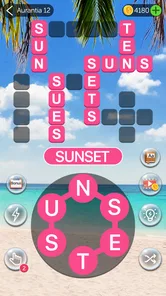
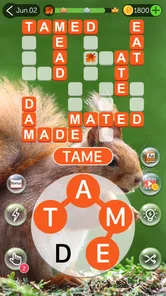
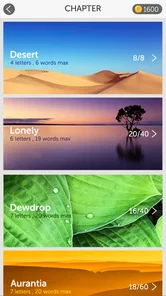
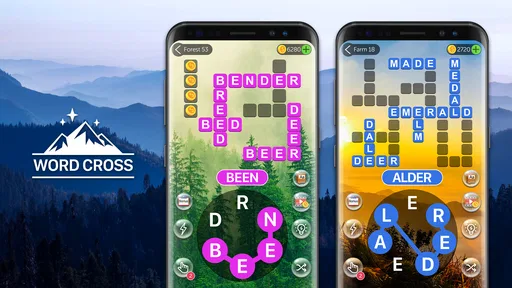
Crossword Quest is a word puzzle game built around filling crossword-style grids with words made from a set of letters. It combines familiar crossword clues and vocabulary challenges with a casual, level-based format. The exact presentation and available features can vary by version, so check the current store listing for details such as supported languages, recent updates, and any additional game modes before downloading.
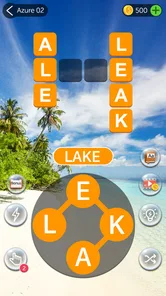
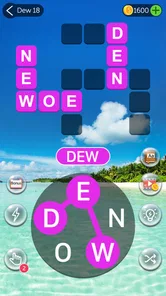
You typically read the clues or inspect the crossword grid, then use the available letters to form words that fit the spaces. Correct answers fill the board and let you move on to more puzzles, while tricky sections may call for patience or hints if the version offers them. The basic idea is easy to grasp, but later levels can test spelling, vocabulary, and your ability to spot less obvious words.
Crossword Quest may be offered as a free download, but that does not necessarily mean every part of the experience is free. Some versions of mobile puzzle games include advertising, optional in-app purchases, or paid hint packs. Before installing, review the app-store listing for the current price, purchase options, and advertising information, and check whether your device’s settings allow you to restrict purchases if children may play.
Offline availability depends on the particular version and its current requirements. Some crossword levels may work without an internet connection after they have loaded, while ads, purchases, account features, or certain game modes may require connectivity. If playing offline matters to you, check the developer’s store description and try launching the game in airplane mode before relying on it during travel or in places with limited service.
Word puzzles can be an enjoyable way for children to practise spelling and vocabulary, but suitability depends on the game’s content, difficulty, advertisements, and purchase options. Check the age rating, privacy information, and store-page details for the version available in your region. If a child will play, consider enabling purchase restrictions and reviewing any permissions or data practices before installation, especially if the game requests information beyond what seems necessary.
On Android, Crossword Quest asks for these permissions.
4.7 out of 5
146,924 reviews
Word · Words Mobile
Word4.8 out of 5

Word4.7 out of 5

Word4.9 out of 5

Word4.9 out of 5
Word4.8 out of 5

Word4.8 out of 5
Word4.7 out of 5

Word4.5 out of 5

Word4.9 out of 5
Word4.8 out of 5

Word4.7 out of 5
Word4.9 out of 5
Word4.9 out of 5
Word4.9 out of 5

Word4.5 out of 5

Word4.1 out of 5

Word4.6 out of 5
Word4.9 out of 5



Gamesive reviews games on its own and is not paid by developers for scores. We do not host game files: the download buttons open the official Google Play and App Store pages. Names, icons and screenshots belong to their owners.