Heads Up!
Word4.5 out of 5
For Android & iOS · PeopleFun
 Analysis by Gamesive
I like word games that let me settle into a small challenge without demanding a long session, and Wordscapes is built for exactly that kind of play. It gives me a set of letters and asks me to connect them into words that fill a crossword-style grid. The idea is easy to grasp, but finding the less obvious answers can turn a quick break into a satisfying little exercise in vocabulary and pattern spotting.
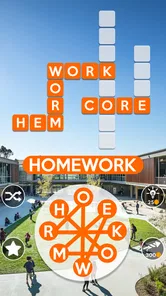
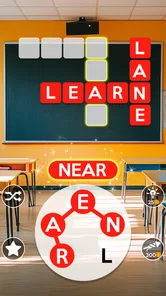
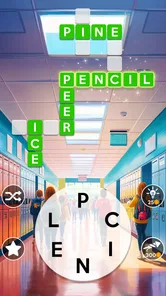
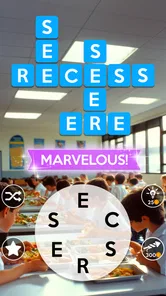
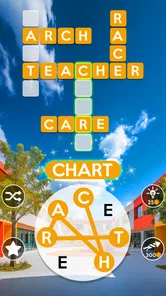
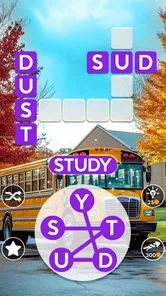
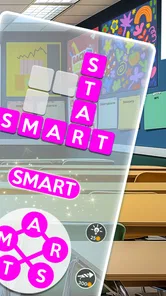
Each puzzle centers on a circle of letters and a grid with empty spaces. I swipe across letters to form words, and valid answers slot into the board. The grid gives each solution a purpose: a word may cross another, so one answer can help me infer the letters of the next. That makes the game feel more like solving a compact crossword than simply listing every word I can make.
The basic loop suits brief moments when I want something focused but not demanding. I can work through a few guesses while waiting for food or winding down in the evening, then stop without needing to remember a complicated story or strategy. The landscape artwork gives the boards a calm visual setting, though the main pleasure comes from the word puzzle itself rather than the scenery.
PeopleFun developed this free word game, which is listed for Everyone and has a 4.7 average from around 1.4 million ratings. It has passed 100 million installs, so it is clearly a familiar choice for a broad audience. Those figures suggest wide appeal, but they do not tell me whether its particular style will suit someone who prefers strict dictionary puzzles, fast competition, or a more demanding vocabulary workout.
My most useful habit is to stop treating the letter circle as a scramble and instead look for likely word shapes. I check for common endings, short connecting words, and letter combinations that could fit the grid’s crossing spaces. If I keep making the same obvious guesses, I pause and change the first letter or try a different ending. That small reset often reveals a word I had been overlooking.
It also helps to use the grid as a set of clues rather than guessing blindly. When a crossing word fixes one or two letters, I can narrow the possible answers and test combinations more deliberately. This is a practical way to keep the game engaging without immediately reaching for assistance: solve the most constrained spaces first, then return to the open ones with a better sense of what remains.
There is a trade-off in that design. The crossing letters make a puzzle feel fair and solvable, but if I already know the likely word pattern, a board can become more about trying variations than discovering a surprising answer. Conversely, a less familiar word may stall progress even when the letter arrangement seems clear. I enjoy that balance in short sessions, but players seeking consistently intricate clues may find the core format too straightforward.
The game’s progression is naturally measured in completed grids. That gives a casual player a clear stopping point: finish the board, put the phone away, and return later. I find that more comfortable than a game built around long rounds or a continuous stream of decisions. It is especially handy when I want a small mental warm-up before reading, commuting, or taking a proper break.
There is also a quiet pressure in any level-based puzzle: an unfinished grid can tempt me to keep going until every space is filled. When I hit a word I cannot see, the session can shift from relaxing to repetitive. I recommend setting a simple limit for yourself—one board, or a few minutes—if you mainly want a calming diversion. The game works best for me when I treat a difficult answer as a reason to pause, not as a test I must pass immediately.
Compared with a conventional crossword, Wordscapes asks less of me in the way of general knowledge because the available letters narrow the search. Compared with a word-search game, it asks for more active construction: I need to assemble words and use the grid’s intersections. A spelling or vocabulary app may be a better fit for someone who wants explicit lessons, definitions, or a structured learning plan. This game’s appeal is the puzzle-solving rhythm, not a promise of formal instruction.
The game is free to download, with in-app purchases listed from $0.99 to $99.99 per item. That range is worth noticing before installing, especially if you share a device with a child or prefer to avoid accidental purchases. The age rating is Everyone, but the presence of optional purchases still makes it sensible to check the device’s purchase controls if spending needs to be restricted.
I would not treat the existence of purchases as proof that a puzzle is unfair, nor would I assume that paying is necessary to enjoy it. The purchase range confirms that paid items are offered; it does not, by itself, explain what each item does or whether any particular board requires one. I would start by playing without spending and decide from my own experience whether the available options matter to me.
For players who care about competitive fairness, the important distinction is that this is primarily a personal word-grid challenge in the experience described here, not a head-to-head contest that I can assess on equal terms. I would not choose it expecting a carefully balanced multiplayer ladder. If your main motivation is to compare scores against other people or compete in timed matches, a game designed explicitly around that format would be a more direct choice.
I would recommend it to someone who likes familiar letters, compact crossword grids, and the satisfaction of finding a word that suddenly unlocks several spaces. It is a particularly comfortable choice for casual players who want to dip in and out rather than commit to a long session. The short, repeatable puzzle format also makes it easy to share the idea with someone who already enjoys word games, without needing to explain a complicated set of rules.
I would skip it if I wanted every answer supported by a definition, a clear vocabulary lesson, or a clue that explains why one word fits. The letter-and-grid format can leave a player testing possibilities without much context, and that may feel like guesswork rather than learning. I would also look elsewhere if I wanted a deeply strategic game, an elaborate narrative, or a strong competitive focus; those are different pleasures from filling a quiet word grid.
One useful way to decide is to notice what you enjoy in other word puzzles. If you like anagrams, you will probably appreciate rearranging the same letters in different ways. If you prefer crosswords because clues lead you toward an answer, the open-ended letter circle may feel less guided. If word searches are your favorite, expect more active spelling and deduction here rather than scanning for a word already placed in a field of letters.
The current version is 3.14.40, and the minimum operating system listed is 7.1. It is free to begin playing, while optional in-app purchases fall within the stated range. I would check that your device meets the operating-system requirement and review purchase settings before handing the phone to a younger player. The game is rated Everyone, making its stated age category broad, but household spending preferences are still personal.
Wordscapes has been available since June 14, 2017, and its large audience makes it easy to understand why the simple formula has lasted: letters create possibilities, the grid supplies constraints, and each solved board provides a clean finish. The version number and long-running presence are useful context, but neither should be mistaken for a guarantee that every player will enjoy the difficulty or pacing. The best test is whether you like searching for words without a clue attached to every answer.
My overall impression is positive, with a clear caveat: this is a relaxing, repeatable word puzzle, not an all-purpose language tool or a competitive game. Its strongest feature is the way a small set of letters and crossing spaces turns casual guessing into a manageable deduction process. My main reservation is that an unfamiliar answer can make the same simple loop feel repetitive, especially if I am determined to finish before stopping.
I would install it for short, low-pressure sessions and begin without buying anything. If I found myself enjoying the grids, I would keep it as a handy break-time game; if I wanted more guidance, richer clues, or direct competition, I would choose a different kind of word app. PeopleFun’s Wordscapes is a sensible free starting point for anyone curious about this style, and its stated purchase options are clear enough to keep in mind while deciding how it fits your habits.
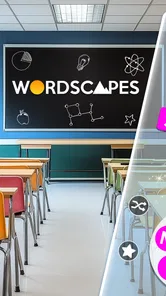
Wordscapes is a word puzzle game that combines a crossword-style board with a set of letter tiles. You swipe across the letters to form words, and valid answers fill spaces on the board. The goal is to find the words needed to complete each level; some letter combinations may also reveal bonus words. Its simple controls make it easy to start, while later puzzles can require more careful thinking.
Many of Wordscapes’ core puzzles can be played offline once the game and relevant content are available on your device. However, an internet connection may be needed for features such as certain events, syncing progress, viewing advertisements for rewards, or accessing online services. Availability can vary by version and device, so it is best to check which features work before traveling or relying on offline play.
Wordscapes is generally free to download, but the game may display advertisements and offer optional in-app purchases. Depending on the current version, purchases can include hints, coins, or other items that help with puzzles. You can usually play without paying, although advertisements or limited hint resources may affect the experience. Check the store listing and your device’s purchase settings for current pricing and options.
You can typically begin playing Wordscapes without creating an account. The game may offer ways to connect or sign in so progress can be backed up or synchronized, but the available options depend on your device and the current app version. If keeping your progress matters, review the game’s account or cloud-save settings before changing devices, reinstalling the app, or clearing its data.
Wordscapes is a vocabulary and spelling game with straightforward mechanics, so it may suit players who enjoy word challenges. Parents should still review the current age rating and store listing, since the app may include advertisements, optional purchases, or online features. Consider using device-level purchase controls and checking privacy settings, especially if a child will play. The difficulty can also increase, so younger players may sometimes need help.
On Android, Wordscapes: Word puzzle game asks for these permissions.
Wordscapes: Word puzzle game is also available in 1 other languages on our site.
4.7 out of 5
1,431,139 reviews
Word · PeopleFun
Word4.8 out of 5

Word4.9 out of 5

Word4.9 out of 5
Word4.8 out of 5
Word4.8 out of 5
Word4.7 out of 5

Word4.7 out of 5
Word4.7 out of 5

Puzzle4.8 out of 5
Word4.5 out of 5

Word4.9 out of 5
Word4.7 out of 5
Word4.8 out of 5
Word4.7 out of 5
Word4.9 out of 5
Word4.9 out of 5
Word4.9 out of 5
Word4.5 out of 5

Word4.1 out of 5

Word4.6 out of 5
Word4.9 out of 5



Gamesive reviews games on its own and is not paid by developers for scores. We do not host game files: the download buttons open the official Google Play and App Store pages. Names, icons and screenshots belong to their owners.