Word Collect - Word Games Fun
Word4.7 out of 5
For Android & iOS · Malpa Games
 Analysis by Gamesive
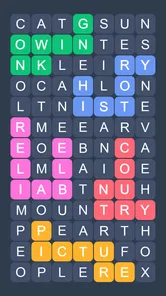
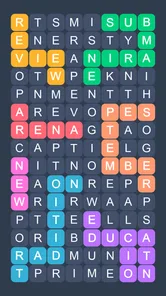
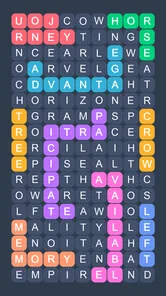
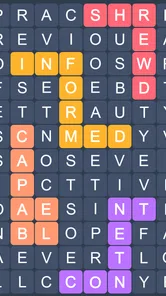
I like word games best when the next move is obvious but the answer still takes a moment to spot. Fillwords builds its play around that small tension: look over a letter grid, find a word, and keep searching until the puzzle is complete. It is a straightforward idea, but the pleasure comes from switching between scanning and reasoning rather than simply tapping through a list of clues.
As a word puzzle game from Malpa Games, it suits the little gaps in a day better than a long, uninterrupted gaming session. The game is free to start, rated for Everyone, and has drawn a 4.9 average from around 584,000 ratings, with over 10 million installs. Those figures suggest broad appeal, though the more useful question is whether this particular style of word search fits how you like to think.
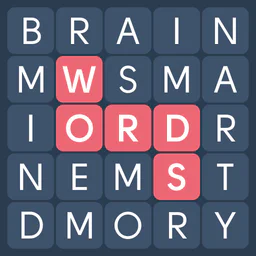
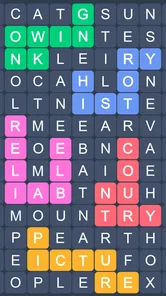
The first action is simple: inspect the letters and trace out a word. Unlike a crossword, where a clue narrows down the answer, a fillword puzzle asks your eyes to do more of the initial work. I find that changes the mood. There is no need to invent an answer from a definition; instead, I scan for familiar letter patterns and test whether they connect into a plausible word.
That makes the opening seconds a small exercise in visual attention. A useful approach is to avoid reading the grid as if it were a sentence. Pick out likely beginnings and endings, then follow the neighboring letters. When a word seems promising, check the whole path before committing. This deliberate scan is more reliable than repeatedly sweeping your eyes over the same area and hoping a hidden answer suddenly appears.
The game’s identity is firmly in word search and logic puzzles, not vocabulary lessons or a competitive spelling challenge. That distinction matters. If you want definitions, sentence context, or a story to guide your choices, a crossword or quiz game will probably be more satisfying. Here, the grid itself is the problem, and the pleasure is in noticing how its letters fit together.
I also like that the basic action is easy to explain to someone else. It works for a quick solo break, but it is simple enough to share: one person can point out a cluster while another checks whether it forms a word. That casual, low-pressure quality is part of the appeal, especially when you want a puzzle without first learning a complicated set of rules.
Each attempted word gives you a clear next step: either you have identified something useful, or you return to the remaining letters and look again. The feedback is less about dramatic surprises than about steadily reducing uncertainty. As parts of the puzzle are resolved, the untouched area becomes easier to inspect, and letter combinations that once looked random can become more noticeable.
One practical trick is to change the direction of your scan when you stall. If you have been looking for words from left to right, pause and inspect vertical or angled-looking arrangements in the visible grid rather than continuing the same sweep. The point is not to force an answer; it is to interrupt a visual habit. On a phone, a brief pause can also help, because rapid swiping makes it easy to overlook a short sequence among neighboring letters.
The rhythm is gentler than a timed word game. I can take a breath, think through a candidate, and resume without feeling that the puzzle is punishing me for being careful. That makes it useful when I want something to occupy my attention without adding pressure. It is also a reason not to expect a high-energy challenge: players who enjoy a ticking clock, head-to-head competition, or a constant stream of new mechanics may find the pace too calm.
There is a trade-off in this kind of feedback. A correct find gives a satisfying sense of progress, but a difficult patch can feel repetitive if your eyes keep landing on the same letters. I would treat a stubborn puzzle as a cue to reset my search method, not as a reason to tap at random. Taking a short break and returning with a fresh scan is often a better use of attention than trying to brute-force the grid.
The reward is the gradual feeling that the board is becoming legible. Finding one word gives you a little confirmation; finding another can make the remaining task feel more manageable. That modest progression is why I can see myself opening the game while waiting for a kettle, sitting on public transport, or taking a short break between chores. It offers a mental task that can begin quickly and does not require a long warm-up.
For me, the strongest use case is a quiet five-minute pause when I want to do something more engaging than scrolling but do not want to commit to a lengthy game. The word-search format asks for concentration, yet the rules are familiar enough that I can return after an interruption. If someone walks into the room or my ride arrives, I can stop thinking about a letter pattern without losing the thread of a complicated plot.
Its offline puzzle positioning is especially relevant for that routine: it is designed for play without needing a continuous connection. That makes it a sensible option to have ready for a commute or a place where service is unreliable. I would still choose a book or a downloaded long-form game for a journey where I want sustained variety, but for scattered pockets of downtime, a self-contained grid has a clear advantage.
Compared with the usual alternatives, this feels more visual than a crossword and less dependent on broad trivia knowledge than a quiz. A conventional word-search book can offer the same basic pleasure without a screen, while a crossword generally gives more help through clues and can reward deeper knowledge of language and culture. Fillwords is a better fit if you want to spot words directly in a grid and prefer a compact digital activity you can pick up between other tasks.
The reward is not a reason to expect a learning course or a major vocabulary boost. I would describe it as practice in noticing patterns and staying attentive. If your goal is to study spelling systematically, learn a new language, or build vocabulary with explanations, choose a dedicated learning tool instead. This game is most enjoyable when you value the search itself rather than expecting every solved puzzle to teach a new word.
A completed puzzle gives the session a natural stopping point. That matters more than it might sound: I can finish a board and put the phone down instead of being pulled into an endless feed. At the same time, the clear finish makes it easy to start another when I have a little more time. The loop is simple—scan, identify, see progress, complete the puzzle, then decide whether to continue.
That reset is also where the game’s limitations become clearer. If you love a rich narrative, a collection of elaborate tools, or a visible competitive ladder, a sequence of word grids may not hold your attention for long. The core activity stays focused on finding words, so players who need a substantial change of pace within each session should look at a broader puzzle collection. I would also skip it if visual searching feels tiring; the main challenge is precisely that repeated inspection of letters.
For a more comfortable session, I recommend playing in short bursts and changing your scan pattern whenever progress slows. This avoids turning a relaxing puzzle into a test of stubbornness. If you are sharing a screen, take turns suggesting candidate words rather than both people scanning independently; it makes the search feel collaborative and helps prevent one player from dominating the whole grid. Those small habits make a simple format feel fresher without pretending it has extra systems.
The game is free to download, with optional in-app purchases ranging from $0.99 to $49.99 per item. I would approach those purchases as optional rather than necessary to understand the central appeal: the core loop is already clear from the word-search action. If you prefer never to encounter optional spending in a game, check the purchase controls on your device before handing it to a child. The Everyone age rating makes the content broadly accessible, but a family’s spending settings are still worth considering.
The current version is 1.72.8 and the minimum operating system is 8.0. That is useful to know before installing on an older device, particularly if you are choosing a game for a family member who keeps an older phone. I would also keep expectations in proportion: the appeal here is a dependable, compact puzzle routine, not a sprawling game that asks for long sessions or regular mastery of new systems.
I would recommend Fillwords to someone who likes finding hidden words, wants an easy activity to pause and resume, and is content with a calm rather than competitive challenge. Its large audience and strong average rating point to a format many players enjoy, but they do not make it the right choice for everyone. The decisive question is whether you enjoy scanning a grid more than solving clues or learning through instruction.
If you are choosing between this and a standard word-search app, consider how you like to spend your attention. A printed puzzle is a good alternative if you want no screen time; a crossword is better if clues are what make language puzzles fun for you; and a timed word game is preferable if speed and pressure are motivating. Fillwords sits in the quieter middle ground, where careful looking is the main skill and a solved board is a tidy reward.
Malpa Games has kept the premise easy to grasp: find words in a letter grid, enjoy the small signs of progress, and decide whether you have time for one more. That loop is the strongest reason to try it and the clearest limit on its appeal. I would reach for it during a short wait or a low-key break, but I would choose something with more variety for a long evening of gaming. If that modest, repeatable rhythm sounds relaxing rather than repetitive, it is a solid word-puzzle companion.
Fillwords: Word Search Puzzles is a word game built around finding words hidden in a grid of letters. Instead of simply scanning for straight lines, you connect neighboring letters to uncover each answer and fill the board. It is designed for quick, casual play, while progressively more challenging puzzles can test your vocabulary, concentration, and ability to spot patterns.
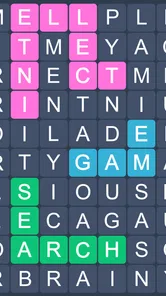
You look at the letters on the board and trace a path through connected letters to form a word. The goal is to find the words requested for that level, with completed answers filling or clearing their spaces according to the puzzle layout. Read the board carefully before making a move: overlapping letter patterns can make some solutions harder to notice than others.
Yes, the basic rules are easy to understand, so newcomers to word-search games can start playing without a lengthy tutorial. Early puzzles offer a gentle introduction to connecting letters and recognizing words, while later levels may require more careful observation and a broader vocabulary. It can suit both relaxed play and players looking for a modest mental challenge.
Offline availability can depend on the version of the app and the features you want to use. The core puzzle experience may be accessible without a connection, but features such as advertisements, rewarded hints, updates, or other online services may require internet access. If playing offline matters to you, check the app’s current store listing and test a level after disconnecting.
The app may be offered as a free download, but that does not necessarily mean every part of the experience is free of interruptions or optional spending. Depending on the current version, you may encounter advertisements or purchases for hints and other extras. Review the Google Play or App Store listing for up-to-date pricing and purchase details before installing, especially if a child will use the app.
On Android, Fillwords: Word Search Puzzles asks for these permissions.
4.9 out of 5
584,086 reviews
Word · Malpa Games
Word4.8 out of 5
Word4.7 out of 5

Word4.9 out of 5

Word4.9 out of 5
Word4.8 out of 5
Word4.8 out of 5
Word4.8 out of 5
Word4.9 out of 5
Word4.8 out of 5
Word4.7 out of 5
Word4.5 out of 5

Word4.9 out of 5
Word4.7 out of 5
Word4.8 out of 5
Word4.7 out of 5
Word4.9 out of 5
Word4.9 out of 5
Word4.9 out of 5
Word4.5 out of 5

Word4.1 out of 5

Word4.6 out of 5



Gamesive reviews games on its own and is not paid by developers for scores. We do not host game files: the download buttons open the official Google Play and App Store pages. Names, icons and screenshots belong to their owners.