
Wordscapes Search: Word Games
For Android & iOS · PeopleFun
- 4.7 out of 5Rating
- 233.68KReviews
- 10.00M+Downloads
- WordGenre
Game details
- Version
- 1.56.0
- Updated
- Requires
- 7.0
- Price
- Free
- Age rating
- Everyone
- In-app purchases
- $0.99 - $99.99 per item
Screenshots

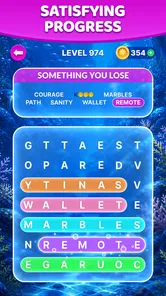
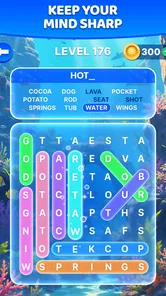
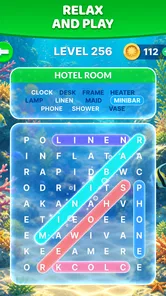
Wordscapes Search: Word Games review
 Analysis by Gamesive
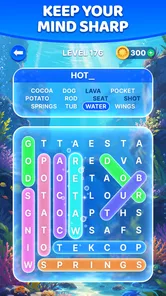
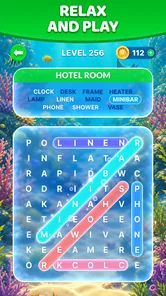
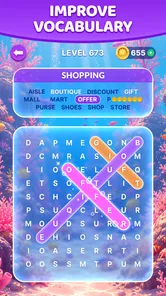
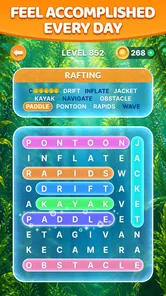
I like word games that let me start playing before I’ve had time to overthink whether I have a full half-hour to spare. Wordscapes Search: Word Games has that easy entry point: you look at a letter grid, trace a word you recognize, and immediately have another puzzle to tackle. It is a free word game from PeopleFun, built around word searches and scenic backgrounds rather than long explanations or elaborate rules. In my experience, its appeal is the simple rhythm of spotting, swiping, and moving on.
From a letter grid to the first word
The basic action is familiar even if you haven’t played a word search in years. You scan a grid, find a word, and connect its letters by swiping. The satisfaction comes from moving between broad visual scanning and a small, deliberate gesture: once a likely sequence catches your eye, you test it and see whether it belongs in the puzzle.
That makes the game approachable for people who don’t want to learn a complicated set of controls. I can pick it up while waiting for a kettle, sitting in a waiting room, or taking a short break between tasks. There is no need to remember a complex strategy from one session to the next; the letters in front of me are enough to get started.
The scenery gives the boards a gentler presentation than a bare grid on a plain background. That suits the pace. It doesn’t change the word-search rules, but it makes the screen feel less like a worksheet and more like a small pause in the day. If you enjoy visual calm alongside a puzzle, that detail helps. If you prefer dense, high-pressure challenges, the relaxed framing may feel too soft.
How I scan without turning it into a chore
Rather than checking every possible letter in order, I find it more useful to look for uncommon combinations and likely word endings first. A distinctive letter can narrow the search quickly, while a short word may be easier to spot from its shape than by reading the whole board line by line. This approach keeps the task active without requiring a notebook or a separate word list.
When I get stuck, I pause and change the way I scan instead of repeatedly swiping at guesses. I check diagonals and directions I may have overlooked, then return to the letters that appear less often. That small reset is useful because word searches can create a visual trap: after staring at one area, familiar patterns start to dominate even when the answer is elsewhere.
The feedback that keeps a round moving
The most appealing part of the loop is how quickly an attempt resolves. A correct swipe confirms that I have found a word and lets me focus on what remains. A mistaken guess doesn’t require a long recovery or a complicated explanation; I can simply look again. That quick feedback suits short play sessions, especially when I’m using the game to occupy a few spare minutes rather than settle in for a demanding challenge.
There is a useful difference between guessing and searching. Guessing can feel fast at first, but it tends to make me repeat the same patterns. Deliberately checking the grid gives each successful find a little more weight and makes the next search feel like a fresh problem. I get more out of the game when I treat each word as a small observation rather than swipe at every possibility.
The best rhythm is quick feedback without the pressure of a timer-led contest. That is a strength for casual players and a limitation for anyone seeking urgency. The game’s central pleasure is noticing a word, not racing an opponent or mastering a deep tactical system. If your favorite word games depend on head-to-head competition, elaborate rules, or escalating pressure, this one may not give you the same charge.
Small rewards, and why I start another puzzle
Finding a word gives me a modest sense of progress: one answer is settled, and the remaining letters become easier to assess. The reward is closely tied to the puzzle itself rather than a complicated layer of management. I can see what I’ve accomplished in the current grid and decide whether I want to continue. That clarity works well when I want a contained activity with a natural stopping point.
The scenic presentation also softens the repetition. Each board is still a search task, so the core action doesn’t transform into a different genre, but the changing puzzle context helps the next round feel like another small invitation. I’m more likely to begin again because a fresh grid offers a new pattern to read, not because I need to study a long chain of instructions.
For an everyday example, I might open it while a friend is a few minutes late. I can complete a bit of a puzzle, put the phone away when they arrive, and return later without needing to reconstruct a complicated plan. That stop-and-start quality is one of its most practical strengths. It works better as a pocket-sized break than as the main event for an evening dedicated to games.
When a session ends—and what brings me back
A good stopping point is the moment I’ve finished a board or noticed that I’m no longer seeing the letters clearly. Word searches can become tiring when I keep scanning after my attention has drifted. I prefer to pause rather than turn a relaxing puzzle into a test of endurance. When I return, looking at the grid with fresh eyes often helps more than forcing another minute of aimless swiping.
This reset is also why the game suits short breaks better than a single uninterrupted marathon. The basic interaction remains easy to resume, but the mental task still depends on attention. If I’m distracted by conversation or trying to do something else at the same time, I may keep missing obvious letter sequences. It is casual, not entirely automatic; the puzzle is most satisfying when I give it a little focus.
People who want to play offline should check how the game behaves on their own device and in the situations where they plan to use it, rather than assume every mobile game works the same way. For a user choosing a word game mainly for travel, that practical check matters. The other useful question is whether a word-search format is genuinely enjoyable: this game centers on finding words in a grid, so it won’t substitute for a crossword-style clue challenge or a free-form vocabulary game.
How it compares with other word games
Compared with a crossword, this is less about interpreting clues and more about visual recognition. Compared with a word-building game, it asks me to locate complete words in the available letters rather than construct answers from a rack or manage a board strategy. Those distinctions make it easy to choose the right tool for my mood: I reach for this when I want a straightforward search, and I’d pick a clue-driven puzzle when I want language knowledge to do more of the work.
It also differs from competitive word games because the appeal here is personal pace. There is no need to keep up with another player to enjoy a successful round. That makes it a comfortable fit for people who want a quiet solo activity, but less compelling for someone whose motivation comes from a score duel or social challenge. I would not recommend it as a replacement for every kind of word puzzle; its value is precisely that it does one recognizable thing without a steep learning curve.
Who is likely to enjoy it—and who may not
I’d recommend it to casual puzzle fans, people returning to word searches, and anyone who likes a game that can fill small gaps in the day. It is also approachable for mixed-age households: its content rating is Everyone, and the rules are simple enough to explain in a sentence. The game is free to install, though it offers in-app purchases ranging from $0.99 to $99.99 per item, so I’d keep that in mind if purchases on a device need to be limited or supervised.
The audience size suggests it has broad appeal: it has more than 10 million installs, an average rating of 4.7 from around 234,000 ratings, and roughly 50,000 written reviews. Those figures are a useful sign that many people have tried it, but they don’t tell me whether its particular pace will suit you. If you tire quickly of scanning grids, prefer a substantial story, or want every session to feel markedly different, the core format may wear thin.
Compatibility is another simple check before installing. The game’s current version is 1.56.0, and it requires Android 7.0 or later. That makes the minimum system requirement worth checking on an older Android phone or tablet. People using iOS should check the app store on their device for the version available to them, rather than assume Android requirements apply there.
The loop verdict
The pattern is easy to understand: scan, swipe, get confirmation, enjoy a small win, then decide whether to face another grid or stop. In my view, that loop is the game’s strongest feature. It gives Wordscapes Search a clear purpose as a low-pressure, solo word game, and its scenic treatment fits that purpose without asking me to learn a complicated system.
I’d choose it for a short, focused break, especially when I want something more engaging than passive scrolling but less demanding than a competitive match. I’d skip it if I wanted clues, word construction, social play, or a sharper challenge. PeopleFun’s game knows the narrow pleasure it is aiming for: finding a word that was hiding in plain sight. When that simple search is what I’m in the mood for, I’m happy to start one more puzzle.
What we like
- The clean interface makes letters and clues easy to read.
- Short rounds work well for quick play sessions.
- Hints offer help when a puzzle becomes difficult.
- Word searches can be played offline.
- Daily puzzles add a reason to return.
What could be better
- Some puzzles may feel repetitive over time.
- Hints are limited unless you earn or purchase more.
- Ads can interrupt the flow between puzzles.
- Later levels may require more patience and careful searching.
- The game offers less variety than broader word puzzle titles.
Frequently Asked Questions
What is Wordscapes Search: Word Games?
Wordscapes Search is a word puzzle game built around finding hidden words in a letter grid. Each level gives you a set of letters or a clue and asks you to trace the matching words, often around a particular theme. It combines familiar word-search gameplay with short, self-contained challenges, making it suitable for quick sessions as well as longer puzzle-solving breaks.
Is Wordscapes Search free to play?
You can generally download and play Wordscapes Search without paying upfront, though the game may offer optional in-app purchases. These can provide items such as hints or other conveniences, depending on the current version. Free play may also include advertisements. Check the listing for your device and the in-game store before downloading if you want to know which purchases, ads, or payment options are currently available.
Can I play Wordscapes Search offline?
Some word-search levels may be playable without an internet connection, which can make the game handy for travel or places with limited service. However, features such as advertisements, purchases, events, or progress-related services may require connectivity, and offline availability can vary by version. For the most reliable answer, open the game once while connected, then test a level with your device in airplane mode.
Is Wordscapes Search suitable for children?
The basic activity is a word puzzle, so it can be an approachable option for players who enjoy spelling and vocabulary challenges. Suitability still depends on a child’s age, reading ability, and comfort with the game’s advertising and optional purchases. Parents should review the app-store age rating and privacy information, and use device settings to manage purchases or limit screen time when needed.
Does Wordscapes Search work on both Android and iOS, and how much space does it need?
Wordscapes Search is offered for mobile devices, but availability and compatibility can differ between Android and iOS, as well as by country and device model. The app’s download size may also change with updates, and additional data can be used after installation. Before downloading, check the current store listing for supported operating-system versions, required storage, and any device-specific restrictions.
Permissions
On Android, Wordscapes Search: Word Games asks for these permissions.
- Wi-Fi connection information
- view Wi-Fi connections
- Other
- view network connections, full network access, control vibration, prevent device from sleeping, Google Play license check
User reviews
4.7 out of 5
233,675 reviews
- 87%
- 5%
- 3%
- 1%
- 4%
Download Wordscapes Search: Word Games
Word · PeopleFun · Free
Games like Wordscapes Search: Word Games
View all: Games like Wordscapes Search: Word Games
Word Search Explorer
Word4.9 out of 5
Crossword Go!
Word4.9 out of 5
Word Connect Association
Word4.8 out of 5
About this listing
- Game
- Wordscapes Search: Word Games
- Developer
- PeopleFun
- Package
- com.peoplefun.wordsearch
- Version reviewed
- 1.56.0
Gamesive reviews games on its own and is not paid by developers for scores. We do not host game files: the download buttons open the official Google Play and App Store pages. Names, icons and screenshots belong to their owners.