Word Collect - Word Games Fun
Word4.7 out of 5
For Android & iOS · Easybrain

 Analysis by Gamesive
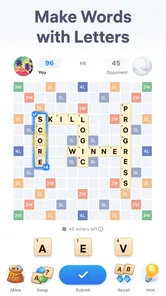
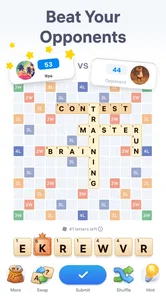
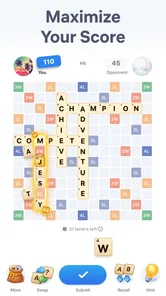
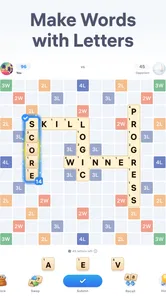
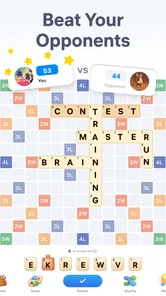
I tend to enjoy word games most when I can understand a round at a glance and make a useful move without needing a long stretch of uninterrupted attention. Easy Words - Word Puzzle Games is built around that simple appeal: it is a word game from Easybrain where you form words from letters and compete against an opponent. In my view, its strongest idea is also its clearest limitation: the experience centres on reading, recognising, and selecting letters, so it can be an easy fit for some players while presenting real barriers for others.
The basic premise is quick to grasp. You look at the available letters, consider what words you can make, and choose a move in a contest against another player. That keeps the mental task focused on vocabulary and word-building rather than on learning a complicated set of controls. If you already enjoy anagrams or turn-based word challenges, you should have a good sense of what you are being asked to do.
That straightforward structure can help people who prefer a game with a clear central task. There is less to keep in mind than in a word puzzle that combines several modes, rule sets, or layered objectives. I also like that the store summary gives a useful expectation: this is about making words with letters and trying to outplay an opponent, not a broad collection of unrelated puzzles.
Still, simple rules do not automatically make every screen easy to read. The core activity depends on distinguishing letters, scanning the available choices, and noticing where a possible word can be formed. If you have low vision, find letter shapes difficult to tell apart, or need larger text, the practical question is whether the game’s on-screen presentation works comfortably for you. I would check that early rather than assume a word game will be readable simply because it uses familiar letters.
For new players, a useful approach is to pause before making a move and scan for short, familiar words first. Then look again for less obvious combinations. This two-pass habit reduces the chance of overlooking an easy option while you search for a clever one. It is a practical strategy for the game’s central challenge, not a claim that the app offers a particular hint or accessibility tool.
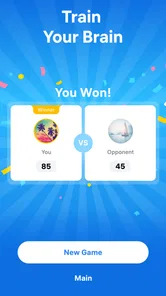
The interface also asks you to interpret a competitive situation, not just solve a private puzzle. That can make the same letter choices feel more purposeful, but it may add pressure for players who prefer to take their time. If you are exploring the game with someone who benefits from spoken instructions or step-by-step guidance, explain the word-making goal before handing over the device; a clearly stated objective can make the first round less confusing.
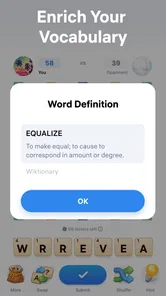
Because word recognition is the heart of the experience, Easy Words is naturally most welcoming to players who can comfortably read the language used in their game and identify letter shapes on screen. It may suit someone looking for a brief vocabulary workout, a casual contest, or a familiar activity to share with a friend. It is less suitable as a language-learning course: forming words can be enjoyable practice, but I would not treat the game as a structured way to study grammar, pronunciation, or vocabulary explanations.
Motor comfort matters too. The game’s task involves selecting and arranging letters, so it is worth considering whether precise touch interaction feels manageable on your device. A player with limited dexterity may find repeated small targets tiring, while someone who can tap comfortably may find the direct input pleasantly simple. I would try a short session before committing to longer play, especially if touch accuracy is a concern.
There is a useful distinction between cognitive challenge and sensory load here. The word-making itself can be engaging without requiring fast action, but the competitive framing may still make a round feel more urgent than a solitary crossword. If you enjoy taking time over words, choose moments when you can concentrate rather than trying to play while hurried. For a player who is easily distracted by competition, a conventional offline word search or crossword may be a calmer alternative.
Audio and visual preferences can also shape the experience. I would not assume that sound is necessary to understand a letter puzzle, but I also would not assume that every important cue can be followed without seeing the screen. If you rely on audio guidance, use a screen reader, or need reduced visual clutter, confirm that the app works with your particular setup before making it part of your routine. Those needs are individual, and a quick trial is more useful than a broad promise about accessibility.
Easy Words is an appealing option for a short break when you want to do something more active than scrolling but do not have the time or focus for a long game. A realistic use might be opening it during a quiet wait, considering a few word combinations, and putting the phone away when your attention is needed elsewhere. The compact idea is easy to return to, although a match against an opponent is not necessarily as self-contained as completing a page in a puzzle book.
That distinction matters if you want to play without an internet connection, need every activity to stop immediately, or prefer a puzzle with a definite finish under your control. The game is built around an opponent, so I would choose it when the competitive element sounds enjoyable, not when I specifically want a solitary, offline pastime. For uninterrupted solo play, a standard crossword or anagram app may be a better fit.
It can also work as a low-key shared activity. Two people who enjoy language can discuss possible words and compare how they approach the same letters. That turns the game into a conversation starter rather than just a way to pass time. But it will not be equally engaging for a group with very different reading abilities or language backgrounds unless everyone is comfortable with the words and the pace of play.
On a small phone screen, I would avoid playing while walking, commuting through a crowded area, or doing anything that needs visual attention. The game asks you to inspect letters and make a considered selection, so dividing your focus can make it harder and less safe. A stable seat and a few calm minutes are a better setting. If you often play in bright light, glare or screen size may affect how easily you distinguish letters; changing your position or choosing a larger display can be a more practical fix than pushing through eye strain.
Compared with a crossword, Easy Words puts more emphasis on making words from a set of letters and less on solving clues. That is a meaningful difference: crosswords reward general knowledge and clue interpretation, whereas this game’s appeal lies in spotting combinations and responding to an opponent. If clue-based puzzles feel frustrating, the letter-centred approach may be more inviting. If you want to learn why a word is correct or build vocabulary through definitions, a dictionary-led word app may offer more educational depth.
It also differs from a word search, which usually asks you to locate words already chosen for you. Here, the satisfying part is generating a word yourself and using it in a contest. That gives each decision a strategic edge, but it may be less relaxing than simply circling words on a page. I would pick Easy Words for active word-making and a word search for a gentler, more predictable task.
The game is free to download, with in-app purchases listed at $14.99 per item. I would treat the purchase option as something to review before spending, rather than assume it is needed to enjoy the basic premise. The game is rated Teen, which is worth considering when choosing an activity for a younger player. Easybrain is the developer, and the current version is 2.20.0; it was released on October 16, 2023, and requires Android 8.0 or later.
The strongest audience is someone who likes short word challenges, can comfortably read the letters on their phone, and welcomes a contest rather than a purely solo puzzle. It may also suit a player who wants a simple activity to revisit during spare moments, as long as the competitive setup fits their preference. The game has an average rating of 4.8 from around 150,000 ratings, and it has been installed over one million times. That suggests broad interest, though popularity does not tell you whether the visual presentation or pace will work for your needs.
I would hesitate to recommend it to someone who needs large, high-contrast text, voice-first interaction, or fully hands-free play without first checking it on their device. I would also steer away from it if you dislike competing, want a fully explained language curriculum, or need a puzzle that is guaranteed to finish in a fixed number of minutes. Those are not flaws in the central idea; they are reasons to choose a different kind of word game.
For anyone trying it, I suggest starting when you are not rushed, checking that the letters are comfortable to read, and paying attention to whether selecting them feels natural. If the visual or touch demands cause strain, stop rather than turning a casual game into an uncomfortable task. If the basic interaction feels clear, then try a few rounds and see whether playing against another person adds fun or pressure. That small test answers more than a long list of general claims could.
My view is that Easy Words has an accessible-to-understand core idea, but its practical accessibility depends heavily on the player’s vision, reading comfort, touch control, and tolerance for competition. It does not need complicated rules to be engaging: the challenge comes from seeing useful words in the letters and choosing a move with an opponent in mind. That focus makes it easy to explain, while also making any difficulty with reading or tapping central rather than incidental.
For a friend who enjoys anagrams and wants a competitive twist, I would recommend giving it a try. For someone who needs strong visual accommodations, prefers spoken interaction, or wants a calm solo puzzle, I would point them toward a different option unless a brief hands-on check confirms that the game suits them. It is a focused word game with a clear audience, and the fairest recommendation is to judge it by the actual letter-reading and touch experience on your own screen.
Easy Words - Word Puzzle Games is a casual word game built around solving puzzles by finding or forming words from available letters. It is designed to be approachable for players who enjoy vocabulary challenges without needing a complicated tutorial or lengthy sessions. Puzzle formats and progression can vary by version, so check the current store listing to confirm the features available on your device.
The game’s straightforward word-puzzle format makes it a reasonable choice for beginners and for players who want a relaxed challenge. You can generally work through puzzles at your own pace, using the letters and clues presented on screen. Some stages may become more demanding as you progress, and the exact difficulty curve can depend on the version. It may also help build familiarity with spelling and word recognition.
Offline availability depends on the game version and the features you want to use. Basic puzzles may work without a continuous connection in some releases, while advertisements, optional hints, daily challenges, or other online features may require internet access. Before traveling or playing offline, open the game while connected and check whether a puzzle loads without a connection. The app-store description and developer notes are the best sources for current requirements.
The availability of advertisements, optional purchases, and hint systems can differ by release, region, and device. Many free mobile puzzle games use ads or offer in-app items, but you should not assume that every version has the same setup. Review the app-store listing for pricing and in-app purchase details, and check the game’s settings for ad or hint options. If a child will play, consider setting purchase controls on the device.
Confirm that the listing is for the intended game and is compatible with your Android or iOS device. Check its latest update date, required operating-system version, storage needs, age rating, privacy information, and any listed ads or purchases. Reviews can help reveal how the game performs on devices similar to yours, though experiences may vary. Download through the official app store where possible, and review permissions before granting access.
On Android, Easy Words - Word Puzzle Games asks for these permissions.
Easy Words - Word Puzzle Games is also available in 2 other languages on our site.
4.8 out of 5
149,976 reviews
Word · Easybrain
Word4.8 out of 5
Word4.7 out of 5

Word4.9 out of 5

Word4.9 out of 5
Word4.8 out of 5

Word4.8 out of 5

Puzzle4.8 out of 5

Board4.6 out of 5
Word4.8 out of 5
Board4.8 out of 5
Word4.7 out of 5

Word4.5 out of 5

Word4.9 out of 5
Word4.7 out of 5
Word4.8 out of 5
Word4.7 out of 5
Word4.9 out of 5
Word4.9 out of 5
Word4.9 out of 5
Word4.5 out of 5

Word4.1 out of 5

Word4.6 out of 5



Gamesive reviews games on its own and is not paid by developers for scores. We do not host game files: the download buttons open the official Google Play and App Store pages. Names, icons and screenshots belong to their owners.