Color Block: Combo Blast
Puzzle4.3 out of 5

For Android · Easybrain
 Analysis by Gamesive
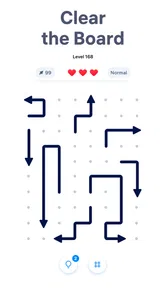
I like puzzle games that make their idea clear before they ask for much of my time, and Arrow Puzzle: Tap Puzzle Games has an appealingly direct premise: work out which arrows can be moved so the board opens up. The pleasure comes from reading the layout, spotting what is blocked, and choosing a sensible order rather than racing a clock. It suits a quick break, though the simplicity that makes it approachable can also make repeated play feel familiar.
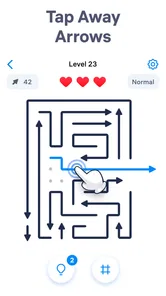
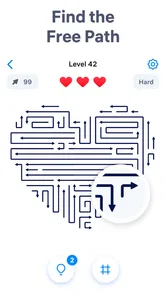
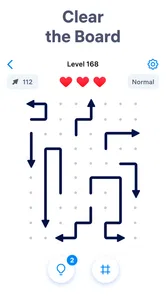
This is a free puzzle game from Easybrain, built around a maze-like arrangement of arrows. Each move asks me to look beyond the arrow I want to tap: can it leave the board now, or is something in its path still in the way? The challenge is to untangle those dependencies until the route is clear. That small shift from tapping whatever looks available to planning a sequence gives the game its satisfying brain-teaser quality.
In the first moments, the appeal is how little explanation the idea needs. I can look at the screen and understand that direction and obstruction matter. There is no long setup to get through before the puzzle becomes the focus. For people who find dense rulebooks or elaborate game systems tiring, that directness is a real strength.
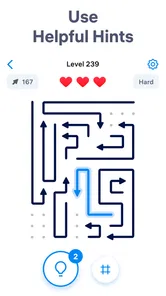
It is still a puzzle game, not just a reflex test. A move that seems obvious may not be the move that helps most, so I get more from scanning the whole arrangement before tapping. I try to identify arrows with an unobstructed route, then consider which removals might open a path for others. That habit turns a seemingly simple board into a compact exercise in planning.
The game’s store rating is 4.8 on average, from around 1.7 million ratings, and it has reached over 100 million installs. Those figures suggest broad appeal, but they do not guarantee that its particular style will suit everyone. The useful question is whether you enjoy visual logic problems where the satisfaction comes from finding the order of moves, rather than collecting a story, building a character, or mastering a complicated set of controls.
I can see this working well during a short wait: open a puzzle, study the arrows, make a few deliberate moves, and stop when I need to. It does not ask me to remember a large plot or maintain a long chain of actions. That makes it easier to fit around ordinary interruptions than a game that depends on a continuous match or a carefully timed run.
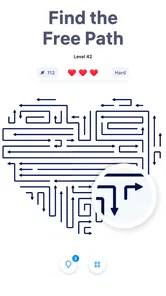
The best way to approach a crowded board is to pause before the first tap. I look for pieces whose direction gives them a clear exit, then check whether removing one would expose a useful route for another. This is more reliable than tapping at random and hoping the board sorts itself out. It also makes mistakes easier to understand: if progress stalls, I can reconsider which dependency I missed.
That makes the game especially suitable for players who like visual sorting, spatial reasoning, and small moments of progress. It is also a reasonable choice for someone who wants a low-commitment puzzle without learning a deep control scheme. The content rating is Everyone, so it is presented for a broad audience; the actual enjoyment still depends on whether a person likes this kind of deliberate, board-by-board thinking.
The rhythm is naturally stop-and-start. A puzzle can give me a clear point to focus on, and the core interaction does not depend on fast fingers. If I only have a few minutes, I can still make progress by finding one or two useful arrows. If I have longer, I can spend more time tracing how one move changes the options elsewhere.
That flexibility is not the same as a promise that every interruption will feel seamless. If I walk away halfway through a layout, I may need a moment to look over the board again and remember the route I was considering. My practical tip is to leave the screen in a state that is easy to read: before putting the game down, note mentally which arrows are currently free and which one you planned to clear next. Because the puzzle is visual, a quick re-scan usually matters more than remembering a complicated strategy.
It is also a game I would choose when I want a calm mental task, not when I need constant stimulation. The satisfaction is measured in a board becoming less tangled, not in a stream of dramatic events. Someone seeking fast action, a social competition, or a strong narrative will probably get more from a different kind of game. Here, the focus stays on the arrows and the order in which they can move.
Arrow puzzles have a naturally reusable logic: each new arrangement asks me to interpret direction, blockage, and sequence again. That is the source of replay value, but also the main limitation. If I enjoy spotting patterns and testing a plan, a fresh layout can be a neat little challenge. If I quickly feel that every board is asking the same question, the basic mechanic may wear thin.
Compared with familiar match-three games, this is less about making rapid combinations and more about removing obstacles in a deliberate order. Compared with Sudoku, it relies less on filling a grid with formal constraints and more on reading the geometry of a board. Those alternatives may be better for players who want a more varied collection of mechanics or a stronger sense of progression. I would pick this game specifically when I want a compact spatial puzzle that is easy to understand at a glance.
One useful way to keep the routine from becoming mindless is to treat each board as a planning problem rather than a tapping task. Before moving, ask which arrow is genuinely free and which removal could unlock several later choices. If a route seems to dead-end, stop and reassess instead of repeating the same tap pattern. That small discipline makes the puzzle feel more intentional and helps preserve the feeling that a solution was worked out, not stumbled into.
There is a trade-off in that simplicity. The clear central mechanic means I can get started quickly, but it also sets a narrow expectation: the fun has to come from the puzzle arrangement itself. Players who want multiple modes or a broad set of distinct activities should compare it with other puzzle games before settling in. I would not recommend it as an all-purpose replacement for every kind of casual game; it fills a more specific niche.
For a daily routine, I would use it as a small mental reset rather than an obligation. A short session while waiting for food or taking a break is a more natural fit than setting aside a long evening. There is no need to turn each board into a performance test: taking a moment to inspect the paths is part of the appeal. If a puzzle stops feeling enjoyable, putting it down is easier than forcing another round.
The game is free to download, with in-app purchases ranging from $1.99 to $99.99 per item. That range is worth keeping in mind if you prefer games with no paid extras at all. I would decide what I am comfortable spending before browsing purchase options, and treat the core appeal as the arrow puzzles rather than assuming that spending is necessary to enjoy them.
Its current version is 1.13.0, and it requires Android 8.0 or later. The release date is November 14, 2025. These details are useful when checking device compatibility, particularly if you are considering installing it on an older Android phone. The developer is Easybrain, a name puzzle fans may recognize from other casual titles, but this game’s appeal rests on its own clean, directional logic.
I would suggest Arrow Puzzle: Tap Puzzle Games to someone who enjoys untangling a visual problem in short bursts and likes the calm satisfaction of finding a correct sequence. It is especially suitable when I want a game I can understand quickly, put aside when life interrupts, and return to without needing to relearn a complex system. The best sessions come from careful observation, not hurried tapping.
I would steer away from it if you need every session to feel dramatically different, want a compelling story, or prefer fast reactions and competitive pressure. The central mechanic is focused, so repetition is a genuine possibility for players who tire of one puzzle style. A broader puzzle collection or a game with more varied challenges would be a better match in that case.
For me, the verdict is straightforward: this is a handy, approachable brain teaser whose strengths are immediate clarity and easy-to-manage sessions. Its limitations are just as clear: the same arrow-and-path logic has to keep earning your attention. If that is the kind of small challenge you enjoy, it is worth trying; if you want constant novelty, I would look elsewhere.
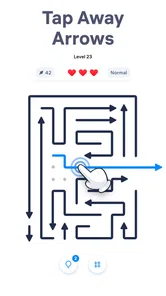
Arrow Puzzle: Tap Puzzle Games is a casual logic game built around clearing arrow-shaped pieces from a crowded board. Each arrow can move only in the direction it points, so you need to inspect the layout, identify which pieces have a clear path, and choose a safe order. The appeal comes from solving compact puzzles at your own pace, rather than from fast reactions or complex controls.
The central task is to tap arrows that can leave the board without colliding with other pieces. An arrow blocked by another piece must wait until the obstruction has been removed, so a successful solution depends on planning the sequence of moves. Later or more crowded layouts may require closer observation and occasional trial and error. The game is generally suited to short sessions, and its simple tap-based controls are easy to learn.
Its straightforward controls and visual rules make the game approachable for newcomers, including players who do not usually play puzzle games. The challenge is primarily about observation and planning, rather than complicated instructions or quick finger movements. However, difficulty can vary from one level to another, and a crowded board may take patience to solve. Adults may also enjoy it as a light brain-teaser, though it is not a substitute for a formal learning tool.
Offline availability, advertising, and in-app purchase options can depend on the current version, device, and store listing. Check the app’s Google Play or Apple App Store page before downloading for details about internet requirements, ads, and optional purchases. If you prefer uninterrupted play or want to avoid unexpected charges, review the listed price and purchase settings, and use your device’s parental or purchase controls where appropriate.
Before installing, confirm that the store listing is for the correct game and that your Android or iOS version meets its current compatibility requirements. Review the developer information, recent update date, ratings, permissions, privacy details, and any notes about ads or purchases. Also consider available storage and whether the game requires an internet connection. These checks help you judge whether it suits your device and preferences, since features and requirements can change with updates.
On Android, Arrow Puzzle: Tap Puzzle Games asks for these permissions.
Arrow Puzzle: Tap Puzzle Games is also available in 1 other languages on our site.
4.8 out of 5
1,702,115 reviews
Puzzle · Easybrain
Puzzle4.8 out of 5
Puzzle4.9 out of 5

Puzzle4.7 out of 5

Puzzle4.8 out of 5

Puzzle4.9 out of 5

Puzzle4.9 out of 5

Board4.6 out of 5
Word4.8 out of 5

Word4.8 out of 5
Board4.8 out of 5
Puzzle4.3 out of 5

Puzzle4.4 out of 5

Puzzle4.7 out of 5

Puzzle4.8 out of 5

Puzzle4.8 out of 5

Puzzle4.1 out of 5
Puzzle4.9 out of 5

Puzzle4.9 out of 5
Puzzle4.8 out of 5

Puzzle4.9 out of 5

Puzzle4.9 out of 5

Puzzle4.9 out of 5



Gamesive reviews games on its own and is not paid by developers for scores. We do not host game files: the download buttons open the official Google Play and App Store pages. Names, icons and screenshots belong to their owners.