Trivia Master - Word Quiz Game
Trivia4.5 out of 5
For Android · Big Cake Apps

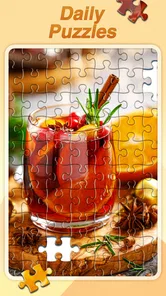
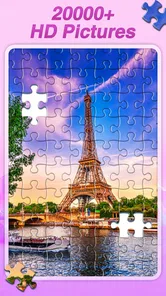
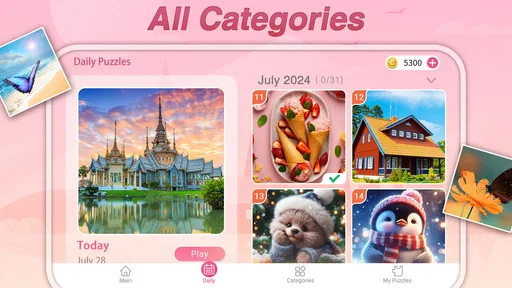
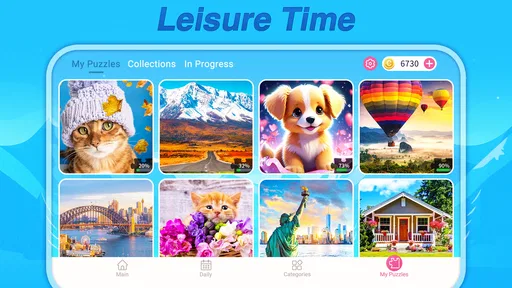
 Analysis by Gamesive
I like jigsaw puzzles as a way to occupy a few quiet minutes without turning my phone break into another demanding task. Daily Jigsaw Puzzles, a free trivia game from Big Cake Apps, is built around that simple appeal: choose an image, fit the pieces together, and stop when you have had enough. Its appeal is easy to understand in the first few sessions, but the more useful question is whether it stays enjoyable once the novelty of a fresh puzzle wears off.
My take is that it can earn a regular place on your phone if you want a low-pressure, image-led pastime rather than a competitive game. The catalog is its main reason to return, while the familiar puzzle format is also its main limitation: the pleasure comes from choosing and completing pictures, not from a changing set of challenges. It works best as a small daily ritual, not as a game that demands a long-term campaign.
The basic idea needs almost no learning. You select a jigsaw image and work through its pieces, relying on color, edges, and visual patterns to decide where they belong. That makes the game approachable even if you have not played a mobile puzzle in a while. I can imagine opening it while waiting for a ride or winding down before bed, doing a little work on one picture, and putting the phone away without needing to remember a complicated storyline.
That low barrier suits a broad range of players. The game is rated for Everyone, and its puzzle format can be appealing to adults who want a calm distraction as well as to families looking for a straightforward activity. It is not a trivia quiz in the usual question-and-answer sense; its category is trivia, but the experience is centered on assembling pictures. If you are choosing it because you want factual questions, rounds, or a test of general knowledge, this is probably the wrong pick.
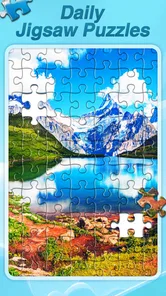
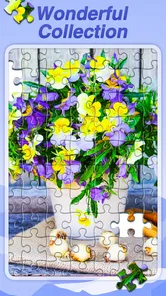
There is a substantial image library to explore: the game promotes more than twenty thousand HD jigsaw puzzles. That scale gives the first week a nice sense of choice. You can browse for a picture that matches your mood rather than being forced into a fixed sequence, which matters more than it may sound. A soothing landscape, a detailed still life, and a colorful scene ask for different kinds of attention even though the underlying activity stays the same.
One practical tip is to choose a picture for its visual structure, not just its subject. Images with several distinct colors or clear boundaries tend to be more satisfying when you want a quick session, because sections are easier to distinguish. A picture with broad areas of similar color may be more absorbing, but it can also slow you down. I would save those for a moment when I genuinely want to concentrate rather than trying to squeeze in a puzzle during a brief break.
The game’s store presence suggests that many players find this format worthwhile: it has a 4.8 average from about 9,700 ratings, alongside more than 1 million installs. Those figures are useful context, not a promise that every puzzle will suit your taste. In my view, the stronger sign of fit is whether you enjoy visual sorting and steady progress. If you need a timer, a rival, or a score to make a game feel engaging, a collection of jigsaws may feel too quiet.
A small habit can help keep the experience fresh. Instead of opening the game and scrolling at random every time, I would pick a theme or mood before browsing: something bright for a morning break, or a calmer image for the end of the day. This turns the large collection into a source of deliberate choice rather than a wall of options. It also makes it easier to notice when you are in the mood for a different kind of game altogether.
Another useful approach is to treat a puzzle as a stopping point, not an obligation to finish in one sitting. A mobile jigsaw is naturally suited to interruptions, but your own attention is the real constraint. If you are tired, a dense image can turn a relaxing activity into a chore. Switching to a clearer picture—or simply leaving the game until later—is a better use of the app than forcing yourself to complete a board just because you opened it.
After the first-week novelty, the catalog has to do the work. A large choice of images gives the game room to stay relevant, especially if you like returning to different subjects instead of chasing a level ladder. Its value is less about a dramatic new mechanic and more about having a ready-made activity for a recurring gap in the day. That can be enough: a puzzle does not need to become a hobby project to justify a place on a phone.
For a realistic everyday use, picture a short wait before an appointment. A quick puzzle session gives your attention somewhere specific to go, unlike endlessly switching between social feeds. At home, the same game can serve as a gentle transition between work and sleep. I would avoid starting a particularly detailed image when I know I have only a moment, though; a small break should feel restorative, not like a task left unfinished.
The comparison with other puzzle options is straightforward. A traditional paper jigsaw offers a larger physical view and the tactile pleasure of handling pieces, but it needs a surface and storage space. Many mobile brain games emphasize scores, timed rounds, or varied puzzle types; those are better if you want a stronger sense of challenge or changing rules. Daily Jigsaw Puzzles is the more focused choice for someone who specifically likes assembling pictures and wants that activity available on a phone.
That focus is both a strength and a trade-off. When I want to calm down, a familiar format is reassuring. When I want to feel surprised, learn new rules, or see obvious progress from one session to the next, a jigsaw collection has less to offer. The game is not a replacement for every kind of casual entertainment, and it should not be judged as though it were trying to be a competitive puzzle tournament.
There are also different kinds of replay value within a picture library. A new image gives you a new visual problem, but it does not necessarily transform the activity. If you have played many jigsaw games before, you will recognize the rhythm quickly. The collection can extend your choice, but it cannot make every board feel novel. I would expect the best long-term experience from players who enjoy the process itself, not just the excitement of unlocking something unfamiliar.
Maintenance is refreshingly simple in concept: the game does not require you to follow a plot, keep up with a complicated build, or study a strategy guide. You can come back after a gap and understand what to do immediately. That makes it a sensible choice for irregular play. The current version is 1.5.102, and it is listed for devices running Android 7.0 or later, which gives Android users a clear compatibility point to check before installing.
The day-to-day burden is less about learning and more about choosing. With a big library, browsing can become the part that takes longer than expected. A practical rule is to give yourself a short moment to select an image, then begin rather than endlessly comparing options. If you repeatedly spend your break searching for the perfect picture, the abundance that makes the app attractive can become friction.
I would also be mindful of the kind of attention the image demands. Small details and similar tones can make a puzzle more taxing than its relaxed presentation suggests. When I am already mentally worn out, I would choose an image with clear visual contrast or skip the game for the day. Relaxation is personal: a slow visual task helps some people settle, while others find that searching for tiny matches becomes irritating.
The game is free, which makes trying it a low-commitment decision. Still, “free” is not the same as a guarantee that every part of the experience will suit every player, and I would approach it as an easy-to-test pastime rather than a reason to reorganize my phone around it. If your device is compatible and you like picture puzzles, it is reasonable to give it a few sessions and see whether you naturally return.
The main source of fatigue is the format’s consistency. The pleasure of placing pieces can be calming, but it can also become repetitive if you want each visit to feel different. A huge image selection helps with subject variety; it does not change the central task. Players who prefer fresh mechanics, escalating difficulty, or a clear achievement track may find that the game stops holding their attention once they have sampled the pictures that first caught their eye.
Another possible snag is the mismatch between a “daily” framing and a player’s actual habits. I would not treat a daily puzzle as a streak to protect or a commitment to fulfill. It is better as an invitation than an obligation. If you skip several days, the uncomplicated format makes it easy to return; if the daily idea starts to feel like homework, taking a break is likely to preserve more enjoyment than forcing a routine.
It is also not the best choice when you need a social activity. The central appeal is individual concentration on an image, so someone looking for cooperative play or lively competition should look elsewhere. Likewise, people who prefer word puzzles, numerical challenges, or trivia questions may be disappointed by the category label. The key decision is whether you want to solve a picture, not whether you generally enjoy games described as brain teasers.
I would recommend Daily Jigsaw Puzzles to someone who already enjoys jigsaws, wants a quiet phone activity, or likes having a picture-based option for short pauses. It is particularly suited to people who value flexible, low-pressure play and do not need a reward structure to keep going. Big Cake Apps has a clear concept here, and the game’s scale—more than twenty thousand images—gives that concept room to serve different moods over time.
I would skip it if you need constant novelty, a brisk competitive loop, or a game that makes each session feel meaningfully different from the last. I would also choose a paper puzzle when tactile handling and seeing the whole board at once matter more than convenience. For a person who wants general-knowledge questions, I would pick a proper quiz game instead. Those are not flaws so much as useful boundaries: this is a specific kind of casual play, and it is strongest when you want exactly that.
Overall, I think it can earn lasting space, but as a small utility for downtime rather than a permanent centerpiece. Its long-term value comes from being easy to return to and having plenty of pictures to choose from, while its limitation is that the basic pleasure remains much the same. Keep it if assembling images genuinely helps you unwind; move on if you find yourself browsing more than puzzling or wishing the game would become something else.
For me, that is a fair and useful standard. A good casual game does not have to dominate an evening; it can simply make a quiet ten minutes feel more intentional. Daily Jigsaw Puzzles is best approached in that spirit: pick an image that suits your energy, enjoy the steady visual problem, and let the session end when it stops feeling relaxing.
Daily Jigsaw Puzzles is a mobile puzzle game centered on assembling picture-based jigsaws, with new puzzles presented for regular play. You select a picture and fit its pieces together, using visual details such as color, shape, and edges to guide you. The exact puzzle selection, difficulty options, and daily content can vary by app version, so check the current store listing before downloading.
The game may be available to download without an upfront charge, but that does not necessarily mean every feature or puzzle is free. Some versions of jigsaw apps include advertisements, optional in-app purchases, or paid content such as extra puzzle collections. Review the Google Play or App Store listing for the current pricing and purchase details, and check your device’s purchase settings if you want to avoid accidental spending.
Jigsaw games commonly offer different piece counts or difficulty settings, letting you choose a quicker, simpler puzzle or a more challenging one. Whether Daily Jigsaw Puzzles provides these options, and how many choices it offers, depends on the version available for your device. Before downloading, look at the store screenshots and description; after installing, try a smaller puzzle first to learn the controls and see which setting suits you.
An internet connection may be needed to download the app, load new daily puzzles, display advertisements, or access online features. Previously downloaded puzzles may work offline in some versions, but offline access is not guaranteed and can differ between Android and iOS releases. If you plan to play while traveling or without reliable data, check the app’s listing and test a puzzle offline before relying on it.
Picture-based jigsaw games are generally straightforward, but suitability depends on the images, advertising, social or online features, and purchase options included in the particular version. Parents should review the age rating, privacy information, and permissions shown on the Google Play or App Store page. If the app includes ads or in-app purchases, consider using device-level parental controls and checking settings before letting a child play.
On Android, Daily Jigsaw Puzzles asks for these permissions.
Daily Jigsaw Puzzles is also available in 1 other languages on our site.
4.8 out of 5
9,655 reviews
Trivia · Big Cake Apps

Trivia4.7 out of 5

Trivia4.8 out of 5

Trivia4.4 out of 5

Trivia4.7 out of 5
Trivia4.6 out of 5

Trivia4.4 out of 5
Card4.7 out of 5
Trivia4.5 out of 5

Trivia4.7 out of 5

Trivia4.8 out of 5

Trivia4.8 out of 5
Trivia4.8 out of 5

Trivia4.8 out of 5

Trivia4.7 out of 5

Trivia4.5 out of 5

Trivia4.8 out of 5

Trivia3.8 out of 5

Trivia4.1 out of 5
Trivia4.6 out of 5



Gamesive reviews games on its own and is not paid by developers for scores. We do not host game files: the download buttons open the official Google Play and App Store pages. Names, icons and screenshots belong to their owners.