Word Collect - Word Games Fun
Word4.7 out of 5

For Android & iOS · Fugo Games

 Analysis by Gamesive
I like word games best when the rules are clear enough to start immediately but the puzzles still make me pause and look at a familiar set of letters differently. Words of Wonders: Search has that simple appeal: each round gives me a letter board, and I search it for hidden words. The pleasure comes less from elaborate mechanics than from spotting a word I had overlooked and steadily clearing the puzzle.
It is a free word game from Fugo Games, rated for Everyone, and its basic format suits short breaks: I can work through a board without needing a long session or a complicated tutorial. The game has a 4.9 average from around 194,000 ratings, with over 10 million installs. Those numbers suggest wide appeal, but the more useful question is whether its pace and word-search format fit the way you like to play.
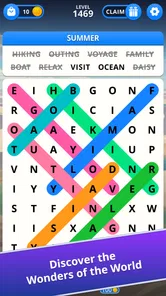
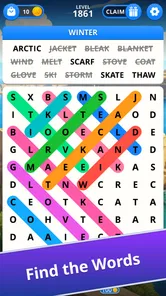
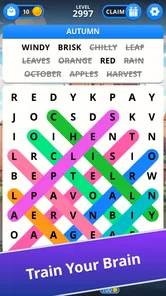
The first goal is immediate and concrete: inspect the letters, identify the hidden words, and complete the board. I find that clarity helpful when I only have a few spare minutes. There is no need to plan a strategy before starting; I can scan the letters, try likely combinations, and adjust when a guess does not fit.
That simplicity also makes the game approachable for people who do not spend much time with word puzzles. The challenge is in recognizing patterns, not learning a large set of controls. It can be a pleasant choice for a quiet coffee break, a short wait, or a low-key screen break when I want something more engaging than scrolling but less demanding than a fast action game.
One useful way to approach a difficult board is to stop searching for whole words at random and instead look for familiar letter pairs and endings. If I notice a likely beginning, I trace possible continuations through the available letters rather than repeatedly scanning the entire board. This small change in method can make the puzzle feel less like guesswork, especially when several candidate words share letters.
I also try alternating between scanning by letter and scanning by word shape. First I look for common combinations; then I search for short words that may be easy to overlook. That second pass matters because a board can feel nearly finished while one small answer remains hidden in plain sight. The game’s core loop rewards patience and a fresh angle more than frantic tapping.
For me, the most satisfying progress signal is simply seeing a board move from a jumble of possibilities to a finished puzzle. Each answer narrows the search and gives the remaining letters more context. Even when a round is not especially hard, that gradual clearing creates a neat sense of momentum: I can tell that I am getting somewhere without needing a complicated progress system to explain it.
This kind of feedback is well suited to casual play, but it may feel modest if you want every session to bring a major unlock or a dramatic change in the rules. The appeal here is repetition with small variations in the letter arrangements, not a deep campaign that constantly introduces new mechanics. I would choose it for the pleasure of solving, rather than for a story or a wide range of modes.
A practical habit is to leave a stubborn board for a moment instead of forcing guesses. When I return, I often notice a combination that had blended into the rest of the letters. That pause also helps keep a quick game from turning into an irritating test of persistence. If you usually play while distracted, it is worth giving the board a focused minute before deciding that it is harder than it really is.
Words of Wonders: Search is best approached at your own pace. The board gives you a task you can understand at a glance, and there is no need to treat every round as a race. That makes it a comfortable fit for players who enjoy noticing patterns, including people who would rather solve one puzzle carefully than chase a timer or compete against other players.
The difficulty in a word-search game often depends on how quickly a player sees connections, and that is the kind of challenge I feel here. A board may look obvious at first, then resist once the easiest words are gone. At that point, the useful skill is not tapping faster; it is changing how you scan. Looking along different paths and checking less obvious word forms can make a real difference.
I would not describe the format as demanding in the same way as a strategic word game where every move affects later choices. Here, each puzzle asks for recognition and persistence. That is a strength when I want a relaxed mental workout, but a limitation if I want the pressure of a head-to-head match, a crossword’s layered clues, or a word-building game where vocabulary choices have consequences.
For younger players and families, the Everyone rating makes the game broadly accessible, and the letter-search premise is easy to explain. Still, I would not assume that every child will find every board equally easy: vocabulary and familiarity with spelling naturally influence how quickly someone spots answers. Adults who enjoy word puzzles can get something from it too, particularly when they want a gentle challenge rather than a demanding study session.
If a board stalls, I recommend changing the scale of the search. Instead of hunting for the longest possible word, look for a short, familiar one or a common ending. Then use the letters around it to reconsider the rest. This is a more reliable approach than repeatedly tracing the same promising route, and it gives the puzzle a fair chance before you decide to put it down.
The game’s uncomplicated loop makes it easy to return to, but that same loop may not hold every player’s attention for long sessions. If you need escalating stakes, a strong narrative, or a steady stream of new mechanics, a straightforward hidden-word puzzle can start to feel familiar. I see that as a matter of taste rather than a flaw: the game seems most enjoyable in compact visits, where the repetition is part of its comfort.
There is also a difference between a satisfying challenge and a frustrating one. When I have time to focus, scanning the board can be calming. When I am tired or trying to play while doing something else, I may miss obvious words and mistake distraction for difficulty. The game works better as a small pocket of attention than as something to multitask through.
The game is free to download, with in-app purchases ranging from $0.99 to $49.99 per item. I would keep that in mind if you prefer a strictly purchase-free experience. The presence of optional purchases does not change the basic appeal of solving boards, but anyone who wants to avoid spending should be comfortable noticing purchase prompts in a free game and choosing not to engage with them.
On Android, the current version is 4.14.0 and the minimum operating system requirement is 8.0. The game was released on October 17, 2019, so it is not a brand-new concept; its value rests on whether this familiar style of puzzle suits you. I would not choose it because I expect a radical reinvention of word games. I would choose it because I want an accessible board to pick up and solve.
I would recommend it to people who like word searches, spotting letter patterns, and finishing a small task during a spare moment. It is especially suitable if you want a game that asks for attention without demanding a long setup. Someone who enjoys quietly working through a puzzle on a commute or between chores may find the format easy to fit into the day.
For example, I might open it while waiting for an appointment, solve what I can, and stop when my turn is called. The board gives me a clear point to return to mentally: I can remember which part I had not searched carefully, rather than needing to reconstruct a complicated plan. That makes it a good companion for interrupted play, though the experience is still better when I can give the letters a little focus.
I would point a competitive player toward a word game built around timed rounds or direct comparison instead. If you prefer clues that tell you what a word means, a crossword-style game may suit you better. And if you are looking for a long-form progression with a story, varied objectives, or substantial strategic decisions, this focused search format probably will not provide enough variety on its own.
Compared with a typical word-search puzzle, the main attraction is the clean, repeatable task: inspect the board and uncover its words. Compared with crosswords, it asks less of your general knowledge and more of your visual scanning. Compared with word-building games, it does not center on composing words for points or outplaying an opponent. Knowing that distinction makes it easier to decide whether its simple rhythm is a plus or a reason to choose something else.
Overall, I find Words of Wonders: Search most rewarding when I treat each board as a short, self-contained goal. The completed puzzles provide a steady sense of progress, and the challenge comes from adjusting my search rather than mastering a complicated system. Its pacing is naturally friendly to brief sessions, while the familiar loop may become repetitive for anyone who expects every return to introduce a new kind of play.
Fugo Games has built a word game with a clear identity: a letter board, hidden answers, and the small satisfaction of finding what was there all along. Its 4.9 average and substantial audience are encouraging, but they should not be mistaken for a guarantee that the format fits every player. I would try it if you enjoy patient pattern spotting; I would skip it if you need competition, deep progression, or constant mechanical surprises.
My practical advice is to give it a few focused boards, use different scanning approaches when you get stuck, and keep sessions short if repetition starts to set in. That is when the game’s strengths are clearest: it is simple to begin, easy to pause, and rewarding in small doses. For a relaxed word puzzle that asks you to look twice, it earns a place on my recommendation list.
In short, it is a good fit for calm, bite-sized word searching—not a substitute for a competitive or story-driven game.
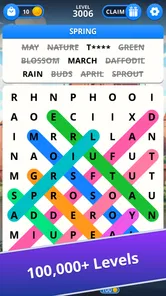
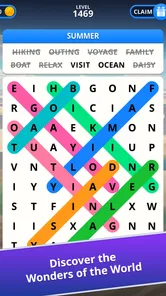
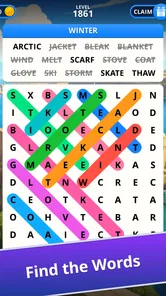
Words of Wonders: Search is a word puzzle game built around finding hidden words in a letter grid. Each level gives you a theme or a set of clues, and you swipe across adjacent letters to form the target words. It combines word-search gameplay with themed stages and progression, making it suitable for quick sessions as well as longer puzzle-solving stretches.
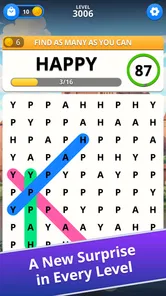
Read the clues or level theme, then scan the grid for the matching words. To select a word, drag your finger across its letters in sequence; words may appear horizontally, vertically, or diagonally, depending on the puzzle. Completing the required words advances the level. If you get stuck, the game may offer hints or other assistance, though availability and costs can vary by version.
Some puzzle levels may be playable without an internet connection, which can make the game handy while travelling or when mobile data is limited. However, features such as advertisements, rewards, purchases, or syncing progress may require a connection. Offline access can also depend on whether the game has already downloaded the necessary content, so it is worth opening the app online before relying on it away from Wi-Fi.
The game is generally offered as a free download, so you can try its word-search puzzles without paying upfront. Like many free mobile games, it may include advertisements and optional in-app purchases, such as items or hints. Check the current Google Play or App Store listing for the precise pricing and purchase details in your region, and review the store’s information before buying anything.
The word-finding format is easy to understand and can provide casual vocabulary practice, but suitability depends on the child and the content shown in the current version. Ads, optional purchases, and any online features are also worth considering. Parents should check the game’s age rating and privacy details in the relevant app store, and use device-level purchase or screen-time controls when appropriate.
On Android, Words of Wonders: Search asks for these permissions.
Words of Wonders: Search is also available in 2 other languages on our site.
4.9 out of 5
194,423 reviews
Word · Fugo Games
Word4.8 out of 5

Word4.7 out of 5

Word4.9 out of 5

Word4.9 out of 5
Word4.8 out of 5
Word4.8 out of 5
Word4.9 out of 5

Word4.9 out of 5

Word4.8 out of 5
Word4.7 out of 5

Word4.5 out of 5
Word4.9 out of 5
Word4.7 out of 5
Word4.8 out of 5
Word4.7 out of 5
Word4.9 out of 5
Word4.9 out of 5
Word4.9 out of 5

Word4.5 out of 5

Word4.1 out of 5

Word4.6 out of 5



Gamesive reviews games on its own and is not paid by developers for scores. We do not host game files: the download buttons open the official Google Play and App Store pages. Names, icons and screenshots belong to their owners.