Word Collect - Word Games Fun
Word4.7 out of 5
For Android · Malpa Games
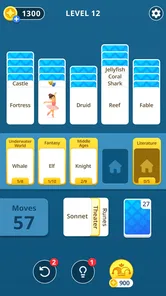
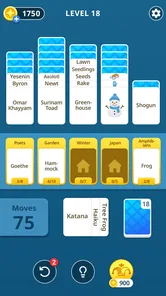
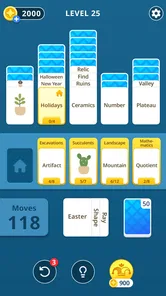
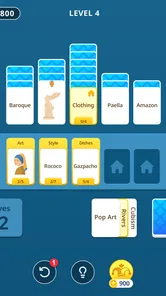
 Analysis by Gamesive
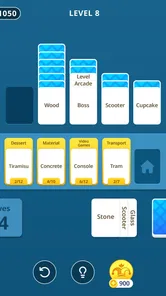
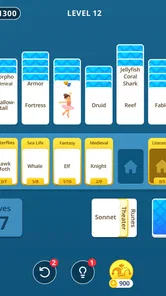
I like word games that give me a small, satisfying problem to solve without demanding a long session. Solitaria: Word Puzzle Game aims for that middle ground: it brings word-making together with the sorting and sequencing feel of solitaire. That combination is a more distinctive starting point than a standard crossword or a word search, though it also means the appeal depends on whether you enjoy thinking in both letters and order.
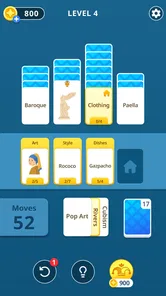
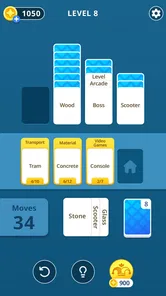
Malpa Games describes the game as a blend of classic card-game ideas and sorting puzzles, and that gives a useful sense of its intended rhythm. Rather than simply scanning a grid for a hidden word, I approach a round as a sequence of small decisions: consider what letters or pieces are available, work out what can be arranged, and avoid committing to a move before I have checked the wider picture. The pleasure comes from making a plan, not just spotting vocabulary.
That makes it a good fit for a short break when I want something more involving than a quick swipe but less demanding than a lengthy strategy game. I can imagine opening it while waiting for an appointment or settling in for a few quiet minutes at home. The solitaire influence suggests a measured pace, while the word element gives each move a language-focused purpose. If you enjoy both categories, the crossover is the main reason to try it.
It is still worth setting expectations. This is a word game, not a conventional card solitaire app with word-themed decoration, and it is not simply a vocabulary quiz. Players who want the familiar rules and predictable flow of a classic card layout may find the puzzle mixture less immediately comfortable. Likewise, someone seeking a pure spelling challenge may prefer a crossword or an anagram game with a more direct focus on clues and answers.
The main early friction is learning to think about arrangement as well as word choice. In a usual word search, I can sweep my eyes across the board and look for a match. In a solitaire-inspired puzzle, the order in which options are handled can matter to my reasoning, so the first tempting word is not always the best move. I get more from pausing to look at the whole position than from reacting to whichever letters catch my eye first.
A useful habit is to treat each decision as two questions: “Can I make a word here?” and “Does doing so leave me with a sensible next step?” That second question is easy to overlook when a promising combination appears. It is also the kind of small adjustment that can turn a confusing opening into an enjoyable planning puzzle. I would not call this a flaw; it is simply a learning curve created by combining two familiar styles.
If a round feels stuck, I would avoid repeatedly trying random combinations. Instead, take a moment to identify which available pieces seem most restrictive and consider whether there is a more flexible move elsewhere. That approach is useful in sorting puzzles generally, but it matters especially here because a move can look productive while narrowing the options that remain. The game is at its best when I am weighing possibilities rather than rushing to clear whatever looks easiest.
Before installing, check that your device meets the stated minimum operating-system requirement of version 12. The game is free to download, so trying it does not require an upfront purchase, but optional in-app purchases are offered, with listed item prices ranging from $1.99 to $99.99. I recommend checking purchase prompts carefully and using your device’s usual purchase controls if you share a phone or tablet with someone else.
For a smoother first session, choose a moment when you can focus for a few minutes rather than opening it while juggling messages or conversation. A word-and-sorting puzzle rewards attention to the current arrangement; frequent interruptions make it easier to forget why a move seemed promising. If you are setting it up for a younger player, the Everyone content rating is reassuring, while purchase settings are still worth reviewing on a shared device.
The game is currently at version 0.5.0. I would treat that as a reason to keep expectations practical: try the core experience on your own device and decide whether its puzzle style suits you before spending anything. The app has a 4.8 average from around 24,000 ratings and over 500,000 installs, which indicates that many players have taken an interest, but those figures cannot tell you whether you personally prefer its particular mix of word play and sorting.
If the app closes, the screen stops responding, or a session seems to behave unexpectedly, I would start with ordinary troubleshooting rather than assuming the puzzle itself is broken. Close and reopen the game, then check that the device has a stable connection if the issue appears related to loading or other online activity. Restarting the device and checking for an available app update are also sensible general steps.
For a puzzle that feels impossible rather than technically stuck, first distinguish between a bad position and a missed option. Re-scan what is available, look for a move that preserves flexibility, and resist repeating the same unsuccessful idea. A short pause can help; returning with fresh eyes is often better than making a hurried move just to get past the screen. I would also avoid uninstalling in the middle of a session unless necessary, since removing an app can affect locally stored progress in some games.
If you are considering reinstalling or switching devices, check whatever account and device-level recovery options are available before doing so. I would not assume that progress automatically transfers or is backed up. That is practical advice rather than a claim about a particular save system: when a game matters to you, it is better to confirm recovery arrangements before taking an action that may remove its local data.
Not every frustrating session points to a game issue. If taps seem delayed or a screen is difficult to use, check whether the device is busy, whether other apps are consuming attention, and whether the display is responding normally elsewhere. Closing background apps, freeing some device resources, or restarting can help isolate a general performance problem. If the same issue appears in other apps, the phone or tablet is a more likely place to begin investigating.
Likewise, a brief loading problem can come from a weak connection or a temporary device interruption rather than from a particular move in the puzzle. I would test again on a stable connection and avoid making multiple changes at once; changing one thing and retrying makes it easier to tell what helped. If only this game continues to have trouble after basic checks, the app store’s support options are a sensible next step.
There is also a difference between a design choice and a malfunction. A puzzle that asks me to plan around the arrangement may feel restrictive compared with a free-form anagram game, but that constraint is part of the solitaire-style challenge. If what I want is relaxed word generation without sequencing decisions, choosing another kind of word game is likely to be more satisfying than trying to force this one into that role.
Compared with crosswords, Solitaria puts less emphasis on reading clues and retrieving a particular answer. Compared with word searches, it asks for more deliberate decisions about the order of play. And compared with classic card solitaire, language is central rather than incidental. That makes it an appealing alternative when I am tired of repeating the same format but still want a puzzle that is easy to understand at a glance.
The trade-off is that its appeal is narrower than the broad label “word game” might suggest. People who love making words but dislike planning several moves ahead may prefer an anagram challenge. Those who want a calm, familiar card layout may be happier with traditional solitaire. I would choose Solitaria when I want both kinds of thinking in one session, and choose a simpler alternative when I only want to unwind without considering what a move leaves behind.
Solitaria is free to start, developed by Malpa Games, and categorized as a word game. It was released on February 26, 2026, and is rated for Everyone. Those details make it straightforward to judge whether it fits your device and household, while its actual appeal comes down to the puzzle blend. I find that distinction useful: the numbers may help establish that it has an audience, but they are no substitute for deciding whether you enjoy its particular rhythm.
I would recommend giving it a try if you already enjoy sorting puzzles and want words to be part of the decision-making, or if word games usually feel too passive and you want a little more planning. It also suits someone who likes to take a brief, focused break and can enjoy working through a position without needing every move to be obvious. The strongest reason to keep playing is the satisfaction of finding a sequence that works, not an expectation of constant novelty or elaborate storytelling.
I would skip it, at least for now, if you need a game that explains itself through familiar crossword conventions, if you prefer rapid-fire rounds, or if you dislike weighing one move against the options it leaves. It is also not the best pick when you are looking for a completely hands-off way to pass time: the sorting element asks for attention. Those are not shortcomings for every player; they are useful boundaries for deciding whether this particular hybrid suits your habits.
My practical verdict is that Solitaria is worth a low-pressure try for players curious about a word puzzle with a solitaire-like planning angle. Start with a short session, focus on preserving future choices instead of grabbing the first available word, and see whether that slower decision-making feels satisfying. If it does, the game offers a distinct alternative to standard word searches and card solitaire; if it feels like unnecessary friction, a more direct word or card game will probably be a better fit.
Solitaria: Word Puzzle Game is a casual word-puzzle experience built around finding and connecting letters to form words. It is designed for short sessions as well as longer play, with puzzles that encourage vocabulary, spelling, and pattern recognition. The exact rules, themes, and progression can vary by version, so check the app listing for details about the release available on your device.
Gameplay generally centers on examining the letters shown in a puzzle and forming valid words according to the level’s rules. You may need to swipe, tap, or otherwise connect letters, then use your answers to complete the board or objective. Early stages are usually a good way to learn the controls and word requirements; consult the in-game instructions if a puzzle’s rules are unclear.
The price and monetization can depend on the platform, region, and current version. Check the Google Play or App Store listing before downloading to see whether the game is free, whether it offers in-app purchases, and whether advertisements are included. Even a free download may offer optional purchases or other paid features, so review the listed terms and your device’s purchase settings before playing.
Offline availability depends on how the current version handles loading puzzles, saving progress, advertisements, and other online features. Some word games let you play already-loaded levels without a connection, while features such as syncing or rewarded hints may require internet access. If offline play matters to you, check the store listing and test the game in airplane mode before relying on it during travel.
Word puzzles can be a relaxed way for players to practice spelling and vocabulary, but suitability depends on the game’s content, advertising, and purchase options. Parents should review the age rating and store information, then check the app’s privacy details and available parental controls. If children will use the device, consider restricting in-app purchases and reviewing any permissions or online features before they play.
On Android, Solitaria: Word Puzzle Game asks for these permissions.
4.8 out of 5
24,022 reviews
Word · Malpa Games
Word4.8 out of 5
Word4.7 out of 5

Word4.9 out of 5

Word4.9 out of 5
Word4.8 out of 5
Word4.8 out of 5
Word4.8 out of 5
Word4.9 out of 5
Word4.9 out of 5
Word4.7 out of 5
Word4.5 out of 5

Word4.9 out of 5
Word4.7 out of 5
Word4.8 out of 5
Word4.7 out of 5
Word4.9 out of 5
Word4.9 out of 5
Word4.9 out of 5
Word4.5 out of 5

Word4.1 out of 5

Word4.6 out of 5



Gamesive reviews games on its own and is not paid by developers for scores. We do not host game files: the download buttons open the official Google Play and App Store pages. Names, icons and screenshots belong to their owners.