Word Collect - Word Games Fun
Word4.7 out of 5
For Android · Gismart
 Analysis by Gamesive
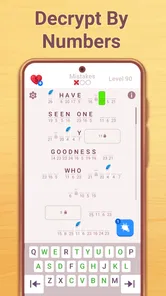
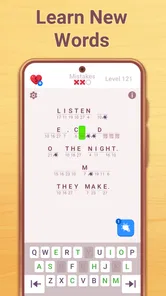
I judge a word puzzle not only by whether it keeps me entertained, but by how comfortably I can read it, navigate it, and fit it into the day. Cryptogram: Word Logic Puzzles is a free word game from Gismart built around decoding letter patterns. Its premise is easy to grasp, which helps when I want a small mental challenge without learning a complicated game system. The experience is less suitable when I need a richly adjustable interface or a puzzle that works well without sustained visual attention.
The central appeal is the act of turning a cryptic arrangement of letters into a recognizable word or phrase. I find that more deliberate than a quick word search: I have to compare repeated letters, consider likely word shapes, and revise a guess when the pattern does not fit. It rewards patient looking rather than fast tapping, so a short session can feel mentally engaging even when I solve only a small part of a puzzle.
The game is presented as a word title, and the store summary also points to logic-based searching, scrambled words, and daily crossword-style play. That breadth may suit players who like language challenges but do not want every session to feel identical. Still, the cryptogram identity is the clearest reason to try it; people seeking a conventional crossword with familiar clue-and-grid solving should not assume this offers the same kind of experience.
For readability, I would approach a puzzle by scanning for repeated symbols or letters before attempting a full solution. A recurring pattern can give a foothold, while guessing one isolated character too early can send the rest of the solve in the wrong direction. This is a useful way to make the task less visually busy: focus on one pattern, test it, and then widen attention to the surrounding text.
I also like that the basic idea does not require much explanation. Someone new to cryptograms can understand the goal quickly, while regular word-game players can bring their own vocabulary and pattern-recognition habits. That said, understanding the objective is not the same as finding every screen comfortable. The puzzle itself asks for close visual inspection, and the experience will depend on whether the lettering and interface suit a player’s eyesight and preferred way of interacting.
On a phone, any letter puzzle can become tiring if I try to solve it all at once. I get more out of this kind of game by holding the device at a comfortable distance, keeping the screen steady, and taking a brief pause when the symbols start to blur together. Those are practical habits rather than special game features, but they matter because a cryptogram rewards noticing small differences between characters.
If you have low vision, sensitivity to visual clutter, or difficulty distinguishing similar letter shapes, I would test the game cautiously rather than assume the puzzle format will be accessible by default. The task depends on seeing and comparing characters. Device-level display adjustments may help some players, but I would not treat them as a guaranteed fix: larger text, magnification, or altered contrast can change how much of a puzzle fits on screen and may require more scrolling or repositioning.
Navigation matters in a different way. A simple puzzle concept can still become frustrating if a player has trouble locating controls or keeping track of a selection. I recommend trying a short session first and noticing whether moving between the puzzle and its controls feels natural. If you can solve the letters but find the interactions awkward, that friction is important; a game can be mentally enjoyable yet still demand more precise input than you want to use regularly.
Cryptograms tend to favor considered input over reflexes, which is a welcome distinction for players who do not enjoy fast reactions. You can think through a pattern before acting, and the core challenge comes from reasoning about words rather than racing an opponent. In that sense, it may be a better fit than a timed action game for someone who wants a calmer pace.
But “not reflex-based” does not automatically mean effortless for every motor ability. If interacting requires repeated, precise taps, hand fatigue or tremor can make even a quiet puzzle frustrating. I would try playing with the phone supported on a table, using the hand or finger position that feels most stable, and stopping when the input itself becomes tiring. These adjustments are especially useful for a game where careful attention is already part of the challenge.
Sensory comfort is also individual. A player who finds dense text tiring may prefer brief visits rather than long solving sessions. I would treat one puzzle as a natural stopping point: step away, rest the eyes, and return only if the visual work still feels comfortable. For someone who needs audio-led interaction, screen-reader-first play, or a game that can be enjoyed without looking closely at text, this is not the option I would choose. Its central activity is visual word decoding.
A realistic use case is a quiet break between errands or during a pause at home. I might open a puzzle while waiting for a meal to finish, work through a few letter patterns, then put the phone down when I am interrupted. That stop-and-return style suits word puzzles better than a game that penalizes a sudden interruption, though I would still avoid playing while walking, driving, or doing anything that needs my attention elsewhere.
For shared play, it can also work as a low-pressure conversation starter: one person spots a repeated pattern, another suggests a likely word, and both test whether the guess makes sense. This is not a claim about a dedicated multiplayer mode; it is simply a way to enjoy a word puzzle together by looking at the same screen. It may be less comfortable for a group if people cannot all see the small display clearly, so a larger screen or a different shared activity could be better.
Compared with standard word searches, the experience asks for more inference and less scanning for a visible list of target words. Compared with crosswords, it leans on letter substitution and pattern logic rather than relying mainly on clue knowledge. That distinction is useful when deciding what to download: choose this if the pleasure is gradually cracking a coded phrase, and choose a traditional crossword or word search if you prefer explicit clues or a more immediately visible objective.
The game is rated for Everyone and is free to download, which makes it easy to try without committing to a purchase up front. It does include in-app purchases, with individual items ranging from $0.49 to $99.99. If you are managing a child’s device or simply want to avoid unexpected spending, check purchase controls in the app store or device settings before handing over the phone. A broad age rating does not tell you whether the puzzle style will suit a particular child’s reading level or patience, so I would let them try a short session and see.
Its scale is substantial: it has more than 10 million installs, an average rating of 4.6 from around 436,000 ratings, and about 10,000 written reviews. Those figures suggest that many people have tried it, but they are not a substitute for checking whether the visual presentation and interaction feel right for you. The game was released on August 18, 2023, and its current version is 3.8.1; it requires Android 10 or later. These details are useful if you are checking compatibility, while the actual comfort of solving remains something to judge on your own device.
One practical tip is to set a personal stopping point before starting: a single phrase, a few minutes, or simply the moment your eyes feel tired. A second is to solve from the most informative pattern instead of tapping through uncertain guesses. A third is to treat display magnification as an experiment, not a promise; it may improve legibility for one person while making it harder for another to keep the whole puzzle in view. Those small choices can make the difference between a satisfying mental break and an unnecessarily tiring session.
I would recommend Cryptogram: Word Logic Puzzles to people who enjoy language, spotting patterns, and solving at their own pace. It is particularly appealing if you like the moment when a repeated sequence suddenly makes a phrase click. Gismart has built a familiar kind of word challenge that can fit a short break, and the free entry point makes trying it straightforward.
I would look elsewhere if you need large, highly configurable text, dependable nonvisual play, minimal precision input, or puzzles that do not demand close reading. Someone who mainly wants quick, obvious word matching may also prefer a simpler word search. For players with visual, motor, or sensory needs, the most useful test is not the game’s general rating but a brief personal trial: can you comfortably read the puzzle, reach the controls, and stop when you want?
My verdict is positive but qualified. This is a thoughtful choice for a visually comfortable player who wants a calm, pattern-heavy word game, and it offers a different kind of reasoning from the usual crossword or word search. Its accessibility depends heavily on the individual, because the core activity is reading and manipulating letters on a screen. If that suits you, it can make an enjoyable pocket-sized challenge; if it does not, a larger-print, audio-friendly, or less visually dense alternative would be the kinder choice.
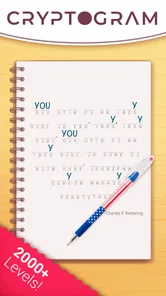
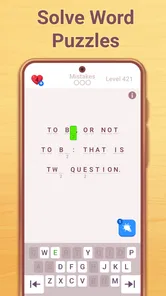
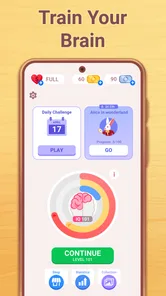
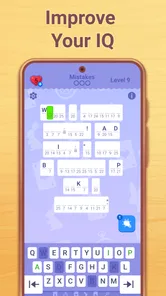
Cryptogram: Word Logic Puzzles is a puzzle game built around decoding short messages. Each puzzle replaces letters with symbols or other letters, and you use patterns, repetition, and logical deduction to uncover the original quote or phrase. It is suited to players who enjoy word games and thoughtful problem-solving, rather than fast-paced action. The exact puzzle selection and features can vary by app version.
Read the coded message and work out which letters the symbols represent. Repeated symbols always point to the same letter within a puzzle, so noticing common words, letter combinations, and repeated patterns can help you make progress. You can typically enter guesses and revise them as new clues become clear. If you get stuck, check the game for available hints or other assistance, as options may differ between versions.
Yes, the basic rules are straightforward: identify patterns in a coded phrase and use them to reveal the text. New players can start by looking for short words, repeated symbols, and familiar letter combinations, then use those discoveries to test other guesses. Some puzzles may be more challenging than others, so the game can still offer a satisfying workout for experienced word-game fans. Check the current listing for details about difficulty settings or tutorials.
Offline availability can depend on the version of the game and how its features are implemented. Core puzzles may work without an internet connection, while features such as advertisements, purchases, cloud saves, or daily content may require connectivity. To avoid losing progress or missing online features, open the game while connected before travelling, and check its store listing or in-app information for the developer’s current connection requirements.
Pricing and monetization can change between releases and may differ between Android and iOS. The game may be free to download while offering advertisements, optional purchases, or paid ways to access additional content or remove ads. Review the store page before installing, and check the purchase details shown in the app so you know what is optional and whether any costs apply. Avoid assuming every feature is included at no charge.
On Android, Cryptogram: Word Logic Puzzles asks for these permissions.
Cryptogram: Word Logic Puzzles is also available in 2 other languages on our site.
4.6 out of 5
435,954 reviews
Word · Gismart
Word4.8 out of 5
Word4.7 out of 5

Word4.9 out of 5

Word4.9 out of 5
Word4.8 out of 5

Word4.8 out of 5
Music3.1 out of 5
Word4.7 out of 5
Word4.5 out of 5

Word4.9 out of 5
Word4.7 out of 5
Word4.8 out of 5
Word4.7 out of 5
Word4.9 out of 5
Word4.9 out of 5
Word4.9 out of 5
Word4.5 out of 5

Word4.1 out of 5

Word4.6 out of 5



Gamesive reviews games on its own and is not paid by developers for scores. We do not host game files: the download buttons open the official Google Play and App Store pages. Names, icons and screenshots belong to their owners.