
Piano Game: Classic Music Song
Music4.0 out of 5

For Android & iOS · Cobby Labs

 Analysis by Gamesive
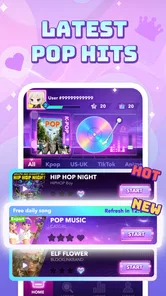
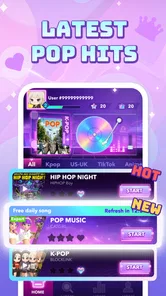
I can see the appeal of a piano game before I even settle into a routine: familiar music gives each short session a clear point, and tapping along feels more engaging than simply letting a playlist run. Pop Piano: Music Games is built around that quick musical reward, with a focus on popular songs and K-pop. In my view, it is best approached as a casual game for spare moments, not as a piano lesson or a replacement for a music player.
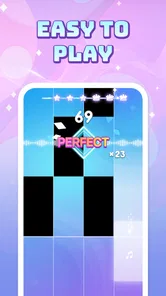
The basic idea is easy to understand: follow the music and tap the notes as they arrive. That low barrier makes the game approachable even if you have never played a rhythm game before. There is no need to know musical notation or have piano experience; the attraction is coordinating your attention and timing with a song.
That simplicity is also the source of its first-week charm. A familiar tune gives you an immediate reason to try a round, while the act of playing gives listening a more active feel. I would reach for it during a short break, while waiting for a friend, or when I want something more involving than scrolling but less demanding than a long game session.
The game sits in the music category, but it scratches a different itch from streaming songs or learning an instrument. A music app is for choosing what to hear; a piano-learning app asks for structured practice and patience. This game is closer to a rhythm challenge: the song supplies the mood, and your attention supplies the play.
That distinction matters if you are deciding what to install. If your goal is to improve your real piano technique, this is not the tool I would choose. If you want a lightweight way to interact with pop and K-pop tunes, it makes more sense. Its free price also lowers the commitment for someone who wants to see whether tapping to music is enjoyable before making it part of a routine.
I get more out of this kind of game when I treat each session as a small challenge rather than background entertainment. Put the phone down somewhere steady, give the song your attention, and play one round without switching between apps. That simple change makes timing feel like the point instead of an incidental tap while multitasking.
Another useful approach is to play when you have a natural pause in the day rather than trying to turn every spare minute into a session. A commute break or a few minutes between tasks can suit the short-round format. If you are tired or distracted, though, it may be more pleasant to listen to music than to demand accurate reactions from yourself.
For a first-time rhythm-game player, I would focus on getting comfortable with the visual rhythm before worrying about playing perfectly. The familiar-song framing can tempt you to follow the melody by ear, but successful play depends on watching the cues and reacting in time. Keeping your attention on the screen is a practical tip that makes the experience feel less frustrating.
The longer-term question is whether a piano game becomes a habit or just a brief curiosity. Pop Piano has a clear recurring use: it gives you a reason to return whenever you want a small, music-led activity. That can be enough for a casual player, especially someone who enjoys pop songs but does not want a competitive game that requires a long, uninterrupted session.
The public response suggests that many people have found the premise appealing: it has a 4.6 average from around 33,000 ratings, and more than 10 million installs. Those figures are a useful sign of broad interest, not a promise that every player will stay engaged. A rhythm game’s lasting value is personal; it depends on whether the song selection and tapping loop keep feeling rewarding for you.
For a more practical test, I would ask whether I still want to open it after the initial curiosity about the controls has passed. If I enjoy replaying music interactively, the format can fit into a simple routine: one round during a break, then close the game and move on. If I only want to hear a particular song, a regular music app is more direct and gives me more control over listening.
That is the key trade-off against common alternatives. Compared with a conventional rhythm game, a song-centered piano format can feel more approachable and less like a complex game system. Compared with a piano-learning app, it is less suited to building technique. It earns a place by making familiar music playable, not by offering the depth of a curriculum or the breadth of a full music library.
I would also be realistic about how much repetition I enjoy. Short sessions are convenient, but repeated play can make the same musical passages feel less fresh. A good way to avoid turning the game into a chore is to stop when the fun drops rather than forcing a daily streak or an arbitrary practice target. A casual game should fit around your habits, not dictate them.
I think it is a stronger match for listeners who like K-pop or popular songs and enjoy testing their timing. It may also suit someone who wants a playful change from watching short videos: the hands and eyes have something specific to do, and a round has a natural beginning and end.
It is less convincing for a player who needs a large sense of progression, deep customization, or a serious skill path. I would also steer away from it if you find rhythm games stressful, dislike repeating musical sections, or prefer to play with the screen mostly out of view. The central appeal depends on focused taps, so it cannot fully double as passive listening.
For parents choosing a game, the age label deserves attention: it is rated Mature 17+. I would not assume that a music theme alone makes it suitable for younger players. The game is free, but the age rating is still an important part of deciding whether it belongs on a particular device.
The maintenance burden seems modest in the sense that this is a game you can pick up for a short session, rather than a hobby that asks for equipment or scheduled practice. Its current version is 0.5.4, and it was released on September 19, 2025. It is developed by Cobby Labs and requires Android 7.0 or later. Those details make it easier to check whether an Android device is a fit before installing.
For day-to-day use, I would keep the game in the same category as other quick diversions: open it when you genuinely want to play, and do not feel obliged to maintain a routine. That avoids a common trap with mobile games, where a relaxing idea gradually becomes another notification-driven task. If the music is no longer pulling you in, taking a break is a sensible choice, not a failure to use the app correctly.
One small but useful decision is to distinguish between “I want to hear music” and “I want to play along with music.” The first calls for a player or streaming service; the second is where Pop Piano has a reason to be on your phone. Making that choice before opening the app helps prevent the game from feeling like an inconvenient way to do something your music app already handles better.
The obvious fatigue point is repetition. Familiar songs can be exciting at first, but a player who is sensitive to replaying the same patterns may lose interest once the initial learning curve disappears. That is not a flaw unique to this title; it is a basic tension in rhythm games. The challenge has to stay enjoyable even after the song stops feeling new.
There is also a mismatch for people who expect a piano game to teach piano. Tapping along may sharpen attention and timing in the moment, but I would not treat it as a substitute for learning hand position, reading notation, or practicing an instrument. If those are your goals, a structured lesson app or a real keyboard with instruction is a better use of your time.
Another possible source of friction is that focused play does not suit every setting. A crowded or distracting environment can make it harder to follow the cues, while playing when you are trying to relax with your eyes away from the screen defeats the format. I would save it for a moment when a little concentration feels welcome, rather than expecting it to work in every spare pocket of the day.
The game’s popularity is encouraging, but ratings and install totals cannot tell you whether its particular mix of songs and play style matches your taste. The best test is whether you enjoy the first few rounds enough to return without needing to persuade yourself. Since it is free, that trial can be low-risk; since it is rated Mature 17+, suitability still needs a separate check.
Pop Piano: Music Games earns a lasting spot only if you like turning pop and K-pop listening into an active, quick challenge. I would recommend trying it to someone who wants a casual rhythm game that can fill short breaks and who is comfortable paying attention to the screen. Its strongest quality is the clear, immediate link between a song and a simple action.
I would not keep it installed just because it is popular, nor expect it to replace a playlist, a full rhythm game, or piano lessons. Its recurring value comes from returning to the musical tapping loop when that sounds fun. If the novelty fades and the same interaction stops being satisfying, there is little reason to force a habit.
Overall, I see it as a worthwhile free option for the right listener, rather than an essential app for everyone. Give it a few focused sessions, notice whether you enjoy playing rather than merely hearing the songs, and let that answer decide whether it stays. That is the fairest test of whether this particular music game has earned space on your phone.
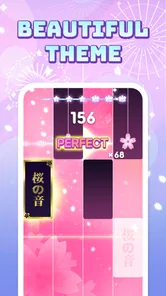
Pop Piano: Music Games is a casual rhythm game built around tapping notes in time with the music. Its piano-style presentation makes familiar songs feel like short, accessible challenges, while increasing difficulty can test your timing and concentration. The exact song selection and features may vary by version, so check the current store listing and in-game catalog before downloading if you have specific music or gameplay expectations.
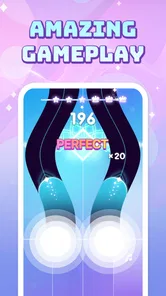
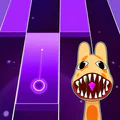
Gameplay generally involves watching notes move across the screen and tapping the corresponding tiles or keys as they reach the target area. Accurate taps help maintain your performance, while missed or mistimed notes can reduce your score or end a run, depending on the mode. New players can start with easier songs to learn the rhythm, then try harder tracks as their timing improves.
The app may be available to download without an upfront purchase, but that does not necessarily mean every feature is free. Rhythm games commonly offer optional purchases, advertisements, or unlockable songs and items, and the available options can differ by platform or update. Review the app-store listing and any purchase prompts carefully, and check whether your device has payment restrictions enabled before letting children play.
Offline availability can depend on how the current version handles songs, ads, and account features. Some tracks may work after they have been downloaded or made available in the app, while other content may require an internet connection to load or unlock. If you plan to play while traveling, open the game online first, test a song with your connection disabled, and avoid assuming that every mode works offline.
Check that your phone or tablet meets the app's current operating-system and storage requirements, and read the store listing for supported devices, permissions, in-app purchases, and privacy details. Headphones can make the beat easier to hear, although sound and touch responsiveness may vary across devices. Also confirm that the song catalog suits your preferences, since track availability and game features can change with updates.
On Android, Pop Piano: Music Games asks for these permissions.
Pop Piano: Music Games is also available in 2 other languages on our site.
4.6 out of 5
33,090 reviews
Music · Cobby Labs

Music4.3 out of 5
Music4.6 out of 5
Music3.1 out of 5
Music4.5 out of 5
Music4.2 out of 5
Music3.7 out of 5
Music4.6 out of 5

Music4.4 out of 5
Music4.2 out of 5
Music4.0 out of 5
Music4.6 out of 5
Music4.3 out of 5
Music4.3 out of 5

Music3.7 out of 5
Music4.4 out of 5

Music4.1 out of 5
Music4.6 out of 5
Music4.5 out of 5
Music4.8 out of 5
Music4.6 out of 5
Music4.0 out of 5



Gamesive reviews games on its own and is not paid by developers for scores. We do not host game files: the download buttons open the official Google Play and App Store pages. Names, icons and screenshots belong to their owners.