
Piano Fire: Edm Music & Piano
Music4.6 out of 5
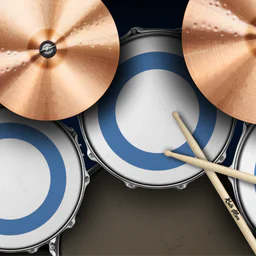
For Android & iOS · Kolb Apps
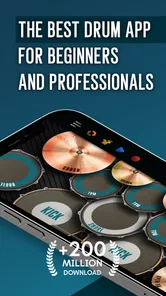
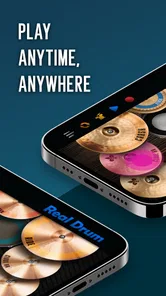

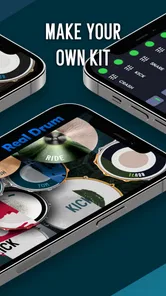
 Analysis by Gamesive
Real Drum makes a convincing case for keeping a drum kit in your pocket. I like the basic idea because it turns a screen into a hands-on musical space: tap out a beat when inspiration strikes, try a lesson when you want direction, or simply explore the sounds without needing a full physical kit. It is a music game from Kolb Apps, but it sits somewhere between a casual rhythm toy and a beginner’s practice aid. That blend is its main appeal—and also the reason it will not suit every drummer.
The first thing I notice is how direct the experience feels. The screen is the instrument, so there is no long setup before you can try a rhythm. That makes it easy to pick up during a spare moment, whether you are waiting for a friend or winding down at home. The game is free to start, with optional in-app purchases ranging from $0.99 to $41.99 per item, so it is sensible to explore the basic experience before deciding whether to spend anything.
Its central promise is not that a phone can replace a real drum kit. Rather, it gives you a convenient way to practise timing, test ideas, and get familiar with arranging a beat. I found that distinction useful: when I treat it as a portable sketchpad for rhythm, it makes sense; when I expect the physical feel and dynamic response of acoustic drums, the touchscreen is an obvious compromise.
The presentation is built around the kit itself rather than a story or a world to explore. That keeps the focus on the playing surface, lessons, and sound. There is no elaborate setting to learn before getting started, which is welcome for a music game, although players looking for a strong visual theme or a campaign-style progression may find it plain.
Real Drum has been available since April 4, 2012, and its current version is 11.18.7. It has an average rating of 4.5 from around 1.7 million ratings, with roughly 21,000 written reviews and over 100 million installs. Those figures suggest that the simple, immediate idea has found a large audience, but popularity alone does not make it the right tool for serious practice.
The game is rated for Everyone and requires Android 7.0 or later. That makes it approachable for a broad range of users, though the experience still depends on having a screen size and touch response that feel comfortable for tapping. On a smaller phone, fingers can crowd the playing area, especially when you are trying to strike different parts of the kit quickly. A tablet can give your hands more room, but it is less pocketable. That is a real trade-off rather than a flaw with a single fix.
Kolb Apps has kept the concept focused on drumming, and I think that focus helps newcomers. You do not have to understand music production or configure a complicated arrangement before making a beat. The flip side is that anyone wanting detailed recording tools, a full band setup, or a highly realistic practice instrument should look at a dedicated music app or an acoustic kit instead.
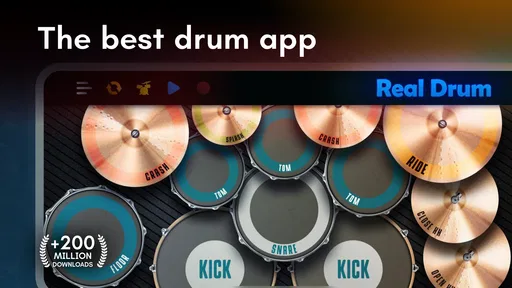
The kit-on-screen format gives the game an immediately readable visual language: each tap is meant to feel like a strike, and the layout encourages you to think in terms of separate drum parts rather than abstract notes scrolling past. That makes the experience feel more like playing an instrument than chasing a score. I find this especially useful when learning how a simple pattern is assembled, because the visual placement helps connect a hand movement with a sound.
There is a pleasing informality to that approach. You can open the game and experiment without needing to prepare a room, set up hardware, or worry about disturbing anyone with loud acoustic hits. It makes rhythm practice feel casual and low-pressure. That atmosphere is a strength for quick sessions, but it is not the same as the physical energy of playing a real kit, where stick rebound, posture, and volume all shape the performance.
One practical tip is to use the screen deliberately rather than tapping at random. Start with a short, steady pulse and add one part at a time. This makes it easier to hear whether each sound lands where you intended, and it turns casual play into a small timing exercise. The game is more rewarding when you give yourself a simple musical goal than when you try to fill every moment with hits.
Sound is the reason a drum game succeeds or fails for me. Real Drum gives you a way to build a beat from drum-kit sounds, so the pleasure comes from arranging and repeating patterns rather than from navigating a fictional setting. A small rhythm can feel satisfying when the parts lock together, and that immediate feedback makes the app easy to return to for short bursts.
Still, tapping on glass changes the musical feel. You can make rhythmic choices, but you do not get the same stick rebound, nuanced touch, or bodily coordination as you would on a physical kit. That means the app can help you think about timing and pattern structure, but it should not be treated as a complete substitute for learning control on real drums. If your main goal is to build hand technique or prepare for a live performance, use it as a supplement, not your only practice space.
A useful everyday routine is to open the game for a few minutes and focus on one question: can I keep a steady beat while adding another part without losing the pulse? That is more productive than chasing speed. I would also keep sessions short if the tapping starts to feel cramped or tiring. A phone screen rewards compact ideas, not necessarily extended, physically demanding practice.
The lessons are a welcome counterweight to free play. They give beginners a reason to approach the instrument with some structure instead of guessing at patterns. I would use a lesson as a prompt, then spend a little time repeating the idea and changing one element. That small adjustment helps turn imitation into understanding. The app is most useful when a lesson becomes a starting point for your own rhythm rather than an endpoint.
Real Drum works best for people who want low-friction access to drumming. A beginner can use it to explore how beats are put together, while a more experienced player may enjoy it as a quick way to sketch a rhythmic idea away from a kit. It can also be a fun shared activity: one person can tap a pattern, and another can try to repeat or vary it. Those are modest uses, but they suit the game’s pocket-sized format.
The central mechanic is tapping different areas of the screen to play the kit. That is approachable, but it creates a limit that becomes more noticeable as your patterns get busier: the screen cannot provide the spacing, rebound, or tactile distinction of drum hardware. If you have large hands or want to play rapid, complex parts, screen size and touch accuracy may become more important than the game’s lessons. Try the basic controls first on the device you intend to use; comfort matters more than ambition here.
Compared with rhythm games built around hitting timed prompts, this feels closer to an open drum surface because the emphasis is on making patterns rather than merely reacting to a sequence. Compared with music-production apps, it is more immediate and less suited to building a polished track. That places it in a useful middle ground: more instrument-like than a conventional score-chasing game, but lighter and less demanding than a full production setup.
There is another trade-off around spending. The game is free, but the available in-app purchases span a broad range, from $0.99 to $41.99 per item. I would not assume that a purchase is necessary just because it is offered. First decide whether the core tapping and lesson experience fits your habits. If you only want occasional rhythm practice, the free entry point is a sensible way to judge that for yourself.
It is also worth being realistic about what a lesson can teach. Lessons can give you direction and help you approach patterns with intention, but improvement still comes from attentive repetition. If you want to learn reading notation, develop limb independence, or receive feedback on your posture and technique, a human teacher or physical instrument will offer things a touchscreen cannot. The game is better at making practice accessible than at covering every part of drum education.
I would recommend it to curious beginners, casual players, and drummers who want a quick way to explore beats without carrying gear. It is also a good fit for someone who likes music games but would rather create a rhythm than follow a fixed stream of notes. The Everyone rating makes it broadly approachable, and the uncomplicated premise helps younger players or complete newcomers start experimenting.
I would skip it if your priority is realistic drumming technique, precise performance evaluation, or a full recording workflow. A dedicated drum-learning tool may be more appropriate if you want structured instruction beyond lessons, while a real kit is the better choice for developing touch and coordination. For people who simply want to tap along to songs, a conventional rhythm game may provide clearer goals and a stronger sense of challenge.
One small but useful way to decide is to set a clear trial goal: make a steady beat, learn one lesson, or recreate a rhythm you already know. If the screen helps you do that and you enjoy the sound, the app is serving its purpose. If you keep wishing for larger pads, physical sticks, or more detailed instruction, that is a sign to move to a different option rather than expecting the game to become a full drum studio.
Real Drum is at its best as a relaxed, playable pocket instrument. Its visual focus, direct tapping, and lessons create a coherent mood: informal, musical, and easy to enter for a few minutes. It does not need a story or elaborate setting because the pleasure is in making a beat and hearing the parts come together. That simplicity is exactly what makes it inviting.
My recommendation is straightforward: try it if you want a convenient way to explore rhythm, practise simple patterns, or pass a spare moment making music. Keep your expectations grounded about touch and technique, and judge the optional purchases only after you know what you actually use. For serious drumming development, pair it with a physical kit or more specialised instruction. For quick, creative rhythm sessions, Real Drum is an easy game to pick up and a useful little place to start.
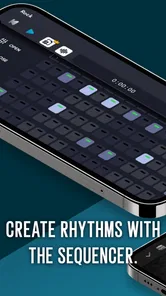
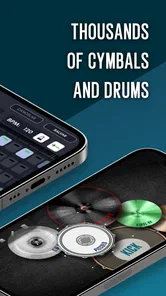
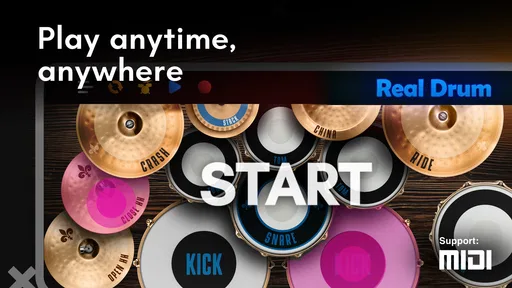
Real Drum is a mobile drumming app that turns your phone or tablet screen into a virtual drum kit. You tap the on-screen drums and cymbals to play rhythms, practice patterns, or perform along with music. The layout can be customized, and the app offers different kit sounds and play options. It can be entertaining for casual players and useful for exploring basic drumming, though tapping a screen is not identical to playing an acoustic or electronic drum set.
No musical experience or additional equipment is required to get started. The app’s touch controls let beginners try simple beats immediately, while more experienced players can use the virtual kit to experiment with rhythms. A phone or tablet with a responsive touchscreen is enough; headphones or external speakers are optional and may make playback clearer. Keep in mind that smaller screens can feel crowded, so a tablet may provide more room to reach the individual drums and cymbals.
Basic drumming can generally be played directly on the device, but some content or features may depend on an internet connection, and availability can vary by version. Ads, optional downloads, or links to online material may also require connectivity. If offline use matters to you, install the app and check that the kits and features you plan to use are available before disconnecting. Review the current app-store listing for details, since requirements can change with updates.
Real Drum is commonly offered as a free download, but the exact business model can differ by platform, region, and version. Free access may include advertisements, while optional purchases or other paid features may be offered in the app. Check the Google Play or Apple App Store listing before installing for current pricing and purchase details. If a child will use the app, consider setting purchase approval and reviewing the device’s advertising and privacy controls.
Real Drum can help you explore drum sounds, practice timing, and learn how different parts of a kit contribute to a beat. It is a convenient introduction, but it does not fully teach real-drum technique: screen tapping lacks the rebound, limb coordination, posture, and dynamics involved with physical drums. Treat it as a practice or entertainment tool rather than a complete course. For structured progress, pair it with lessons or exercises designed for an acoustic or electronic kit.
On Android, Real Drum electronic drums set asks for these permissions.
Real Drum electronic drums set is also available in 2 other languages on our site.
4.5 out of 5
1,668,713 reviews
Music · Kolb Apps

Music4.3 out of 5

Music4.6 out of 5

Music3.1 out of 5

Music4.2 out of 5
Music3.7 out of 5

Music4.0 out of 5
Music4.6 out of 5

Music4.3 out of 5
Music4.3 out of 5

Music3.7 out of 5
Music4.4 out of 5

Music4.1 out of 5

Music4.6 out of 5

Music4.5 out of 5

Music4.8 out of 5

Music4.6 out of 5

Music4.0 out of 5

Music4.8 out of 5



Gamesive reviews games on its own and is not paid by developers for scores. We do not host game files: the download buttons open the official Google Play and App Store pages. Names, icons and screenshots belong to their owners.