
Piano Game: Classic Music Song
Music4.0 out of 5
For Android & iOS · XGAME STUDIO

 Analysis by Gamesive
Music games can be a fun way to turn a few spare minutes into a little rhythm challenge, but their appeal depends on more than the soundtrack: clear cues, comfortable controls, and a pace that works for the player all matter. Beat Piano Dance is a free music game from XGAME STUDIO built around tapping along to piano-style play. I find its premise easy to understand, and that simplicity makes it approachable at first glance. The more important question is how comfortably different people can engage with a rhythm game whose central activity relies on timing and touch.
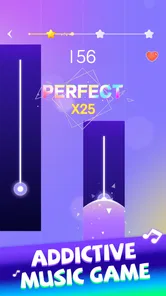
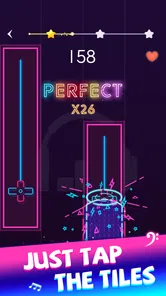
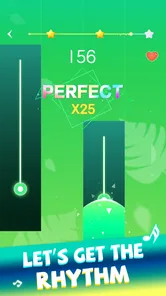
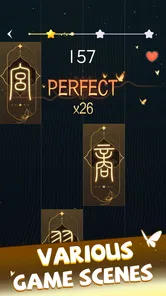
The store summary puts the experience plainly: players use their fingertips to beat along in a piano game. That gives Beat Piano Dance a clear identity as a casual music game, rather than a broad collection of unrelated activities. If you enjoy matching taps to musical cues, the concept should make sense without a lengthy explanation. I like that the basic idea is immediately recognizable, especially for someone browsing for a quick rhythm challenge.
The game is free to download, and optional in-app purchases are listed at $2.99 to $24.99 per item. That makes it possible to try the game without an upfront purchase, while still leaving players responsible for deciding whether optional spending suits them. It has an Everyone content rating, which can help families understand the store’s age classification, though that rating alone does not describe how comfortable the moment-to-moment play will be for a particular person.
Its reach suggests that many players have been willing to give it a try: the game has over 50 million installs and an average rating of 4.4 from around 304,000 ratings. Those figures offer a useful snapshot of broad interest, not a guarantee that every player will find the controls or presentation comfortable. Rhythm games are personal; what feels lively and satisfying to one person can feel demanding to another.
For a rhythm game, readability starts with understanding what the player is expected to do and recognizing when to do it. The piano-game premise gives a newcomer a helpful mental model: follow the musical beat with taps. I find that kind of direct concept easier to approach than a game whose goal is buried under several layers of instructions. It can also make the title easier to explain to a friend or family member who has not played it before.
Still, a familiar premise does not answer every navigation question. Players may differ in how quickly they can interpret visual cues, read small text, or move between screens. The most inclusive experience is one that makes actions and choices easy to distinguish, but I would not assume specific text sizing, contrast settings, or navigation aids without a clear basis for doing so. If these details matter to you, it is sensible to check the current app-store screenshots and description before downloading.
The game is listed for Android devices running version 7.0 or later. That gives Android users a straightforward compatibility point to check against their device, while the game’s presence in the wider app market also makes it relevant to people looking for mobile music games. Compatibility is only one part of access, of course: a supported device can still feel awkward if its screen, touch response, or display setup does not suit the player.
The central activity is finger tapping, so this is a game where timing and touch are naturally important. That can be satisfying for players who enjoy quick, precise interaction, but it may be less comfortable for someone with limited dexterity, hand fatigue, tremors, or difficulty making repeated taps. I would approach it as a touch-based rhythm challenge rather than assume that it offers alternative input methods. Anyone who needs a specific control option should confirm that it is available before relying on the game.
Rhythm play also asks the senses to work together. Players may need to notice a cue, connect it with the beat, and respond promptly. That combination can be engaging, but it can also create extra effort for people who have difficulty with fast visual processing, hearing, or coordinating sound and movement. The musical framing may be part of the fun for many players; it is also a reason to think about personal comfort before settling in for a session.
There is no single sensory profile that suits everyone. Some people prefer a quiet room and clear audio; others play with sound lowered, in a shared space, or while managing distractions. I would not count on a particular audio adjustment, visual alternative, or difficulty setting unless it is clearly shown in the game. Rather than treating these options as a given, check what is available on your device and in the game itself, then decide whether that setup makes the tapping experience workable.
It is worth remembering that a game’s Everyone rating is an age classification, not an accessibility label. It does not tell players whether the rhythm is gentle, whether the display is comfortable for light-sensitive users, or whether tapping demands are adjustable. That distinction matters for families and for anyone choosing a game around a specific access need. The rating is useful context, but personal comfort depends on the actual interaction.
A short-form music game can be appealing when you want a compact activity rather than a long story or a complicated set of rules. The basic premise is easy to carry in your head: listen and tap. That can make it a natural option for a brief break, provided the setting allows you to focus on the cues and use the screen comfortably. I would be more cautious about playing while walking, commuting through a busy area, or doing anything else that needs your attention.
Shared spaces create their own considerations. A player might want to keep volume low or use the device in a way that does not disturb others, while still being able to follow the rhythm. Because audio and visual cues can both matter in a music game, the most comfortable arrangement may vary from person to person. If you play in a quiet public place or near someone who is resting, it is worth checking your sound level and choosing a moment when focused tapping will not be disruptive.
Device setup can affect comfort, too. Screen size, brightness, grip, and where the phone rests all influence how easy it is to see and tap. A player with sore hands may prefer to stop after a short session, while someone who finds bright screens uncomfortable may want to adjust their device settings before playing. Those are practical habits rather than promised game features, and they can help people make a better-informed choice about whether a touch-driven music game fits their routine.
The game has been available since May 7, 2023, and its current version is 2.2.4. For a player considering it now, the version number is a useful way to identify the release shown in the store, while the original release date provides a little history. Neither detail says on its own how the game will behave on a particular phone or whether its presentation matches an individual’s access needs, so checking the current listing remains a sensible step.
The strongest limitation to keep in mind is built into the basic idea: success depends on responding to musical timing with touch. That can be exactly what rhythm fans want, but it may leave less room for players who need slower responses, a different input method, or fewer simultaneous demands. I would not describe the game as broadly accessible to every ability on the strength of its simple premise alone. A clear concept helps with orientation; it does not remove the physical and sensory requirements of play.
Another possible barrier is uncertainty about whether the presentation can be tailored. Players may look for options that help with text readability, visual intensity, sound, or pace. Those adjustments can make a meaningful difference, but it is better not to assume they exist. If you rely on a particular setting, treat that as a key part of your decision and inspect the game directly before spending time on it. The same applies to families choosing a game for someone who benefits from predictable controls or less demanding interaction.
Purchases are another practical consideration. Downloading is free, but optional items cost between $2.99 and $24.99 each. That range is worth bearing in mind if a child or another family member will be using the device, especially where purchase approval matters. The game’s price structure does not determine how accessible it feels, but clear expectations around optional spending can make the overall experience easier to manage.
Feedback is substantial, with 501 written reviews alongside the large rating count. Reading recent comments in the app store can help prospective players see what other people mention about the current experience, though individual opinions will not replace testing it on your own device. I would use reviews as one source of context, particularly if you are trying to answer a practical question about controls or comfort, rather than treating a high average as proof that the game will suit every player.
Overall, I see this as a straightforward piano rhythm game with a recognizable touch-based premise and broad popularity. Its free entry point makes it easy to consider, and its music-focused play may be appealing if you enjoy keeping time with taps. The Everyone rating and the familiar format may make it approachable for a wide audience, but neither should be confused with a promise that every player will find the controls, pace, or sensory demands comfortable.
For players who enjoy precise finger interaction and can comfortably follow musical cues, it looks like a simple way to explore a casual rhythm challenge. For people with motor, visual, hearing, or sensory needs, the best approach is more deliberate: check the current store presentation, review the available settings in the game, and try a brief session only if the interaction seems suitable. I would not rely on an unconfirmed feature to solve a specific access barrier.
The inclusive takeaway is that Beat Piano Dance has an easy-to-grasp idea, but the experience remains centered on tapping in time. That gives it a clear appeal while also setting a real boundary around who may find it comfortable. If rhythm games are your thing and touch-based play works for you, it is worth considering; if you need alternative controls or particular sensory adjustments, verify those details first. That balanced expectation is the fairest way to decide whether this music game belongs on your device.
Beat Piano Dance: Music Game is a rhythm game built around tapping tiles in time with music. Its core appeal is following the beat, maintaining accuracy, and trying to achieve higher scores as songs become more challenging. The exact song selection, modes, and progression can vary by version, so check the app listing and in-game menus to see what is currently available on your device.
The game may be available to download for free, but that does not necessarily mean every feature is free. Mobile rhythm games commonly include advertisements, optional purchases, or limits on access to songs and other content. Before playing, review the store listing for current pricing and check the game’s purchase details. If a child will use the app, consider setting appropriate purchase and screen-time controls.
Offline availability can depend on the game’s current version and how it delivers songs or other content. Some rhythm games require an internet connection to load tracks, display advertisements, synchronize progress, or access online features, while previously available content may work without a connection. Check the app description and test the game in offline mode before relying on it during travel or in places with limited service.
The simple tap-based controls may be approachable for younger players, but suitability also depends on the child and the app’s current content. Advertisements, in-app purchases, song themes, and online features can vary. A parent or guardian should review the store’s age rating and privacy information, then check the game’s settings and purchase options before handing over the device. Consider using parental controls if needed.
Confirm that the game is offered for your device and operating-system version, and review the store listing for its age rating, permissions, privacy details, and any advertised purchases. Also consider whether your device has enough free storage and whether the available songs suit your preferences. Downloading from the official Google Play or Apple App Store helps ensure you get the legitimate app and receive updates through the normal channel.
On Android, Beat Piano Dance:music game asks for these permissions.
Beat Piano Dance:music game is also available in 1 other languages on our site.
4.4 out of 5
303,830 reviews
Music · XGAME STUDIO

Music4.3 out of 5
Music4.6 out of 5
Music3.1 out of 5
Music4.5 out of 5

Music4.2 out of 5
Music3.7 out of 5
Music4.0 out of 5

Music4.6 out of 5

Music4.3 out of 5
Music4.3 out of 5

Music3.7 out of 5

Music4.1 out of 5
Music4.6 out of 5

Music4.5 out of 5

Music4.8 out of 5

Music4.6 out of 5
Music4.0 out of 5
Music4.8 out of 5



Gamesive reviews games on its own and is not paid by developers for scores. We do not host game files: the download buttons open the official Google Play and App Store pages. Names, icons and screenshots belong to their owners.