
Piano Game: Classic Music Song
Music4.0 out of 5
For Android & iOS · SAMFEN LIMITED



 Analysis by Gamesive
I can see the appeal of a music game that’s easy to pass around: someone taps, the ball moves with the beat, and the next person can have a go without learning a complicated control scheme. Music Ballz Hop is built around that quick, hands-on idea. In my view, it makes most sense as a casual game for short breaks or shared-device moments, rather than as a deep rhythm game that asks everyone to commit to long sessions.
The basic interaction is immediately understandable: tap to influence the ball’s jumps in time with the music. That makes it easy to offer a turn to a friend or family member without giving a lengthy explanation. On a sofa, during a quiet wait, or between other activities, one person can try a run and then pass the device along. The music gives the action a shared focus, while the simple input keeps the learning curve low.
That simplicity is also a useful limit to keep in mind. This is a music game, not a general-purpose family activity app. The central attraction is timing taps to a beat; it is not built around household organization, separate profiles, or a group mode that I can recommend as a substitute for taking turns. If several people use one phone or tablet, agreeing who is playing and when is a practical household arrangement, not something I would assume the game manages for you.
A helpful way to try it together is to keep the turns short and let each person decide whether they want another attempt. That avoids turning a simple rhythm challenge into a competition that dominates the room. It also makes the game easier to fit around different attention spans: one person can enjoy a quick go, while another can keep practicing if they want to improve.
The tap-based control gives the experience a direct connection between listening and acting. Rather than treating the music as background decoration, you are responding to its rhythm as you guide the ball’s movement. That is the part I would focus on when deciding whether it suits you: if matching a simple action to a beat sounds satisfying, the premise is appealing; if you want a broad music library, instrument practice, or detailed rhythm-game controls, this is a narrower kind of entertainment.
In practical use, a quiet moment can make it easier to concentrate on the beat. If the game is being played in a busy shared room, conversation and other sounds may compete with the music, so I would not expect every casual attempt to feel equally focused. A sensible household tip is to treat it as a small, optional activity rather than putting it on while someone nearby needs quiet or attention.
It also helps to be clear about what a turn means. The simple control invites spontaneous play, but that does not guarantee that everyone will find the same level of challenge or enjoyment. A younger player may enjoy the immediate movement, while someone who likes precision may care more about keeping time. Letting each person approach it differently is more realistic than expecting a single shared score or goal to suit everybody.
When one device is used by more than one person, I recommend treating the game as a shared activity unless you have personally checked how it behaves on your device. Don’t assume that one person’s progress, preferences, or purchases are automatically kept separate from another person’s. Before handing over a device, it is worth agreeing whether the next player is simply taking a turn or using the same ongoing game session.
That boundary matters most when children and adults share a phone. A child may be ready to tap through a music challenge but not ready to make decisions about purchases or other account activity. I would keep the device owner involved in any payment prompts and avoid handing over access to payment methods as part of an unsupervised game session. This is a general shared-device precaution, not a claim that the game offers a particular family setting.
The game is free to download, with in-app purchases listed at $6.99 per item. That makes it especially useful to establish expectations before a child starts playing: free access does not mean every possible item or option is necessarily included at no cost. If you are setting up a shared tablet, discuss who is allowed to approve purchases and keep that decision with the adult who manages the device.
For a household with separate phones, each person can make their own decision about whether to install it. On a single family device, the simplest workflow is more modest: one person opens the game, other people take turns, and the device owner handles any account or payment decisions. I would not choose it on the assumption that it contains built-in turn scheduling, child profiles, or parental controls.
The game has an Everyone content rating, so its stated age context is broad. I would still make the decision based on the child, the device, and the household’s rules rather than treating an age label as a complete recommendation. A straightforward music-and-tapping concept may be approachable, but children can still need guidance about screen time and in-app spending.
SAMFEN LIMITED is the developer, and the game’s current version is 0.0.23. It was released on May 31, 2024. Those details can help a device owner identify the product when comparing versions in an app store, but they do not replace checking the current app page or a device’s purchase settings before letting a child play.
For a first try with a child, I’d sit nearby and see whether the pace and interaction feel comfortable. That is more useful than making assumptions from the category alone. If the child enjoys the rhythm challenge and can follow the household rules for device use, it may work as a brief shared activity; if music games tend to lead to arguments over turns or more screen time than you want, another activity may be a better fit.
Compared with music games that emphasize complex note patterns or longer sessions, this one’s tap-and-jump premise sounds easier to introduce casually. That can be an advantage when a friend is curious but does not want a tutorial. The trade-off is that players looking for a more technical rhythm challenge may prefer a game with a deeper focus on precision, varied input, or a larger sense of progression.
It is also different from music apps meant for listening or learning an instrument. The goal here is to interact with the beat through a game, not to browse music as a personal soundtrack or practice playing an instrument. I’d pick it for a quick, playful test of timing, not as a replacement for a music-learning tool or a playlist app.
The store shows an average rating of 4.6 from around 48,000 ratings, with more than 50 million installs. Those figures suggest that the quick-play concept has found a broad audience, but they do not tell me whether it will match one household’s tastes. I would use them as context, then judge the game by whether its particular rhythm-and-ball interaction is enjoyable for the people sharing the device.
If you want to try it during a short break, start with one person playing while the others watch. That gives everyone a chance to understand the timing before turns begin, without requiring a formal competition. If the group prefers cooperation, take turns simply for fun; if score-based comparisons create friction, keep the focus on the music and the attempt instead.
For a device used by both adults and children, decide in advance who may approve any purchase and whether the game is available during unsupervised use. The game is free, but its listed in-app purchases make that conversation worthwhile. This small bit of coordination is more reliable than assuming the app will enforce household boundaries for you.
On Android, the minimum operating-system requirement is version 7.0. If an older device is being considered for a shared game, check its operating-system version before trying to install the game. That is a practical first step for a hand-me-down phone or family tablet, and it avoids confusing device compatibility with whether the game itself is a good fit.
I’d recommend Music Ballz Hop to someone who wants a light rhythm game that is easy to explain and can be played in brief turns. Its strongest household use is a casual shared-device moment: one person taps along, another watches, and the device owner keeps control of account and spending decisions. Its free entry point and Everyone rating make it easy to consider, while the in-app purchases are a good reason to set clear expectations.
I would skip it if your priority is separate family profiles, built-in coordination for multiple players, or a more demanding music-game experience. It is also not my first choice for a child to use without adult guidance around device and purchase boundaries. For a household that is comfortable taking turns and wants a simple beat-based diversion, though, it is a sensible little game to try. Its appeal is the directness of the interaction; whether that is enough depends on how much your family enjoys timing a tap to the music.
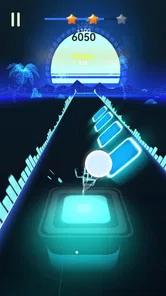
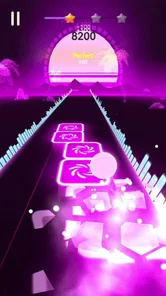
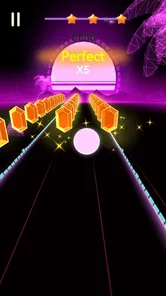
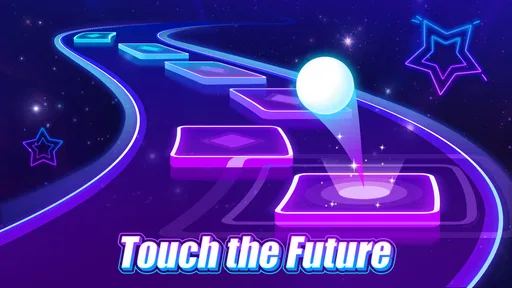
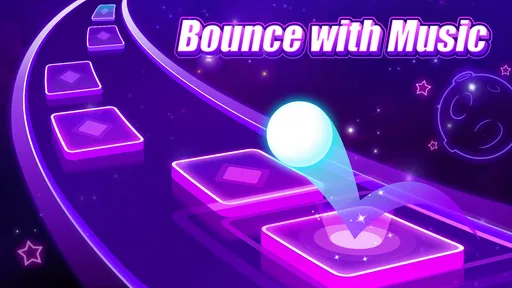
Music Ballz Hop is a rhythm-based arcade game in which you guide a bouncing ball across a path of platforms while music plays. The main challenge is to time each movement so the ball lands safely and follows the beat. Levels may feature different songs, visuals, and obstacle patterns, so success depends on both listening and reacting quickly. Check the current store listing for the precise features available in your version.
The app’s price and monetization can vary by platform, country, and version. Before downloading, look at its Google Play or App Store listing to see whether it is free, whether it offers in-app purchases, and whether advertising is mentioned. A free download does not necessarily mean every song, feature, or customization option is included at no cost. Review the purchase details carefully, particularly if a child will be playing.
Whether Music Ballz Hop works offline may depend on how it handles songs, advertisements, and other online services. Some rhythm games let players replay downloaded or built-in tracks without a connection, while other features may require internet access. Check the app description and test offline play after installation if this matters to you. If you plan to play while traveling, confirm that the songs or levels you want are available without a network connection.
Suitability depends on the game’s content, advertising, and purchase options, not only on its simple ball-and-music gameplay. Parents should check the age rating and content disclosures on the relevant app store, then review whether the game displays ads, links to external pages, or offers in-app purchases. Ratings and available features can differ between versions. For younger players, consider enabling device-level purchase controls and supervising the first session.
First, confirm that your device meets the operating-system requirements shown on its store page and has enough free storage. Close other demanding apps, restart the device, and install any available game or system updates. Rhythm games can feel especially difficult when performance drops or audio is delayed, so try lowering graphics or audio options if the game provides them. If problems continue, consult the developer’s support information listed in the app store.
On Android, Music Ballz Hop asks for these permissions.
Music Ballz Hop is also available in 2 other languages on our site.
4.6 out of 5
48,406 reviews
Music · SAMFEN LIMITED

Music4.3 out of 5

Music4.6 out of 5

Music3.1 out of 5

Music4.5 out of 5

Music4.2 out of 5

Music3.7 out of 5

Music4.5 out of 5
Music4.0 out of 5

Music4.6 out of 5

Music4.3 out of 5
Music4.3 out of 5

Music3.7 out of 5

Music4.4 out of 5

Music4.1 out of 5

Music4.6 out of 5

Music4.5 out of 5

Music4.8 out of 5

Music4.0 out of 5
Music4.8 out of 5



Gamesive reviews games on its own and is not paid by developers for scores. We do not host game files: the download buttons open the official Google Play and App Store pages. Names, icons and screenshots belong to their owners.