Piano Fire: Edm Music & Piano
Music4.6 out of 5
For Android & iOS · Dream Tiles Piano Game Studio
 Analysis by Gamesive
I like music games that are easy to pick up but still ask for a little attention, and Piano Game: Classic Music Song is built around that simple appeal. It is a free rhythm game from Dream Tiles Piano Game Studio, aimed at players who want a quick musical challenge rather than a full instrument lesson. The basic idea is approachable: follow the rhythm and tap along as the music plays. That makes it a natural choice for a short break, though the experience is better suited to casual play than to anyone expecting detailed piano training.
In this kind of piano rhythm game, the pleasure comes from matching attention, timing, and sound. I find that the appeal is less about learning where notes sit on a real keyboard and more about responding to a musical pattern without losing the beat. A familiar tune can make the first moments inviting; keeping a steady rhythm is what gives a session its challenge.
The game’s music focus also gives it a clear place among mobile games. Compared with a conventional piano-learning app, it is a lighter, more immediate way to engage with music: there is no need to approach a session as practice or as a lesson. Compared with a general rhythm game, the piano framing gives the tapping a musical identity. That distinction matters if you want an entertaining music-themed game, but not if you are looking for instruction in reading notation or playing an acoustic piano.
Its audience is broad: the content rating is Everyone, and the game has passed the scale of a niche release, with over 100 million installs. It holds a 4.0 average from around 330,000 ratings, alongside roughly 2,600 written reviews. Those figures suggest many people have tried it, but they cannot tell me whether its particular musical style will suit you. I would treat them as useful context, not a promise that every session will click.
I’d reach for this game when I have a few spare minutes and want something more active than scrolling. A short wait, a quiet moment between tasks, or a relaxed break at home are more natural settings than a long, uninterrupted gaming session. The rhythm format gives even a brief attempt a clear focus: listen, watch, tap, and see whether you can stay with the music.
One practical tip is to give the audio your attention rather than treating every round as a visual reflex test. Listening can help you anticipate the beat, especially when looking at the screen alone makes you react late. If you are in a noisy place, the visual timing cues matter more, but I would still avoid playing while walking near traffic or doing anything that needs your full attention. A game that encourages quick taps can pull your eyes away from your surroundings.
Another useful way to approach it is to treat an early stumble as a timing check, not a verdict on your musical ability. Rhythm games reward getting comfortable with the game’s pace. If you are tapping too soon, pause and follow the beat for a moment before trying again. If you are tapping late, watch how the visual cue relates to the sound rather than speeding up your fingers. That kind of adjustment is more helpful than simply tapping harder or faster.
For me, the satisfying part of a rhythm game is the small improvement from one attempt to the next: a cleaner response, fewer missed beats, or a better sense of when a phrase is about to change. That is a different kind of progress from unlocking a large world or building a character over many hours. It suits players who enjoy sharpening a quick skill, but it may feel thin to someone who wants a deep campaign, a story, or a long-term collection to manage.
There can also be a pressure trade-off. A score-focused approach can make a song feel like a test, while a relaxed approach keeps the music enjoyable even when a run is imperfect. I recommend deciding which mood you want before opening the game. If you are already tired or irritated, chasing a flawless result may make a casual break feel like another task. If you want to concentrate for a few minutes, however, the demand to keep time can be a welcome change of pace.
For younger players or families, the Everyone content rating makes the intended audience straightforward, but it does not mean every child will enjoy the timing challenge equally. A child who likes music and quick visual games may find it engaging; one who gets frustrated by missed taps may prefer a slower, less performance-focused activity. I would keep sessions light and let the player decide when to stop rather than framing repeated attempts as something they must master.
The game is free to install, with in-app purchases listed from $0.99 to $3.99 per item. That gives a useful boundary for the purchase context: paid items are available within the app, but the listed range alone does not explain what each item does or how much of the experience can be enjoyed without buying anything. I would not assume that spending is required, nor would I assume that every song or option is free. Before purchasing, check the item description shown in the app store or in the purchase flow and make sure it matches what you want.
That distinction is important when judging fairness. A price range does not establish whether purchases affect scores, unlock content, remove friction, or are purely optional extras. I can’t responsibly label the game pay-to-win or claim that paying has no effect without knowing what the items provide. If competitive results matter to you, look for clear in-game explanations before spending and avoid buying anything just to keep pace with other players unless the terms are explicit.
For a casual player, the most sensible approach is to install it for the rhythm challenge and decide later whether any paid item is worth it. The low entry barrier is appealing, but the purchase range still means it is wise to keep control of in-app spending, especially on a shared device. If a child will play, use the device’s purchase controls and discuss purchases beforehand. That is practical caution, not a claim that the game uses any particular sales tactic.
Against piano-learning apps, this game’s strength is immediacy. You can engage with music through timing rather than beginning with lessons, exercises, or instrument technique. The trade-off is equally clear: tapping to a rhythm should not be mistaken for learning to play piano. If your goal is to understand keys, chords, sight-reading, or proper finger technique, a structured learning app or a real keyboard with instruction is the better tool.
Against other casual rhythm games, the piano theme is the reason to choose this one. If you like the visual and musical idea of piano notes and want a compact game built around that identity, it has a more specific appeal than a rhythm title with a different instrument or a broader soundtrack concept. If you mainly care about competitive depth, social play, or a particular music library, compare those details in the app store before installing; popularity by itself does not answer those questions.
The game is available for devices running Android 6.0 or later, and its current version is 3.3.6. I would check compatibility before downloading if you use an older device, and keep enough storage available for the app and its updates. The developer is Dream Tiles Piano Game Studio. It was released on March 26, 2020, so this is an established title rather than a brand-new experiment; still, an older release date does not by itself tell you how frequently it changes or what a future update will add.
I’d recommend giving it a try if you enjoy music, like short reaction-based challenges, and want a game that does not ask you to commit to a long session. It may also work well for someone who wants a playful way to focus on rhythm without treating music as formal study. The free installation makes it easy to see whether the tapping style suits you before deciding whether to spend anything.
I’d steer clear if you want a realistic piano simulator, lessons that build transferable playing skills, or a deep progression system. It is also not an ideal pick if you dislike timing pressure or prefer games that can be played without keeping your eyes and attention on the screen. For those needs, a piano-learning app, a slower music puzzle, or a less reflex-driven game is likely a better fit.
My view is that Piano Game: Classic Music Song makes most sense as a quick music game, not as a substitute for piano practice. Its rhythm-first format offers an easy entry point, and the piano theme gives it a recognizable personality. The main caution is to keep expectations specific: it can make a spare moment more engaging, but it is not automatically a lesson, a full-length music experience, or a fair competitive environment simply because it is popular.
If you install it, try a few sessions with the sound on, focus on the beat instead of rushing, and decide whether the challenge feels satisfying or stressful. Keep purchases deliberate, especially on a shared device, and use another app if your real goal is to learn an instrument. For a casual player who wants a little musical concentration in a small window of time, I think it is worth trying; for everyone else, the best choice depends on whether they want rhythm-based play or actual piano skills.
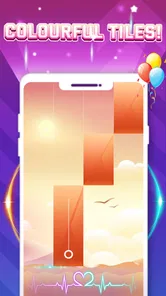
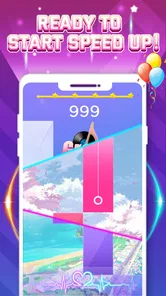
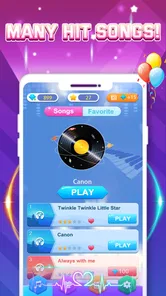
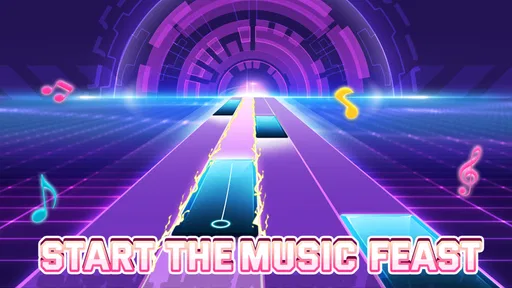
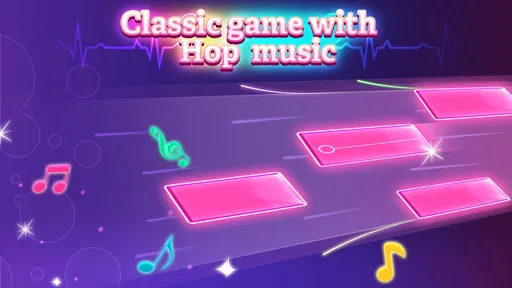
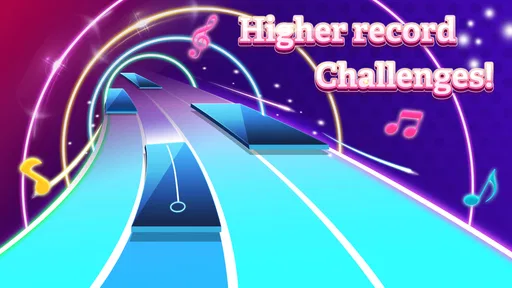
Piano Game: Classic Music Song is a mobile rhythm game built around tapping piano-style tiles in time with music. Its basic appeal is easy to understand: follow the notes as they appear, keep up with the tempo, and try to finish songs without missing a tile. The title alone does not confirm which tracks, modes, or features are included, so check the current store listing for the exact catalog and gameplay options.
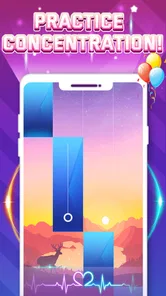
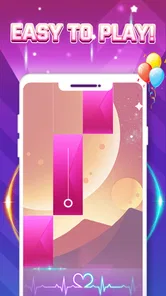
Gameplay typically involves tapping the correct tiles as they move down the screen, while avoiding missed notes and keeping a steady rhythm. Songs may become more challenging as their pace or note patterns change. If you are new to this style of game, starting with slower tracks can make it easier to learn the timing. Controls, difficulty choices, and scoring rules can vary by version, so review the in-game instructions before playing.
Whether the game works offline depends on how its current version handles song downloads, advertisements, and other online services. Some rhythm games let you replay selected tracks without a connection, while others require internet access to load music or use certain features. Before relying on offline play, check the app’s store description and test a song in airplane mode. An internet connection may still be needed for updates or optional online content.
The price and monetization can differ by platform, region, and app version. A game may be free to download while showing advertisements or offering optional purchases, such as extra content or ad removal. Check the Google Play or App Store listing for current pricing and purchase details, and review the payment settings on your device if children may use the app. Do not assume every song or feature is available at no cost.
The tile-tapping format may be approachable for players who enjoy music and quick reactions, but suitability depends on the game’s content, ads, and purchase options. Before downloading, check its age rating, privacy information, permissions, and recent user reviews in your app store. Also consider whether the pace and screen interaction are appropriate for the player. If a child will use it, enable device-level purchase controls and supervise any advertising or online features.
On Android, Piano Game: Classic Music Song asks for these permissions.
Piano Game: Classic Music Song is also available in 2 other languages on our site.
4.0 out of 5
329,542 reviews
Music · Dream Tiles Piano Game Studio
Music4.3 out of 5
Music4.6 out of 5
Music3.1 out of 5
Music4.5 out of 5
Music4.2 out of 5
Music3.7 out of 5
Music4.1 out of 5
Music3.5 out of 5
Music4.6 out of 5
Music4.3 out of 5
Music4.3 out of 5

Music3.7 out of 5
Music4.4 out of 5
Music4.1 out of 5
Music4.6 out of 5
Music4.5 out of 5

Music4.8 out of 5

Music4.6 out of 5
Music4.0 out of 5
Music4.8 out of 5



Gamesive reviews games on its own and is not paid by developers for scores. We do not host game files: the download buttons open the official Google Play and App Store pages. Names, icons and screenshots belong to their owners.