
Piano Game: Classic Music Song
Music4.0 out of 5
For Android · SYNTHJOY GAMES
 Analysis by Gamesive
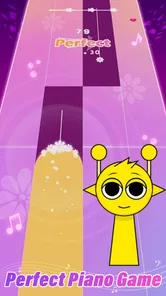
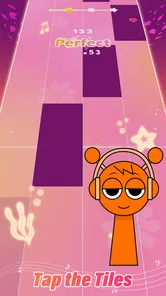
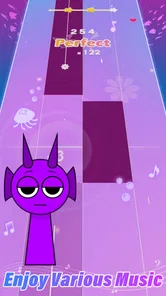
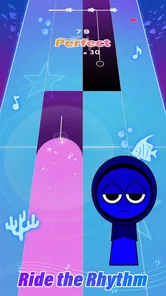
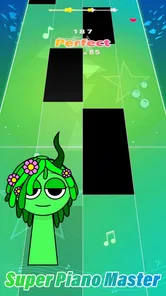
I like rhythm games that make it easy to start playing before I have time to talk myself out of it, and Pocket Piano fits that quick-session role. You tap along to songs on piano tiles, with K-pop, phonk, EDM, and pop among the styles highlighted for the game. That gives each round a familiar musical hook, while the tile-tapping keeps the focus on timing rather than learning a complicated instrument interface.
My overall impression is that Pocket Piano is best approached as a casual music game, not as piano lessons or a deep rhythm challenge. It is free to download, with optional in-app purchases, and SYNTHJOY GAMES has positioned it for players who want to pick up a phone and play. Its Teen age rating is worth noting for families, and its broad music mix makes it easier to find a mood that suits a short break.
The first useful goal is simply to follow the tiles through a song. That sounds modest, but it gives a new player an immediate task: watch the screen, match the beat, and try to keep the sequence going. Unlike music games built around instrument technique, this is about quick visual decisions and rhythm. I would recommend it to someone who wants a light test of attention without needing prior musical knowledge.
The song choices also help set a natural short-term target. If I am in the mood for an energetic track, I can gravitate toward the faster-feeling styles; if I want something more familiar, pop or K-pop may be a better fit. I would treat choosing a song as part of the play session rather than expect a long narrative or elaborate campaign to pull me forward. The appeal is the immediate connection between a recognizable musical style and the next run of tiles.
For a practical first session, I would start with a track that feels comfortable rather than choosing the most intense-sounding option. That lets me learn how quickly I can read the tile pattern before I begin chasing a tougher performance. A useful habit is to focus on the next few tiles instead of staring at the whole screen; it makes the game feel less frantic and helps prevent a small mistake from disrupting the rest of a run.
Rhythm games often communicate improvement through a clear, repeatable loop: try a song, notice where timing slips, then attempt it again with better concentration. Pocket Piano’s central tile-tapping format naturally supports that kind of self-set progress. Even without treating every attempt as a score chase, I can use a familiar song as a reference point and ask whether I am keeping up more consistently than before.
That is a more useful measure than expecting a large progression system to do all the motivating. Players who enjoy refining a performance through repetition may find satisfaction in returning to a track and improving their control. On the other hand, anyone who needs visible milestones, a long unlock path, or a strong collection goal to stay interested may find the basic rhythm loop less compelling. I would go in expecting the music and the challenge of staying on beat to do most of the work.
There is also a small but important choice in how to play: treat each run as practice, or treat it as a quick score attempt. Practice-minded play is less frustrating because a missed tile becomes information about timing or attention. Score-minded play can be exciting, but it can also make a familiar song feel like a test. I prefer alternating between the two: a relaxed run to get comfortable, followed by a more focused attempt when I feel ready.
The basic interaction is easy to understand, but keeping up with a stream of tiles is a different matter. The challenge comes from coordinating sight and timing while music moves forward, not from mastering complicated controls. That makes the game approachable at first glance while leaving room for moments that demand more concentration. I would not assume every song will suit every player equally; musical familiarity and personal comfort with fast visual sequences can change how demanding a run feels.
When a track becomes difficult, I find it more sensible to slow down mentally than to tap harder or faster. Watch the pattern, keep your hands relaxed, and use the beat as a guide rather than reacting in panic to every tile. If repeated attempts stop being fun, switch to a different musical style and return later. That is a practical way to preserve the casual feel instead of turning one difficult song into a chore.
This is also where Pocket Piano differs from a traditional piano-learning app. It can sharpen attention to rhythm and timing in a game context, but tile taps are not the same as practicing notes, scales, or hand technique on a keyboard. If your goal is to learn to play piano, I would choose an instructional app or a real keyboard routine instead. If you want a music-themed reflex game, this is a more direct fit.
The game’s strongest retention tool is the simple promise of another attempt: a song is short enough to make replaying feel manageable, and familiar music gives a run an immediate identity. That works especially well during a commute break, while waiting for food, or between tasks at home. I would use it in brief bursts rather than plan a long session, because the core activity depends on repeating the same kind of focused interaction.
Its offline-play appeal is another practical plus for those moments when connectivity is inconvenient. I would still open the game before heading somewhere with unreliable service, just to make sure it is ready for the session I have in mind. Playing offline makes it a handy option for travel or a spotty connection, but it does not change the underlying rhythm loop: the enjoyment still depends on whether the songs and tile challenge hold your attention.
Optional spending is the main point to keep in mind if you are sensitive to in-app purchases. The game is free to start, while purchases are offered at prices ranging from $0.99 to $29.99 per item. I would decide before playing whether I am comfortable with optional purchases and avoid treating them as necessary for enjoyment. For parents, that is a sensible conversation to have alongside the Teen content rating, especially if a younger player will use the device.
The larger question is whether repetition feels satisfying or pressured. If I am enjoying a song, another run can feel like a low-stakes chance to do better. If I am replaying only because I feel pushed to keep advancing, the loop loses its charm. I would recommend setting a small personal limit for a session—one song, a few attempts, or a short break—and stopping when the game stops feeling playful. That keeps the experience in its strongest lane: quick entertainment rather than an obligation.
Compared with music games that ask players to follow notes along a lane or match prompts with a controller-like interface, Pocket Piano’s tile format is easy to grasp on a touchscreen. It is also less demanding than a rhythm game centered on complex chart patterns or a competitive leaderboard mindset. That simplicity is a strength for casual players, though it may feel too straightforward to people who want elaborate modes, detailed instrument simulation, or a broad social competition layer.
Against piano apps, the distinction is sharper. Learning-focused tools usually reward deliberate practice and explain musical concepts; Pocket Piano is built around responding to tiles in time with songs. I would choose it for a small burst of play, and choose a lesson-based app if I wanted a structured path toward musicianship. For someone who already enjoys tapping rhythm games, it can be an easy alternative when they want familiar pop-oriented energy without committing to a lengthy session.
The game has reached over 10 million installs and holds a 4.6 average from around 18,000 ratings, which suggests it has found a sizable audience. Those figures are a useful sign of reach, but they cannot tell me whether its particular song mix or replay style will suit you. The best test is whether you enjoy listening closely and reacting to a moving tile sequence; if that basic loop does not appeal, popularity will not make it feel deeper.
I would suggest Pocket Piano to players who want music-led touchscreen play, like recognizable contemporary genres, and are happy to improve through repeated attempts. It also makes sense for someone looking for an offline-friendly distraction that can fit into spare minutes. The current version is 0.6.25, and the game was released on April 25, 2024; it supports Android 7.1 and later, so checking device compatibility before installing is worthwhile.
I would skip it if you are looking for piano instruction, a long-form story, highly strategic progression, or a rhythm game whose main attraction is competitive depth. The tile format puts timing and attention first, and its appeal depends on enjoying that direct challenge. Players who grow bored with repeating songs may be better served by a music game with a more varied set of activities, while learners should look for a tool that teaches rather than simulates a piano-themed rhythm task.
In the end, I see Pocket Piano as a straightforward pick-up-and-play rhythm game with a useful mix of musical moods and a clear reason to try another run. Its goals are small, its progress is most rewarding when you notice your own improvement, and its pacing suits short sessions better than marathon play. I would try it if you want a free music game for idle moments, keep purchases in mind, and move on if you need deeper progression or genuine piano practice. That is a modest promise, but for the right player, it is an appealing one.
Pocket Piano is a portable piano-style app designed for playing notes and simple melodies on a phone or tablet. It turns the touchscreen into a keyboard, making it possible to experiment with tunes without carrying a physical instrument. The exact instruments, recording tools, lessons, and other features can differ between versions, so check the app listing and screenshots to confirm what is included in the edition you plan to download.
Beginners can use Pocket Piano to explore note positions, practise simple melodies, and get familiar with tapping keys, but a touchscreen app is not a full substitute for piano lessons or a real keyboard. Screen size, touch response, and the available learning guidance may affect how useful it is for practice. Check whether your version offers lessons, note labels, or adjustable keyboard settings if those features are important to you.
Basic keyboard playing may work offline once Pocket Piano is installed, but availability can depend on the particular version and whether it relies on online content, account services, or advertising. If you need to use it while travelling or away from Wi-Fi, test the app before you leave and review its store description. Downloading the app and any additional content generally requires an internet connection.
The price and payment model can vary by platform, region, and app version. Pocket Piano may be offered as a free download, but that does not necessarily mean every feature is free or that the experience is ad-free. Before installing, review the Google Play or Apple App Store listing for the current price, advertising disclosures, in-app purchases, and any subscription terms. Avoid assuming that features shown in promotional material are included at no cost.
Check the current store listing for Pocket Piano’s supported Android or iOS versions, device compatibility, download size, and declared permissions. A piano app may need sound output to play notes, while features such as saving recordings or sharing files could involve additional access; requirements vary by version. Install it from the official app store where possible, and review privacy details and developer information before granting permissions or entering personal data.
On Android, Pocket Piano asks for these permissions.
Pocket Piano is also available in 2 other languages on our site.
4.6 out of 5
17,690 reviews
Music · SYNTHJOY GAMES

Music4.3 out of 5
Music4.6 out of 5
Music3.1 out of 5
Music4.5 out of 5
Music4.2 out of 5
Music3.7 out of 5
Music4.0 out of 5
Music3.5 out of 5
Music4.0 out of 5

Music4.6 out of 5

Music4.3 out of 5
Music4.3 out of 5

Music3.7 out of 5
Music4.4 out of 5

Music4.1 out of 5
Music4.6 out of 5
Music4.5 out of 5

Music4.8 out of 5

Music4.6 out of 5
Music4.0 out of 5



Gamesive reviews games on its own and is not paid by developers for scores. We do not host game files: the download buttons open the official Google Play and App Store pages. Names, icons and screenshots belong to their owners.