
Piano Game: Classic Music Song
Music4.0 out of 5
For Android · Dream Tiles Piano Game Studio


 Analysis by Gamesive
The first thing I notice in Piano Rush: Magic Rhythm is how little it asks me to learn before I can start: the appeal is immediate, rhythmic tapping, quick reactions, and the hope of staying in time as the action speeds up. That makes it easy to pick up for a brief break, but it also means the game’s lasting appeal depends on whether repeating that small, focused task feels satisfying rather than merely frantic. I’d treat it as a compact reflex game with a musical frame, not as a piano tutor or a substitute for learning songs on an instrument.
As a music game from Dream Tiles Piano Game Studio, it sits in familiar territory: follow the rhythm through touch rather than learning keys or music theory. The basic idea is approachable even if you have never played a rhythm game. You can begin with your attention on timing and hand movement, rather than on complicated controls or a long setup. That simplicity is useful when you have only a few minutes and do not want to commit to a lengthy session.
The most helpful way to approach a run is to watch the pattern and keep your taps deliberate. When I try to react to every movement as if it were a surprise, my fingers get tense and I lose the beat. Relaxing my hands and treating each input as part of a repeating rhythm makes the action easier to follow. This is a small but practical distinction: the game rewards attention and timing, not simply tapping as fast as possible.
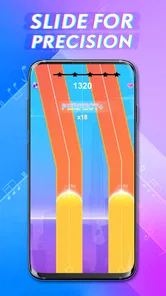
The store description positions the experience around fast taps and sharp sliding, so players should expect an active touch-screen challenge rather than a passive music player. The appeal is physical: eyes track the action while fingers respond. That makes it a natural fit for short sessions on a phone, though it is less suitable when you cannot give the screen your full attention. Trying to play while walking, carrying something, or watching another task is likely to turn a quick challenge into a frustrating one.
The core pleasure comes from the connection between what I see, what I hear, and what my fingers do. When those elements line up, a successful sequence feels earned. A missed beat, by contrast, is immediately understandable: I was late, rushed, or distracted. That clear action-and-feedback loop is one reason a simple music game can hold my attention even without the complexity of a full rhythm-game setup.
There is a useful mental shift here. Instead of staring at every individual cue, I try to anticipate the next movement while staying anchored to the current beat. That helps keep a run controlled, especially when the pace feels demanding. It is also a good reason to play with the sound at a level where the rhythm remains easy to follow. If you prefer to play silently, the visual action can still be the focus, but the musical character is naturally less central.
Compared with music games built around elaborate song libraries, instrument-style controls, or deeper progression systems, Piano Rush is best judged on immediacy. It has the kind of low-friction loop that suits a quick phone break. It is not the choice I would make if I wanted to practise piano technique, explore a wide range of musical styles, or build a detailed performance. For that, a dedicated instrument-learning app or a more content-focused rhythm game is a better match.
The reward in this kind of play is partly the feeling of keeping a difficult sequence under control. A clean stretch gives me a small burst of satisfaction, while a mistake makes the next attempt feel like a chance to do better. The rhythm provides the immediate payoff; improvement comes from noticing where I tend to rush and adjusting my timing. That is more compelling than mindless tapping, but it does require me to enjoy repeating a compact challenge.
A practical tip is to treat an early failure as information, not as a reason to speed up. If I miss because my attention drifted, I need a steadier focus. If I get ahead of the beat, trying to tap harder or faster is unlikely to help. A calmer reset makes it easier to tell whether the problem was timing or distraction. This approach is useful for anyone who tends to tense up in reflex games and then make the same mistake repeatedly.
For a realistic everyday use, imagine waiting for a ride or taking a short pause between tasks. A quick session gives your attention something specific to do, and the music-game format feels more active than scrolling through a feed. I would keep it to a moment when I can look at the screen and listen comfortably. It is not ideal during a noisy commute if you rely on hearing the beat, or in a setting where quick finger movements would be awkward.
There is also a difference between a satisfying challenge and a relaxing one. Piano Rush may be enjoyable when I want a short test of coordination, but a fast reaction game is not automatically calming. If I am tired, stressed, or looking for background music, I would choose a listening app or a slower, less demanding game instead. The best use is intentional: a few focused minutes, rather than expecting it to fill a long, varied evening.
The reset is central to the loop. A run ends, I get a reason to try again, and the next attempt begins with the same basic goal: react more cleanly. That structure is easy to understand, but repetition can become the main limitation. Players who need a constant stream of new modes, story, or strategic decisions may find the cycle thin. The game is a stronger fit for people who enjoy refining a small skill than for those who want every session to introduce something new.
To keep repeated attempts useful, I would change one thing at a time. Focus on steadier timing in one run, then on avoiding rushed inputs in the next. If I simply restart without paying attention, I am likely to repeat the same error and blame the game. This small self-imposed method turns a string of attempts into practice, while keeping expectations realistic: the point is a more controlled run, not musical training.
One trade-off is that a familiar loop can be both convenient and limiting. It is easy to return because there is little to relearn, yet that same consistency may make the experience feel repetitive once the basic action has lost its novelty. I would recommend trying it in short bursts before deciding whether it deserves a regular place on your phone. If the satisfaction comes from beating your own sense of timing, the cycle can work. If you need a broad catalogue of activities, it may not.
The game is free to download, with in-app purchases ranging from ninety-nine cents to thirty-nine dollars and ninety-nine cents per item. I would start with the free experience and decide whether I enjoy the core loop before spending anything. Optional purchases can change how much someone chooses to invest, so it is sensible to check the purchase screen carefully, particularly if a child might use the device. The game carries a Mature 17+ age rating, which is an important consideration for families choosing what to install.
I can see Piano Rush working well for players who like quick reflex challenges, enjoy music as a guide to movement, and are happy to repeat a short task in pursuit of a cleaner run. It is also suitable for someone testing the rhythm-game genre who wants a straightforward starting point. Its current version is 1.3.6, and it requires Android 7.0 or later. The game has over ten million installs and an average rating of three and a half from around five thousand six hundred ratings, so it has attracted a sizable audience, though that does not mean its particular loop will suit every player.
I would skip it if my priority were learning real piano, playing songs with expressive control, or having a deep progression system to explore. I would also be cautious if fast touch input tends to frustrate me, or if I prefer games that reward planning more than immediate reactions. The age rating matters too: it is not a pick I would casually hand to a younger player without first considering that classification and reviewing the app’s purchase options.
Against the usual alternatives, the choice is straightforward. A music streaming app is better when I want sound without active play; a piano-learning tool is better when I want structured musical skills; and a more elaborate rhythm title may suit me better if variety and a larger sense of progression are priorities. This game’s strength is the short path from opening it to making a rhythmic input. Its weakness is the flip side of that focus: if the repeat-and-reset pattern does not hook me, there may be little else to hold my attention.
My recommendation is qualified but positive for the right player. The central loop is easy to grasp: I tap or slide in response to the rhythm, get immediate feedback, enjoy the satisfaction of a successful stretch, then reset and try to make the next attempt more controlled. That cycle can make a spare moment feel lively, especially when I approach it as a focused reflex challenge rather than expecting a full musical experience.
The best reason to try it is its quick, hands-on rhythm play; the best reason to stop is that the same simple loop can become repetitive. I would install Piano Rush: Magic Rhythm if I wanted a free, short-session music game and was comfortable with a Mature 17+ rating and optional purchases. I would choose another option if I wanted lessons, richer variety, or a calmer way to enjoy music. For the right expectations, it offers a clear little challenge: find the beat, stay composed, and see whether the next run feels better than the last.
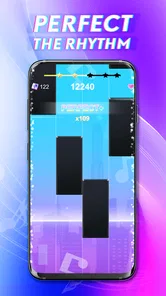
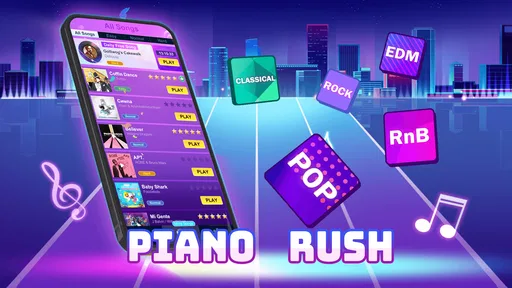
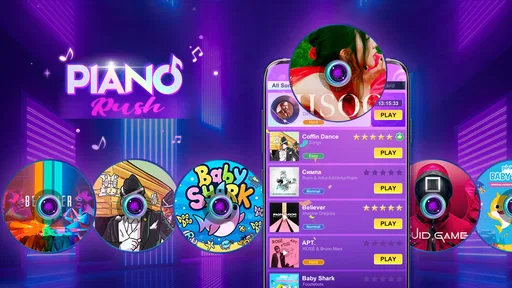
Piano Rush: Magic Rhythm is a rhythm game built around tapping tiles in time with music. Its basic appeal is easy to understand: follow the notes as they move across the screen and try to keep your timing accurate through each track. It can suit casual players looking for quick sessions, though the precise gameplay may become challenging as songs speed up.
Choose a song or available level, then tap the tiles in rhythm as they reach the play area. Staying on beat and avoiding missed notes helps you complete a track and achieve a better result. The controls are simple, but songs can demand quick reactions, so headphones and a steady connection to the music may help. Check the in-game instructions for the current rules and scoring.
The game may be offered as a free download, but availability, pricing, and in-app purchase options can differ by platform and region. Free games may also include advertisements or optional paid items. Before installing, review the Google Play or App Store listing for the latest price, purchase details, and any recurring charges, and confirm that the app is compatible with your device.
Offline play depends on how the current version handles song downloads, advertisements, and other online features. Some rhythm games let you replay downloaded tracks without a connection, while menus or new content may require internet access. If you plan to play while travelling, check the store listing and test a song after installation with your device offline rather than assuming every feature will be available.
Check that your phone meets the app’s operating-system and storage requirements, and read the latest store listing for supported devices, permissions, ads, and purchases. Rhythm games rely on responsive touch controls and audio timing, so performance can vary with older hardware or Bluetooth audio latency. Also review the privacy information and ratings, especially if a child will be using the app.
On Android, Piano Rush: Magic Rhythm asks for these permissions.
Piano Rush: Magic Rhythm is also available in 1 other languages on our site.
3.5 out of 5
5,559 reviews
Music · Dream Tiles Piano Game Studio

Music4.3 out of 5
Music4.6 out of 5
Music3.1 out of 5
Music4.5 out of 5
Music4.2 out of 5
Music3.7 out of 5
Music4.0 out of 5

Music4.1 out of 5
Music4.0 out of 5

Music4.6 out of 5

Music4.3 out of 5
Music4.3 out of 5

Music3.7 out of 5

Music4.4 out of 5
Music4.1 out of 5
Music4.6 out of 5

Music4.5 out of 5

Music4.8 out of 5

Music4.6 out of 5
Music4.0 out of 5



Gamesive reviews games on its own and is not paid by developers for scores. We do not host game files: the download buttons open the official Google Play and App Store pages. Names, icons and screenshots belong to their owners.