Music Piano 7: Rush Song Games
For Android & iOS · Melodya Muses
- 4.8 out of 5Rating
- 472.31KReviews
- 50.00M+Downloads
- MusicGenre
Game details
- Version
- 3.10.0
- Updated
- Requires
- 7.0
- Price
- Free
- Age rating
- Everyone
- In-app purchases
- No
Screenshots



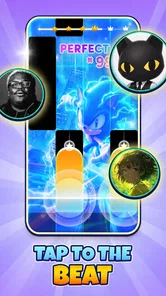
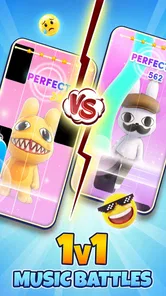
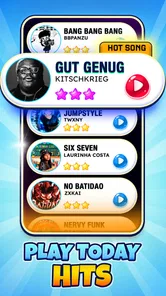


Music Piano 7: Rush Song Games review
 Analysis by Gamesive
I like rhythm games best when I can understand what they want from me within a few seconds, then feel my timing improve through play. Music Piano 7: Rush Song Games is built around that immediate appeal: listen, tap along, react to the notes, and try again when a run slips away. It is a music game from Melodya Muses, aimed at people who want quick, music-led play rather than a long tutorial or a complicated setup.
One tap gets the rhythm moving
The first thing to know is that this is a timing game, not a piano lesson. The piano imagery sets the mood, but the central challenge is responding to the song’s moving cues accurately. That makes the game easy to approach even if you have never played an instrument. You are paying attention to rhythm and reaction, not learning scales or reading conventional sheet music.
That distinction matters when choosing between this and other music games. A full rhythm-game experience may ask you to learn several controls or follow a more elaborate track layout. A piano-tile style game keeps the action direct: focus on the cues, tap in time, and stay composed as the song continues. I find that simplicity especially useful when I have only a few minutes and want to start playing without first remembering a complicated control scheme.
The music selection is part of the draw. The game’s identity points toward contemporary styles such as K-pop and EDM, so it is a natural fit for players who enjoy energetic, beat-driven tracks. If your idea of a music game is mainly classical piano practice, this may not scratch that itch. It is better approached as an accessible rhythm challenge with piano-themed presentation than as a realistic instrument simulator.
The store lists the game as free and suitable for Everyone. That lowers the barrier to trying it, though “free” does not mean every player will have the same experience or that every possible in-game choice is cost-free. I would treat it as an easy game to sample, then decide whether its rhythm loop and music are a good match for the way you like to play.
Why the first attempt feels approachable
A short rhythm game can be a good fit for a commute, a wait between errands, or a brief break at home. You can make a focused attempt without setting aside a whole evening. For a realistic everyday example, I might open it while waiting for someone to arrive, play one song, and put my phone away when they do. The format makes that kind of stop-and-start use feel more natural than a story game that expects me to remember a plot or return to a lengthy mission.
There is also a useful mental shift between tapping casually and playing deliberately. On a first run, I might simply follow the screen and enjoy the beat. On a later attempt, I can pay closer attention to where my timing falters, keep my hands relaxed, and avoid tapping ahead just because a section sounds fast. That small change turns a simple round into a practice loop without requiring a separate training mode.
Feedback, reward, and the next try
The appeal of a tile-based rhythm game depends on whether the screen and sound make your timing feel legible. Each successful response should feel connected to the beat, while a miss gives you a clear reason to reset your focus. The useful feedback is not only a score or end screen; it is the immediate sense that a well-timed tap keeps the performance flowing. When the timing gets messy, the interruption is a reminder to settle down rather than chase every cue in a panic.
My practical advice is to begin with the rhythm you hear, not the speed you imagine the game expects. Players often tense up when a song becomes busy and start tapping too early. I would keep the phone steady, use a comfortable grip, and let the beat guide each response. If a run goes wrong, the next attempt is more valuable when I identify one cause—rushing, distraction, or an awkward hand position—instead of changing everything at once.
That is where the reward loop becomes tangible. A clean stretch feels satisfying because it reflects attention, not luck alone. A successful run can also make the next song or replay feel inviting: I know I can sharpen the same skill, or see whether I can keep my timing under pressure. The reward is primarily the pleasure of staying in sync and improving a performance, rather than a deep progression system I would expect from a role-playing game.
There is a trade-off here. Simple controls let the music take center stage, but they also mean that players who want expressive instrument controls may find the interaction limited. You are not shaping a melody with a keyboard or choosing how to perform a piece. If you want to make music, learn piano technique, or improvise, a music-learning app or a more instrument-focused game would be a better choice. This one is for reacting to music, not creating it.
What makes a replay useful
For a more satisfying second attempt, I would avoid treating every miss as proof that the song is too difficult. First check whether your tapping is matching the beat consistently. Then try again with less force and fewer anticipatory movements. This is a small but meaningful workflow: one run to learn the pattern, a pause to reset your hands, and a second run with a specific adjustment. It helps prevent the familiar cycle of repeatedly restarting while making the same mistake.
It also helps to choose the right moment to play. If you are distracted by conversation or need to watch your surroundings, a timing game can become frustrating because the core task depends on attention. A quieter break is more suitable. On the other hand, the short-session format is handy when I want a small challenge but do not want to commit to a lengthy multiplayer match or a multi-stage adventure.
Offline play is part of the game’s stated appeal, which can make it useful when a connection is unreliable or unavailable. I would still distinguish that from assuming every screen, feature, or store-related function works offline. For the basic reason to open a rhythm game—playing along with music—the offline angle is a practical advantage, especially during travel. It is not a substitute for checking that the particular content you want is available before heading out.
When the loop resets—and when it wears thin
Like many score-focused rhythm games, the reset is both its strength and its limitation. A failed run is easy to understand: you lost the rhythm, so you can try again. There is little mental overhead, and the next attempt starts with a clear goal. That makes the game inviting for short bursts and gives a determined player a reason to replay a track until the timing feels steadier.
But repetition can also expose the limits of a compact loop. If you mainly want a narrative, varied objectives, or a sense of exploration, tapping through songs may begin to feel samey. The game is most rewarding when I enjoy the act of matching cues to music itself. A player who needs frequent changes in setting, character, or strategy may prefer a broader arcade game or a rhythm title with more elaborate modes.
Another sensible expectation is that touch response and comfort depend on the device and how you hold it. For precise play, I would keep the screen unobstructed and avoid gripping so tightly that my taps become stiff. If the game feels less accurate during a hurried one-handed attempt, I would try a more stable position before blaming my timing. That is an especially useful distinction for players who usually play on the move.
The game has an average rating of 4.8 from around 472,000 ratings, and it has been installed over 50 million times. Those figures suggest that its straightforward rhythm format has reached a large audience, but they do not tell me whether its music or challenge will suit every person. I would use them as a sign that the game is widely played, not as a promise that every session will feel fresh.
Who should give it a try
I would recommend it to someone who enjoys tapping games, wants a quick way to engage with K-pop or EDM-style rhythms, or likes the small satisfaction of improving a run. It can also work as a casual game to share with a family member who wants simple, immediate interaction; its Everyone age rating reflects that broad intended audience. The game is free to start, so it is approachable for people who would rather try the play style before committing to a purchase.
I would steer away from it if your main goal is learning piano, practicing musical notation, or composing. I would also look elsewhere if you prefer rhythm games built around complex inputs, competitive depth, or lots of different objectives. This title’s strength is its directness, and that same directness is what may leave a more experienced rhythm player wanting another layer of challenge or a different kind of musical interaction.
It is a substantial release rather than a tiny experiment: it launched on October 12, 2023, and the current version is 3.10.0. The minimum operating system is 7.0. Those details are useful when checking device compatibility, while the version number gives a straightforward way to identify the current release in the app store. The developer is Melodya Muses, and the game sits firmly in the music-game space rather than presenting itself as a general-purpose piano tool.
My verdict on the repeat-play appeal
What keeps me interested is the clean cycle: start a song, react to its rhythm, enjoy the flow when my taps land, and reset when concentration slips. A replay has a clear purpose if I can name what I want to improve. That makes Music Piano 7: Rush Song Games a sensible pick for short, music-centered breaks, especially for players who like quick feedback more than elaborate systems.
I would not call it a replacement for piano practice or a deep rhythm-game alternative. Its appeal is narrower and more immediate: music in the foreground, simple tapping, and the chance to do a little better on the next run. If that is the kind of small challenge you reach for between daily tasks, I think it is worth trying. If you need creative control, long-term variety, or a more demanding musical interface, you will probably be happier with a different app.
Overall, I see it as an easy-to-enter game whose best sessions come from matching its pace rather than rushing through it. Start casually, use a replay to test one adjustment, and stop when the loop feels repetitive instead of forcing another round. That approach lets the game’s strongest quality—its quick, understandable rhythm challenge—remain enjoyable.
What we like
- Quick rounds make it easy to play during short breaks.
- Simple tap controls are approachable for new players.
- The rhythm format can help sharpen timing and focus.
- A broad song selection may appeal to different tastes.
- Progress-based challenges offer a reason to keep playing.
What could be better
- Fast note sequences can feel difficult for beginners.
- Some songs or features may require in-app purchases.
- Frequent play can become repetitive over time.
- Ads may interrupt the flow between rounds.
- The game may need an internet connection for some content.
Frequently Asked Questions
What kind of game is Music Piano 7: Rush Song Games?
Music Piano 7: Rush Song Games is a rhythm game built around tapping piano-style tiles in time with music. Its main appeal is the quick, arcade-like challenge: follow the notes as they move across the screen, keep your timing steady, and try to complete each song without missing a tile. It is designed for short sessions, though song availability and specific modes can vary by version.
How do you play Music Piano 7: Rush Song Games?
The basic controls are simple: tap the tiles as they reach the target area and avoid tapping empty spaces. Some tracks may introduce faster sequences or other tile patterns, so staying focused matters more as a song progresses. The game is easy to understand at first, but achieving a clean run can take practice. Check the on-screen instructions when starting, since controls and scoring details may differ between releases.
Does Music Piano 7: Rush Song Games work offline?
Whether you can play without an internet connection may depend on the version and the features you want to use. A downloaded track or basic mode might be available offline, while opening the game, loading additional songs, viewing ads, or using online features may require a connection. For reliable offline play, launch the game while connected first and check whether your chosen songs remain accessible after disconnecting.
Is Music Piano 7: Rush Song Games free, and does it include ads or in-app purchases?
The app may be offered as a free download, but that does not necessarily mean every feature is free or ad-free. Mobile rhythm games commonly use advertising, optional purchases, or other unlocks, and the exact setup can change between versions and regions. Review the current store listing and the purchase details shown in the app before downloading, especially if you are setting it up for a child or want to avoid unexpected charges.
What should I check before downloading Music Piano 7: Rush Song Games?
Before installing, check that the store listing matches your device, operating-system version, and available storage, and read recent reviews for information about performance and song availability. Also review the app’s age guidance, privacy disclosures, requested permissions, and any advertising or purchase details. If you are unsure about its suitability or offline features, consult the current listing rather than relying on assumptions, since app content and policies can change with updates.
Permissions
On Android, Music Piano 7: Rush Song Games asks for these permissions.
- Wi-Fi connection information
- view Wi-Fi connections
- Other
- view network connections, full network access, change your audio settings, control vibration, prevent device from sleeping
User reviews
4.8 out of 5
472,307 reviews
- 87%
- 7%
- 3%
- 1%
- 2%
Download Music Piano 7: Rush Song Games
Music · Melodya Muses · Free
Games like Music Piano 7: Rush Song Games
View all: Games like Music Piano 7: Rush Song Games
Tiles Hop Music & Ball Game
Music4.3 out of 5
Magic Tiles 3™ - Piano Game
Music4.6 out of 5

Magic Dancing Tiles
Music4.8 out of 5

Kpop Piano Beats - Music Game
Music4.7 out of 5
About this listing
- Game
- Music Piano 7: Rush Song Games
- Developer
- Melodya Muses
- Package
- com.bunbunstudio.magicblocktiles
- Version reviewed
- 3.10.0
Gamesive reviews games on its own and is not paid by developers for scores. We do not host game files: the download buttons open the official Google Play and App Store pages. Names, icons and screenshots belong to their owners.