
Brain Test 4: Tricky Friends
Trivia4.7 out of 5
For Android & iOS · TapNation
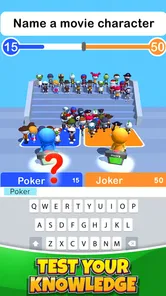
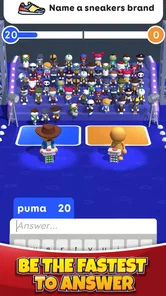
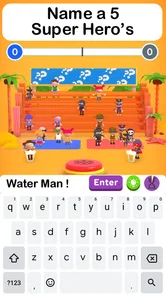

 Analysis by Gamesive
I find Guess Their Answer - IQ Games works best as a quick social distraction rather than a deep test of knowledge. Its trivia-style challenges ask you to think about what other people might say, which gives a round a different feel from a conventional quiz with one objectively correct fact. That makes it easy to bring out during a short break or pass around with friends, though it also means your success can depend on guessing a popular response rather than knowing the most.
The central idea is simple, but the wording matters. When a prompt asks for a likely answer, I have to set aside the response that feels most logical to me and consider what a broad group of players might choose. If I treat every question like a school quiz, I can miss the point. The enjoyable part is often the brief debate afterward: one person argues for the obvious choice, while another thinks of the answer that more people would give.
That social angle is also the main source of friction. A question can feel subjective, and a response that seems perfectly reasonable may not match the answer the game expects. I would not use every result as a measure of intelligence; the format rewards familiarity with common opinions and phrasing as much as reasoning. If a prompt feels ambiguous, it is more useful to treat it as a playful guessing challenge than to insist that there must be a single universally correct answer.
TapNation’s game sits in the trivia category, but it is not quite the same as a traditional fact quiz. Its premise is closer to predicting a crowd’s response, so it suits players who enjoy quick choices and light discussion. Someone looking for detailed explanations, a structured course, or questions that carefully test a specialist subject may find the experience too casual.
If the game does not behave as expected, I would start with ordinary checks rather than assume the challenge itself is broken. Confirm that the device meets the stated minimum operating-system requirement of version 7.0 or later, then make sure the app is up to date. The current release is version 5.2.3, and using a current build is a sensible first step when something seems out of date or inconsistent.
It is also worth checking the exact app name before installing. There are plenty of quiz and guessing games, and similar titles can make it easy to open the wrong one. This one is made by TapNation, is free to download, and is rated for Everyone. Those details make it straightforward to identify in an app store, while the presence of optional in-app purchases means I would check the purchase controls on a shared device before handing it to a child.
The game has drawn a sizeable audience, with over 50 million installs, and its average rating is 4.4 from around 563,000 ratings. I take that as evidence that the quick, accessible premise appeals to many players, not as a guarantee that every prompt will suit my taste. A large audience can help explain the crowd-guessing concept, but it does not remove the occasional mismatch between my interpretation and the answer the game is looking for.
When a round or screen seems to stop responding, I would use a simple recovery sequence: wait briefly, leave the current screen if the controls allow it, and reopen the game. If that does not help, close and relaunch the app, then check for an available update. These are general steps rather than a claim about a particular known bug, but they can separate a temporary pause from a problem that persists across launches.
If a challenge seems confusing rather than frozen, I would reread the prompt slowly and identify what it is asking me to predict. Is it asking for the answer I personally prefer, or the answer I think a typical player would give? That small distinction can prevent a lot of unnecessary retries and frustration. In a group, saying your reasoning out loud before choosing can also make the round more entertaining, even when the guess does not land.
For a more reliable group session, I would agree on a simple turn-taking routine before starting: one person reads the prompt, everyone makes a choice, and then the group compares answers. It avoids people talking over the question or influencing each other before they have decided. This is not a special game mode; it is just a practical way to make a subjective guessing game fairer and more fun in a room with different ages or personalities.
Some disappointments come from expecting a different kind of game. If you want answers supported by explanations or a clear lesson after each question, a conventional knowledge quiz is a better fit. If you want a serious IQ assessment, this title’s playful challenges should not be treated as a clinical or scientific measure. The word “IQ” in the name may set expectations, but I would approach the experience as entertainment, not as a dependable evaluation of ability.
Likewise, a disagreement over an answer does not automatically mean the app has failed. The whole appeal is tied to anticipating what other people might say, and people can interpret a prompt differently. If the group is split, that may be a sign to discuss the wording rather than proof that one player is smarter. Players who dislike subjective prompts or want every point to hinge on verifiable facts may be happier with a standard trivia app.
Connection or device conditions can also affect how any mobile game feels, so I would check whether other apps are responding normally before concluding that this one is responsible. Restarting the app and trying again later are reasonable first moves. If the same issue continues, it is better to use the app store’s support route than to repeatedly reinstall without a clear reason, especially if the device is shared or has settings that need to be restored.
The game is free to start, with optional in-app purchases listed from $0.99 to $7.99 per item. That makes it easy to try without paying upfront, but I would not assume every part of play is purchase-free. On a family device, purchase authentication and spending limits are worth checking in advance. For someone who only wants an occasional round, the free entry point is appealing; anyone particularly sensitive to prompts to buy extras should keep that possibility in mind.
I see its strongest use in small pockets of time: waiting for food, sharing a quiet moment on a trip, or filling a few minutes before everyone heads out. For example, friends waiting for a table can each guess what a typical person would choose, then compare their reasoning. The game gives the group a prompt to react to without requiring a long setup or deep concentration. It is less suitable for a formal party game night where players expect extensive rules, team strategy, or a carefully balanced competition.
Compared with a standard multiple-choice trivia game, this one asks for social intuition rather than simply recalling facts. Compared with a word or logic puzzle, it is less about solving a single self-contained problem and more about predicting a broadly appealing response. That distinction is useful when choosing what to play: pick this for casual conversation and quick guesses, but choose a knowledge quiz for learning or a puzzle game for more focused solo thinking.
Guess Their Answer - IQ Games is a good pick when I want a low-commitment trivia game that can spark a little friendly argument. TapNation’s title has a broad audience, a free starting point, and an Everyone age rating, with optional purchases available. Its best quality is also its defining limitation: answers are about what people might choose, so the experience can feel lively and unpredictable, but not always as precise as a conventional quiz.
I would recommend it to casual players, families who enjoy comparing opinions, and friends who want an easy activity between other plans. I would skip it if I needed a rigorous IQ test, a detailed learning tool, or a quiz where every answer is plainly objective. Before playing, keep the app updated, check purchase settings on shared devices, and remember to answer as a crowd might—not only as you would. With those expectations, it is an approachable way to turn a few spare minutes into a quick guessing game.
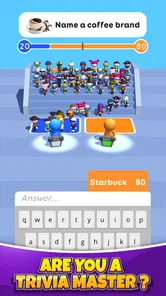
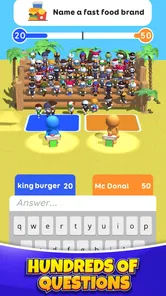
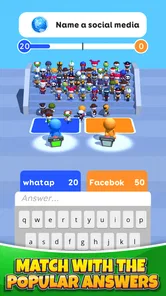
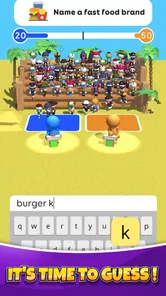
Guess Their Answer - IQ Games is a casual quiz game built around predicting what other people might say to a prompt. Rather than relying only on factual knowledge, rounds test how well you can anticipate common or popular responses. The format makes it suitable for quick sessions, though the exact prompts, modes, and features may vary by version and region.
A round presents a question or topic, and you enter or choose an answer that you think other players are likely to give. Your goal is generally to match popular responses and score points, rather than provide a single objectively correct fact. Read each prompt carefully, since a broadly recognizable answer may perform better than an unusual or highly specific one.
Offline availability can depend on the app version and the features you want to use. Some casual quiz games allow limited solo play without a connection, while online play, content updates, advertisements, or certain modes may require internet access. Check the store listing and test the game before relying on offline access, particularly if you plan to play while traveling.
The game may be free to download, but that does not necessarily mean every feature is free or uninterrupted. Mobile games commonly use advertising, optional purchases, or both, and the exact options can change with updates or by platform. Review the current Google Play or App Store listing for pricing details, available purchases, and any notes about ads before downloading.
Its simple quiz format may appeal to a broad audience, but suitability depends on the prompts, advertising, online features, and the child’s age. Content and privacy details can also differ between releases. Before letting a child play, check the age rating and store disclosures, review any available parental controls, and consider whether ads or purchases need to be restricted on the device.
On Android, Guess Their Answer - IQ Games asks for these permissions.
Guess Their Answer - IQ Games is also available in 2 other languages on our site.
4.4 out of 5
562,691 reviews
Trivia · TapNation

Trivia4.7 out of 5
Trivia4.8 out of 5

Trivia4.4 out of 5

Trivia4.7 out of 5
Trivia4.6 out of 5
Trivia4.5 out of 5
Trivia4.7 out of 5

Trivia4.8 out of 5

Trivia4.8 out of 5
Trivia4.8 out of 5
Trivia4.8 out of 5

Trivia4.7 out of 5

Trivia4.5 out of 5

Trivia4.8 out of 5

Trivia3.8 out of 5

Trivia4.1 out of 5
Trivia4.6 out of 5
Trivia4.8 out of 5



Gamesive reviews games on its own and is not paid by developers for scores. We do not host game files: the download buttons open the official Google Play and App Store pages. Names, icons and screenshots belong to their owners.