Trivia Master - Word Quiz Game
Trivia4.5 out of 5

For Android & iOS · Unico Studio



 Analysis by Gamesive
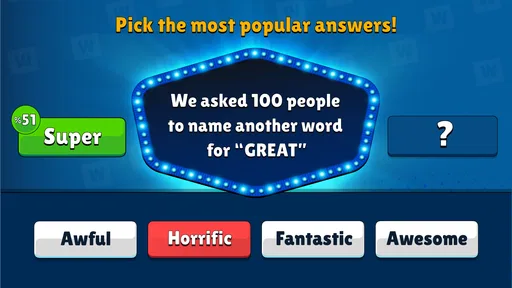
I can see the appeal of Popular Words: Family Game as a shared-device game: its central challenge is simple to explain, and people can take turns guessing what answers are likely to come to mind. That makes it an easy pick for a quiet evening at home, a short wait, or a casual get-together where not everyone wants to learn complicated rules. My main reservation is that a shared screen does not automatically make a game a genuinely social one; the fun depends on whether your group enjoys comparing guesses and talking through them.
This is a trivia game from Unico Studio, built around predicting popular responses rather than recalling obscure facts. In practice, that distinction matters. A conventional quiz often rewards the person who remembers the right date or name. Here, I find the more interesting question is whether I can anticipate the answer other people would choose. You may know a subject well and still miss because your response is unusual, while a familiar, obvious answer can be the better guess.
That makes it a natural fit for a household with mixed interests. One person can read the prompt, another can suggest an answer, and a third can argue for a different one before the group commits. The game gives people an immediate topic to discuss without requiring them to share the same specialist knowledge. It is less suited to a group looking for a deep board-game session or a competitive quiz night where every point depends on factual expertise.
A realistic use is a short round while dinner is being prepared. Someone can play for a few minutes, pass the device to another person, and let the conversation take over when a prompt sparks debate. I would treat that as an informal way to fill a gap, not assume that every session will work as a structured party game. The actual social energy comes from the players; the app supplies the guessing premise.
The useful twist is that answers are judged by how popular they are, not simply by whether they are technically correct. That encourages a small but satisfying change in thinking: instead of asking, “What do I know about this?” I ask, “What would most people say first?” This can make familiar topics unexpectedly tricky. It also gives a confident player a reason to listen to less certain players, whose ordinary, widely shared answer may be more effective than a clever one.
For a group, I recommend saying each person’s candidate answer aloud before deciding. That keeps one fast guesser from setting the direction for everyone else and turns the prompt into a quick conversation. If you are playing alone, it is worth resisting the urge to overthink every blank. The game’s premise rewards common instincts, so a simple first response can be a better choice than a long chain of reasoning.
There is a trade-off in that design. Anyone who wants questions with one indisputable answer may find the popularity angle less satisfying, since it can feel more like judging a crowd than proving knowledge. It is not the option I would choose for serious trivia practice. If you enjoy word games, quick prediction, and seeing whether your instincts match a broad answer set, the format is much more appealing.
On a household device, I would keep the distinction between “taking turns” and “sharing an account” clear. Passing a phone or tablet around can make a casual session convenient, but it does not establish separate player identities or private progress. I would not assume that each family member gets an independent record simply because several people are playing. If personal tracking matters to your household, check what the current app experience offers before making a shared device the default.
There is also a practical boundary around who handles the device. For younger children, an adult can open the game and remain nearby while they take turns, rather than treating a family session as a reason to hand over unrestricted device access. That is ordinary shared-device judgment, not a special family-control feature. It helps keep the activity focused on the guessing and makes it easier to step in if a child wants to explore beyond the current game.
For a smoother turn-taking routine, agree on a simple order before starting: one person reads or views the prompt, everyone offers a guess, and the device moves on after the group has decided. This avoids the common shared-screen problem where the person holding the phone controls the pace and others become spectators. It also makes the game more welcoming to quieter players, who may need a moment to formulate an answer.
The strongest household use case is a flexible one. I would bring it out when people are already together and have a few spare minutes, rather than trying to organize an entire evening around it. It can work as a conversation starter between other activities, but groups should be comfortable with informal turn-taking. If your family prefers everyone to play simultaneously with clearly separated roles, a dedicated party game designed around teams may coordinate that better.
A small coordination tip is to let everyone make a guess before anyone explains why they chose it. Otherwise, the first explanation can influence the rest of the group and turn independent predictions into follow-the-leader answers. After the guess, compare the reasoning: did someone choose the most familiar response, the funniest one, or the answer that seemed most likely to be common? That discussion is where this style of trivia can become more than a succession of taps.
It is also worth matching the session to the group’s mood. When people want a fast, low-effort diversion, keep turns moving and do not turn every prompt into a debate. When the goal is family conversation, pause and let people explain their choices. The game can support either approach, but it cannot decide which one your group wants. I would skip it as the main activity for a gathering where players expect elaborate rules, physical interaction, or a sustained team competition.
The game is rated for Everyone, which makes it approachable for a broad audience, but that rating is not a substitute for an adult’s judgment about a particular child or household. A younger player may need help understanding that the task is to anticipate popular answers, not necessarily to produce the most original one. Explaining that difference before the first turn can prevent confusion and make the challenge feel fairer.
It is free to download, while optional in-app purchases are listed from $0.99 to $64.99 per item. For a shared family device, I would set clear expectations about purchases before handing it to a child and use the device’s usual purchase safeguards. A free download should not be treated as a promise that every part of the experience is free. If you want to keep spending at zero, make that boundary explicit and avoid treating purchase prompts as part of the game.
The game has an average rating of 4.8 from around 99,000 ratings, with over 10 million installs. Those figures suggest that many players have found the basic concept appealing, but they cannot tell you whether it suits your particular household. People who dislike guessing what a crowd might say, or who expect a traditional knowledge test, may still find the central mechanic frustrating. I would use the format itself—not its popularity—as the deciding factor.
Compared with standard quiz apps, this is a better fit when the group enjoys common-sense guesses and discussing what counts as a likely answer. A conventional fact quiz is the stronger choice when players want clear right-or-wrong scoring based on knowledge. Compared with word puzzles, this game is less about finding a hidden word or building vocabulary and more about predicting a shared response. Those differences are useful when choosing what to put on a family device: the best alternative depends on whether the group wants knowledge, language play, or social guessing.
For solo play, the same distinction can be a limitation. Without another person to compare instincts with, the social side is reduced, and the prompts may feel more like a sequence of predictions. I would still consider it for a brief break if that mechanic appeals, but someone seeking a long, story-driven experience or a complex progression system should look elsewhere. It is strongest when the lightweight premise is exactly what you want.
The title is free, is listed for users aged Everyone, and was released on December 7, 2022. Its current version is 1.4.4, and the minimum operating-system requirement is 7.1. I mention these practical details because they matter when deciding whether an older device can run it and whether the game is a suitable fit for a household, but they do not change the main question: do your players enjoy predicting what others will answer?
I would recommend Popular Words: Family Game to households that want a simple, conversational trivia option they can pick up without a long explanation. Its best moments are not necessarily the guesses themselves, but the quick disagreement over which answer feels most familiar and why. Try it when people are already together, agree on turns, and keep purchase expectations clear if children use the device.
I would pass on it if your group wants rigorous fact-checking, separate personal records, or a fully organized multiplayer setup. The game’s appeal rests on popular-answer guessing, so it is not a universal replacement for quizzes or party games. For the right household, though, it is a handy low-pressure way to turn a few spare minutes into a shared conversation—and that is a more realistic recommendation than expecting it to carry an entire evening.
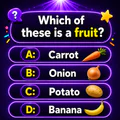
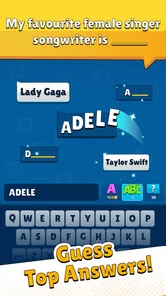
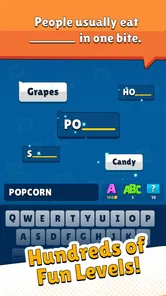
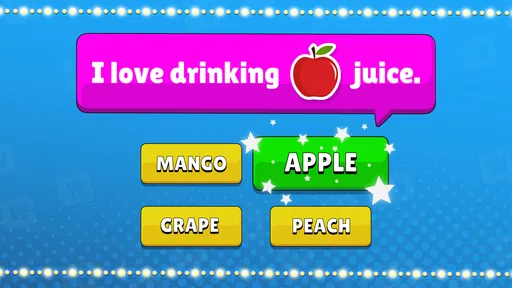
Popular Words: Family Game is a casual word and trivia-style game built around guessing answers that many people might give to a prompt. Rather than testing obscure facts, it focuses on familiar topics and popular responses, making rounds easy to understand for players with different levels of experience. Its family-friendly format makes it suitable for quick solo sessions or for sharing questions and guesses with others.
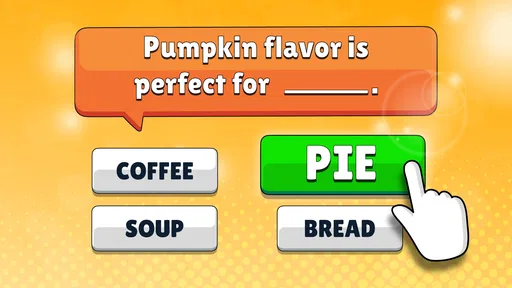
Read the question shown on screen and enter a response you think is among the most popular answers. The game evaluates your guess against its accepted answers, with progress depending on how well your response matches the prompt. Question formats and available modes can vary by version, so check the in-game instructions before starting. If an answer is not accepted, try another familiar response rather than assuming the question has only one possible solution.
The game’s accessible questions and simple guessing format can make it enjoyable to play alongside family or friends, even if everyone does not usually play mobile games. Whether the app includes a dedicated multiplayer mode, shared-device play, or only individual play may depend on the current version. Check the mode selection and app-store details before downloading if playing together is essential; you can also take turns answering prompts for an informal group challenge.
The price, advertising, and optional purchase arrangements can differ by platform, region, and app version. Before installing, review the Google Play or App Store listing for the current price and any disclosed in-app purchases. You may also encounter advertisements during play, depending on the version and settings. If you are downloading for a child, check purchase controls and parental settings on the device so accidental spending is less likely.
Confirm that your device meets the app’s current operating-system requirements and that the download is available in your region. Read the store listing for details about supported devices, permissions, data collection, and any online features, as these can change with updates. It is also worth checking recent reviews for reports about performance or bugs on devices like yours. Download through the official Google Play or App Store listing for the safest installation.
On Android, Popular Words: Family Game asks for these permissions.
4.8 out of 5
99,193 reviews
Trivia · Unico Studio

Trivia4.7 out of 5
Trivia4.8 out of 5

Trivia4.4 out of 5

Trivia4.7 out of 5
Trivia4.6 out of 5

Trivia4.4 out of 5
Trivia4.7 out of 5
Trivia4.7 out of 5

Trivia4.7 out of 5

Trivia4.8 out of 5
Trivia4.5 out of 5
Trivia4.7 out of 5

Trivia4.8 out of 5
Trivia4.8 out of 5

Trivia4.8 out of 5

Trivia4.7 out of 5

Trivia4.5 out of 5
Trivia4.8 out of 5

Trivia3.8 out of 5

Trivia4.1 out of 5

Trivia4.6 out of 5
Trivia4.8 out of 5



Gamesive reviews games on its own and is not paid by developers for scores. We do not host game files: the download buttons open the official Google Play and App Store pages. Names, icons and screenshots belong to their owners.