Trivia Master - Word Quiz Game
Trivia4.5 out of 5
For Android · Masterskaya DK
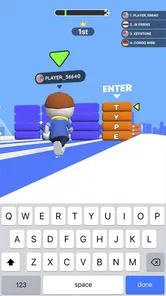
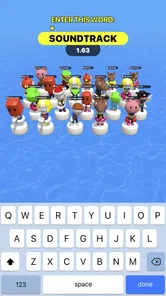
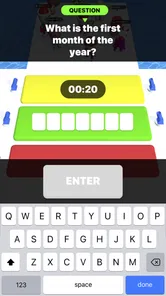
 Analysis by Gamesive
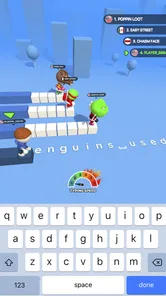
The first thing I notice about Type Sprint is how directly it turns a familiar skill—typing—into a contest. Instead of answering trivia questions by tapping choices, I have to enter text while a race plays out on screen. That small change gives each round a different kind of pressure: I’m not just recalling information, but trying to keep my fingers moving accurately while the action encourages me to hurry. It makes the game easy to understand at a glance, though the appeal depends on whether you enjoy typing as much as racing.
Type Sprint is a free trivia game from Masterskaya DK, built around a simple promise: typed words drive a running competition. Its 3D presentation gives the central idea a playful, kinetic frame, rather than making the experience feel like a plain typing test. The game is rated for Everyone, which fits its straightforward premise and broadly accessible style. It has an average rating of 4.5 from around 128,000 ratings, with about 2,000 written reviews and over 10 million installs.
My first impression is that this is best approached as a quick skill game, not as a deep trivia library or a serious typing course. The store describes a fast typing race, and that is the useful expectation to bring: the fun comes from converting text into movement under pressure. If you want a relaxed quiz where you can pause over each answer, the race framing may feel impatient. If you like short challenges that reward focus and quick hands, the concept has an immediate hook.
The difference from a conventional multiple-choice trivia game matters. In those games, recognition is often enough: scan the options, spot the answer, tap. Here, the act of typing becomes part of the challenge. That means familiarity with a keyboard layout and comfort entering text can matter as much as knowing what to type. It also gives the game a more physical rhythm than a quiz built around tapping buttons.
The 3D runner framing gives the words a purpose beyond filling in an answer. Typing is tied to forward motion and competition, so the screen’s visual language supports the mechanic rather than sitting apart from it. I find that connection useful: when a game makes typing the control, showing a race helps explain why speed matters. The setting is not something I’d choose for detailed world-building; its job is to make each exchange feel active and legible.
That focus creates a clear trade-off. The running battle can make a familiar task more exciting, but it also risks pulling attention away from the text. For the best experience, I’d treat the visuals as a cue to stay engaged, not as the main attraction. The core test is still whether the typing feels fair and readable when the pace rises. Players drawn mainly to elaborate environments or a story may find the presentation functional rather than richly developed.
One practical tip is to prioritize clean input over frantic key-mashing. In a game where typed text is the action, a small accuracy slip can disrupt the rhythm more than a slightly slower, controlled start. I’d use the opening moments of a round to settle into the keyboard, then increase speed once my hands are moving comfortably. That approach is especially helpful on a phone, where the on-screen keyboard and the race visuals compete for limited attention.
Typing naturally creates a beat: read, press, check, continue. The running format gives that loop urgency, and the result can feel more involving than typing disconnected sample sentences. I like the idea because it turns a small everyday action into a measurable burst of concentration. A short session can fit between other tasks without requiring the commitment of a long campaign or a complicated ruleset.
That same urgency will not suit everyone. If you make frequent typing mistakes, dislike timed challenges, or find it stressful to divide attention between text and motion, the game’s central tension may become friction rather than fun. It is also not the option I’d pick when I want a quiet, contemplative trivia session. A standard quiz is better for leisurely recall; a dedicated typing exercise is better if my main goal is deliberate practice without a race atmosphere.
For a realistic everyday use, I can see opening it during a short break and playing a few rounds as a change from scrolling. It asks for active attention, but the premise is easy to grasp, so I don’t need to spend that break learning a large set of systems. I would avoid starting a round when I need to respond to a message or keep half an eye on something else: even a brief interruption can break the typing rhythm that makes the contest enjoyable.
The most useful question before downloading is not simply “Do I like trivia?” but “Do I enjoy typing under a little pressure?” The game is a stronger match for people who like word-based challenges, quick reflex tasks, and the satisfaction of keeping a steady pace. It may also appeal to players who want a more active alternative to tapping answer cards. Those who mainly want general-knowledge depth, careful explanations, or untimed questions should look for a conventional quiz instead.
On a touchscreen, comfort can vary with device size, keyboard layout, and how you hold the phone. I’d try it in a position where both thumbs can reach the keys without covering too much of the action. If typing on a small screen is already tiring for you, the race presentation will not remove that limitation; it may make it more noticeable. Conversely, someone accustomed to mobile typing may find the physical input loop immediately approachable.
There is also a distinction between entertainment and training. Repeatedly typing in a race can encourage quick reactions, but I would not treat that alone as a structured typing course. The game’s appeal is the contest, not a promise of lessons or progress tracking. If I wanted to improve accuracy for work or learn touch typing from the beginning, I’d choose a tool designed around instruction and measured practice. Type Sprint makes more sense when I want practice-like activity wrapped in play.
The current release is version 1.14.2, and it runs on Android 7.1 or newer. It is free to download, which makes trying the central idea a low-commitment decision. I would still judge it by whether the typing-and-racing loop stays enjoyable after the novelty wears off. A high install count and strong average rating suggest it has found a broad audience, but personal comfort with typing under time pressure is a more useful predictor for an individual player.
Because the game is rated Everyone, it is suitable to consider for a broad range of ages, though a child’s comfort with keyboard typing and fast-paced play will naturally vary. The rules are easy to explain: type to take part in a race. That makes it approachable for a casual family tryout, but I would not assume every player will enjoy the same pace. Someone who finds competitive timing stressful may prefer a slower word game, while a player who likes quick rounds may welcome the extra urgency.
One small but important way to get a fair first impression is to test it when you have a few uninterrupted minutes and are not rushing through another task. That separates the game’s intended pressure from outside distractions. If a round feels messy because you are holding the phone awkwardly or typing with one hand, adjust your grip before deciding the mechanic itself is not for you. On the other hand, if the pace still feels uncomfortable once you are settled, that is a genuine sign that a calmer trivia format would suit you better.
What I like most is the coherence between the central action and the presentation: typing is not an incidental menu interaction but the thing that powers the contest. The 3D runner framing gives that action momentum, and the short, focused premise makes it easy to imagine fitting into a break. The strongest reason to try it is that unusual blend of word input and racing, rather than an expectation of a sprawling trivia experience.
My reservation is equally simple: urgency can make typing less comfortable, and the same feature that gives the game its identity may put off players who prefer to think slowly. It is not a universal replacement for quiz apps, typing tutors, or more elaborate runner games. Each of those alternatives serves a different mood. Choose a quiz for leisurely knowledge checks, a typing tool for structured improvement, and this game when you want a quick, competitive-feeling typing challenge.
Overall, I’d recommend Type Sprint to anyone curious about turning text entry into a lively little race, especially if they already enjoy mobile word games and do not mind a timer-like sense of urgency. Go in expecting a focused arcade-style trivia experience, not a deep course or a richly explored world. When I want an active break that asks me to read and type instead of simply tap, its central idea is distinctive enough to make it worth trying; when I want calm, detailed questions, I’d reach for another kind of game.
Type Sprint: Typing Games is a casual mobile game built around typing words to move through short racing-style challenges. Rather than steering with on-screen controls, you enter the words shown during a round, making typing speed and accuracy central to play. It may suit players who want a quick arcade experience that also gives them a reason to practise typing, though the exact modes and features can vary by app version.
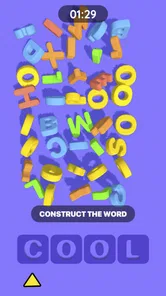
In a typical round, the game displays words or text prompts, and you type them to make progress toward the finish. Correct, quick input helps you keep pace, while mistakes or slower typing can affect your progress. Read each prompt carefully and focus on accuracy before trying to type faster. The precise controls, scoring rules, and challenge structure depend on the version available for your device.
The basic idea is easy to understand, so players who are new to typing games can usually learn by trying a few rounds. The game may still feel challenging if you are unfamiliar with a keyboard or if the prompts require fast responses. Start at a comfortable pace and treat early attempts as practice. Check the current store listing for information about difficulty options, supported languages, and accessibility features.
Playing may give you practice recognizing and entering words under time pressure, which can encourage better speed and accuracy over repeated sessions. However, it should be viewed as a casual game rather than a complete typing course: it may not provide structured lessons, detailed progress tracking, or instruction on proper finger placement. Results depend on how often you play and the features included in the version you download.
Availability, pricing, advertisements, and optional purchases can differ by platform, region, and app version. Before installing, review the Google Play or Apple App Store listing for the current price, in-app purchase details, age guidance, and data or privacy information. If the game is listed as free, that does not necessarily mean every feature is available without payment, so check the listing and on-screen purchase prompts.
On Android, Type Sprint: Typing Games asks for these permissions.
4.5 out of 5
127,587 reviews
Trivia · Masterskaya DK

Trivia4.7 out of 5
Trivia4.8 out of 5
Trivia4.4 out of 5

Trivia4.7 out of 5
Trivia4.6 out of 5
Trivia4.4 out of 5
Trivia4.5 out of 5

Trivia4.7 out of 5

Trivia4.8 out of 5
Trivia4.8 out of 5
Trivia4.8 out of 5
Trivia4.8 out of 5

Trivia4.7 out of 5

Trivia4.8 out of 5

Trivia3.8 out of 5
Trivia4.1 out of 5
Trivia4.6 out of 5
Trivia4.8 out of 5



Gamesive reviews games on its own and is not paid by developers for scores. We do not host game files: the download buttons open the official Google Play and App Store pages. Names, icons and screenshots belong to their owners.