Trivia Master - Word Quiz Game
Trivia4.5 out of 5
For Android & iOS · Super Free
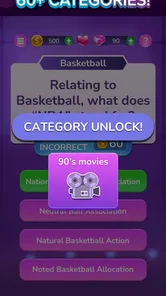
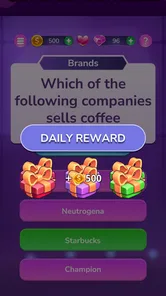
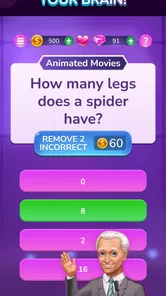
 Analysis by Gamesive
I’d recommend TRIVIA STAR Quiz Games Offline if you want a straightforward quiz game that’s easy to pick up for a few minutes at a time. Its appeal is less about elaborate presentation and more about the familiar pleasure of recognizing an answer, learning something along the way, and trying another question. As a trivia game from Super Free, it suits casual play better than a serious study routine, and its Everyone age rating makes it a reasonable option for a broad range of players.
The basic attraction is easy to understand: you answer general-knowledge questions and use short play sessions to test what you know. That makes the game a natural fit for a coffee break, a quiet moment while waiting, or a relaxed round with someone nearby. I find this kind of format most enjoyable when I treat each question as a small challenge rather than expecting a deep, story-driven game.
The game sits in the crowded trivia category, where many alternatives offer themed quizzes, head-to-head matches, or more classroom-like learning. This one is a better fit if you want a direct quiz experience without needing to arrange a match or commit to a long session. On the other hand, players who need detailed explanations after every answer, a structured course, or a strong social competition angle may prefer a more specialized option.
The title highlights offline play, which is useful when a connection is inconvenient or unreliable. I’d still check that the game is ready on your device before depending on it for a trip or commute; the practical test is to open it and try a round before you leave a stable connection. Offline-friendly play is helpful, but it shouldn’t be treated as a guarantee that every part of the app works without internet access.
Its popularity is reflected in an average rating of 4.8 from around 398,000 ratings, alongside roughly 47,000 written reviews and more than 10 million installs. Those figures suggest that many people have tried it, but they don’t tell you whether its question style will match your taste. I’d use them as reassurance that it’s an established choice, not as a substitute for deciding whether casual quiz play is what you want.
I think it works best for people who like quick general-knowledge challenges and don’t mind getting some answers wrong while they build familiarity. It can also suit families or friends who want a low-pressure way to pass time together, provided everyone is comfortable taking turns and comparing answers informally. Because it is rated for Everyone, it is broadly accessible, though that rating alone does not mean every question will be equally easy or interesting for every age.
It is less suitable if your main goal is exam preparation, learning a language, or mastering one subject in depth. A general trivia game can keep knowledge active, but it isn’t a replacement for a textbook, a flashcard system, or a topic-specific learning app. Likewise, if you mainly enjoy live competition against other players, check whether the available play style meets that need before making it your regular game.
Once installed, I’d keep the first session simple: open the game, look at the main screen, and begin with the most obvious quiz option rather than trying to understand every menu at once. The goal for a first visit isn’t to optimize a score; it’s to learn how a question is presented, how you submit an answer, and what the game does after you respond. That small test gives you a reliable sense of the rhythm before you settle in for a longer session.
The game is free to download, so you can try it without paying upfront. It does include in-app purchases, with items listed from $0.99 to $199.99 each, so I’d pay attention to any purchase prompts and avoid treating optional spending as part of the basic quiz experience. If you’re setting it up for a child or sharing a device, reviewing purchase controls in the device’s settings is a sensible precaution.
A useful first-session habit is to pause briefly after a wrong answer and consider why your guess missed. Even when a quiz is played for fun, that moment turns a random tap into a small learning opportunity. If you’re playing with another person, take turns explaining your reasoning before revealing an answer; it makes familiar questions more engaging without needing extra equipment or a complicated house rule.
For a first meaningful success, choose a short session and aim to finish it with a better sense of the game’s pacing, not a perfect result. Notice whether you’re reading carefully or rushing, and whether the question style feels comfortable. If you find yourself missing questions because you’re tapping too quickly, slowing down is a more useful adjustment than trying to play for longer immediately.
One practical way to use a general quiz game is to make it a transition activity: play a brief round while waiting for an appointment or before starting a different task, then stop when that window ends. This keeps the game in its strongest role as a quick diversion instead of letting it become an open-ended time sink. If you’re using it on a commute, keep attention on your surroundings and only play when it’s safe to do so.
Another helpful approach is to treat repeated uncertainty as a cue to change your habits, not as a reason to spend money. When a question surprises you, remember the subject or phrase that caught you out. You can later look it up elsewhere if you want a fuller explanation. That gives the quiz a useful prompt-and-review role while keeping it distinct from a dedicated learning tool.
If you want to share the game, make it a cooperative challenge: one person reads the question and everyone makes a guess before the answer is entered. That reduces the pressure of keeping score and makes it easier for people with different knowledge levels to take part. It also helps reveal whether the game’s question mix is a good fit for your group; if one person dominates every round, another trivia option with a narrower theme may be more enjoyable.
As with many mobile quiz games, the first screen may offer more than one thing to tap, and a new player can mistake promotional or progression elements for the main activity. I’d focus on the clearest route into a quiz and leave optional menus for later. If a button leads somewhere you didn’t expect, backing out and returning to the main screen is a calmer approach than tapping through prompts quickly.
Another point to keep in mind is that “offline” describes an intended use case, not necessarily every screen or connected element. A sensible workflow is to try the core quiz while connected, then test again with connectivity unavailable before relying on it in a no-signal setting. That avoids discovering at an inconvenient moment that the part you wanted to use behaves differently from the part you tested at home.
Scores and progress can also make casual play feel more demanding than it needs to be. If a round goes badly, I wouldn’t assume the game is only for trivia experts; question difficulty and personal knowledge vary. Try another short session when you’re in the mood, or switch to a different activity if repeated guessing stops being fun. The best use of a casual quiz is to enjoy the challenge, not to turn every result into a judgment of your intelligence.
The game was released on March 3, 2020, and its current version is 1.423. It requires Android 7.1 or later, so check your device’s software compatibility before trying to install it. Those details are especially useful if you’re setting up an older phone or helping someone else choose a game; compatibility is a better first check than assuming that a popular app will run on every device.
For comparison, a themed quiz app may be better if you only want questions about a favorite subject, while a multiplayer trivia game may suit you more if the competition itself is the point. A flashcard or educational app is the stronger choice when you need dependable repetition and explanations. I’d choose this one for low-friction, general quiz sessions, and I’d switch to those alternatives when I want a narrower focus, formal learning, or live opponents.
My practical recommendation is to give it a short trial, test the offline behavior you personally need, and decide whether the question rhythm keeps you interested. Don’t spend money just to see whether the basic experience suits you; the free download gives you a chance to make that judgment first. If you enjoy quick rounds and can accept that a general trivia game won’t teach every answer in depth, TRIVIA STAR Quiz Games Offline is an approachable option to keep on hand for spare moments.
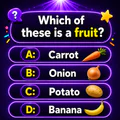
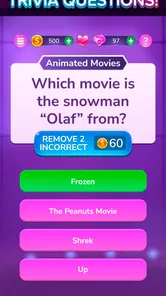
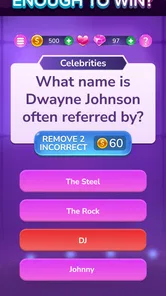
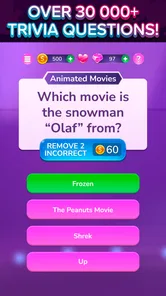
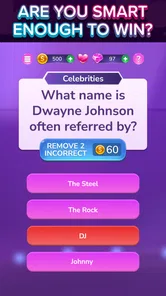
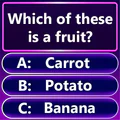
TRIVIA STAR is a general-knowledge quiz game built around short multiple-choice questions. It typically presents a question with several possible answers, letting you test what you know across subjects such as entertainment, history, science, and everyday facts. The game is designed for casual play, with levels and rewards providing a sense of progression. The exact selection of categories and features may vary with updates and your version of the app.
The game is promoted as playable offline, so you can generally answer questions without a continuous internet connection once the relevant content is available on your device. However, features such as ads, online events, progress syncing, or purchases may require connectivity, and availability can depend on the app version. If offline access is important, try launching a level in airplane mode before relying on the game during travel.
The app is generally offered as a free download, but free play may include advertisements and optional in-app purchases. Purchases can provide items or other conveniences, depending on the current version, and are not necessarily required to answer questions. Check the store listing for the latest pricing, purchase options, and age rating before downloading. If a child will play, review device-level purchase controls and advertising settings.
TRIVIA STAR focuses on broad trivia rather than a single specialist subject, with questions commonly covering areas such as popular culture, sports, geography, history, and general knowledge. Levels can become more challenging as you progress, though question difficulty and category availability may differ between builds. Because trivia content can be updated, no particular topic mix is guaranteed. Players who enjoy quick quizzes and learning assorted facts are likely to find the format approachable.
TRIVIA STAR is available for supported Android and iOS devices, but compatibility depends on your operating-system version, device model, and the current store requirements. Before downloading, check the app’s official Google Play or App Store listing for supported software versions, storage needs, regional availability, and recent updates. It is also sensible to review the listed data practices and permissions, since these details can change as the app and its services are updated.
On Android, TRIVIA STAR Quiz Games Offline asks for these permissions.
4.8 out of 5
397,732 reviews
Trivia · Super Free

Trivia4.7 out of 5

Trivia4.8 out of 5

Trivia4.4 out of 5

Trivia4.7 out of 5
Trivia4.6 out of 5

Trivia4.4 out of 5
Word4.7 out of 5
Trivia4.5 out of 5

Trivia4.7 out of 5

Trivia4.8 out of 5

Trivia4.8 out of 5
Trivia4.8 out of 5

Trivia4.7 out of 5

Trivia4.5 out of 5

Trivia4.8 out of 5

Trivia3.8 out of 5
Trivia4.1 out of 5

Trivia4.6 out of 5
Trivia4.8 out of 5



Gamesive reviews games on its own and is not paid by developers for scores. We do not host game files: the download buttons open the official Google Play and App Store pages. Names, icons and screenshots belong to their owners.