Color Block: Combo Blast
Puzzle4.3 out of 5
For Android & iOS · Dream Games, Ltd.

 Analysis by Gamesive
I would recommend Royal Kingdom to someone who likes match-3 puzzles but wants more than a string of isolated boards. Its appeal is the way a quick tile-matching session sits inside a larger, royal-themed adventure. That framing gives each puzzle a sense of forward motion, while the familiar rules make it easy to pick up when I have a few spare minutes.
It is a puzzle game from Dream Games, Ltd., and its scale is hard to miss: it has more than 100 million installs, an average rating of 4.8 from around 2.9 million ratings, and roughly 29,000 written reviews. Those figures suggest broad appeal, but they do not guarantee that its pacing will suit everyone. I would approach it as a polished casual game, not as a demanding strategy title or a story-heavy adventure.
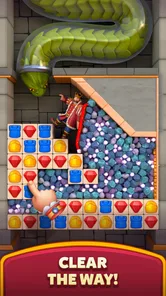
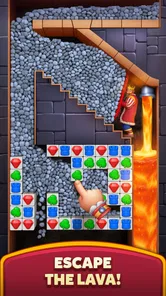
The basic idea is familiar: match tiles to complete a puzzle objective. That makes the first few minutes approachable even if you have not played this particular game before. The trickier part is learning to read each board before making a move. I find it useful to pause briefly and identify what the level is asking for rather than immediately matching the first group of tiles I notice.
That small habit matters because match-3 puzzles can make a move look productive without actually advancing the objective. A match near the edge may clear tiles but leave the important area untouched; a setup that creates space or lines up a later match may be more valuable. I would treat each move as a choice between immediate progress and improving the board for the next turn.
Royal Kingdom is best for short, focused visits. A level can make a convenient break between errands or during a quiet commute, provided you are somewhere you can comfortably look at the screen. It is less suitable when you need a game that can be played entirely by feel while your attention is elsewhere: the puzzle rewards noticing the board, and interruptions can make it easy to forget which area you meant to work on.
If a level stalls, I would not respond by making moves faster. First, look for matches that affect the area tied to the objective; then check whether a move can open up a more useful part of the board. This is a practical way to avoid spending turns on attractive but low-value matches. It does not make every puzzle easy, but it gives each attempt a clearer purpose.
The game is free to download and is rated for Everyone. It includes in-app purchases, with listed item prices ranging from $0.99 to $99.99, so I would decide in advance whether I want to spend anything. For a relaxed, no-cost trial, simply treat purchases as optional and judge the game by the play available without paying. If you are setting it up for a child, the age rating is useful context, but I would still review purchase controls on the device itself rather than assume the rating handles them.
For compatibility, the listed minimum is Android 7.0. If installation fails, I would start with the straightforward checks: confirm that the device meets that requirement, make sure the app store is using the intended account, and check that the device has enough free space for an installation. These are general device checks, not a promise that every problem has the same cause. If the store shows a compatibility issue, repeatedly tapping install is unlikely to help until the device or account situation is resolved.
The current version is 35325, and the game was released on November 20, 2024. If you are comparing what appears on two devices, a version difference is one sensible thing to check before assuming the game behaves differently by design. I would use the app store’s update controls and avoid unofficial copies; that keeps the installation straightforward and reduces the risk of troubleshooting a version that is not the normal release.
First launch problems can also be ordinary connection or device interruptions. If loading seems stuck, I would check whether other apps can reach the internet, close and reopen the game, and then try again on a stable connection. If the problem persists, restarting the device is a reasonable next step. I would avoid deleting the app as an early fix: uninstalling can remove local information, and a user should first make sure they understand how their progress is preserved.
When a session is interrupted, my first move would be to reopen the game and see whether it returns to a usable state. If it does, take a moment to inspect the current board instead of tapping immediately; an interrupted attempt can make it easy to misremember the objective or the move you were considering. If it does not load properly, the basic sequence is to close and relaunch, check the connection, and restart the device before considering more disruptive steps.
There is a useful distinction between a puzzle that feels difficult and a game that is actually malfunctioning. A level that does not resolve the way you hoped may simply reflect a move that did not address its objective. A screen that stops responding, repeated loading trouble, or a failure to open is a different kind of issue. Separating those cases prevents unnecessary reinstalling when what is really needed is a slower look at the board.
I also recommend keeping play sessions deliberately small if you are using the game as a break. Decide whether you want to try one puzzle or continue only while you are enjoying it. That personal stopping point helps keep a casual game from turning into an unplanned time sink, especially when you are tempted to make one more attempt after a frustrating board.
If you are playing around other people, the best workflow is to pause between levels rather than leave the game open while attention shifts elsewhere. Match-3 play depends on visual focus, and returning mid-board can make the next move less deliberate. For the same reason, I would not use it as a substitute for a game designed around very brief, fully self-contained interactions if interruptions are constant.
Not every rough experience points to a flaw in the puzzle design. An older device that barely meets the minimum operating-system requirement may feel less comfortable than a newer one, and an unstable connection can complicate loading. If performance changes after switching networks or reopening the game, test one variable at a time. That is more useful than changing several settings at once and then guessing which change mattered.
It is also worth being honest about the kind of challenge you want. Royal Kingdom is a casual match-3 game, so it is not the right pick if you want deep tactical systems, a long-form narrative as the main attraction, or a puzzle experience that avoids familiar genre conventions. The royal adventure framing adds context, but the core appeal remains matching tiles and working through puzzle boards.
Compared with a basic match-3 game that presents one board after another, the adventure wrapper can make progression feel more inviting. Compared with a pure logic puzzler, however, it asks for a different kind of attention: pattern recognition and move planning within a changing tile board, rather than solving a fixed riddle. If you prefer Sudoku-style deduction or word puzzles, those alternatives may fit your taste better. If you enjoy spotting combinations and adjusting when a board changes, this is a more natural match.
Another trade-off is the free-to-play structure. The download costs nothing, which makes trying it low-risk, but optional purchases can change how tempting it feels to continue. I would not buy anything simply because a particular puzzle is frustrating. Step away, return later, and see whether the challenge is still enjoyable. That is a better test of whether the game suits you than spending money to push through a moment of impatience.
I would suggest it to a friend who likes casual puzzles, wants an easy game to understand, and enjoys having a themed journey around the boards. It can work well as a small daily ritual: play during a coffee break, focus on the objective, and stop when the session no longer feels relaxing. Its Everyone rating and free entry point also make it easy to consider for a broad audience, while purchase choices are something families should manage deliberately.
I would steer away a friend who dislikes repeated match-3 play, prefers games with no optional spending, or wants every session to be meaningful without needing to study a board. It may also be a poor fit for someone who gets annoyed by retrying puzzles or who tends to keep playing mainly because they are determined to clear a stubborn level. Those are not reasons the game is broken; they are signs that its style may not be a comfortable fit.
My practical verdict is positive, with a clear caveat: Royal Kingdom works best when you treat it as a light puzzle adventure and play at your own pace. I like the approachable match-3 foundation and the sense of progression around it, but I would keep an eye on session length and purchases, and I would troubleshoot device or loading issues methodically rather than immediately deleting the game. If that balance sounds appealing, it is worth trying; if you want a more intricate or less purchase-oriented puzzle experience, another category of game will likely serve you better.
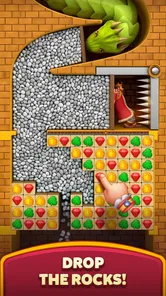
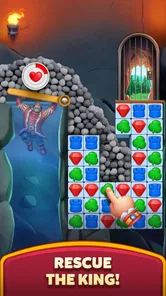
Royal Kingdom is a casual match-three puzzle game built around completing levels and restoring a fantasy kingdom. You swap colorful pieces to match three or more, work toward the level’s objectives, and earn rewards that help you rebuild areas and follow the story. It is easy to learn, but later stages can require careful moves, boosters, and repeated attempts.
Royal Kingdom can be downloaded and played for free, but it may offer optional in-app purchases, such as extra lives, boosters, or other items. Progress is possible without spending money, although challenging levels and limited lives may mean waiting for them to replenish or trying a stage again. Check the store listing and your device’s purchase settings before playing, especially if children use the device.
Some parts of Royal Kingdom may require an internet connection, particularly features that involve account synchronization, events, advertisements, or online services. Basic puzzle play may be available in some circumstances without a connection, but availability can vary by game version and device. For reliable access to all features and to help preserve progress, launch the game while connected and follow its in-game account or save instructions.
Royal Kingdom is offered for supported Android and iOS devices, but availability and compatibility can depend on your country, operating system version, and device hardware. Before downloading, check the official Google Play or Apple App Store listing for current requirements and the publisher’s details. If you plan to switch devices, look for the game’s supported progress-saving options rather than assuming progress transfers automatically.
Royal Kingdom’s colorful presentation and straightforward match-three controls may appeal to a wide range of ages, but parents should review the current store age rating and privacy information before installing it for a child. The game may include optional purchases and online features. Use parental controls or purchase authentication to prevent accidental spending, and check the app’s settings and permissions to understand how its features work.
On Android, Royal Kingdom asks for these permissions.
Royal Kingdom is also available in 2 other languages on our site.
4.8 out of 5
2,851,765 reviews
Puzzle · Dream Games, Ltd.
Puzzle4.8 out of 5
Puzzle4.9 out of 5

Puzzle4.7 out of 5

Puzzle4.8 out of 5

Puzzle4.9 out of 5

Puzzle4.9 out of 5
Puzzle4.3 out of 5

Puzzle4.4 out of 5

Puzzle4.7 out of 5

Puzzle4.8 out of 5
Puzzle4.8 out of 5

Puzzle4.1 out of 5
Puzzle4.9 out of 5

Puzzle4.9 out of 5
Puzzle4.8 out of 5

Puzzle4.9 out of 5

Puzzle4.9 out of 5

Puzzle4.9 out of 5



Gamesive reviews games on its own and is not paid by developers for scores. We do not host game files: the download buttons open the official Google Play and App Store pages. Names, icons and screenshots belong to their owners.