
Color Block: Combo Blast
Puzzle4.3 out of 5

For Android & iOS · Lessmore GmbH






 Analysis by Gamesive
I found Arrows – Puzzle Escape easiest to appreciate in short bursts. Its central idea is direct: look at a board of arrows, work out how to clear them, and avoid treating each move as an isolated guess. That simplicity makes it inviting during the first few sessions, while the need to read the board carefully gives the puzzle more substance than a reflex game. It is a free puzzle game from Lessmore GmbH, rated for Everyone, and its large audience—over 100 million installs and a 4.7 average across around 2.3 million ratings—suggests that this compact format has broad appeal.
The pleasure here comes from turning a visually busy arrangement into a sequence of sensible decisions. I like that the basic objective is easy to understand, but a board still asks me to pause and inspect how its arrows relate to one another. Instead of relying on speed, the game rewards attention: a move that looks obvious at first may not be the one that opens the rest of the puzzle.
That makes it a natural fit for the small gaps in an ordinary day. I can imagine opening it while waiting for a coffee, taking on a puzzle, then putting my phone away without needing to remember a plot or manage a long session. The same quality works during a commute or a quiet break, provided I have enough attention to think rather than merely tap. It is more satisfying when I give a board a moment of concentration than when I try to play while distracted.
The first-week appeal is also tied to a useful balance: the rules do not demand a tutorial-heavy commitment, yet the puzzle format leaves room for trial, observation, and correction. When I get stuck, I find it more productive to stop tapping and trace what each arrow’s direction implies for clearing the board. That small change in approach can turn a frustrating guess into a deliberate plan, and it is a tip worth using before deciding that a level is unfair.
Arrows suits players who enjoy visual logic more than word riddles, matching games, or puzzles built around elaborate stories. It gives the eye a concrete problem to organize. I find that especially appealing when I want a mental reset: there is no need to remember characters or follow a complicated objective, but I still have to think ahead instead of switching off completely.
Compared with familiar match-three games, this is a more deliberate kind of break. Match-three play often invites a quick scan for combinations; here, I get more value from considering order and consequences. Compared with a traditional grid-based logic puzzle, the arrow arrangement feels more immediately readable, though it may offer less of the paper-and-pencil satisfaction that comes from building a long formal deduction. That distinction matters: if I want a deep challenge to sit with for an hour, a dedicated logic puzzle may be a better match. If I want a focused problem that can fit between errands, this is easier to pick up.
A puzzle game earns a lasting place on my phone through repeatable reasons to return, not just a clever first impression. The strongest recurring value here is the short-session format. I can use it as a quick focus exercise, or as a deliberate alternative to scrolling when I have a few spare minutes. The benefit is practical rather than dramatic: it gives that idle moment a clear task and a small sense of completion.
To keep the experience from becoming automatic, I would vary how I approach each board. On one attempt, I might scan for arrows that seem immediately clearable; on another, I might trace the dependency chain from an obstructed area back to its likely opening move. This is not a special mode, just a way of changing the reasoning process. It helps me stay attentive and makes mistakes informative: instead of repeating the same taps, I can ask which assumption about the board was wrong.
There is also a useful distinction between a game that is good for brief mental activity and one that supports a serious long-term hobby. Arrows is better at the former. Its appeal depends on whether the player enjoys returning to concise visual challenges, not on a promise of a sweeping campaign or a social routine. I would keep it installed as a low-commitment option if I already enjoy this kind of reasoning, but I would not expect it to replace a more varied puzzle collection by itself.
For recurring use, I recommend treating it as a small break rather than a daily obligation. A useful routine is to play when I have enough quiet to inspect the board, then stop once I start making careless moves. That prevents a relaxing puzzle from turning into a forced streak of attempts. It also makes the game easier to revisit: I can return when I genuinely want a short reasoning task, rather than feeling that I have homework waiting on my phone.
New players may wonder whether they need to spend money to enjoy it. The game is free to download, with in-app purchases ranging from $1.49 to $40.00 per item. I would begin without buying anything and see whether the puzzle loop itself holds my interest. The presence of purchases is a reason to be mindful of spending, not a reason to assume a purchase is necessary. Anyone setting up a phone for a child can also note its Everyone content rating, while still using the usual family judgement about in-app spending.
The same simplicity that makes the game accessible can eventually become its main limitation. If I want changing mechanics, rich narrative, a strong competitive layer, or a broad mix of puzzle types, a focused arrow-clearing loop may start to feel narrow. Players who dislike careful visual inspection may also find that the game asks for a kind of attention they do not want from a casual mobile title. It is not the best choice for someone seeking a game that can be played mindlessly in the background.
Another source of fatigue is the temptation to treat every stuck moment as a cue to tap randomly. That can make a logic puzzle feel like trial and error, even when the more rewarding move is to pause and reconsider the board. I would take a short break rather than grind through frustration. If a level stops being interesting and becomes a test of patience, a different puzzle genre—or simply putting the phone down—may be the better option.
As with any free game that includes optional purchases, I would keep an eye on spending habits, particularly if a child uses the device. The available item prices range from $1.49 to $40.00, so it is sensible to use device-level purchase controls where appropriate. This is a practical housekeeping point, not a judgement on the puzzles themselves. The game is most appealing when I can focus on solving rather than feeling nudged into spending.
The current version is 0.25.0, and the game was released on July 9, 2025. Its minimum operating-system requirement is 7.1, which is worth checking against the device before downloading. Lessmore GmbH is the developer, and the game’s puzzle focus is clear enough that I would recommend trying it on a device where the board is comfortable to inspect; visual clarity matters more here than quick reactions.
For a first session, I would avoid rushing through several boards just to judge the game by volume. Give the arrow relationships a proper look, notice whether planning the order feels satisfying, and stop if the visual logic is not clicking. That test answers the key question better than a long grind: do you enjoy resolving this particular kind of board? If yes, its bite-sized format can make it a handy companion; if not, the same format may feel repetitive quickly.
Arrows – Puzzle Escape earns space on my phone when I want an uncomplicated puzzle that still asks me to think. I like its quick entry, its emphasis on observation, and the way a short play session can feel complete without demanding a large block of time. The strongest reason to return is the satisfaction of finding an orderly route through a board, especially when I resist random tapping and treat each move as part of a plan.
Its long-term value is real but specific. Players who enjoy compact visual logic and want a casual game for waiting rooms, breaks, or a few minutes at home are the best fit. Those who need frequent changes of pace, a substantial narrative, or a deep puzzle system should look elsewhere or pair it with another game. For me, it is a worthwhile light companion rather than an all-purpose staple: easy to pick up, pleasant when my attention is fresh, and best kept as an option instead of a chore.
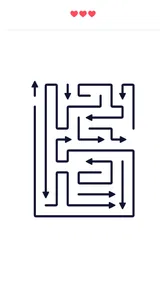
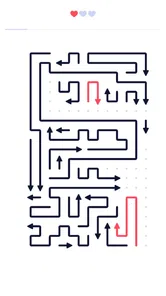
Arrows – Puzzle Escape is a logic puzzle game built around moving arrows through a crowded board. The goal is to find a sequence of moves that lets the arrows leave without colliding with one another or getting blocked. Levels generally start simply and introduce tighter layouts and more complicated paths over time. It is a good fit for players who enjoy planning ahead, spotting patterns, and solving bite-sized challenges.
The game may be available to download for free, but the exact pricing and available features can depend on the platform, region, and current store listing. Free mobile games may include advertising or optional purchases, such as ways to get hints or other in-game benefits. Check the Google Play Store or Apple App Store page before installing, and review its purchase details if you want to avoid unexpected charges.
Puzzle games of this kind may let you play downloaded levels without a continuous internet connection, but features such as ads, rewards, cloud saves, or leaderboard updates can require connectivity. Offline availability can also vary by version and device, so it is sensible to test the game after installation rather than assume every feature will work without internet. Check the store listing for the developer’s current connection requirements.
Some levels can be difficult because one arrow’s route may depend on moving several others in the right order. Look for arrows with a clear path to the edge and consider which pieces are blocking the exits before making moves. If the game offers hints or a reset option, these can help you explore a solution without starting the level over. Available assistance may vary between versions.
The core gameplay focuses on logic and spatial reasoning, making it broadly approachable for players who enjoy puzzles. However, age suitability also depends on the app’s current content, advertising, privacy practices, and any optional purchases. Parents should review the age rating, permissions, and data-safety information on the relevant app store, and use device-level purchase controls if children may play on a shared device.
On Android, Arrows – Puzzle Escape asks for these permissions.
4.7 out of 5
2,291,909 reviews
Puzzle · Lessmore GmbH
Puzzle4.8 out of 5

Puzzle4.9 out of 5

Puzzle4.8 out of 5

Puzzle4.8 out of 5

Puzzle4.9 out of 5

Puzzle4.9 out of 5

Strategy4.5 out of 5
Puzzle4.3 out of 5

Puzzle4.4 out of 5

Puzzle4.7 out of 5

Puzzle4.8 out of 5

Puzzle4.8 out of 5

Puzzle4.1 out of 5

Puzzle4.9 out of 5

Puzzle4.9 out of 5

Puzzle4.8 out of 5

Puzzle4.9 out of 5

Puzzle4.9 out of 5

Puzzle4.9 out of 5



Gamesive reviews games on its own and is not paid by developers for scores. We do not host game files: the download buttons open the official Google Play and App Store pages. Names, icons and screenshots belong to their owners.