
Ball Sort Puzzle - Color Game
Puzzle4.9 out of 5
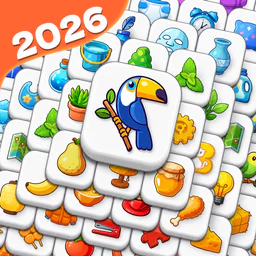
For Android · Nebula Studio
 Analysis by Gamesive
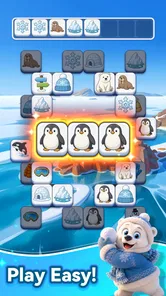
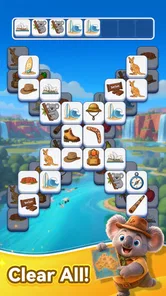
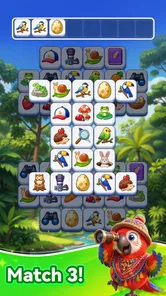
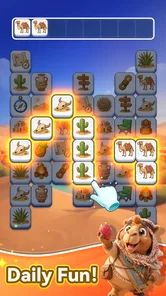
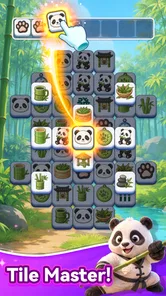
I like puzzle games that make it easy to settle in for a few minutes without demanding a long tutorial. Tap Tile! is built around a simple matching idea: choose groups of three tiles and work toward clearing the board. That makes it approachable at a glance, but the satisfying part is deciding which set to remove now and which tiles to leave available for later. I’d treat it as a casual brain teaser, not a game that promises a deep campaign or elaborate strategy.
The basic premise is easy to understand; the uncertainty comes from planning. A tile that looks like an obvious match may not be the best choice if taking it exposes a more awkward arrangement or leaves fewer useful options. I found it helpful to pause before tapping rather than clearing the first three that catch my eye. That small change makes the puzzle feel more deliberate and can prevent an avoidable dead end.
When a board feels confusing, I recommend scanning the visible tiles in groups instead of following one attractive pattern. First notice which matching sets are available, then consider whether removing one might affect access to others. This is a practical way to make each move feel intentional, even if you are playing casually. It also gives the game a little more mental texture than a reflex-based matching game.
There is a trade-off here: the simple rule is welcoming, but it does not automatically make every board relaxing. If you rush, you may turn a calm break into a sequence of second-guessing. I enjoy the game most when I have enough attention to look over the board, but not so much time that I want a long, complex puzzle.
When I get stuck, I stop tapping for a moment and look for the clearest available sets. I then choose one that seems to preserve options rather than merely remove tiles quickly. After that, I reassess the board instead of committing to a chain of moves based on my first impression. This is not a secret mechanic; it is a useful way to avoid making several rushed choices in a row.
That approach is especially handy in short sessions, when interruptions are likely. If I need to put the phone down, I try to leave the board in a state I understand rather than making one last hurried move. The game’s appeal is its accessible puzzle loop, so keeping the pace comfortable matters more to me than chasing speed.
As a puzzle game from Nebula Studio, Tap Tile! is best suited to people who enjoy sorting, spotting patterns, and making low-pressure choices. The store summary presents it as a way to unwind while exercising the brain, and that is a fair description of the kind of session it invites. I would reach for it while waiting for an appointment, during a quiet break, or when I want something more engaging than scrolling but less involved than a lengthy game.
For example, if I have a few minutes before leaving home, I can start a board and focus on the visible matching choices rather than needing to remember a complicated story or control scheme. It is also a reasonable option for a shared household device: the age rating is Everyone, and the central idea is simple enough to explain in ordinary language. That does not mean every player will find it equally easy; patience and visual scanning still help.
The game is free, which makes it easy to try without treating the decision like a major purchase. Its average rating is 4.8, supported by around 340,000 ratings, and it has over 10 million installs. Those figures suggest that many players have found the format appealing, but they are not a guarantee that it will suit your taste. If you prefer puzzles with a clear narrative, elaborate tools, or a strong sense of progression, this compact matching format may feel too slight.
The main comparison is with other casual tile-matching puzzles. Tap Tile! leans on selecting sets of three and clearing a board, rather than asking you to learn a complicated rulebook. That makes it easier to pick up than strategy-heavy puzzle games, while still asking for more thought than a purely automatic or idle activity. The trade-off is that players looking for a novel control system or a large variety of mechanics may find the core loop familiar.
I would use the game as a focused break rather than an activity to multitask through. A quick glance at the whole board before the first move helps establish what choices are available. During play, reassessing after each set keeps the puzzle readable and makes it easier to recover from a choice that was less useful than expected. The practical insight is simple: the game rewards a little attention more than rapid tapping.
If you are introducing it to someone who does not usually play puzzles, explain the goal in your own words and let them explore the board at their pace. The basic matching premise is accessible, but giving another player time to examine the layout can make the experience less intimidating. For someone who already enjoys careful tile games, the appeal is less about learning a new genre and more about having a light option readily available.
Tap Tile! is listed at version 1.7.4 and requires Android 7.1 or later. If you are deciding whether to install it, checking your device’s operating-system version first is a sensible step. An incompatible device can prevent an otherwise suitable game from installing, so it is worth confirming that basic requirement before troubleshooting anything else.
If the game does not appear to install or open properly, I would start with ordinary checks: confirm that the device has a working connection when using the app store, make sure there is enough available storage for an installation, and try opening the game again after the installation finishes. If an update is available, use the app store’s normal update process. These are general device checks, not claims about special settings or permissions in this game.
When a screen seems unresponsive, first give it a moment and avoid repeatedly tapping several places. Then close and reopen the game using the device’s usual controls. If the issue continues, restarting the device and checking for an available update are reasonable next steps. I would not assume that a slow or stalled moment means the puzzle itself is broken; a temporary device or connection problem can affect many apps.
In the puzzle itself, recovery starts with looking at the current board rather than trying to reconstruct what you meant to do. Find the sets that are clearly available now, then make one careful selection and check how the layout changes. This avoids compounding a questionable move with several more based on an outdated view of the board.
If you lose track of your plan, simplify it. Pick a visible set, note what remains, and make the next decision from the updated situation. That method is more reliable than trying to memorize a long sequence of intended moves in a casual session. The game’s three-tile premise encourages a step-by-step approach, and I think that is a better fit than treating every board like a race.
Some frustration can also come from playing while distracted. If notifications, conversation, or a task at hand keep pulling your attention away, a board that would otherwise feel manageable may become hard to read. I find it more useful to pause and return when I can focus than to keep tapping in the hope that speed will solve the problem.
Not every puzzle player will want this kind of experience. If you prefer long-term planning with many interacting systems, a deeper logic game may hold your interest longer. If you want something purely effortless, even a simple tile puzzle may feel like too much concentration when you are tired. Tap Tile! sits between those preferences: its rules are approachable, but the choices still ask you to pay attention.
It may also be a poor fit if you strongly prefer puzzles that teach a new mechanic as they progress or provide a clearly defined story to follow. The core attraction here is the matching-and-clearing format, so a player who quickly tires of repeating a central idea should look elsewhere. On the other hand, people who like familiar rules and a compact mental challenge may appreciate not having to learn a new system every time they open it.
It is also worth separating device trouble from game difficulty. A board that offers awkward choices is part of playing a puzzle; a game that will not launch, freezes, or behaves oddly may involve the device or installation instead. For the latter, I would try the ordinary checks above before deciding the game itself is at fault. For the former, taking a moment to inspect the board is more likely to help than restarting.
Tap Tile! is an easy recommendation for a friend who wants a free, approachable matching puzzle for small pockets of downtime. I like that the central action is immediately understandable while still leaving room to make more thoughtful choices. Its Everyone age rating also makes the premise easy to share across ages, though individual players will differ in how much they enjoy the need to scan and plan.
My main reservation is that a clear, familiar loop can become repetitive for players who want a steady stream of new mechanics or a more substantial sense of progression. It is not the game I would choose for a demanding strategic session, nor for a moment when I cannot spare attention for the board. But when I want a brief puzzle that encourages me to slow down and consider a move, it fits that purpose well.
Overall, I would try it if tile-based matching sounds appealing and you are happy with a focused, lightweight challenge. Start with a calm pace, look over the board before choosing a set, and reassess after each move. That simple habit brings out the more satisfying side of the game and makes it easier to tell whether its particular rhythm suits you.
Tap Tile! is a casual puzzle game built around tapping tiles to clear or match them, with the exact objective depending on the mode and level. It is designed for quick play sessions and generally uses simple touch controls, making it approachable for players who enjoy lightweight brain teasers. Check the store listing and in-game instructions for the current modes, features, and age rating, as these can vary by version.
Tap Tile! is played by selecting tiles on the screen and following the goal shown for the current level. That may involve matching tiles, clearing a board, or choosing valid moves under a limited number of turns or time. Pay attention to the tutorial and any hints before tapping, since a move can affect the tiles around it. Rules and level mechanics may differ between versions or game modes.
Whether Tap Tile! works offline can depend on the version and the features you want to use. A basic level may be available without a continuous connection, while advertisements, cloud saves, leaderboards, events, or other online features may require internet access. If offline play matters to you, try launching the game with your connection disabled after installation and review its store page for any stated connectivity requirements.
The price, advertisements, and optional purchases for Tap Tile! can differ by platform, region, and release version. Check the Google Play Store or Apple App Store listing before downloading for the current cost and any disclosures about ads or in-app purchases. If purchases are available, review what they unlock and use your device’s purchase controls to prevent unintended spending, especially when children can access the device.
Tap Tile! availability and compatibility depend on its current Google Play Store or Apple App Store listing. Before downloading, confirm that your Android or iOS version meets the listed requirements, that your device has enough free storage, and that the game is available in your region. Also review the developer, recent update date, ratings, and requested permissions so you know what to expect from the version offered to you.
On Android, Tap Tile! asks for these permissions.
Tap Tile! is also available in 2 other languages on our site.
4.8 out of 5
340,052 reviews
Puzzle · Nebula Studio
Puzzle4.8 out of 5
Puzzle4.9 out of 5

Puzzle4.7 out of 5

Puzzle4.8 out of 5

Puzzle4.8 out of 5

Puzzle4.9 out of 5

Board4.8 out of 5

Puzzle4.8 out of 5

Puzzle4.9 out of 5
Puzzle4.9 out of 5
Puzzle4.3 out of 5

Puzzle4.4 out of 5

Puzzle4.7 out of 5

Puzzle4.8 out of 5

Puzzle4.1 out of 5
Puzzle4.9 out of 5

Puzzle4.9 out of 5
Puzzle4.8 out of 5

Puzzle4.9 out of 5

Puzzle4.9 out of 5

Puzzle4.9 out of 5



Gamesive reviews games on its own and is not paid by developers for scores. We do not host game files: the download buttons open the official Google Play and App Store pages. Names, icons and screenshots belong to their owners.