
Piano Game: Classic Music Song
Music4.0 out of 5

For Android & iOS · Kooapps Games | Fun Arcade and Casual Action Games





 Analysis by Gamesive
I like rhythm games that make their challenge clear right away: listen, watch the notes, and tap in time. Piano Tiles 2™ has that immediate appeal, but it also asks for more than quick fingers once the pace picks up. In my experience, its best use is a short, focused session—whether I have a few minutes alone or want a simple game to pass around at a casual get-together.
This is a free music game from Kooapps Games | Fun Arcade and Casual Action Games. It is rated Everyone, and its broad appeal makes sense: the basic idea is easy to grasp without a tutorial-heavy introduction. The challenge comes from keeping a steady rhythm and avoiding careless taps, not from learning a complicated control scheme.
The most useful way to approach a run is to treat it as a listening task first and a speed test second. I focus on the musical pulse, then let my fingers follow the notes rather than trying to guess what is coming next. That sounds obvious, but it helps prevent the hurried, uneven tapping that tends to derail a run when the tempo rises.
At the beginning, it is tempting to tap as quickly as possible. I get better results by keeping my hand relaxed and using small, deliberate movements. When a sequence feels comfortable, I work on making the timing consistent before trying to push for a longer run. Steady taps beat frantic ones when the screen starts demanding more attention.
That makes the game easy to fit into an ordinary day. I might play a round while waiting for someone or take a brief break between tasks. A realistic routine is to start with one attempt, notice whether I lost focus or rushed, and then try again with that single issue in mind. The short-loop format suits practice better than treating every run as a high-stakes test.
For a party, the appeal is different. Passing the game to a friend creates an immediate challenge that people can understand just by watching. It works best when everyone is happy with quick turns and a little friendly pressure. If the group wants a game built around conversation or cooperative play, this is not the strongest fit; its fun comes from individual timing and concentration.
Repeated attempts are more useful when I give each one a purpose. If I keep failing after a faster passage, I try to stay loose and listen for the beat rather than speeding up my hand. If I make early mistakes, I pay attention to accuracy before thinking about pace. This simple habit turns retries into practice instead of a string of identical guesses.
I also avoid changing several things at once. A small adjustment—such as sitting more comfortably or holding the device differently—makes it easier to tell whether the change helped. Rhythm games depend on timing and attention, so a consistent setup gives me a fairer sense of my progress than constantly shifting how I play.
The first setting worth checking is the device’s sound level. Since the game is built around music, hearing the rhythm can make it easier to stay composed, especially when a run becomes demanding. I prefer to choose a comfortable volume before starting rather than adjust it mid-play. In a quiet place, I keep it considerate; in a noisy room, I make sure I can still follow the music without turning the session into a distraction.
It is also worth choosing a stable position for the phone or tablet. When I hold it awkwardly, my hands tense up and my taps become less controlled. A secure grip—or a surface that lets me play comfortably—can make a bigger practical difference than trying to force a faster technique. This is particularly helpful if I expect to play several attempts in a row.
Because concentration matters, I try not to begin a run while juggling another task. A notification or conversation can interrupt the rhythm, and then it is hard to know whether a mistake came from the game or from divided attention. For a casual one-round break, that may not matter. When I am trying to improve, a quieter moment is a better choice.
The game is free to download, with in-app purchases ranging from $0.99 to $299.99 per item. I would treat those purchases as optional rather than part of the basic reason to try it. If you are installing it for a younger player, the Everyone age rating is reassuring as a broad content label, but I would still review purchase controls on the device beforehand. That is a sensible precaution whenever a game offers paid items.
Once the basic rhythm feels natural, I find it more productive to build speed in stages. First, I aim to make clean taps through a familiar section. Then I try to maintain the same relaxed motion as the pace increases. The important trade-off is that speed without accuracy does not feel like mastery; it just makes mistakes arrive faster.
Another useful habit is to reset my attention between attempts. I take a breath, loosen my fingers, and decide what I want to improve before starting again. That brief pause is especially helpful after a frustrating miss, when the instinct is to tap immediately and prove I can do better. Going straight into another run while tense usually works against me.
I also keep sessions short when my timing starts to slip. Longer practice is not automatically better if I am tired or distracted. A few focused attempts can reveal more than repeatedly playing while my hands and attention are worn out. If I want to return to the game later, stopping on a clear lesson is better than ending with a vague sense of irritation.
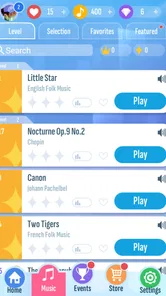
Compared with music games that emphasize collecting songs, elaborate customization, or a deeper progression layer, Piano Tiles 2™ is appealing for its direct tap-and-listen rhythm. I can get into a round quickly, which is useful when I do not want to spend time preparing a session. Players who prefer more control over song selection or a broader set of modes may find a different rhythm game more satisfying.
It is also not a substitute for a music-learning app. Following a beat can sharpen attention and coordination, but I would not use it to learn piano technique or read sheet music. Its music theme is the setting for a reflex challenge, not a structured lesson. That distinction matters if you are choosing an app for a child who specifically wants to study an instrument.
The game has an average rating of 4.1 from around 76,000 ratings, and it has been installed over 10 million times. Those figures suggest that the simple rhythm format has broad reach, but they do not tell me whether it matches an individual player’s taste. I would judge it by whether quick, repeated timing challenges are the kind of play you enjoy.
I would skip this one if rapid tapping tends to frustrate you, if you want a relaxed soundtrack experience with little pressure, or if your main goal is learning an instrument. The same focused repetition that makes the game satisfying for a rhythm enthusiast can feel demanding to someone who wants variety in every session.
It may also be a poor choice when you need a game that encourages a group to play together at the same time. Its party-friendly quality is more about taking turns and comparing attempts than about shared cooperative play. For a gathering, it can work as a quick side activity, but I would not make it the centerpiece if the group wants ongoing social interaction.
The current version is 1.13.5, and it supports devices running Android 7.0 or later. The game was released on October 6, 2023. Those details are useful when checking compatibility, while the free entry point makes it easy to try before deciding whether the format deserves a place in your regular rotation.
What keeps me interested is the clear connection between attention and performance. I can feel when I am listening carefully and staying relaxed, and I can also tell when I am rushing. That makes each attempt easy to understand: I do not need a long explanation to see what went wrong, just enough patience to correct one habit at a time.
For a beginner, I would recommend starting slowly, choosing a comfortable volume and grip, and treating early runs as practice. For an experienced rhythm-game player, the appeal is in refining timing and keeping control under pressure. For a casual group, it is a neat quick-turn challenge. Those are distinct ways to enjoy the same straightforward idea, and none requires treating every round as a serious competition.
Overall, Piano Tiles 2™ is a good fit if you want a free, music-themed game that gets to its central challenge quickly. Its limits are just as clear: it is focused on reflexes, repeated attempts, and individual concentration, rather than lessons or broad social play. I would recommend giving it a try if that kind of focused rhythm challenge sounds satisfying—and choosing something else if you would rather listen, learn, or play cooperatively.
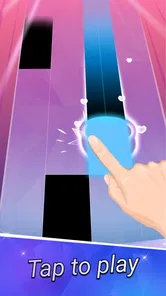
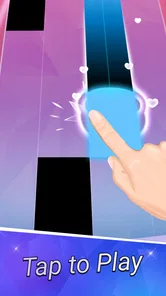
Tap the black tiles as they move down the screen, following the rhythm of the selected song, and avoid tapping the white tiles. The notes arrive at different speeds, so staying focused and keeping a steady rhythm are important. Songs may include longer notes or other patterns that call for holding a tile rather than making a quick tap. A missed note or an incorrect tap can end a run, depending on the mode.
The game is generally available as a free download, but free access may not include every song or feature without limits. It can offer in-app purchases for items such as additional content or gameplay resources, and advertisements may also appear. Check the current store listing for the exact pricing, supported devices, and purchase options in your region. If children will play, review purchase settings on the device before downloading.
Some gameplay may be available without an internet connection, but online access can be needed for features such as downloading songs, syncing progress, events, or leaderboards. Offline availability may also depend on whether the relevant content has already been downloaded and on the current version of the game. For a reliable answer on your device, try launching the game with connectivity disabled after installing it and check which modes remain accessible.
The basic controls are easy to understand, so new players can start tapping quickly, but the faster songs and more demanding patterns can take practice. Timing and accuracy matter more as the pace increases, and a small mistake may interrupt a run. It is suitable for short casual sessions, while players who enjoy rhythm challenges can work on improving scores and completing harder songs. Difficulty and available modes can vary by version.
Review the Google Play or Apple App Store listing for the current privacy details, data practices, and permissions before installing, since these can change with updates and may differ by platform or region. The game may use network access for online features, advertisements, or purchases. If privacy is a concern, check the developer’s disclosures and your device’s permission controls, and consider restricting optional permissions that are not needed for the features you use.
On Android, Piano Tiles 2™ - Piano Game asks for these permissions.
Piano Tiles 2™ - Piano Game is also available in 2 other languages on our site.
4.1 out of 5
76,198 reviews
Music · Kooapps Games | Fun Arcade and Casual Action Games

Music4.3 out of 5
Music4.6 out of 5
Music3.1 out of 5
Music4.5 out of 5

Music4.2 out of 5
Music3.7 out of 5

Action4.1 out of 5
Music4.0 out of 5

Music4.6 out of 5

Music4.3 out of 5

Music4.3 out of 5

Music3.7 out of 5

Music4.4 out of 5

Music4.1 out of 5

Music4.6 out of 5

Music4.5 out of 5

Music4.8 out of 5

Music4.6 out of 5
Music4.0 out of 5



Gamesive reviews games on its own and is not paid by developers for scores. We do not host game files: the download buttons open the official Google Play and App Store pages. Names, icons and screenshots belong to their owners.