
Solar Smash
Simulation4.6 out of 5
For Android · SayGames Ltd
 Analysis by Gamesive
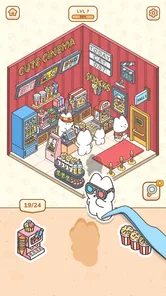
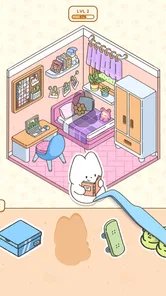
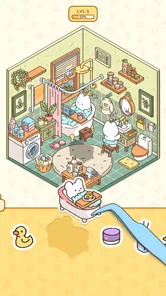
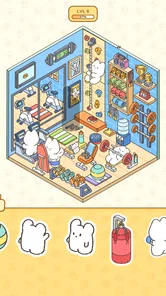
I’d look at My Sticker Room as a small creative break, not as a full interior-design simulator. Its appeal is the simple pleasure of arranging stickers to give a room a different mood. If that sounds relaxing, this simulation game may be an easy fit; if you want to plan realistic layouts, manage a household, or build rooms with detailed controls, I’d choose a different kind of game.
That distinction matters before you install it. Sticker decorating is about visual choices and a playful finish, rather than learning professional design tools. I find that makes the game approachable when I have a few spare minutes and want to make something cute without committing to a complicated project. The trade-off is that players who want deep customization may find the central idea limited once the novelty of decorating wears off.
Made by SayGames Ltd, the game sits in the simulation category but takes a lighter, more casual route than room-planning titles. The store description points to sticker-led home decor, and that is the right way to set expectations: the creative activity is the draw, not a realistic model of furnishing or renovating a home.
In a typical room-design game, I might expect to compare furniture, work around dimensions, or spend time adjusting a layout. Here, the idea is more immediate: use decorative elements to shape the look of a room. That makes it better suited to someone who enjoys choosing colors and visual details than to someone who wants a sandbox with precise placement and extensive building options.
The game is free to download, with in-app purchases listed from $0.99 to $49.99 per item. I’d treat that range as a reason to check the purchase prompts carefully rather than assume every decorative choice is available at no cost. If you’re installing it for a younger player, it carries an Everyone age rating, but I’d still review purchase settings on the device so an accidental tap doesn’t turn a free start into an unexpected expense.
The strongest use case is a brief pause in the day. Imagine waiting for a meal to finish or taking a break between chores: a sticker-decorating task can feel more satisfying than scrolling because it gives you a small visual result to work toward. I’d recommend opening it when you want a low-pressure activity, rather than expecting a long story or a demanding challenge.
That quick-session appeal is also a useful way to judge whether the game suits you. If you like trying a few arrangements, deciding which details make a room feel cozy, and then moving on, the format makes sense. If you prefer a game that rewards long sessions with complex planning, layered goals, or a steadily expanding design toolkit, this may feel too slight.
One practical tip is to approach each room with a simple idea before placing decorations: for example, keep the look soft and calm, or aim for a busier, more playful feel. A loose theme helps the finished space look intentional, especially in a game where stickers rather than realistic furniture carry much of the visual personality. It also gives you a reason to reconsider choices instead of placing every appealing item at once.
Sticker decoration has a lower barrier to entry than detailed interior-design games. You don’t need to know how to balance a floor plan or coordinate a whole collection of furniture to enjoy making a room look different. That’s a genuine strength for casual players, younger audiences, or anyone who wants to experiment visually without treating each choice as a design problem.
It also works well for people who enjoy decorating but don’t want a realistic home-management layer attached. Some simulation games ask you to juggle budgets, residents, maintenance, or other systems alongside design. This one’s stated focus is decor, so I’d choose it when the decorating itself is the activity I want, not when I’m looking for an elaborate simulation around it.
The game has an average rating of 4.3 from around 97,000 ratings, and it has passed 10 million installs. Those figures suggest a broad audience has tried it, but they can’t tell you whether its particular style will click with you. I’d weigh them less heavily than the basic question: do you enjoy arranging cute visual elements, or do you need more control and depth from a design game?
If your idea of decorating is carefully positioning furniture, changing room proportions, or testing realistic layouts, a dedicated home-design or building game is likely a better choice. Those alternatives are built around more detailed spatial decisions. My Sticker Room is more appealing when I want a light, decorative result without turning a spare moment into a planning session.
Likewise, players who want a strong progression loop should think about what keeps them interested after the first few rooms. The sticker concept may be enough for someone who enjoys repeating a familiar creative activity with different visual outcomes. It may not be enough for someone who needs a deep narrative, competitive play, or a wide set of management systems to stay engaged. I wouldn’t install it expecting those things.
There is also a difference between cute room styling and learning practical interior design. A playful sticker arrangement can help you explore color and visual balance, but it should not be mistaken for a tool that teaches measurements, furniture fit, or real-world renovation choices. If you’re planning an actual room, a dedicated layout tool or a more detailed design simulator will be more useful.
When I start a room-decorating game, I usually avoid filling every available space immediately. A more useful approach is to place a few pieces that establish the mood, then add accents only where they help the room feel complete. In a sticker-focused game, that restraint can make the result feel more considered than simply using every decoration that catches my eye.
I’d also treat each finished room as a small composition rather than a checklist. Look at the overall balance: are the most noticeable details competing, or does one area draw the eye while the rest supports it? That kind of simple visual check is a practical way to get more enjoyment from the activity, even if the game is intended to stay casual.
Another useful choice is to decide how much time you want to spend before opening it. A quick session is ideal when you’re in the mood to make one small change; a longer one makes more sense if you want to test a few styles. This keeps the game in its best role—as an easy creative diversion—rather than leaving you frustrated because it doesn’t offer the depth of a more involved design title.
The current version is 1.5.5, and the game requires Android 8.0 or later. It was released on March 27, 2025, so it is a relatively recent addition to the casual decorating space. Before downloading, I’d check that your device meets the minimum system requirement and that the app is available through the store you normally use.
Because the download is free but optional purchases are offered, I’d decide in advance whether you’re comfortable spending on a casual decorating game. The listed purchase range runs from $0.99 to $49.99 per item, a substantial spread. I would not buy anything just to see whether the game is enjoyable; first try the free experience and judge whether the core sticker activity is something you’ll return to.
The switching cost is low if you’re simply sampling it: you can try the basic idea and move on if it isn’t for you. The more important consideration is whether you’ve invested in optional purchases or become attached to a particular decorating collection. For that reason, I’d keep spending deliberate and avoid treating every available purchase as necessary to enjoy the game.
I’d suggest My Sticker Room to someone who likes cute visuals, enjoys small acts of creative arrangement, and wants an uncomplicated game to dip into. It could also suit a parent looking for an age-rated-for-Everyone decorating game to consider for a child, provided purchases are handled thoughtfully. The key attraction is the gentle creative task, not a promise of realism or extensive systems.
I’d skip it if you’re looking for precise room planning, a substantial progression challenge, or a simulation that keeps several systems in motion. I’d also be cautious if you strongly prefer games with no purchase prompts at all. A free download is a convenient way to test the basic appeal, but the in-app purchase range means I’d make spending decisions with care.
Overall, I see it as a focused, approachable choice for sticker-based room styling. Its best quality is that it makes decorating feel accessible without asking for much preparation. Its main limitation is the same simplicity that makes it easy to pick up: players looking for deeper design control may soon want more. If you want a cheerful visual break, it’s worth trying; if you want a serious home-design sandbox, a more detailed alternative is the better match.
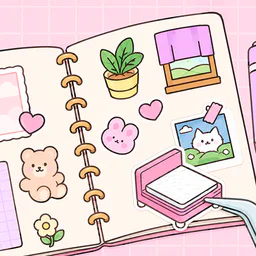
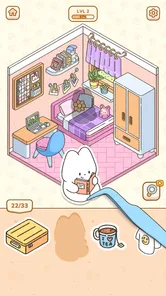
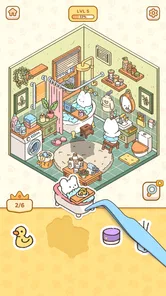
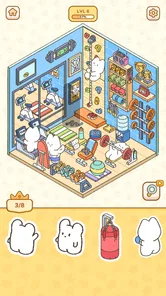
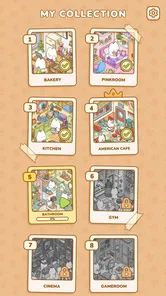
My Sticker Room - Decor Game is a casual decorating game built around placing stickers and other decorative items in room scenes. You can arrange the available designs to create a look that suits your taste, making it a relaxed choice for players who enjoy interior styling without complicated controls. The precise themes, levels, and customization options can vary by version, so check the app listing for current details.
The main activity is selecting decorative stickers and positioning them in a room or scene to complete its design. Play is generally suited to short sessions, with touch controls that make it easy to move and place items on a mobile screen. Before downloading, review the screenshots and description to confirm which decorating tasks, progression systems, and creative options are included in the version available for your device.
The game may be offered as a free download, but availability, pricing, and payment options can differ between the Google Play Store and Apple App Store, as well as by region. A free installation does not necessarily mean that every feature or item is free to use. Check the store page for in-app purchases, optional payments, and any other current costs before installing.
Offline play is not guaranteed, and some features may require an internet connection for loading content, displaying advertisements, syncing progress, or accessing updates. If you want to play while traveling or without mobile data, check the app listing and recent user feedback for the current connection requirements. You can also test basic gameplay after installation, but avoid assuming that every feature will remain available offline.
Its sticker-based room decorating may appeal to children and anyone looking for a gentle creative activity, but suitability depends on the game's current content and store settings. Parents should review the age rating, privacy information, advertisements, and in-app purchase disclosures before allowing a child to play. For younger users, consider enabling device-level purchase controls and checking whether the game requires an account or collects personal information.
On Android, My Sticker Room - Decor Game asks for these permissions.
My Sticker Room - Decor Game is also available in 2 other languages on our site.
4.3 out of 5
96,935 reviews
Simulation · SayGames Ltd

Simulation4.3 out of 5

Simulation4.2 out of 5

Simulation4.4 out of 5

Simulation4.6 out of 5

Simulation4.7 out of 5

Simulation4.5 out of 5

Arcade4.2 out of 5

Arcade4.5 out of 5

Simulation4.5 out of 5

Racing4.6 out of 5
Simulation4.6 out of 5
Simulation4.5 out of 5

Simulation4.4 out of 5

Simulation4.5 out of 5

Simulation4.1 out of 5

Simulation4.4 out of 5

Simulation4.5 out of 5

Simulation2.9 out of 5

Simulation4.5 out of 5

Simulation4.5 out of 5

Simulation4.8 out of 5

Simulation4.3 out of 5



Gamesive reviews games on its own and is not paid by developers for scores. We do not host game files: the download buttons open the official Google Play and App Store pages. Names, icons and screenshots belong to their owners.