
Solar Smash
Simulation4.6 out of 5
For Android · Patane Global
 Analysis by Gamesive
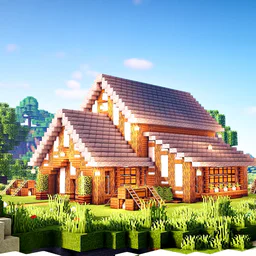
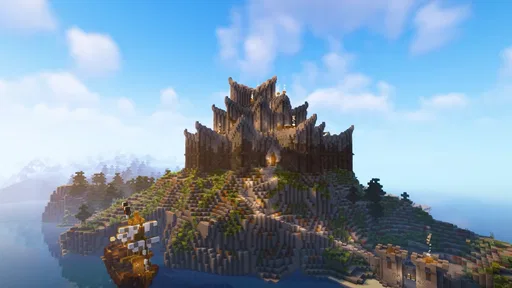
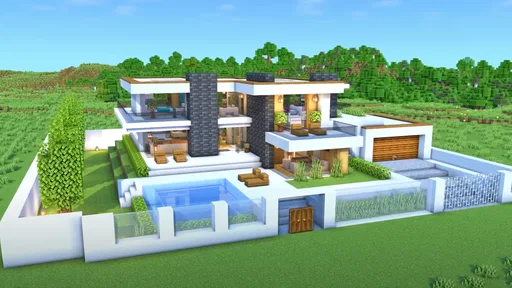
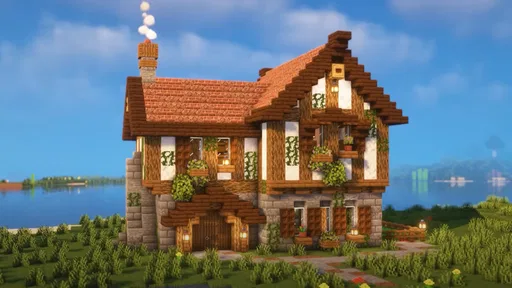
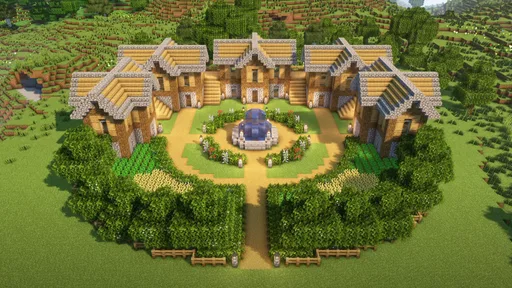
I like building games that let me set my own pace, and Craft World Block Building 3D is aimed squarely at that mood: make a place, change it as ideas come, and explore the result. It is a free simulation game from Patane Global, with a block-building focus rather than a campaign-heavy structure. That makes it easy to approach when I have a few spare minutes, though the open-ended format also asks me to bring my own goals.
It has an average rating of 4.3 from around 140,000 ratings, and more than 10 million installs. Those figures suggest that its simple premise has found a broad audience, but popularity alone does not tell me whether it suits a particular player. The useful question is whether you enjoy shaping a world one decision at a time, and can stay motivated without a tightly guided sequence of objectives.
My most useful way to approach a block-building game is to begin with a small, clear project instead of trying to plan an entire dream city at once. In Craft World, that could mean laying out one house, a short street, or a small square. A limited first build gives me a chance to learn how placing blocks and moving around feel before I commit to a larger design.
I also find it helps to decide what a space is for before filling it in. A house needs an entrance and a route through its rooms; a street needs enough space to read as a street rather than a row of walls. Even in a relaxed creative game, thinking about movement and proportion makes a build feel more intentional. I would sketch the rough footprint mentally, mark the main edges, and only then add detail.
That approach matters because the central appeal is personal construction, not a prewritten story that tells me what to do next. If I open the game with no idea at all, I may spend time placing blocks without feeling that the result is going anywhere. A modest target—a front door, a roofline, or one complete corner of a neighborhood—turns a casual session into visible progress.
For a realistic everyday session, I might pick up the game during a short break and add one feature to a build already in progress. I would finish a roof section, adjust a path, or make a small public space, then stop while the next step is still obvious. That makes it easier to return later than leaving a half-started project with no clear direction.
Before working on a large structure, I recommend spending a little time moving around and placing a few blocks in a low-stakes area. In building games, the difference between a comfortable control scheme and a frustrating one often shows up when you need to make repeated, precise adjustments. A short test helps me learn how the game responds without risking hours of work on a layout I later find awkward to manage.
I would also look through the available settings early, particularly anything that affects movement, view, or how building actions feel. I am not assuming a particular option is present; the practical point is to check what the game actually offers on your device instead of accepting the starting setup by default. If a control feels imprecise, changing a relevant setting—when available—may be more useful than trying to compensate with a complicated build plan.
A good habit is to test one change at a time. If I adjust several controls together, it becomes difficult to tell which change helped. I would make a small test wall or doorway, try the new setup, and keep it only if ordinary actions become easier. For a game built around repeated placement, a minor comfort improvement can matter more than a clever shortcut I rarely remember.
It is equally sensible to check the device requirements before downloading. The game requires Android 7.0 or later, is listed for Everyone, and is free to download. I would still consider whether my device feels comfortable running a 3D building game and whether the screen gives me enough room to place blocks accurately; the minimum operating-system requirement does not guarantee the same experience on every device.
The best time-saving trick I use in open-ended construction games is to repeat a simple pattern deliberately. If several parts of a building share a similar shape, I decide on one version first, then use it as a reference for the next. That could be a consistent wall height, matching window spacing, or a repeated entrance style. It reduces stop-and-start design decisions and makes a town feel coherent.
Another practical habit is to work from large forms to small details. I would establish the footprint and overall height of a structure, check that it sits comfortably in its surroundings, and only then spend time on decorative touches. If I decorate too early, I may have to undo that work when the building turns out to be too narrow or poorly positioned. This is especially important for a city project, where one oversized building can make nearby spaces feel cramped.
I also like to divide a larger idea into visible milestones. Rather than thinking, “build a whole city,” I might aim to finish one block of buildings, then connect it to the next area with a clear route. That gives me a satisfying stopping point and helps prevent a sprawling project from becoming a collection of unfinished structures. It is a workflow choice, not a special in-game feature, but it makes a sandbox-style game easier to enjoy over time.
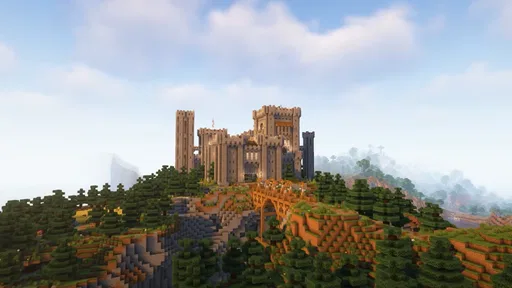
When exploring a build, I try to view it from more than one position before calling it done. A façade can look convincing from the front and awkward from the side; a path can seem clear until I follow it through the space. I use those checks to find proportions or gaps I missed while placing blocks. For anyone who enjoys both creating and wandering around their own work, this is where construction and exploration reinforce each other.
These habits are most useful when I am building something with repeated parts, such as a row of homes or a planned street. They are less important for a playful one-off structure, where asymmetry and improvisation may be the point. The game’s flexible premise suits both moods, but I get better results when I choose whether I am trying to make a coherent place or simply experiment with shapes.
Compared with more guided simulation games, Craft World gives the builder more room to decide what counts as progress. That freedom is its main strength for players who enjoy inventing a project and adjusting it as they go. If you prefer objectives, unlocks, or a clear chain of tasks to keep every session moving, a mission-led building game may be a better fit.
The trade-off is that an open canvas can make motivation uneven. A big city sounds exciting, but without a manageable plan it can become repetitive to keep adding similar structures. I would avoid treating size as the measure of success. A small area with a clear layout and a few thoughtful details can be more satisfying than a huge world that I stop caring about halfway through.
Precision is another consideration. Block placement depends on being able to see and reach the part of a build I want to change, and a 3D view can take some getting used to. If you tend to prefer games with fine-grained architectural tools or detailed decoration controls, block-based construction may feel too simplified. I would choose this game for straightforward spatial creativity, not for professional-style design work.
It is also worth being realistic about what “explore your dream city” means in practice: the pleasure here comes from making a place your own and looking around it, rather than expecting a deep city-management simulation. I would not choose it if my main interest were managing residents, traffic, budgets, or a complex economy. Someone who wants to build freely will likely appreciate the focus; someone who wants systems to manage may prefer a different kind of simulation.
I would recommend Craft World to players who like block-based building, want a relaxed creative activity, and are happy to supply their own projects. It can work well for a quick session focused on one small improvement, or for longer stretches spent developing a setting piece by piece. The Everyone age rating also makes it broadly approachable, though a parent should still decide whether the style and play habits suit a particular child.
I would be more cautious about recommending it to players who need a strong tutorial-driven path or a steady stream of explicit goals. It may also be the wrong choice if you want highly detailed city management, advanced architectural precision, or a competitive challenge. In those cases, a more structured simulation or a construction game with deeper planning systems would better match what you are looking for.
The current version is 2025, and the game was released on February 24, 2025. I see those as useful context for identifying the edition, not as a promise about how much content or what specific systems it contains. Patane Global is the developer, and the free entry point makes it easy to try if the premise sounds appealing, while your own enjoyment will depend on whether the open-ended building loop holds your attention.
My overall impression is that Craft World Block Building 3D is best approached as a personal construction space, not a checklist. I would start small, learn the controls, settle on a repeatable visual pattern, and expand only when the first area feels complete. Those habits make its freedom more rewarding and reduce the chance of turning a fun idea into an overwhelming project.
Its strengths are the approachable block-building focus, the ability to set your own pace, and the satisfaction of exploring a place you have shaped. Its limits are the flip side of that freedom: players who need clear objectives, complex management, or fine design tools may find the experience too loose or too simple. If you enjoy making your own reasons to play, I think it is worth trying; if you want the game itself to provide a detailed plan, I would look elsewhere.
Craft World Block Building 3D is a sandbox-style building game centered on exploring a block-based world and creating structures from available materials. It is designed for players who enjoy open-ended play rather than a fixed sequence of missions. The exact activities and available features can vary by version, so check the app’s store listing for current details before downloading.
Whether the game works without an internet connection can depend on its current version and how its features are implemented. Basic building or exploration may be available offline in some versions, while ads, updates, or online features may require a connection. If offline play is important to you, review the store listing and test the game before relying on it away from Wi-Fi.
The price and monetization options can differ between Android and iOS, and may change over time. A free download does not necessarily mean that every feature is free: the game may display advertisements or offer optional in-app purchases, depending on the version. Check the app-store page for current pricing, purchase details, and any notes about advertising before installing.
Its block-building and exploration premise may appeal to younger players, but suitability depends on the specific version and the child’s age. Check the age rating, privacy information, and store listing for details about ads, purchases, online interactions, and data handling. Parents may also want to review device settings for purchase approvals and screen-time limits before letting a child play.
Compatibility and storage requirements depend on the release available for your device. Before downloading, check the game’s current Google Play or App Store listing for supported operating-system versions, device requirements, and download size. Allow for additional storage because updates and saved game data can take space, and performance may vary across phones and tablets, especially older or lower-powered models.
On Android, Craft World Block Building 3D asks for these permissions.
Craft World Block Building 3D is also available in 2 other languages on our site.
4.3 out of 5
140,410 reviews
Simulation · Patane Global

Simulation4.3 out of 5

Simulation4.2 out of 5

Simulation4.4 out of 5

Simulation4.6 out of 5

Simulation4.7 out of 5

Simulation4.5 out of 5
Simulation4.5 out of 5
Simulation4.6 out of 5

Simulation4.5 out of 5

Simulation4.4 out of 5

Simulation4.5 out of 5

Simulation4.1 out of 5

Simulation4.4 out of 5

Simulation4.5 out of 5

Simulation2.9 out of 5

Simulation4.5 out of 5

Simulation4.5 out of 5

Simulation4.8 out of 5

Simulation4.5 out of 5



Gamesive reviews games on its own and is not paid by developers for scores. We do not host game files: the download buttons open the official Google Play and App Store pages. Names, icons and screenshots belong to their owners.