
Offline Games No WiFi internet
Casual4.7 out of 5
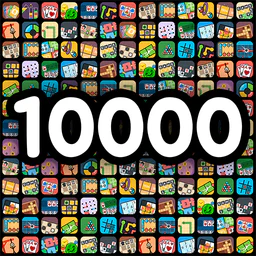
For Android & iOS · JindoBlu
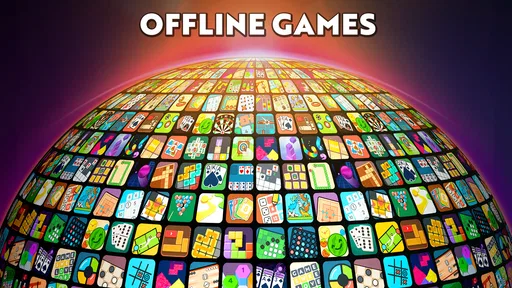
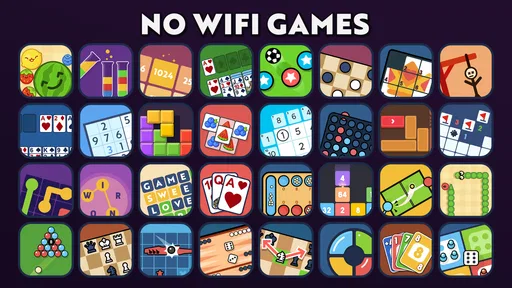


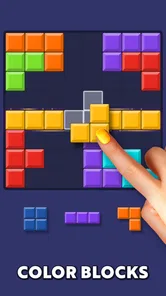

 Analysis by Gamesive
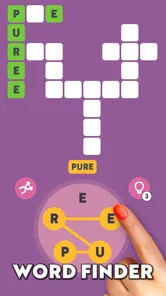
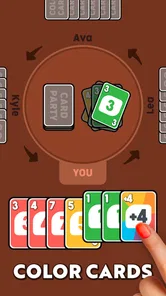
When I have a few minutes to spare, I usually want something I can start playing without setting up a long match or remembering where I left off. Offline Games - No Wifi Games is built for that sort of moment: it brings a collection of puzzles and minigames together, with familiar options such as chess and word games. Its appeal is less about mastering one deep game and more about having a quick choice ready when I want a small mental break.
This is a free casual game from JindoBlu, aimed at people who like switching between different kinds of play. Rather than asking me to commit to a single puzzle style, it offers a bundle of activities that can suit different moods: a word challenge when I feel focused, chess when I want to think several moves ahead, or another minigame when I have only a moment. That variety is the main reason I would keep it installed.
The practical promise is also right there in its short description: offline games. That makes it useful when a connection is unavailable or inconvenient, and it distinguishes the experience from casual titles that lean on online events, opponents, or constant connectivity. I would still treat it as a collection of self-contained diversions, not as a replacement for a full chess app or a dedicated word-game library.
Its reach is substantial: it has passed 100 million installs, with an average rating of 4.6 from around 508,000 ratings. Those figures suggest that the broad, pick-up-and-play approach has found an audience, though popularity alone does not tell me whether every included game will suit every player. The content rating is Everyone, making the overall presentation appropriate for a wide range of ages.
The strongest use case is a break with an uncertain end. Imagine waiting for a takeaway order, sitting in a lobby, or having a few minutes before a meeting. A collection is handy in those situations because I can choose an activity based on how much attention I have, rather than opening one game and discovering that its next round requires a longer stretch of time. The variety gives me a better chance of finding something that fits the moment.
That flexibility matters more than a huge feature list. A quick game should be easy to approach, and familiar formats such as chess and word puzzles lower the learning barrier. I can spend my effort on the puzzle itself instead of first learning an elaborate set of rules. For a casual player, that makes the app feel welcoming; for someone seeking a serious challenge, it may also underline the limits of a mini-game collection.
My useful rule of thumb is to choose by attention, not just by time. If I am likely to be interrupted, I would pick a puzzle that feels easy to resume mentally. If I have a quieter stretch, chess or a word game may make better use of it. This small choice helps the collection feel less like a random assortment and more like a pocket menu for different kinds of breaks.
Collections like this have a clear trade-off compared with the usual alternatives. A dedicated chess game can focus on analysis, opponents, and a consistent chess experience; a specialist word app can build its identity around vocabulary and word puzzles. Here, the benefit is breadth and convenience: I can move between familiar styles without keeping a separate app for every passing mood. The cost is that no single activity is necessarily the reason to choose this over a specialist.
I see that as a good fit for players who are curious and casual rather than committed to one format. It is also useful for households or friends with different preferences: one person may gravitate toward chess while another prefers words. But if you already know you want a deep chess experience, structured progression, or a particular kind of word challenge, a focused alternative will likely serve you better.
Another practical distinction is the value of having options when the first choice does not land. A puzzle can feel too demanding after a tiring day, or too easy when I am alert. With several kinds of minigame in one place, I can change direction instead of abandoning the app entirely. That is a more meaningful advantage than simply counting how many activities a collection contains.
Offline play makes the game especially appealing for commutes and travel, but I would not assume that every situation is equally comfortable. A crowded train or a short wait can break concentration, even when connectivity is no issue. I would favor a small, self-contained activity when interruptions are likely, and save a more thoughtful game for a stretch when I can give it proper attention.
For a realistic routine, I might open it while waiting for a delayed appointment, choose one activity, and stop when my turn or puzzle reaches a natural break. That approach avoids turning a few idle minutes into a commitment. It also makes it easier to return later: I am relying on the kind of game I selected, rather than expecting the whole collection to preserve a complicated long-term session.
One useful habit is to notice which formats leave me feeling satisfied after a brief attempt and which make me want more time than I have. That tells me what to choose for a quick queue and what to reserve for a quiet evening. It is a small bit of self-management, but it gets more value from a varied collection than repeatedly tapping whichever icon happens to be closest.
The replay value here comes from switching between types of play and returning to familiar formats, not from a promise that every session will feel entirely new. Chess and word games have natural appeal for people who enjoy testing themselves repeatedly, while a bundle lets me change the flavor when one activity starts to feel stale. I find that more sustainable than expecting a single casual mode to hold my attention indefinitely.
There is a limit, though. If you need a strong narrative, a long progression path, competitive rankings, or a social reason to return, this is not the kind of experience I would choose on that basis. Its value is immediate access to casual play, especially when I do not want to plan around a network connection. Players who prefer one expertly tuned game over a range of small diversions may find the breadth less compelling.
The title’s focus on offline use can also shape expectations. I would think of it as a handy option for moments when being connected is not part of the plan, rather than as a social platform. That makes it easy to recommend to someone who wants simple activities on hand, while also making clear that those looking for online competition should compare it with games built specifically around that experience.
The game is free to download, with in-app purchases listed from $1.99 to $10.99 per item. I would approach it as a free collection first and decide whether anything beyond that is worthwhile based on my own use. The presence of purchases is worth keeping in mind, especially if you are setting up a device for a child, even though the age rating is Everyone.
It runs on Android 6.0 and later, and the current version is 3.16.1. It was released on August 4, 2023. Those details make it easier to judge basic compatibility, but the more important question is whether you want a mixed set of casual diversions. If you want a single game with a carefully developed competitive scene or a substantial campaign, I would skip this and choose a specialist title instead.
I would also skip it if variety tends to make you indecisive. A collection is only convenient when picking an activity feels easier than opening separate apps; if browsing options becomes its own chore, a dedicated game can be more satisfying. On the other hand, if your preferences change from day to day, keeping several familiar styles together is a sensible shortcut.
Offline Games - No Wifi Games makes the most sense as a pocket collection for short, flexible sessions. I like the idea of choosing between chess, word play, and other minigames according to the time and attention I have, especially when an internet connection is not available. Its strongest quality is not depth in one particular activity but the convenience of having different kinds of casual play close at hand.
I would recommend it to people who want an easy distraction for travel, waiting rooms, or spare moments at home, and to anyone who likes alternating between puzzles rather than sticking with one genre. I would not recommend it as a substitute for a dedicated chess or word-game app if depth, competition, or focused progression is your priority. For me, it succeeds when I treat it as a flexible break-time companion: easy to dip into, useful across different moods, and best enjoyed without expecting every minigame to become a lasting hobby.
Offline Games - No Wifi Games is a collection of games designed for moments when you cannot or do not want to use an internet connection. It typically brings several simple, pick-up-and-play activities together in one app, so you can switch between game types without downloading each one separately. The exact games and features can vary by version, so check the app listing and screenshots before installing.
The app is promoted for offline play, and its included games are intended to work without Wi-Fi or mobile data once the app has been installed. You may still need an internet connection to download the app, receive updates, or access any online-dependent features, if offered. To avoid unexpected data use, launch the games you want while connected first, then test them in airplane mode.
The app may be available to download without an upfront payment, but free access does not always mean every feature is free or uninterrupted. Depending on the current version, it may include advertisements, optional purchases, or other paid content. Check the store page for the latest pricing and in-app purchase details, and review the developer’s privacy information before installing if those points matter to you.
The title suggests a variety of casual games gathered in one place, but the specific selection can differ between releases and platforms. Review the current store listing, screenshots, and description to confirm which games are included and whether they suit your interests. Also check whether the collection offers difficulty options, progress saving, or additional content, rather than assuming those features are available.
Suitability depends on the games, advertising, and content in the version available for your device. Before downloading for a child, check the age rating, store description, ad disclosures, privacy details, and any in-app purchase information. If the app displays advertisements, consider whether they can appear during play and use your device’s parental controls where appropriate. Offline play alone does not guarantee an ad-free or child-safe experience.
On Android, Offline Games - No Wifi Games asks for these permissions.
Offline Games - No Wifi Games is also available in 1 other languages on our site.
4.6 out of 5
507,954 reviews
Casual · JindoBlu

Casual4.2 out of 5

Casual4.3 out of 5

Casual4.6 out of 5

Casual4.8 out of 5

Casual4.6 out of 5

Casual4.7 out of 5

Arcade4.6 out of 5

Arcade4.6 out of 5
Casual4.7 out of 5

Casual4.2 out of 5

Casual3.2 out of 5

Casual4.7 out of 5

Casual4.7 out of 5

Casual4.3 out of 5

Casual4.7 out of 5
Casual4.5 out of 5
Casual4.8 out of 5

Casual4.6 out of 5

Casual4.9 out of 5

Casual4.7 out of 5



Gamesive reviews games on its own and is not paid by developers for scores. We do not host game files: the download buttons open the official Google Play and App Store pages. Names, icons and screenshots belong to their owners.