
Solar Smash
Simulation4.6 out of 5
For Android & iOS · CrazyLabs LTD



 Analysis by Gamesive
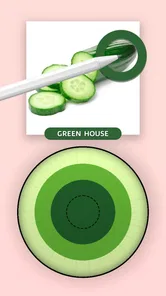
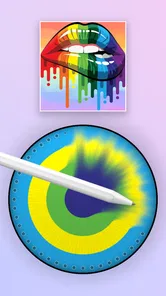
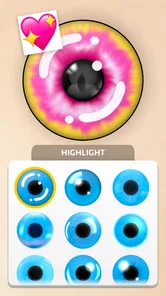
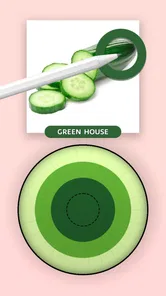
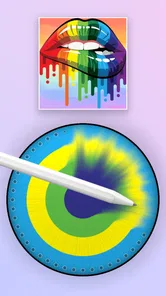
I like Eye Color Mix most as a small creative break: it turns choosing and blending eye colors into the central activity, rather than asking me to manage a complicated simulation. The idea is easy to grasp, and the appeal is in trying combinations and seeing how a palette comes together. If you want a relaxed, color-focused game that you can approach without a long learning curve, it has a clear point of difference from more involved simulation games.
Eye Color Mix is a free simulation game from CrazyLabs LTD, with in-app purchases listed at $2.99 to $9.99 per item. That makes the basic decision straightforward: you can start without paying, while optional purchases may cost extra. I would treat the free access as a chance to find out whether its particular coloring activity suits you, rather than assuming that every option or item is included at no cost.
The game is rated for Everyone, which makes its broad, non-specialist appeal easy to understand. It launched on September 23, 2023, and its current version is 1.7.0.0. It has an average rating of 4.5 from around 248,000 ratings, with about 2,300 written reviews and over 10 million installs. Those figures suggest that many people have tried it, but they cannot tell you whether you will enjoy the repeated focus on color mixing. For that, the kind of play matters more than the popularity.
My practical advice is to begin with the free experience and decide what you want from the game before considering any optional purchase. If you mainly want a few minutes of low-pressure color play, free access may be enough to judge its appeal. If you are tempted to buy something, first ask whether it would change the activity you enjoy or simply add another item to it. The listed price range gives a useful boundary for individual purchases, but it is not a reason on its own to spend.
The store description frames the activity around painting and combining colors, and that is the useful lens for judging the game: its value is in the small creative choices, not in a promise of deep simulation. I would come to it when I want to experiment with shades without having to plan a large project. The eye-color theme gives those choices a specific visual target, which helps the activity feel more focused than opening a blank canvas and deciding what to do from scratch.
That focus is also a trade-off. Someone who enjoys the moment of selecting and comparing colors may find the theme satisfying, while a player looking for a broad art tool may quickly want more subjects and more freedom. Likewise, anyone expecting a detailed, realistic eye-care or medical simulation should look elsewhere: the game is presented as a coloring experience, not a way to learn about vision or diagnose anything.
One useful way to approach it is to treat each session as a palette experiment. Instead of tapping through colors without a purpose, pick a mood first—soft, vivid, or unusual—and compare choices against that aim. This small change makes the activity feel more intentional, even though it does not turn the game into a full painting application. It is a good fit for people who like visual trial and error more than elaborate objectives.
Compared with general coloring games, Eye Color Mix has a narrower subject, which can be a strength if that is exactly what interests you. A broad coloring app usually offers a larger variety of images to fill in; this game’s identity is instead tied to eye colors and blending. Compared with open-ended drawing tools, it asks for less from the player: you do not have to invent an entire picture to get started. The flip side is that it is less suited to someone who wants to sketch freely or build a finished illustration from scratch.
It also differs from management-focused simulation games. Those often appeal through systems, long-term planning, or a sense of running something. Here, the draw is much more immediate and visual. If you want a game to occupy a short lull between tasks, that lighter commitment is useful. If you prefer progression built around complex decisions or a lasting world, the coloring premise may feel too limited.
A realistic everyday use is a short pause while waiting for a ride or taking a break at home. I would open it with one simple goal—try a combination that feels calmer or more striking—rather than expecting a substantial session. That gives the game a clear role: a quick creative distraction. It is less compelling as a substitute for a dedicated art app when you want to save and develop a personal design, or for a deeper game when you want sustained challenges.
The most helpful habit is to compare colors deliberately instead of treating every choice as equally promising. Start with a color family, then test nearby variations before jumping to a completely different look. This makes it easier to notice what you actually like and helps each session feel like an experiment rather than a sequence of arbitrary taps. Because the game centers on eye color, subtle differences can be the point; you do not need to chase the most dramatic combination every time.
Another useful approach is to set a stopping point before you begin. A focused color game can be easy to dip into, but it may not offer the kind of deep objective that makes a long session feel purposeful. I would use it as a compact break and stop once the palette exploration stops being enjoyable. That is not a flaw for everyone: casual players may prefer an activity that does not demand a long commitment. But people who want a clear campaign or a complex reward structure should choose a different style of game.
It is also worth separating creative enjoyment from practical color matching. The game gives you a playful setting for exploring combinations; I would not use it as a dependable guide for makeup, contact lenses, or any real-world cosmetic decision. Screen colors can look different from physical products and displays, and the game’s purpose is entertainment. Keeping that distinction in mind helps avoid expecting it to solve a problem it was not designed to address.
The main limitation is the narrow premise itself. If eye-color mixing is the thing you want, a focused activity can feel more inviting than a general-purpose art app. If you tire of that subject, however, the same focus may leave you with little reason to return. This is the kind of game I would recommend based on personal interest in the theme, not simply because it sits in the simulation category.
There is also a difference between free access and total value. The game costs nothing to start, but optional in-app items are priced from $2.99 to $9.99 each. I would not assume those purchases are necessary, nor would I claim they unlock a particular feature without knowing what an individual item offers. The sensible approach is to enjoy what is available first and spend only if the purchase you are considering clearly adds something you personally want.
For parents, the Everyone rating is a helpful starting point when deciding whether the game is appropriate for a household. It does not answer every question about a child’s spending habits, so I would still pay attention to in-app purchases and make sure the child understands that optional items can cost money. For adult players, the same point is simply a reminder to keep the free-to-play appeal separate from any impulse to buy.
I would recommend it to casual players who enjoy choosing shades, trying combinations, and seeing a visual result without needing a long tutorial or a demanding objective. It may also suit someone looking for a quick, low-pressure mobile activity that feels more hands-on than simply browsing pictures. The theme is specific enough that people who are curious about eye colors may find it more engaging than a generic coloring book.
I would skip it if you want a full-featured drawing studio, a realistic simulation, a broad collection of unrelated coloring subjects, or a game built around deep strategy. It is not the choice I would make for learning about eye health, nor for making real-world beauty decisions. Those needs call for tools designed for those jobs, not a casual game organized around color play.
The install count—over 10 million—shows that it has reached a large audience, and the average rating of 4.5 is encouraging context. Still, neither number should decide the purchase question for you. The better test is whether the central activity sounds enjoyable after several short sessions. If trying eye-color combinations feels relaxing, the free entry makes it easy to explore. If that narrow loop already sounds repetitive, popularity is unlikely to change your mind.
My recommendation is to try Eye Color Mix for free if you like color-based casual games and are comfortable with a focused theme. Its value is clearest when you want a brief creative distraction and enjoy comparing shades for their own sake. I would hold off on purchases until you have spent enough time with the basic experience to know what you want from an optional item, especially since those purchases range from $2.99 to $9.99 each.
For the right player, the game offers an approachable way to play with eye-color ideas without requiring a big time commitment. For someone seeking depth, a broad canvas, or practical guidance, another app or game will be a better fit. I would start free, keep expectations centered on casual color exploration, and pay only if a specific optional purchase clearly improves an experience you already enjoy.
Eye Color Mix is a photo-editing app designed to let you experiment with different eye-color effects in pictures. Depending on the version available on your device, you may be able to select an eye area, apply a color or lens-style effect, and adjust how it looks before saving or sharing the result. Check the app listing for the current feature set, since tools can vary between releases.
For the most natural-looking edit, start with a clear, well-lit photo in which the eyes are visible and not covered by glasses, hair, or heavy shadows. Carefully align the effect with the iris, then use any available controls for color strength, size, or blending rather than choosing the strongest setting immediately. Results depend on the photo and the app’s editing tools, so preview the image before saving.
The price and monetization can differ by platform, country, and app version. Eye Color Mix may be offered as a free download, but that does not necessarily mean every effect or feature is free; the app may include advertising, optional purchases, or other restrictions. Review the Google Play or App Store listing and the purchase details shown in the app before downloading or paying.
To edit an existing picture, the app generally needs permission to access selected photos or your photo library. Camera access may be requested if the version you install supports taking a picture within the app, but it may not be necessary for editing imported images. You can review permissions in your device settings and grant only those you are comfortable with; permission names and options vary by operating system.
The app’s available export options depend on the installed version, but photo editors commonly let you save a finished image or share it through other apps. Before editing, keep a copy of any picture you want to preserve, and check whether the app creates a separate result rather than overwriting the original. If saving fails, check available storage and the app’s photo permissions.
On Android, Eye Color Mix asks for these permissions.
Eye Color Mix is also available in 1 other languages on our site.
4.5 out of 5
248,228 reviews
Simulation · CrazyLabs LTD

Simulation4.3 out of 5

Simulation4.2 out of 5

Simulation4.4 out of 5

Simulation4.6 out of 5

Simulation4.7 out of 5

Simulation4.5 out of 5

Role Playing4.5 out of 5

Casual4.7 out of 5

Arcade4.4 out of 5

Action4.5 out of 5
Simulation4.6 out of 5

Simulation4.5 out of 5

Simulation4.4 out of 5

Simulation4.5 out of 5

Simulation4.1 out of 5

Simulation4.4 out of 5

Simulation4.5 out of 5

Simulation2.9 out of 5

Simulation4.5 out of 5

Simulation4.5 out of 5

Simulation4.8 out of 5

Simulation4.3 out of 5



Gamesive reviews games on its own and is not paid by developers for scores. We do not host game files: the download buttons open the official Google Play and App Store pages. Names, icons and screenshots belong to their owners.