
Chess - Play and Learn Online
Board4.7 out of 5

For Android & iOS · Candy Mobile
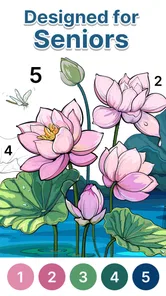
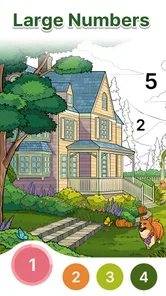
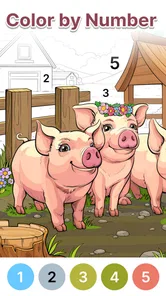
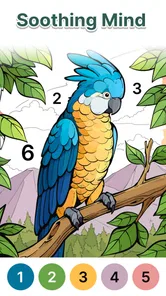

 Analysis by Gamesive
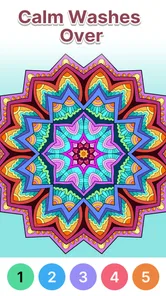
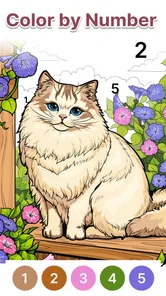
I find the appeal of Anima Color - Paint by Number in how it turns a large illustration into a string of small, clear decisions. Instead of asking me to choose a palette or draw carefully, it asks me to match numbered spaces with colors. That makes it easier to settle into a quiet activity when I want to focus on something simple without needing art skills or much preparation.
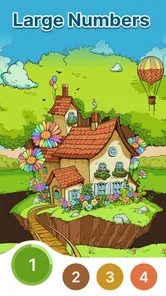
This is a board-style coloring game from Candy Mobile, built around filling pictures by number. Its particular emphasis on large-number coloring makes the format appealing to seniors and to anyone who finds tiny, intricate coloring tasks tiring. The central idea is not artistic freedom; it is having a manageable next step. I can concentrate on locating the right numbered area, filling it, and moving on.
That structure changes the mood of the activity. In a blank-page drawing app, I have to decide what to make, which colors to use, and whether the result looks right. Here, the picture already provides direction. The numbered regions do the planning, so my attention can stay on the repetitive, calming part. For a short break, that can be more welcoming than a creative tool that leaves every choice to me.
The trade-off is equally clear: this is coloring, not a drawing studio or a strategic board game. Anyone looking for freehand sketching, detailed image editing, or complex challenges will probably find the central loop too guided. I see that simplicity as a strength when I want low-pressure downtime, but it also sets a firm limit on what the game is trying to offer.
Matching a number to a patch of an image gives the session a natural rhythm. I do not have to finish a whole picture in one sitting to feel that I have made progress; each correctly colored section is a small completed task. That makes the game easier to fit around ordinary pauses than a game that demands a long run or a continuous chain of decisions.
The large-number focus also points toward a practical benefit: the activity is intended to feel approachable rather than fiddly. For a player who wants to relax but dislikes hunting through very small details, a coloring book framed around larger numbered areas may be a more comfortable starting point. I would still judge comfort on my own device and with my eyesight, but the design emphasis is a useful clue about the experience it aims to provide.
In practice, I would treat it as a brief, repeatable ritual. After lunch or while waiting for an appointment, I could open a picture, work on a few numbered areas, and stop when I need to. The best way to keep the activity relaxing is not to chase completion: choosing one image and making steady progress is less demanding than turning every session into a task to finish.
A helpful habit is to scan the picture before coloring and notice where the same number appears. Completing those matching regions together can make the image feel less scattered and gives me a simple plan without adding difficulty. If I start losing track of where I was, I can return to the numbered areas rather than trying to remember a complicated sequence. This is a small workflow tip, but it matters in a game whose pleasure comes from keeping mental effort light.
I would also use it differently depending on my energy. When I am alert, I might work through a picture more methodically; when I am tired, I would choose a few easy-to-find areas and call that enough. The number system supports both approaches: it gives direction, but it does not require me to set a demanding target for every visit. That flexibility is more useful than simply calling the game relaxing.
The most convincing everyday scenario is a short pause when I want something more engaging than scrolling but less involved than a conventional game. It gives my hands and eyes a single task to follow, while the numbered layout reduces the pressure to invent or perform. I can imagine recommending it to a family member who enjoys coloring books but would prefer digital guidance, or to someone who wants a gentle activity during a quiet evening.
It may also work well for players who like gradual visual progress. At the beginning, a picture is a set of unfinished spaces; as I fill them, the image becomes easier to read as a whole. That visible change supplies a modest sense of completion without relying on a story or a competitive goal. If that kind of patient, stepwise progress is satisfying to you, the format has a clear reason to return.
By contrast, I would steer away from it if I wanted open-ended art, lively interaction, or a substantial test of logic. Traditional paper coloring gives me more freedom to choose colors and materials, while a free-drawing app is better for making something original. A puzzle game is a better choice when I want to solve a changing problem rather than repeat a soothing matching action. The right alternative depends on whether I am seeking calm or creative control.
The same guidance that makes the game approachable can make it feel repetitive. Once I understand the number-to-color routine, the basic action does not ask me to learn a new technique or rethink a strategy. If I enjoy a coloring session for the calm repetition, that is fine; if I need frequent surprises or a growing challenge, the core loop may not hold my attention for long.
There is also a difference between relaxing repetition and relaxing on a screen. A numbered coloring activity still asks me to look closely and tap accurately, so it is not automatically restful for everyone. I would keep sessions short if my eyes feel strained, and I would not assume that a large-number emphasis removes every concern about visual comfort. The useful point is that the format aims to reduce the complexity of coloring, not that it turns screen time into a universal remedy.
Another trade-off is reduced ownership over the finished image. Because the numbers determine the color choices, the outcome follows the picture’s intended design rather than my personal palette. I like that when I want a guided activity, but a player who enjoys experimenting with unusual combinations may feel constrained. In that case, a conventional coloring app with more control—or paper and pencils—would better match the goal.
Compared with a physical coloring book, this game removes the need to prepare supplies and makes the next action explicit. The convenience is useful when I have only a few minutes or do not want to set up a table. Paper still wins for people who value texture, a larger working surface, or the freedom to improvise without a number guide.
Compared with a general digital coloring app, the numbered approach is less open-ended but easier to start. I do not have to make a design decision before I can begin. That can be a real advantage for someone who finds blank canvases intimidating, but it is not a substitute for a fuller creative tool. I would choose Anima Color when the goal is guided coloring and choose another option when the goal is to create, edit, or personalize art more deeply.
For a shared household, the simple premise also makes it easy to explain: find a number and color the matching area. I would not assume that every person will enjoy the same pace, though. Someone who likes to move quickly may find the method too deliberate, while a player who appreciates a calm routine may welcome precisely that steady pace.
I think the strongest audience is people who want a low-pressure coloring activity, especially seniors interested in larger-number designs, and casual players who prefer clear instructions to open-ended creation. It is also a sensible choice for someone who wants to try digital coloring without first learning drawing tools. The game is free, has an Everyone content rating, and is listed for devices running Android 6.0 or later, which makes it approachable for a broad audience with compatible hardware.
The game has an average rating of 4.6 from around 15,000 ratings, and it has been installed over a million times. Those figures suggest that the simple format has found an audience, but they cannot tell me whether an individual player will enjoy repetitive coloring. I would use them as context, not as a substitute for asking whether number-led coloring is the kind of break I actually want.
Its current version is 2.0.1, and it was released on November 28, 2023. I mention those details mainly because version and device compatibility can matter when deciding whether to try a game; they do not change the basic question of fit. If you are using an older device, checking that it meets the Android requirement before installing is a practical first step.
I recommend Anima Color - Paint by Number when someone asks me for a straightforward way to unwind through guided coloring. Its strongest quality is not complexity but the way numbered regions make starting easy and progress visible. I would keep expectations focused: it is a gentle coloring game, not a drawing tool, a demanding puzzle, or a source of endless novelty.
If you enjoy calm, small-step activities and would rather follow a picture than invent one, it is worth trying. If you want full control over colors, intricate artistic tools, or a changing challenge, I would choose a different kind of app. For the right person, though, a few minutes spent matching numbers can be a pleasantly simple way to make a break feel intentional.
Anima Color - Paint by Number is a digital coloring app built around numbered illustrations. You choose a picture, then tap the matching numbered areas to fill them with color. It is designed for casual, relaxing play rather than freehand drawing, so you do not need artistic experience or special tools. Available pictures and features may vary by app version, and some content may require an internet connection or an in-app purchase.
Choose an illustration from the available collection and use its numbered palette as a guide: select a color, then tap the areas marked with the corresponding number. The app fills those spaces automatically, which makes it easy to work through detailed designs one section at a time. Check the on-screen controls for features such as hints or zoom, since their availability and behavior can differ between versions.
The app may be available to download without an upfront charge, but that does not necessarily mean every feature or illustration is free. Like many coloring apps, it may offer optional in-app purchases, advertisements, subscriptions, or locked content; the exact arrangements can change. Review the current store listing and purchase details before installing, and check any payment prompts carefully if you are setting it up for a child.
Some coloring apps let you continue working on pictures already downloaded, while requiring an internet connection to load new artwork, advertisements, or other online features. Whether Anima Color supports offline play may depend on the version and the content you want to access. If offline use matters to you, open a picture while connected, then test it in airplane mode before relying on the app during travel.
The simple tap-to-color format can be approachable for children, but suitability depends on the artwork, advertising, purchases, and privacy practices in the current version. An adult should review the app-store age rating, permissions, and privacy information before installation, and supervise use where appropriate. Consider disabling or restricting in-app purchases through device settings, especially if a child will use the app independently.
On Android, Anima Color - Paint by Number asks for these permissions.
4.6 out of 5
14,810 reviews
Board · Candy Mobile
Board4.1 out of 5

Board4.8 out of 5

Board4.6 out of 5
Board4.6 out of 5

Board4.6 out of 5
Board4.8 out of 5

Board4.5 out of 5

Sports4.6 out of 5
Board4.7 out of 5

Board4.9 out of 5
Board4.5 out of 5

Board4.6 out of 5

Board4.8 out of 5

Board4.7 out of 5

Board4.8 out of 5

Board4.9 out of 5

Board4.6 out of 5

Board4.7 out of 5

Board4.5 out of 5
Board4.9 out of 5



Gamesive reviews games on its own and is not paid by developers for scores. We do not host game files: the download buttons open the official Google Play and App Store pages. Names, icons and screenshots belong to their owners.