
Chess - Play and Learn Online
Board4.7 out of 5

For Android · Splend Apps
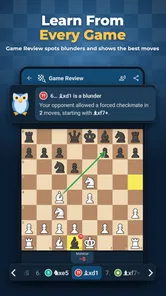

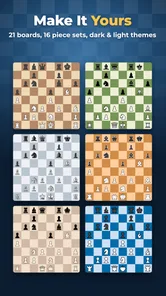
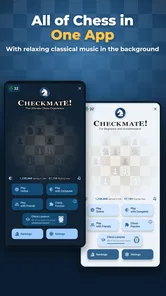
 Analysis by Gamesive
I like chess apps best when they get out of the way: I want to start a game quickly, see the board clearly, and focus on the position rather than wrestling with menus. Chess Online & Offline is a board game from Splend Apps that aims to make chess available whether I’m playing with someone online or looking for a game without an internet connection. Its straightforward premise makes it easy to understand, though the experience suits casual practice better than players who need a highly specialized training environment.
The app is free to download, is rated for Everyone, and has an average rating of 4.7 from around 566,000 ratings. It has been installed over 10 million times, so it is a familiar choice for people looking for chess on a phone. Those figures suggest broad appeal, but they do not tell me whether its particular style will suit you: that depends on whether you want convenient games or a more demanding study tool.
The current version is 3.0.12, and the game was released on September 4, 2024. Those are useful reference points for identifying the build you are considering, but they do not, by themselves, explain what changed between releases. I would not treat a version number as evidence of a particular feature or improvement. For an existing player, the practical question is whether the installed app remains a comfortable way to start and play a game.
That distinction matters because chess software can serve very different purposes. A board for a quick match is not automatically a good analysis suite, and a teaching tool may feel cumbersome when all you want is a short game. I see this title primarily as an accessible way to play chess, rather than a substitute for dedicated study software or a club’s over-the-board routine.
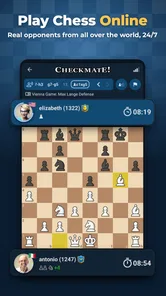
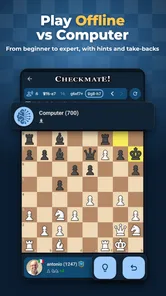
Its short description is “Chess Online,” while the game’s name also signals offline play. That combination is useful for people who switch between connected and disconnected settings. Before relying on offline access for a particular situation, I would test it on the device and mode I plan to use; the practical benefit is only real if the game is available when I need it.
Compared with a physical board, a phone game is easier to carry and makes it possible to play without setting up pieces. Compared with a dedicated online chess service, a mobile app can feel more immediate, but players who want a deep community, tournament tools, extensive analysis, or a large library of lessons may prefer an option built around those priorities. I would choose this game for accessible play, not assume that it covers every part of serious chess improvement.
For a beginner, that narrower focus can be an advantage. A new player can concentrate on legal moves, piece coordination, and avoiding simple blunders without first learning a complicated training interface. For an experienced player, the same simplicity may feel limiting if they expect detailed post-game analysis or a structured way to study openings. The right choice depends less on a rating figure and more on what you want to do after the game ends.
A realistic use case is a short break between errands: I can open a chess game instead of carrying a board, play while I have a connection, and keep the app in mind for times when a network is unavailable. Another is a family visit where one person has a phone handy but no chess set. In both cases, the value is convenience. It is not necessary to turn every spare moment into a lesson for the game to be worthwhile.
One useful habit is to decide before starting whether I want a relaxed game or focused practice. If I am trying to improve, I can pay attention to one recurring issue—such as leaving a piece undefended—rather than rushing through several games and forgetting what went wrong. If I only want a casual distraction, I can keep expectations modest and enjoy the board without treating every result as a measure of skill.
Another practical tip is to use the offline option as a fallback rather than discovering its behavior at the worst moment. Try opening the game before travelling or going somewhere with unreliable service, and confirm that the kind of play you want is available there. That small check avoids confusing a connection problem with a game problem, and it helps set realistic expectations about what “offline” means in your own routine.
I would recommend it to someone who wants a chess game that is easy to keep on a phone, especially a beginner, a casual player, or someone who values the choice of online and offline play. It can also suit a returning player who knows the basic rules and wants to rebuild the habit of thinking through positions. Because the age rating is Everyone, it is also a reasonable option to consider for family play, while adults should still make their own decisions about in-app purchases.
I would point a tournament-focused player toward a more specialized service if they need advanced preparation, a large competitive community, or detailed tools for reviewing games. Likewise, a learner who wants step-by-step coaching may be better served by an app whose central purpose is instruction. Chess Online & Offline is not the wrong choice for those players, but it may be only one part of their setup rather than the whole solution.
There is also a difference between playing against a person and practicing alone that affects how useful any chess app feels. If your goal is social competition, check that the available online experience matches the kind of opponent and pace you prefer. If your goal is quiet repetition, an offline option may be more attractive. I would choose based on the setting I expect to use most, rather than assuming that a single chess app will satisfy both needs equally well.
The game is free, with in-app purchases listed at $4.99 per item. I would treat the free starting point as a chance to see whether the board and style suit me before spending anything. The listed purchase price alone does not tell me what each item contains, so I would check the purchase details in the app before confirming one. That is sensible for any game, particularly when a child may use the device.
The main trade-off is breadth. A focused chess app can be easier to approach than a feature-heavy platform, but players who want multiple study workflows may eventually run into its limits. I would not pay for an item just because I had played for a while; I would first ask whether it solves a need I actually have. If I am only using the game for occasional matches, the free experience may be enough.
For device compatibility, the minimum operating system is Android 7.0. That gives many Android users a clear starting check before installing. On iOS, I would check the relevant app-store page for the device requirements rather than assume that the Android version’s requirement applies. This matters most if you are setting up an older phone for a child or keeping a spare device for travel.
For someone who already has the app, the release date and current version provide a useful snapshot of its present state, not a promise of a future direction. The version number may help when checking whether an installation is current, but I would avoid expecting a specific new mode or change unless it is explicitly described in the app store. That is a more reliable way to separate what is available now from what one might hope to see later.
If you have been using the game for casual matches, the key question is whether it continues to fit your routine: can you reach a game easily, is the board comfortable to read on your screen, and does the online or offline option cover the situations you care about? These are personal checks, not abstract measures of quality. A player who primarily studies openings will judge it differently from someone who wants a quick game before bed.
Before making it my only chess app, I would try both the connected and disconnected use cases I expect to rely on, then decide whether the available experience meets my needs. I would also look at the current in-app purchase descriptions and confirm the operating-system requirement for my specific device. Those checks answer practical questions without relying on assumptions about features that may not be relevant to my version or platform.
Overall, I see Chess Online & Offline as a convenient, approachable board game for people who want chess close at hand. Its strongest case is everyday accessibility: beginners can get started without choosing a specialist platform, and casual players have the appeal of online and offline play in one app. Its limits matter just as much: serious learners may want deeper analysis or structured instruction elsewhere. If your priority is simply to play more often, I think it is worth trying; if your priority is comprehensive chess training, I would compare it with a dedicated learning tool first.
Yes. The game’s offline mode lets you play chess without connecting to the internet, which is useful while traveling or whenever a connection is unavailable. Offline play is generally against the game’s built-in opponents rather than remote players, so check the in-game mode descriptions to see which difficulty options are available. Online features, by contrast, require a working connection.
The app offers online chess, so you can play against other players when you have an internet connection. The exact options for inviting friends, finding opponents, or choosing a match format may depend on the current version and the available online services. Before starting a game, review the matchmaking or multiplayer menus and make sure your connection is stable to reduce interruptions.
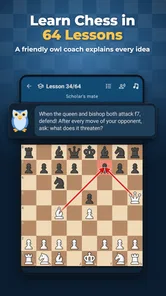
It can be a practical choice for new players because offline games provide a way to learn at your own pace before facing human opponents online. Chess itself has a straightforward objective, but improvement takes practice, and the app’s available lessons, hints, or difficulty settings can vary by version. Beginners should explore the menus first and choose an opponent level that feels manageable.
The app’s download price, advertising, and optional purchases can differ between its Android and iOS listings, and these details may change over time. Check the store page for the specific version available on your device before installing. If ads or purchases are present, review any prompts carefully, particularly before confirming a transaction, and consult the app’s settings for available controls.
Confirm that the store listing matches your device, operating-system version, and available storage, since compatibility requirements can change with updates. Also review the developer information, recent update history, user feedback, and privacy details. You will need internet access for online matches, while offline play can work without it; avoid assuming that every feature is available in every release.
On Android, Chess Online & Offline asks for these permissions.
Chess Online & Offline is also available in 2 other languages on our site.
4.7 out of 5
565,682 reviews
Board · Splend Apps

Board4.1 out of 5

Board4.8 out of 5

Board4.6 out of 5
Board4.6 out of 5

Board4.6 out of 5

Board4.8 out of 5
Board4.7 out of 5

Board4.9 out of 5

Board4.5 out of 5

Board4.6 out of 5

Board4.8 out of 5

Board4.7 out of 5

Board4.8 out of 5

Board4.9 out of 5

Board4.6 out of 5

Board4.5 out of 5

Board4.9 out of 5

Board4.8 out of 5



Gamesive reviews games on its own and is not paid by developers for scores. We do not host game files: the download buttons open the official Google Play and App Store pages. Names, icons and screenshots belong to their owners.