
Vita Mahjong
Board4.9 out of 5

For Android & iOS · X-FLOW







 Analysis by Gamesive
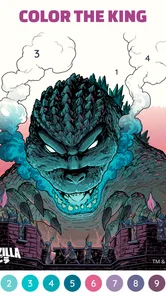
I reach for Happy Color® when I want a quiet activity that gives my hands something simple to do without asking me to plan, compete, or learn complicated rules. It is a free board game from X-FLOW, built around filling numbered areas in illustrations. The basic idea is easy to understand, but the experience depends on whether you enjoy patient, guided coloring more than making your own art.
What makes it appealing to me is the low barrier to starting: choose a picture, match its numbered regions to colors, and watch the image take shape. It works well in short breaks, though some pictures reward a longer, more deliberate session. I would recommend it to someone who likes coloring books but wants a little direction; I would not choose it as a substitute for a drawing app or an open-ended creative tool.
My usual routine is to pick an illustration based on the time I have, then color a few sections rather than treating every picture as a task I must finish immediately. That makes the game easier to fit around a commute, a wait, or a quiet moment at home. The numbered format removes the decision of choosing each color, so I can settle into the activity without preparing anything.
That guidance is also the main trade-off. I’m following a prepared design, not deciding the composition or palette myself. If I want the satisfaction of completing a polished image without worrying about artistic technique, that structure is a strength. If I want to experiment with colors, sketch freely, or make something personal from scratch, it can feel restrictive.
A useful habit is to choose a picture with the session in mind. A simpler-looking image can be more comfortable when I only have a few minutes, while a detailed one is better when I can stay focused and enjoy the gradual progress. I avoid switching pictures just because one area feels fiddly: returning to the same illustration later makes the overall activity feel more continuous.
The game is suitable for Everyone, and the format is approachable for people who have never used a digital coloring book. Its audience is broad, but the best fit is less about age than temperament. Anyone who enjoys orderly, small tasks may find the rhythm soothing; anyone who dislikes tapping through many separate areas may find the same process tedious.
Before settling into a longer session, I check the available settings and adjust what I can to make the display comfortable. On a phone, tiny numbered spaces and close-together regions can demand more attention than the simple premise suggests. A comfortable screen brightness and a steady grip help me avoid turning a relaxing activity into a squinting exercise.
I also treat notifications and interruptions as part of the setup, rather than blaming the game when I lose my place mentally. If I’m coloring while waiting for something, I keep the session casual and don’t expect uninterrupted concentration. At home, putting the phone somewhere stable and giving the picture a few focused minutes is more satisfying than tapping while multitasking.
Settings are worth checking for comfort, but I don’t assume they can transform the core mechanic. The appeal remains matching regions to numbered colors. If that loop itself is not enjoyable, changing display preferences will not turn the game into a freehand art studio or a strategy-heavy board game.
There is also a practical difference between a quick session and a long one. Short sessions are easy to stop at a natural point, while detailed images can invite repeated close attention to small areas. I take a break when my focus slips; rushing through a picture just to see the finished result makes the activity less pleasant and increases the chance of tapping inaccurately.
Experienced play, for me, is less about hunting for secret shortcuts and more about building a repeatable rhythm. I scan the illustration for areas that seem easy to complete, work through a manageable stretch, and then pause before I start tapping randomly. That approach helps me stay oriented and makes progress feel visible even when the picture contains many separate spaces.
It can also help to think in small passes. I focus on one part of the image at a time instead of jumping between distant details whenever I notice them. This is especially useful on a phone, where constant repositioning of attention can make a picture feel more fiddly than it really is. The method is simple, but it cuts down on the feeling that I’m merely searching for the next place to tap.
Another sensible habit is to match the image to your attention, not just its subject. A picture with many compact sections may be satisfying when I’m rested, but frustrating when I’m distracted or using the app in a hurry. When I only have a short window, I choose something that looks easy to follow and accept that I may leave it unfinished.
That last point matters: the game does not need to be played as a race to completion. I get more out of returning to a picture with a clear head than forcing myself through the final details when I’m tired. For a calming pastime, a steady pace is more valuable than maximizing how much I finish in one sitting.
The strongest limitation is built into the concept. The game offers a prepared coloring experience, so the numbered areas and assigned colors guide the result. That can be relaxing, but it offers less creative control than a blank canvas, a painting app with brushes, or a traditional coloring book where I choose the palette. If personal expression is the main goal, those alternatives are a better fit.
It is also not the right choice for every kind of downtime. I would pick a puzzle or a competitive board game when I want a challenge with a stronger sense of strategy, rules, or interaction. Happy Color is much quieter and more repetitive by design. The appeal is the process of filling the image, not mastering a complex system or competing against another player.
Small spaces can be a source of friction, particularly if I’m using a compact screen or trying to play while distracted. The game asks for repeated visual attention, so it is not entirely hands-off. I would not recommend it as something to play while walking, handling another task that needs care, or expecting to make meaningful progress with only occasional glances.
The game is free to download and includes in-app purchases priced from $1.99 to $7.99 per item. I’d start with the free experience and decide whether it suits my habits before spending. Paid options may appeal to someone who uses the game regularly, but they are not a reason to assume that everyone needs to pay to enjoy the basic coloring loop.
Its scale is notable without being a substitute for personal fit: it has an average rating of 4.6 from around 3.9 million ratings, with over 100 million installs. Those figures suggest that the format has found a large audience, but they do not change the central question for me: do you enjoy calmly completing guided pictures? The answer matters more than popularity.
The version is 2.24.1, and the game runs on Android 7.0 or later. It was released on January 24, 2018, and has accumulated around 403,000 written reviews. I see those details as useful context for someone checking device compatibility or looking for an established title, rather than a promise that every session will suit every player.
For an everyday scenario, I can imagine opening it while waiting for a friend at a café, completing a few sections, and putting my phone away when the conversation starts. It works better for that kind of stop-and-start pause than a game that requires me to remember a complicated position or react quickly. At home, it can also make a short quiet break feel more deliberate, provided I’m in the mood for repetitive, focused tapping.
My practical recommendation is to give the game a few sessions before deciding whether it belongs in your routine. Try different kinds of pictures, keep your first sessions short, and notice whether the numbered guidance feels calming or limiting. If you enjoy seeing an image gradually fill in and prefer not to make artistic decisions, it’s an easy game to return to. If you want originality, deep challenge, or complete control over the final image, choose a different kind of creative app.
Overall, Happy Color® works best as a dependable coloring pastime rather than a full creative tool. Its clear, repeatable workflow makes it approachable, and a few thoughtful habits can make sessions more comfortable without turning them into a chore. I’d recommend it to patient players who like guided progress; I’d skip it if numbered coloring feels more like busywork than relaxation.
Happy Color is a digital coloring app that lets you fill illustrated designs by matching numbered areas with their corresponding colors. Its catalog includes a variety of themes, such as animals, flowers, landscapes, and characters, with new pictures sometimes added. It is designed for casual, relaxing use and does not require drawing skills, though the available content and features may vary by version.
Happy Color is generally available to download for free, and you can color many pictures without paying. The app may also offer optional in-app purchases, subscriptions, or advertisements, depending on the platform and current version. Check the store listing and payment details before downloading, especially if you plan to let a child use the app or want to avoid accidental purchases.
Some coloring activity may be available offline, particularly for pictures that have already been loaded or downloaded, but access to the full catalog and online features can require an internet connection. Availability can differ between app versions and devices. If offline use matters to you, open a few pictures while connected first, then test the app in airplane mode before relying on it while traveling.
The simple numbered-coloring format can be approachable for children, but suitability depends on the child and the content shown in the app. The catalog may include a broad range of illustrations, and advertisements or in-app purchase prompts may appear depending on settings and version. Parents should review the store’s age rating, check available parental controls, and supervise purchases and ad interactions.
The app may retain your coloring progress on the device, so you can usually return to pictures you have started. Moving progress to a different device can depend on whether the current version supports account-based backup or cloud synchronization, as well as your device settings. Before changing phones or reinstalling, check the app’s settings and backup options; do not assume progress will transfer automatically.
On Android, Happy Color®: Color by Number asks for these permissions.
Happy Color®: Color by Number is also available in 2 other languages on our site.
4.6 out of 5
3,909,112 reviews
Board · X-FLOW
Board4.1 out of 5

Board4.8 out of 5

Board4.6 out of 5
Board4.6 out of 5
Board4.8 out of 5

Board4.7 out of 5
Board4.9 out of 5
Board4.5 out of 5

Board4.6 out of 5

Board4.8 out of 5

Board4.7 out of 5

Board4.8 out of 5

Board4.9 out of 5
Board4.6 out of 5

Board4.7 out of 5

Board4.5 out of 5

Board4.9 out of 5

Board4.8 out of 5



Gamesive reviews games on its own and is not paid by developers for scores. We do not host game files: the download buttons open the official Google Play and App Store pages. Names, icons and screenshots belong to their owners.