
Football League 2026
Sports4.4 out of 5
For Android & iOS · Wildlife Studios




 Analysis by Gamesive
I enjoy sports games most when they make the action easy to understand but still leave room for a player’s decisions to matter. Tennis Clash aims for that balance: it turns tennis into short online contests where timing, positioning, and reading an opponent are more important than learning a long list of commands. That makes it appealing for a quick match, though its focus on live competition also brings demands that are worth considering before you settle in.
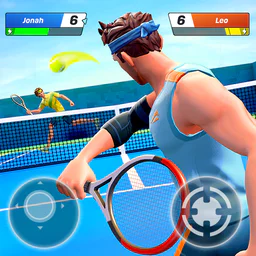
At a glance, the game’s purpose is clear. You are playing tennis, and the central task is to send the ball back while anticipating where your opponent will move. The presentation keeps attention on the court rather than burying the action beneath complicated sports-management systems. I find that clarity useful when I only have a few minutes and want to start playing without studying a lengthy tutorial.
Wildlife Studios made this free sports game, and its online format gives it a different feel from a tennis title built mainly around solo practice or a season mode. Matches against other people make each exchange feel less predictable: an opponent may favor one side, change direction, or respond to a pattern you thought was working. The same simplicity that makes the game approachable also means that players looking for deep simulation or detailed off-court control may want something else.
The game’s scale is substantial: it has passed 100 million installs, with an average rating of 4.6 from around 2.3 million ratings. Those figures suggest that it has reached a wide audience, but they are not a substitute for deciding whether its particular kind of tennis suits you. I would treat it as an accessible competitive mobile game, not as a replacement for a full console tennis simulation.
Navigation matters in a game that asks you to move quickly once a rally begins. I recommend taking a little time to learn the controls before treating online matches as a test of skill. The useful distinction is between understanding what the interface is asking and being able to react at match speed. If a first rally feels hectic, that does not necessarily mean the game is too complicated; it may simply take a few exchanges to connect the visual cues with your movement.
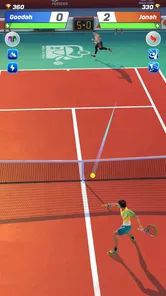
The court gives the match a clear visual focus, but following the ball and judging where it is going still requires attention. Beginners may find that they move toward the ball late while concentrating on the opponent or the edge of the court. I found it more helpful to watch the exchange as a whole instead of staring only at the ball: the opponent’s position can offer a clue about where a return might go, while the open space helps frame a sensible response.
A practical early habit is to avoid making every shot a last-second reaction. As you learn the rhythm, try to notice where you are standing before the return arrives, then make a deliberate movement rather than repeatedly correcting your direction. This can make the action feel less frantic and helps reveal whether a mistake came from timing, positioning, or simply not seeing the ball clearly enough. That distinction is useful because each problem calls for a different adjustment.
The game is rated for Everyone, which makes its general presentation suitable for a broad audience. That rating does not mean every player will find the pace or controls comfortable, however. A child, an older player, or someone new to mobile sports games may still benefit from a quiet first session rather than jumping straight into a high-pressure contest.
Because matches are interactive and time-sensitive, the game asks for more than a single tap at a relaxed pace. You need to notice the incoming play, choose where to move, and act quickly enough for that choice to matter. For players who enjoy responsive touch games, that creates a satisfying link between attention and outcome. For anyone who finds repeated quick gestures uncomfortable, or who has limited precision or stamina in their hands, the same demand may become tiring.
I would test a short session before committing to a long stretch of play. If your movements feel rushed, take a break and return when you can focus; forcing a long session is unlikely to make the experience more enjoyable. It can also help to use a comfortable grip and keep the phone steady, since unnecessary hand movement makes a fast exchange harder to follow. These are practical adjustments, not a promise that the controls will work equally well for every player.
Sensory comfort is another individual question. The ball, court, and opponent all compete for attention during a live rally, so players who are sensitive to busy movement or visual changes may find the screen demanding. I suggest trying the game in a calm setting first. If the pace or visual activity makes it difficult to track the point, this may not be the right sports game for you, even if you like tennis.
Sound can be a preference rather than a requirement for enjoying a match, but I would not assume that every cue is easy to understand without looking at the screen. If you play in a noisy place, keep your attention on the court and avoid relying on audio alone to tell you what is happening. Likewise, playing with the sound muted may suit a shared room or public transport, while a visually busy match still calls for an unobstructed view.
The online format is best suited to moments when you can give a match your attention, even if you do not have time for a long gaming session. For example, I might open it during a break at home, play a match, and stop before moving on to another task. That is a better fit than trying to play while walking, carrying something, or keeping one eye on a conversation: the quick exchanges reward focus, and interruptions can turn a manageable rally into a frustrating one.
Live competition also makes the quality of your connection and the surrounding situation relevant. If you are somewhere with an unstable connection or frequent interruptions, a game against another person may be less satisfying than an offline sports title. I would save this one for a place where you can hold the phone comfortably and stay engaged for the duration of a contest. It is a small change in routine, but it can prevent the game’s competitive side from feeling like a chore.
Compared with the usual alternatives, the key choice is between quick head-to-head play and a more deliberate solo experience. A traditional tennis simulation may be better if you want to manage a tournament, practice without an online opponent, or spend time learning realistic shot mechanics. A casual arcade sports game may be better if you prefer low-pressure rounds that do not demand close attention. This game sits between those options: it keeps the tennis theme immediate, while the human opponent adds unpredictability and pressure.
That comparison also helps answer who should skip it. If your priority is a fully offline game, a slower pace, extensive customization, or a detailed career, I would look elsewhere rather than expecting this title to provide those things. If you mainly want a compact way to challenge another player and enjoy reacting to their choices, its live format is the point, not a side feature.
The game includes in-app purchases, with individual items ranging from $0.49 to $149.99. The free entry point makes it easy to try, but the range is wide enough that I would decide in advance whether I am comfortable spending anything. A good approach is to play first and see whether the basic match loop keeps you interested; avoid treating a purchase as a shortcut to enjoying a game whose pace or control style may not suit you.
Online competition can make progress feel personal: a close loss may tempt you to keep playing, while a win can encourage another match. I find it helpful to separate improvement from spending. Focus on what happened in the rally—whether you moved early enough, left space uncovered, or repeated a predictable return—before deciding that you need an item or upgrade. That simple review of your own decisions gives you a more useful next step than reacting to a single result.
There is also a trade-off between competitive variety and predictability. Playing real opponents can make matches lively, but it means you cannot expect every session to feel equally easy or relaxed. If you want a game that reliably offers a calm, fixed challenge, a solo-focused tennis game is likely a better fit. If adapting to different opponents is part of the fun, the online design has a clear advantage.
The game was released on October 23, 2019, and its current version is 6.48.1. It requires Android 7.1 or later, so checking your device’s operating system before downloading is a straightforward first step. The store information identifies it as a free download, while optional purchases are available in the game. I would also check the app store on your device for the current installation details before deciding whether it is a good match for your phone.
For a first session, I would keep the goal modest: learn how movement feels, follow a few rallies, and notice whether the screen remains comfortable to watch. Then decide whether you enjoy reacting to a human opponent, rather than judging the game only by an early win or loss. If the controls feel manageable and the match pace is fun, continue. If tracking the action is tiring or the timing creates stress, there is no reason to force it just because tennis itself appeals to you.
This is also a useful way to judge suitability for different ages and abilities. The Everyone rating gives a broad indication of content, but a young player may still need help understanding online competition and purchases. Someone with limited hand mobility may want to test the touch demands before investing time, while someone sensitive to fast visual activity should try a short match in a comfortable setting. Those practical checks are more informative than assuming a single rating makes the game accessible to everyone.
I would recommend it to people who like tennis, enjoy quick competitive matches, and are comfortable giving a screen their attention for a short stretch. It is particularly appealing if you prefer responding to another person’s choices over repeating a fixed challenge. The large audience and strong average rating make it a popular option, but its clearest strength for me is the immediate, readable premise: get into a rally, pay attention, and try to outthink the player across the court.
I would be more cautious for players who need offline play, dislike rapid touch interactions, or want a quiet game they can leave and resume without losing the thread of a live contest. The optional purchases are another reason to set boundaries before playing, especially if you are choosing it for a younger family member. Free to start does not mean every player will want to ignore the shop, so making that decision early keeps the focus on the game itself.
Wildlife Studios has made a sports game with a clear niche: approachable tennis action shaped by live multiplayer. Its 4.6 average across roughly 2.3 million ratings reflects broad appeal, but what matters more is the match experience you want. I would give it a try if you have a steady connection, a comfortable way to hold your phone, and an appetite for fast rallies. If your ideal tennis game is slower, more solitary, or easier on your hands and eyes, a different kind of sports title will probably serve you better.
My verdict: it is a lively choice for focused, short tennis contests, but its speed and online demands make comfort and context part of the decision. If those demands suit you, the game can turn a spare moment into a satisfying challenge. If they do not, the best choice is not to push through, but to pick a tennis game built around the pace and control style you actually enjoy.
Tennis Clash is a free-to-play tennis game for Android and iOS that focuses on short, real-time matches against other players. You control movement and shots with touch gestures, choosing where to send the ball while trying to anticipate your opponent. It also includes player and equipment progression, tournaments, and other competitive modes. Features and availability can vary by version and region.
Tennis Clash is primarily designed for online multiplayer, so you generally need an internet connection to play its main matches and access progression features. A stable connection helps keep rallies responsive and reduces the chance of interruptions or match disconnections. If you are planning to play while traveling or on a limited data plan, check the current app listing and settings for connection requirements and consider using Wi-Fi.
The game is generally free to download, but it offers optional in-app purchases and progression systems. Purchases may include currency, packs, or other items that can help unlock or upgrade content, while some rewards can also be earned through play. Spending is not required to try the game, but progression and competitive balance may feel different depending on how much time or money you invest.
Matches use simple touch controls: you move your player and swipe or tap to direct shots, with timing and shot placement affecting the result. The controls are easy to understand, but winning consistently takes practice because positioning, stamina, and reading the opponent matter. It is worth completing the introductory matches and trying different swipe strengths and directions before entering more competitive play.
The game is designed for mobile devices, but the exact system requirements and performance depend on the current version and your phone or tablet. Check the store listing for supported operating-system versions, and make sure you have enough storage and a reliable connection. It may appeal to younger players, but online competition, chat or social features, and optional purchases are worth reviewing with a parent or guardian.
On Android, Tennis Clash: Multiplayer Game asks for these permissions.
Tennis Clash: Multiplayer Game is also available in 2 other languages on our site.
4.6 out of 5
2,346,263 reviews
Sports · Wildlife Studios

Sports4.8 out of 5
Sports4.4 out of 5

Sports4.6 out of 5

Sports4.6 out of 5

Sports4.5 out of 5

Sports4.5 out of 5

Action4.6 out of 5

Arcade4.5 out of 5
Board4.6 out of 5
Sports4.4 out of 5

Sports4.1 out of 5

Sports4.7 out of 5

Sports4.5 out of 5

Sports4.6 out of 5

Sports4.2 out of 5

Sports4.5 out of 5

Sports3.0 out of 5

Sports4.3 out of 5

Sports4.7 out of 5

Sports4.7 out of 5

Sports4.6 out of 5



Gamesive reviews games on its own and is not paid by developers for scores. We do not host game files: the download buttons open the official Google Play and App Store pages. Names, icons and screenshots belong to their owners.