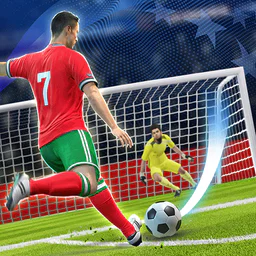
Soccer Superstar
For Android & iOS · Real Freestyle Soccer
- 4.7 out of 5Rating
- 3.56MReviews
- 100.00M+Downloads
- SportsGenre
Game details
- Version
- 0.3.85
- Updated
- Requires
- 6.0
- Price
- Free
- Age rating
- Everyone
- In-app purchases
- $0.99 - $24.99 per item
Screenshots
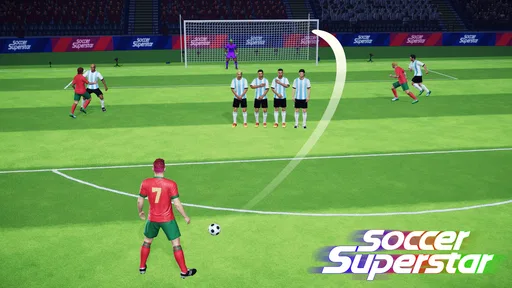


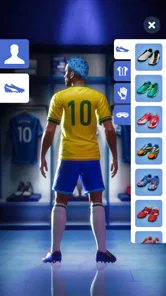

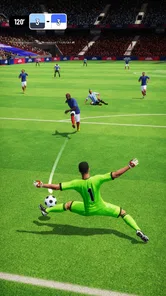
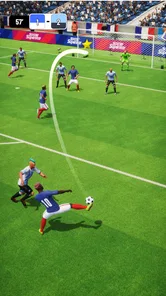

Soccer Superstar review
 Analysis by Gamesive
I found Soccer Superstar easiest to understand when I treated it as a quick, focused football game rather than a full simulation. Its appeal is in the direct link between a touch and an attempt to score: there is little to learn before you can start playing, and the short challenge format makes it inviting for a spare moment. That simplicity can help people who prefer a clear goal over menus packed with modes, but it also means this is not the best fit if you want to manage a team or control a match in detail.
Clear goals, with a light learning curve
The basic premise is straightforward: guide the ball toward a goal and work through a sequence of challenges. The store’s promise of a long climb is reflected in the game’s emphasis on level progression, with 5,000 stages to aim for. I like that a new player can grasp the point without first studying football tactics or a complicated control scheme. For someone who wants a few minutes of play rather than a deep career mode, that clarity is a genuine strength.
Navigation and readability matter even in a simple sports game. Here, the central task tends to stay obvious: look at the situation, decide where the ball should go, and try to make the shot. That reduces the amount of interpretation needed compared with a traditional football game, where a player may have to track teammates, opponents, a clock, and multiple controls at once. I would recommend it to casual players who want the game to explain itself through play rather than a long tutorial.
Still, “easy to understand” does not mean every attempt is effortless. The challenge comes from judging the path of a shot and responding to the particular setup of a level. A useful habit is to pause for a moment before acting instead of immediately repeating the same swipe or gesture. When an attempt fails, I find it more helpful to change one part of my approach—such as the direction or force of the movement—than to rush through another identical try.
The game is made by Real Freestyle Soccer and sits in the sports-games category, though its compact challenges make it feel quite different from a full match simulator. It has a 4.7 average from around 3.6 million ratings, and more than 100 million installs. Those figures suggest a broad audience, but they do not tell you whether its particular style will suit you; the main question is whether you enjoy aiming and solving brief scoring situations.
What the controls ask of you
Because the core interaction centers on directing a shot, the game asks for more deliberate touch input than a passive watching experience. That can be satisfying for players who enjoy trying to place a ball precisely. It can also be a source of friction for anyone who finds repeated touch gestures tiring, uncomfortable, or difficult to perform consistently. I would not assume that a simple control concept automatically works equally well for every hand or playing style.
One practical way to make sessions more comfortable is to play in short bursts and give yourself time to reset between attempts. That is especially useful when precision starts to slip: fatigue can make a familiar action feel much harder, and pressing on may turn a playful challenge into a frustrating one. If you are deciding whether the game is manageable for you, try a small session first and notice whether the aiming interaction feels comfortable, rather than judging only by how quickly you understand the objective.
Sensory demands are comparatively modest in concept: the player’s attention is directed toward the ball, the goal, and the immediate challenge rather than a crowded match with many moving players. That can make the experience easier to follow for someone who prefers a visually focused task. At the same time, I would not describe it as a low-stimulation or universally accessible game without testing it in the settings and circumstances that matter to you. A simple screen can still demand sustained visual attention, and a fast decision can still feel pressuring.
Good for short breaks, less suited to every setting
A realistic use case is a brief wait—perhaps sitting in a waiting room or taking a break between errands—when you want something more active than scrolling but do not have time to start a long match. Individual challenge-based play is a natural match for that window: you can focus on a goal, make an attempt, and decide whether to continue. It is also a reasonable choice for a younger player curious about football games, since its content rating is Everyone.
Context still matters. Precision touch play is less comfortable when you are walking, riding in a vehicle, or trying to divide your attention between the screen and something else. I would save it for a moment when you can look at the display and hold the device steadily. If you need a game that can be played entirely by listening, with one hand, or without visual focus, this is not a choice I would make on the assumption that it will meet those needs.
For a more traditional football experience, the usual alternatives in the sports category often focus on controlling a full team, managing a match, or competing through a broader set of actions. Soccer Superstar is a better fit when you want the opposite: a compact scoring puzzle rather than responsibility for every pass and player. That distinction is important. Someone who loves tactical decisions may find the limited focus repetitive, while someone who wants a quick, understandable challenge may appreciate not having to learn a large control layout.
Progress, repetition, and spending choices
The large level count gives the game a clear long-term direction, but it also raises a practical question: will you enjoy repeating its central kind of challenge? I would not choose it solely because the number of stages sounds impressive. A player who likes refining an attempt and seeing a new setup may find progression motivating; a player who needs frequent changes in activity could tire of the same basic loop before reaching far into it.
The game is free to download, with optional in-app purchases ranging from $0.99 to $24.99 per item. That makes it easy to try without paying upfront, but I would treat any purchase as optional spending rather than a necessary part of deciding whether the core play suits you. If you are setting up the game for a child, it is sensible to discuss purchases before handing over the device. The age rating is Everyone, but that does not remove the need for an adult to make choices about spending in a shared device environment.
For a fair first impression, I suggest playing enough to see whether aiming and level progression remain enjoyable after the novelty wears off. Avoid buying anything just to get past an early frustration. Instead, check whether a different line or pace improves your attempt, and take a break if repeated retries stop being fun. That small change in approach helps distinguish a temporary learning curve from a control style you simply do not enjoy.
Who may need to think twice
The most important remaining barrier is the game’s reliance on visual judgement and touch precision. Players with limited vision, difficulty distinguishing what is happening on screen, reduced fine-motor control, or pain triggered by repeated gestures may find the central mechanic challenging. The game’s straightforward premise does not remove those demands. If that describes you, I would test a short session before investing time or money, and stop if the interaction causes discomfort.
It may also be a poor match for anyone looking for a slower, more forgiving football experience or for detailed team strategy. A challenge built around putting a shot on target is narrow by design; the narrowness makes it approachable but limits the kinds of decisions available. I prefer that honesty over expecting it to replace a complete soccer simulation. It is a small, focused diversion, not a substitute for every kind of sports game.
Version 0.3.85 supports Android 6.0 and newer. The release date was September 28, 2020, so it has been available for several years, and its broad adoption points to an established audience. I would still make the decision based on your device and comfort with the interaction, rather than assuming that a large player base guarantees a good personal fit.
A welcoming idea, with real limits
My overall view is that Soccer Superstar makes a good case for keeping football play simple: clear scoring goals, bite-sized attempts, and a progression path that can suit short breaks. I especially like it for people who want to get into a sports game without learning a full match’s worth of controls. Its broad appeal and Everyone rating make it easy to consider for a range of players, but neither fact should be mistaken for proof that every person will find the touch-based challenge comfortable.
If you enjoy careful aiming and can comfortably focus on the screen, I think it is worth trying as a free game. If you need team tactics, varied match management, or controls that demand less precise touch input, a conventional football title—or a different kind of casual game—will probably be a better choice. In the end, its inclusive strength is the clarity of its central goal; its limitation is that reaching that goal still depends on abilities and circumstances that vary from person to person.
What we like
- Simple swipe controls make shooting easy to learn.
- Quick levels suit short play sessions.
- Offline play is available for many stages.
- Unlockable challenges add variety to the campaign.
- The game runs smoothly on many modest devices.
What could be better
- Energy limits can interrupt longer sessions.
- Ads may appear between levels.
- Later stages can require precise swipe timing.
- Progression may feel repetitive over time.
- Some upgrades and bonuses encourage in-app purchases.
Frequently Asked Questions
What is Soccer Superstar, and what do you do in the game?
Soccer Superstar is a mobile soccer game built around short, swipe-controlled matches. You draw a path to direct a pass or shot, with the aim of getting the ball past defenders and into the goal. Rather than controlling every movement of a team in real time, you focus on choosing the right angle and timing for key plays. The simple controls make it approachable, while later challenges can call for more careful planning.
Can I play Soccer Superstar offline?
Soccer Superstar is generally designed to let you play its core levels without a constant internet connection, which can be useful when traveling or away from Wi-Fi. However, some features may require connectivity, including advertisements, optional purchases, or online services. Availability can also vary by app version and device. If offline play matters to you, try launching the game in airplane mode after installation to see which content remains accessible.
Is Soccer Superstar free to download, and does it include ads or in-app purchases?
The game is typically free to download, but that does not necessarily mean every part of the experience is free of interruptions or optional spending. Soccer Superstar may show advertisements and offer in-app purchases, depending on the current version and region. Check the listing in the Google Play Store or Apple App Store for the latest pricing and purchase details. You can also review your device’s purchase controls before letting children play.
Is Soccer Superstar suitable for children and beginners?
The swipe-based controls are straightforward, so beginners can usually understand the basic idea quickly. Its soccer theme and level-based format may appeal to younger players, but suitability depends on a child’s age, preferences, and your household’s rules. Before downloading, check the game’s current age rating and store-page disclosures, especially for advertising and in-app purchases. For children, consider enabling parental controls and preventing purchases without adult approval.
What should I check before downloading Soccer Superstar on Android or iOS?
Download Soccer Superstar from the official Google Play Store or Apple App Store, and check that the developer and app listing match the game you intend to install. Review the current system requirements, age rating, permissions, privacy information, and details about ads or purchases, since these can change with updates. Make sure your device has enough storage and runs a supported operating system. If you encounter performance issues, updating the game and your device software may help.
Permissions
On Android, Soccer Superstar asks for these permissions.
- Photos/Media/Files
- read the contents of your USB storage, modify or delete the contents of your USB storage
- Storage
- read the contents of your USB storage, modify or delete the contents of your USB storage
- Wi-Fi connection information
- view Wi-Fi connections
- Other
- view network connections, full network access, control vibration, prevent device from sleeping, Google Play license check
Languages
Soccer Superstar is also available in 2 other languages on our site.
User reviews
4.7 out of 5
3,558,483 reviews
- 82%
- 11%
- 4%
- 1%
- 3%
Download Soccer Superstar
Sports · Real Freestyle Soccer · Free
Games like Soccer Superstar
View all: Games like Soccer Superstar
8 Ball Pool
Sports4.8 out of 5

EA SPORTS FC Soccer Mobile 26
Sports4.6 out of 5

82-0.com
Sports4.5 out of 5

17-0 Football Manager
Sports4.7 out of 5
About this listing
- Game
- Soccer Superstar
- Developer
- Real Freestyle Soccer
- Package
- com.soccer.score.star
- Version reviewed
- 0.3.85
Gamesive reviews games on its own and is not paid by developers for scores. We do not host game files: the download buttons open the official Google Play and App Store pages. Names, icons and screenshots belong to their owners.