Geometry Dash Lite
Arcade4.4 out of 5

For Android & iOS · SYBO Games






 Analysis by Gamesive
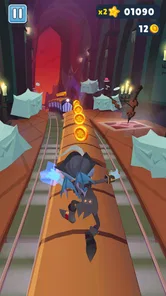
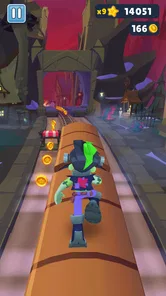
The first thing I notice about Subway Surfers is how quickly it gets going: there is no long explanation to work through before I can understand the basic appeal. I guide a runner through a busy rail setting, reacting to obstacles and trying to keep a run alive. That makes it easy to pick up for a short break, but the pace also means a missed swipe can end a promising attempt before I have time to settle in.
This is an arcade game from SYBO Games, and its central challenge is immediate rather than story-heavy. The store’s premise centers on Jake, Tricky and Fresh escaping an Inspector and his dog; in play, the useful question is less about following a plot and more about whether I can read the track quickly enough to choose a safe route. If you enjoy short sessions built around reflexes, that simplicity is a strength.
It is also where new players can get stuck. The lanes, barriers and other hazards demand quick decisions, and the game rarely gives me much time to think once a run is moving. I found it helps to watch the path ahead instead of focusing only on the character. When I react to the next visible obstacle rather than the one directly underfoot, I make fewer panicked corrections.
Swipes are the core language of the game, so an early stumble may be a control issue rather than a sign that the game is too difficult. On a phone, a small or hurried gesture can be harder to register consistently than a deliberate one. I recommend making clear, purposeful movements and keeping the device steady. If a swipe seems to do nothing, try slowing down the gesture slightly before assuming the game has frozen.
The other common source of frustration is trying to do too much at once. A new player may be watching the runner, scanning for hazards and thinking about a possible reward in the same moment. I get better results when I prioritize survival first. Learning to recognize the rhythm of the route is more useful than chasing every tempting opportunity during an early run.
The game is free to download, with optional in-app purchases priced from $0.99 to $99.99 per item. I would approach those purchases as optional extras, not as a requirement for deciding whether the basic arcade loop suits me. If I am setting it up for a child, I would also keep the Everyone 10+ age rating in mind and check the device’s purchase settings before handing it over.
Subway Surfers requires Android 7.0 or later, and its current version is 3.71.11. Before troubleshooting a launch or update problem, I would check that the device meets the minimum operating-system requirement and that the game has finished installing or updating. A partially completed update or an older operating system can look like an in-game fault even when the immediate problem is setup.
If the controls feel unreliable, I first check whether the screen is responding normally in other apps. I also make sure my fingers are not covering the part of the track I need to read. These are small adjustments, but they matter in a game where the difference between a clean lane change and a collision can come down to a quick input.
For a session that starts slowly or behaves oddly, I would close and reopen the game, then check whether the device has enough room and is otherwise running normally. I would avoid repeatedly tapping the screen while a load is in progress; extra input can make it harder to tell whether the game is still responding. These basic checks are more sensible than immediately assuming the latest version has broken something.
A run that ends quickly is not necessarily wasted. I use early attempts to learn which kinds of obstacles make me hesitate and where I tend to swipe too late. Instead of treating every run as a high-score attempt, I set a small goal: stay calm through a tricky stretch, make cleaner lane changes, or avoid reacting to a hazard at the last second. That gives a short session a purpose even when I do not last long.
One practical habit is to keep my attention a little farther down the track. Looking only at the runner makes hazards feel sudden, while looking ahead gives me more time to choose a direction. I also try not to chain several hurried swipes just because one movement felt uncertain. A deliberate correction is easier to judge than a burst of inputs that may leave me unsure which one the game received.
When a run goes badly, I take a brief pause before starting again. That sounds minor, but it stops frustration from turning into even faster, less accurate gestures. Subway Surfers works best for me when I treat each attempt as a compact challenge rather than a test I must immediately win. The quick restart loop is inviting, yet it can also encourage mindless repetition if I do not give myself a reason to improve.
For a younger or less experienced player, I would suggest learning the basic movement first and leaving optional purchases alone until the game’s appeal is clear. For someone already comfortable with arcade runners, the more useful question is whether this particular track-reading rhythm feels satisfying. It rewards attention and timing, not elaborate planning, so a player who wants deep tactical choices may find the loop too simple.
If the game closes unexpectedly or becomes sluggish, I would not assume that the gameplay itself is responsible. I would first see whether other apps are also struggling, restart the device if needed, and check that the operating system is supported. If the trouble began during an update, confirming that the installation completed is a better first step than changing several settings at random.
Likewise, if a swipe fails only intermittently, the touchscreen or the way I am holding the device may be part of the problem. A screen protector, damp fingers or a thumb resting near the edge can make quick gestures less consistent. I cannot fix a hardware issue from inside the game, so checking touch response elsewhere helps separate a control habit from a device problem.
Expectations matter too. This is a fast arcade game, not a slow exploration experience or a puzzle that lets me pause over every choice. If I want something calm to play while distracted, the constant need to watch the route may make it a poor fit. And while the free entry is convenient, the presence of in-app purchases means I would use appropriate purchase safeguards on a shared device.
Compared with other familiar arcade runners, its appeal is the directness of the run: I can understand what I am trying to do almost immediately, then focus on improving my reactions. That same focus is a limitation if I want a broader set of activities or more deliberate decision-making. I would choose it for quick reflex practice and repeatable short sessions, but look elsewhere for a game built around a long campaign, quiet pacing or complex strategy.
The game has been around since September 20, 2012, and its scale is reflected in an average rating of 4.6 from around 41 million ratings, alongside more than 1.7 million written reviews and over one billion installs. Those figures tell me it has reached a huge audience, though they do not guarantee that its particular speed and repetition will suit every player.
I would recommend it to someone who wants an immediately understandable arcade challenge that can fit into a spare moment. Its free download makes trying it straightforward, and the familiar runner setup gives me a clear reason to replay: make cleaner decisions and last longer. The best way to enjoy it is to focus on the track, use deliberate swipes and treat a failed run as feedback rather than a demand to spend or keep playing.
I would skip it if I dislike reflex-based games, find repeated attempts tiring, or want a slower experience with more room to plan. I would also be cautious about purchases on a child’s device, since optional items can cost up to $99.99 each. For the right player, though, Subway Surfers is a brisk, easy-to-start arcade game whose strongest feature is also its clearest boundary: it keeps asking for quick attention, and it does not pretend to be anything else.
Subway Surfers is a colorful endless-runner game in which you guide a character through subway tracks while avoiding trains, barriers, and other obstacles. Swipe to change lanes, jump, or roll, and collect coins and power-ups along the way. A guard and his dog chase you, so the run ends when you collide with an obstacle or fail to escape. The basic controls are easy to learn, though surviving for longer runs takes practice.
Subway Surfers is generally free to download and play on supported Android and iOS devices. The game includes optional in-app purchases, such as coin bundles and other items, and may show advertisements. You can make progress without buying anything, but purchases can provide extra resources or convenience. Check the store listing for your region to confirm current pricing, device requirements, and available purchase options, and use parental controls if you want to restrict spending.
Many of Subway Surfers’ core endless-running features can be played offline after the game has been installed, making it suitable for short sessions without a connection. However, an internet connection may be needed for features such as advertisements, online events, leaderboards, updates, or syncing certain progress. What is available can vary by version and device. If offline access matters to you, open the game while connected first and check which modes and rewards remain accessible without internet.
Subway Surfers uses bright cartoon visuals and straightforward, non-realistic action, but its age rating can differ between the Apple App Store and Google Play and may change over time. The game can include advertisements and optional in-app purchases, so it is worth reviewing the current store listing and the game’s settings before a child plays. Parents can also use device-level purchase restrictions and screen-time controls to help manage spending and play sessions.
Subway Surfers is primarily a single-player running game, with competition often coming through scores, missions, events, or leaderboards rather than direct real-time races. Social features and progress syncing may depend on the current version, device, account connection, and regional availability. Do not assume that progress will automatically transfer between Android and iOS or survive a device change. Before reinstalling or switching devices, check the game’s account and save options and follow the platform’s backup guidance.
On Android, Subway Surfers asks for these permissions.
Subway Surfers is also available in 2 other languages on our site.
4.6 out of 5
41,398,162 reviews
Arcade · SYBO Games

Arcade4.5 out of 5

Arcade4.2 out of 5

Arcade4.4 out of 5

Arcade4.7 out of 5

Arcade4.3 out of 5

Arcade4.5 out of 5

Action4.6 out of 5
Arcade4.4 out of 5

Arcade4.6 out of 5

Arcade4.2 out of 5

Arcade4.5 out of 5

Arcade4.7 out of 5

Arcade4.5 out of 5

Arcade4.4 out of 5

Arcade4.4 out of 5

Arcade4.2 out of 5

Arcade4.7 out of 5

Arcade4.8 out of 5

Arcade4.6 out of 5



Gamesive reviews games on its own and is not paid by developers for scores. We do not host game files: the download buttons open the official Google Play and App Store pages. Names, icons and screenshots belong to their owners.