
Chess - Play and Learn Online
Board4.7 out of 5
For Android & iOS · VERTEX GAMES PTE. LTD.






 Analysis by Gamesive
I like bingo best when it gives me something to focus on without demanding a whole evening, and Bingo Voyage is built around that easy-to-understand appeal. It is a free board game from VERTEX GAMES PTE. LTD., with the familiar rhythm of watching numbers called and marking matching spaces. Its twist is the option to play with multiple cards, which makes each round busier than a simple, single-card game. Bingo Voyage suits players who enjoy quick decisions and a little friendly pressure, though it is less appealing if you want a quiet, fully offline-style pastime or dislike games that offer purchases.
The basic attraction is immediate: keep track of the calls, find matches on your cards, and try to complete a winning pattern. You do not need to learn a complicated board-game rulebook before starting. That accessibility is a strength, especially for someone who wants a short break between errands or a simple game to play while relaxing at home.
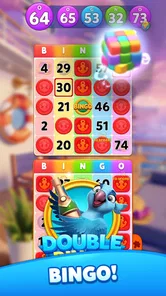
Playing with more than one card changes the feel of the task. Instead of following a single grid at a leisurely pace, you have to divide your attention and scan several places for the same call. I find that this is the most meaningful choice a player can make during a session: one card keeps things manageable, while multiple cards increase the mental juggling. More cards are not automatically better if they make you miss calls or stop enjoying the round.
The game’s emphasis on a large jackpot gives each match a sense of occasion, but bingo still depends heavily on chance. Paying close attention can help you manage your cards; it cannot guarantee a win. I would approach the jackpot as part of the game’s excitement, not as a promise or a reason to spend money.
A realistic use case is a ten-minute pause while waiting for a ride or winding down after dinner. You can open the game, follow a round, and leave when you have had enough rather than committing to a long strategy session. For a more social occasion, it can also provide an easy shared activity: each person already understands the core idea, so the conversation does not have to stop while someone learns elaborate rules.
That convenience has a trade-off. The live, call-and-mark rhythm rewards attention, so it is not ideal if you need to keep checking messages, watch something closely, or play in a noisy setting. If interruptions are likely, choosing fewer cards is the sensible move. It is better to enjoy one board than to add more and turn a casual break into a stressful race to catch up.
The age rating is Everyone, which makes the basic premise approachable across age groups. Still, I would make sure younger players understand that in-app purchases are available before handing over a device. The game costs nothing to download, but optional purchases range from $0.79 to $199.99 per item. That wide span is a good reason to set expectations and device-level spending controls in advance, particularly for children.
Compared with a traditional paper bingo game, Bingo Voyage removes the need to manage physical cards and makes it easier to follow several at once. Compared with a simple mobile bingo app built around one board, its multi-card emphasis offers a more demanding way to play. That is useful when you want your attention occupied, but it is not an advantage for everyone: players seeking a slow, low-pressure round may prefer a simpler digital bingo format.
It also differs from deeper board games, where planning several turns ahead can shape the result. Here, the central challenge is responding accurately as calls arrive, while luck remains essential. I would not choose it as a substitute for a tactical strategy game. I would choose it when I want the familiar bingo pattern, quick comprehension, and a reason to stay alert for a few minutes.
The game has an average rating of 4.8 from around 194,000 ratings, alongside roughly 7,800 written reviews and over 5 million installs. Those figures suggest that it has reached a substantial audience and that many players have found enough to enjoy. They are useful context, but they cannot tell me whether the pace, purchase options, or multi-card pressure will suit a particular person.
It launched on January 23, 2024, and the current version is 1.58.9. Those facts establish a product that has continued to receive versioned releases since launch, but they do not by themselves reveal what changed in each update. I would not assume that a particular feature, balance adjustment, or improvement arrived in a specific version without release notes to support that claim.
For someone already playing, the current version number is a practical reminder to keep the app updated through the app store. Updates can matter for compatibility and general upkeep, while the experience a player values most may remain the same: following calls and managing cards. If you are deciding whether to return after time away, it is reasonable to check the current release notes and see whether they mention changes that affect your usual way of playing.
One useful habit is to begin a session with the number of cards you can comfortably scan, rather than immediately choosing the busiest setup. This gives you a personal baseline. If you finish rounds without feeling rushed, you can try handling more; if you repeatedly lose track, scaling back is not a failure but a better fit for the pace.
Another practical choice is to treat attention as a limited resource. Start a round when you can look at the screen consistently, not while crossing a street or trying to follow a conversation. Multiple cards magnify interruptions because each call asks you to scan more than one grid. This is a specific reason to use a lighter setup when playing on the move, even if you usually enjoy a bigger challenge.
I would also decide on a spending boundary before opening purchase options. Because the game is free to start and offers in-app items at a wide range of prices, it is easy to confuse optional spending with what is needed to enjoy a basic bingo session. A simple rule—play without buying anything, or set a strict limit—keeps the focus on the game rather than the shop.
Bingo Voyage is a good match for casual players who know bingo, enjoy quick visual scanning, and like the extra pressure of managing several cards. It can also work for someone introducing the game to a friend or family member because the central idea is familiar and does not require a lengthy tutorial. If you already enjoy mobile bingo, the multi-card format gives you a clear reason to try this particular version.
I would skip it if you want an entirely hands-off game, dislike chance-led outcomes, or feel uncomfortable with games that present optional purchases. It is also not my first recommendation for someone looking for deep strategy, a quiet solo puzzle, or a game that can be played while attention is elsewhere. A conventional number puzzle would be a better fit for uninterrupted solo thinking; a physical bingo set may be preferable when the goal is an offline group activity.
Android compatibility is listed from version 7.0 onward, so players on older systems should check their device before expecting to install it. The game is free to download, but that should not be mistaken for a guarantee that every optional item is free. These details are worth checking before planning a family session or installing it on a device with limited storage or spending controls.
My main question for future releases is whether updates continue to make the multi-card experience comfortable for different kinds of players. Clear, useful release notes would help returning users understand whether a change affects the way they play, rather than leaving them to guess from a version number. I would also pay attention to whether the game keeps the distinction between enjoying a round and spending on optional items easy to understand.
For now, my recommendation is straightforward: try Bingo Voyage if you want familiar bingo with a more demanding screen to follow, and start with a manageable card load. Its strongest appeal is not complicated strategy but the small burst of concentration each round creates. Keep expectations grounded—the jackpot is a game feature, not a reliable outcome—and set a purchase limit if you or a younger player might be tempted by optional items. If that balance sounds right, this is an approachable way to fit a lively bingo session into an ordinary day.
Bingo Voyage is a mobile bingo game built around playing rounds, marking called numbers, and aiming to complete a winning pattern. Its travel-themed presentation gives the experience a sense of progression beyond a basic bingo card. The exact modes, events, and rewards can vary with app updates, so check the current in-game menus and store listing to see what is available in your region.
Bingo Voyage is presented as a live bingo game, so you should expect an internet connection to be needed for core play, account features, and any multiplayer or event activities. Without a stable connection, rounds may not load or progress reliably. If offline access matters to you, check the app’s current store description and try launching it with your device disconnected before relying on it while traveling.
The app may be available to download without an upfront purchase, but free-to-play games can include optional in-app purchases, such as currency or other items used during play. The presence and cost of purchases may differ by platform, country, and version. Review the Google Play or App Store listing and your device’s purchase settings before installing, particularly if children may use the device.
Account and progress-saving options can depend on the current version and the platform you use. Look in the game’s settings for sign-in, cloud-save, or account-linking features, and avoid assuming progress will transfer automatically between devices. Before changing phones or reinstalling, confirm that your game is linked to a supported account and note any recovery instructions provided by the developer.
Bingo Voyage may be easy to understand, but suitability depends on its current ads, chat or social features, data practices, and in-app purchase options. Check the age rating and privacy information on your platform’s store page, then review parental controls and purchase restrictions on the device. If a child will play, supervise the first session and disable spending or communication features where appropriate.
On Android, Bingo Voyage - Live Bingo Game asks for these permissions.
Bingo Voyage - Live Bingo Game is also available in 2 other languages on our site.
4.8 out of 5
194,421 reviews
Board · VERTEX GAMES PTE. LTD.

Board4.1 out of 5

Board4.8 out of 5

Board4.6 out of 5
Board4.6 out of 5

Board4.6 out of 5

Board4.8 out of 5

Board4.9 out of 5
Board4.7 out of 5

Board4.9 out of 5

Board4.5 out of 5

Board4.6 out of 5

Board4.8 out of 5

Board4.7 out of 5

Board4.8 out of 5

Board4.9 out of 5

Board4.6 out of 5

Board4.7 out of 5

Board4.5 out of 5
Board4.9 out of 5



Gamesive reviews games on its own and is not paid by developers for scores. We do not host game files: the download buttons open the official Google Play and App Store pages. Names, icons and screenshots belong to their owners.